Home Blog Page 857

MIT’s Answer to Cutting Webpage Load Times? It’s the Polaris Compression-Trumping Browser Framework

mitwebpageRather than using compression, MIT and Harvard researchers have adopted a different approach to cutting page load-times in their new Polaris browser tech.

Researchers at MIT say a framework they’ve developed for browsers can reduce page load-times by up to 34 percent and enhance data-compression techniques used in Chrome.

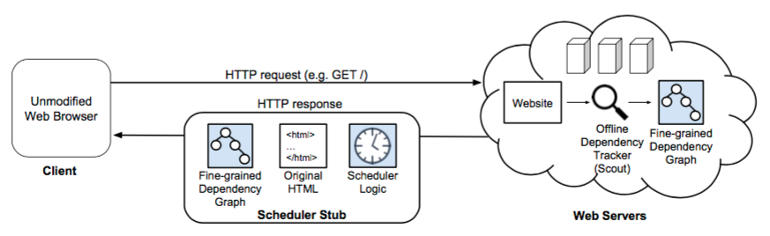
MIT Computer Science and Artificial Intelligence Laboratory (CSAIL) and Harvard University researchers argue that the framework could, if adopted by browsers, make a significant contribution to existing compression-focused efforts to cut page load-times. Rather than using compression, their take is based on a new ‘dependency tracker’ called Scout…

Read more at ZDNet News

Google and Facebook Team Up to Open Source the Gear Behind Their Empires

At the annual Open Compute Summit in San Jose, California, Google announced that it too has joined the project. And it’s already working with Facebook on a new piece of open source hardware.

The announcement reaffirms the power of Facebook’s big idea. Google was the first company to rethink data center design for the modern age. For years, its technology was well ahead of anyone else. And when Jonathan Heiliger complained of that Fight Club mentality, Google was surely top of mind. But through the Open Compute Project, Facebook has pushed the rest of the industry forward.

Read more at Wired

Microsoft Will Release a Custom Debian Linux for Networking

OCP Summit:  Put down your coffee gently. Microsoft has today released a homegrown open-source operating system, based on Debian GNU/Linux, that runs on network switches.

The software is dubbed SONiC, aka Software for Open Networking in the Cloud. It’s a toolkit of code and kernel patches to bend switch hardware to your will, so you can dictate how it works and what it can do, rather than relying on proprietary firmware from a traditional networking vendor.

It also pits Redmond against white-box network operating systems from the likes of HP, Dell, and Cumulus Networks. SONiC builds upon the Windows giant’s Linux-based Azure Cloud Switch (ACS) operating system…

Read more at The Register

Lenovo, Juniper Partner to Build Hyperconverged Systems

The alliance enables the two tech vendors to compete with a growing number of companies entering the space, including HPE and Cisco.  Officials with the two companies on March 9 announced a partnership in which they will take advantage of Lenovo’s strengths in x86 servers and Juniper’s expertise in next-generation networking to create converged, hyperconverged and hyperscale offerings for enterprises and Web-scale companies, which are looking for simple, integrated infrastructure products that will enable them to accelerate the time it takes them to bring applications and services to market and to drive down costs. 

The converged and hyperconverged market is getting a lot of attention and is expected to grow rapidly over the next several years. IDC analysts expect the hyperconverged infrastructure market to increase to almost $2 billion this year and almost $5 billion by 2019. The systems offers compute, networking, storage, virtualization and software in a tightly-integrated appliance.

Read more at eWeek

RaspEX Live CD Is Ready for Raspberry Pi 3, Based on Debian 8.3 and Ubuntu 15.10

raspex-live-cdRaspEX developer Arne Exton informs Softpedia about the availability for download of a new, special build of the RaspEX Live CD distribution optimized for the new Raspberry Pi 3 single-board computer.

The new RaspEX Build 160307 has been specially released to support the Raspberry Pi 3 Model B SBC announced by the Raspberry Pi Foundation on February 29, 2016, in addition to it supporting the Raspberry Pi 2 Model B board. Exton exclusively told Softpedia that not all the Linux kernel-based operating system initially designed for Raspberry Pi 2 boards will run on the new Raspberry Pi 3 Model B computer, so that’s why he had to release a new build of RaspEX.

HA support for DVR centralized default SNAT functionality on RDO Mitaka Milestone 3

Verification been done bellow is actually targeting conversion of HAProxy/Keepalived (Active/Active) 3 Node Controller which design was suggested for RDO Liberty  in  https://github.com/beekhof/osp-ha-deploy/blob/master/HA-keepalived.md   to be able support Compute Nodes running in DVR mode. The core issue on Liberty was resolved for Mitaka , see upstream record  [RFE] Unable to create a router that’s both HA and distributed 

Complete text maybe seen here


UEFI Forum Announces Updated UEFI v2.6 and ACPI v6.1 Specifications

The latest updates to UEFI and ACPI help allow PCs to offer enhanced mobility and manageability for customer and enterprise levels.

The UEFI Forum has announced availability of the Advanced Configuration and Power Interface (ACPI) Specification v6.1 and the Unified Extensible Firmware Interface (UEFI) Specification v2.6. These updates allow PCs to offer enhanced mobility and manageability for customer and enterprise levels.

New to the ACPI Specification v6.1 we have:

  • Interrupt-signaled events for expanded hardware-reduced platform support and improved system-on-chip designs.
  • Standardized ARMv8-A processor support

Read more at ZDNet News

How to find out Raspberry Pi GPU and ARM CPU temperature on Linux

I am using a Raspberry PI 2/3 credit size computer. If a Raspberry Pi run hot enough to cause permanent hardware damage, under some situations it could get hot enough to cause stability problems until the system cools off. So, how do I find out my GPU or ARM CPU temperature from Linux operating system command line option?

Read more…

How to configure Nginx with free Let’s Encrypt SSL certificate on Debian or Ubuntu Linux

Let’s Encrypt is a free, automated, and open certificate authority for your website or any other projects. You can grab free TLS/SSL certificate including wildcard certificate to create encrypted HTTPS session for your site visitors. In this tutorial, I will explain how to use Let’s Encrypt to install a free SSL certificate for Nginx web server along with how to properly deploy Diffie-Hellman on your nginx server to get SSL labs A+ score on Debian and Ubuntu Linux server.

Read more…

Linux directory structure: /home and /root folders

This is our 6th post on understanding first level directories in /. Knowing these folders in detail or at least what each is meant for will help you understand Linux/Unix in whole. we already covered below directories, please have a look at those to understand them. In this post we will see two more directories ie /home and /root directory. These directories are meant for similar purpose. The /root is meant for just root user and /home is for all the remaining users.

Linux Directory Structure explained: /bin folder

Linux Directory Structure explained: /boot folder


Linux Directory Structure explained: /dev folder

Linux directory structure explained:/etc folder

What is lost+found directory in Linux/Unix?

A brief intro to /home directory in Linux/Unix

The /home directory is a place where by default all user home directories are created.

OK, what are user home directories for?

These directories are a kind of personal place(Working space) for all the users other than root. There will be a separate folder for each user in /home directory. For example if you have a user called ‘Tom’, then his default home directory is /home/tom. We can change this default folder when creating user in Linux. Our Tom user can do what ever he wants in /home/tom folder where he have full rights on the files he created and owned in that folder.

The properties of /home folder?

1)  A separate sub folder ie /home/<user-name> is present for each user.
2) Only user who owns this sub folder can access its content other than root user. So, tom user can not access  Barbi user home directory content which is located at /home/barbi.
3) All his terminal properties, command history file, application setting files(~/.vimrc, ~/.ssh) etc                        everything is located in this folder.
4) System admins when try to implement quota for users they will implement it on /home directory. This         /home directory should be mounted on a separate partition.

Each user home directory is important and frequently used directory for that user, we have alias name for it. This alias is set to ~ so that when ever user wants to navigate to his home directory, he do not have to use /home/<username> but just use below short cuts.

Read Full Post:   http://www.linuxnix.com/linux-directory-structure-home-root-folders/