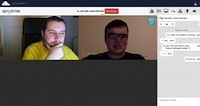
Founder, maintainer, and CTO of ownCloud, Frank Karlitschek, was happy to inform the world that the upcoming ownCloud 9.0 self-hosting cloud server will implement a free and secure WebRTC teleconferencing system based on Spreed.
As usual, we were very curious to find out what’s the fuss all about, and to our surprise, we found out that Spreed will, in fact, bring private and secure video calls to ownCloud 9.0, which should hit the streets in a few weeks from today, based on Spreedbox.
Calamares 2.0 was released today as the newest major release of this distribution-independent, open-source installer framework. Calamares continues to be used by Manjaro, Sabayon, Netrunner, and other Linux distributions while with Calamares 2.0 there is even more features and functionality.
Due in early March, Lagom is a microservices framework that lightens the burden of developing these microservices in Java. Built on the Scala functional language, open source Lagom acts as a development environment for managing microservices. APIs initially are provided for Java services, with Scala to follow.
On February 20th, a hacker working under the handle “Peace” took control of the website of Linux Mint, a popular Linux distribution derived from Ubuntu (and Debian) targeted toward non-technical users and power users unhappy with modern desktop environments like GNOME 3, KDE Plasma 5, and Unity 7. The hacker replaced the download link for Linux Mint with one which contained a backdoor called Tsunami-an attack which put “several hundred” systems with a fresh installation of Linux Mint in the hacker’s control, according to an interview with ZDNet’s Zach Whittaker.
While these attacks are regrettable, and part of an infrastructure problem rather than a problem with the distribution itself, it increasingly appears that the Linux Mint team, led by project leader Clement Lefebvre, is spread too thin when it comes to security.
Recently, Google experts have revealed a security fault because of which many devices and apps are at risk – Linux servers are also a part of it. It is a bug known as glibc bug which can distress hundreds of devices, applications and softwares which are internet connected. It allows hacker to introduce a code into the memory of the device which in turn helps in hacking attacks. The hacker can then control computers, smartphones, internet routers etc. It is found in building blocks of the internet which can also negatively affect apps and websites. It is a key part of Linux operating system.
A patch was developed by Google engineers in association with security experts at Red Hat. It is somehow able to fill the susceptibility but wide adoption is still left.
What is glibc bug?
Glibc bug was found in glibc (GNU C Library) which is the implementation of GNU project of C standard library. It was initiated by Free Software Foundation in early 90’s for their GNU operating system. To be precise, glibcis an open source library of codes which are used in internet connected devices and web development.
The bug alert was already made in July 2015. According to Google researchers, they first wanted to study and understand the issue and then call out to glibc keep takers. On the other hand, at Red Hat a separate team was working on the issue.
What devices are affected?
Devices which have Linux operating system are affected by this vulnerability. Devices include wireless routers, internet of things devices, surveillance cameras, servers etc. Bitcon Softwares, Linux Computers and anything or everything which is built using PHP, ruby and python are affected by this bug as well. Facebook, Twitter, Drop box etc. use these languages.
Google android also operates on Linux but android phones are safe because a different version is used. But, it can affect some android applications. Windows and OS X are not affected.
How to Protect Yourself?
One thing everyone should always do is to regularly upgrade the security updates for all the connected devices. Organizations stop releasing security updates once they stop selling their products and services. Manufacturers should release security updates as at some or the other time vulnerabilities will be detected in connected devices.
A security patch has been released by Google for developers who have used the system. It is known as “proof of concept” attack by which manufacturers and developers can examine software for detecting flaws and then taking necessary steps to overcome if at all any flaw is detected.
Bugs and attacks will not stop coming in your way of growth and expansion. It is you who have to take preventive measures to protect and secure your systems and business. “Security should never be compromised” –this simple mantra will help you to achieve the set objectives. Many hosting companies strongly believe and follow this mantra and provides different tools like MTvScan Security Tool to ensure your business is not affected with such malicious activities and attacks. Make sure to have security tools and preventive steps which can help you gain a competitive advantage in the market.
I feel man is one of the frequently used command along ls and cd commands in Linux. Have some more which you think we use frequently then post it in comments. Many people who are new to Linux do not know its potential. They just read a man page for a specific command and go away or just use “man commandâ€. This post is mainly meant for newbies to Linux/Unix. Do you know there are other commands which are similar to man command? Below are the list of commands which I call cousins to man pages.
Windows XP and Windows 7 are gone…at least as far as Microsoft is concerned. For many, many users across the globe, however, those platforms still live on. Both businesses and homes still use both desktop operating systems that have seen their End Of Life. These platforms are no longer supported by Microsoft, which means they are no longer getting security updates. What does that mean to end users? It means their computers and data are at risk.
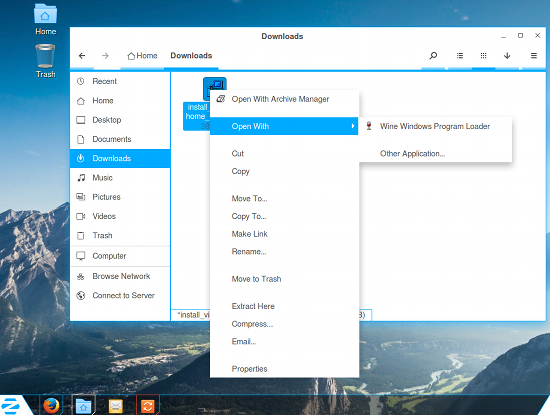
Figure 1: Installing Virtual DJ with the help of Wine.
Fear not, there is a solution—thanks to Linux.
Zorin OS has been around for a while. In fact, it’s only recently released its 11th iteration. Not surprisingly, the latest release looks and feels very similar to the previous release. The previous release also looks very similar to its predecessor (and so on, and so on). But, Zorin offers a bit more than just a single platform to make Windows XP/7 users feel at home. You’ll find both Zorin OS 11 (the cutting-edge release) and Zorin OS 9 (the stable release). That’s not all. If you select either Zorin OS 9 or 11 (from the Zorin OS download page), you’ll find four different flavors for each:
Core (Free): The essential Zorin OS (everything you need for a typical Zorin OS desktop)
Lite (Free): A lightweight version of Zorin OS (to run on older hardware)
Business (€8.99): Core plus everything you need to run a business (Accounting, bookkeeping, retail, and more)
Ultimate (€9.99): Core plus everything you need for business, multimedia, gaming, etc.
All flavors, except Lite, are available in both 32- and 64-bit editions.
How Close Is Zorin OS to Windows XP or 7?
This is looming question. Before I get into the minutiae of the Zorin OS desktop, it cannot be left unsaid that this is not a Windows platform. To many, that’s not a bad thing. However, to those who depend upon Windows to get their daily work done, this could be a hurdle. Fortunately, Zorin saw fit to include Wine, which allows end users to install many of their favorite Microsoft software. This means you can download those .exe files, right-click them from within the file manager, and select Run with Wine (Figure 1 above) to install the Windows software. Once installed, you can run the software as expected.
Of course, you shouldn’t expect to have to use Windows software when on Linux…and Zorin OS makes sure you have everything you need to get your work done. You’ll find Firefox (web), LibreOffice (office suite), Geary (email), Gimp (graphics), Rhythmbox (music), and much more. You can also easily install tens of thousands of software titles from what is clearly the Ubuntu Software Center (hopefully, Zorin will migrate from USC to GNOME Software).
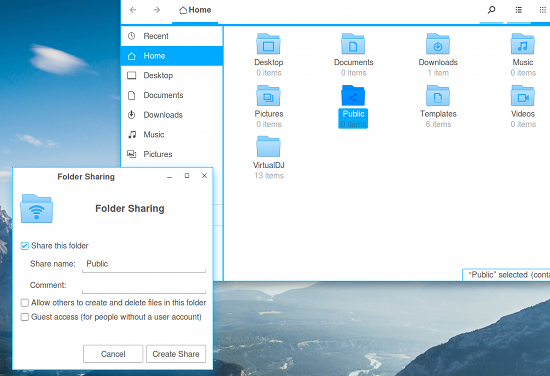
If you work with either Windows XP or 7 on a network that often requires you to share folders with others, you’ll find that process incredibly similar. To share out a folder on your Zorin OS desktop, follow these steps:
Open up the File Manager
Right-click the folder to be shared
Select Local Network Share
In the resulting window (Figure 2), check the box for Share the folder
Give the share a name, add a comment (if needed), and check the box(es) required for necessary permissions
Click Create Share
If you’ve altered the permissions (by checking either permission box), you will then be prompted to click Add the permissions automatically. Click that and the share will be added. That share should now be available on your network.
Figure 2: Sharing a folder to your network is simple on Zorin.
NOTE: You might see an error when sharing a folder. This is most likely due to the fact that Samba isn’t running. Samba is the service used to share out folders on a network. If you see that error, here’s what you need to do to resolve that issue:
Click on the Zorin Start button
Type start
Click Startup Applications when it appears
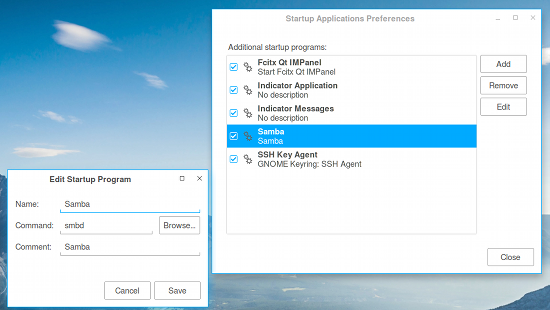
In the resulting window, click Add
Enter the details as shown in Figure 3
Click Save
Reboot
Figure 3: Adding Samba to the list of startup applications.
Now Samba will always run at startup, and you didn’t even have to get your fingers dirty with the command line.
AWN
At the heart of Zorin OS’s ability to closely resemble Windows XP and 7 is Avant Window Navigator. This is a particular dock, placed on the desktop, that serves to act as the Windows Start button, Taskbar, and System Tray.
AWN is an outstanding choice for this task. Not only is it very stable, it’s also quite flexible. You can add/remove applets, change the theme, add application launchers, and so much more. In fact, the AWN dock offers significantly more configuration options than does either the Windows XP or 7 panel. But if you really only want Zorin OS to look and feel like XP/7, here’s what you need to know.
To add an application launcher to the panel, you first must add it to the desktop. To do this, follow these steps:
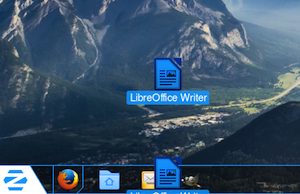
Figure 4: When the + sign appears, release the launcher to add it.
Find the application launcher in the Start menu
Right-click the launcher
Select Create Desktop Shortcut
Go to the desktop
Click and drag the shortcut to the panel
You’ll need to drag the shortcut to the currently existing launchers on the panel (otherwise, it can’t be added to the panel). When you see a small + sign on the launcher (Figure 4), you can release it and it will be added to the panel.
NOTE: You can remove the shortcuts from the desktop, once you’ve added the launcher to the panel.
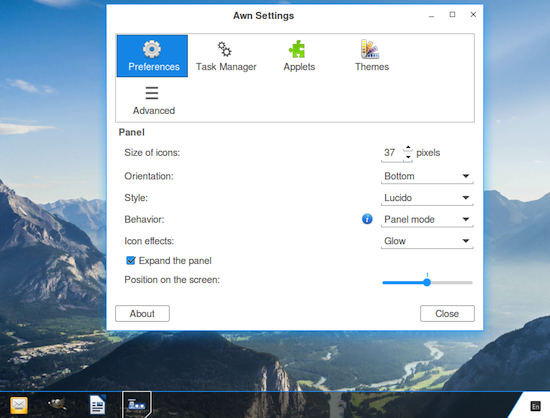
To configure AWN, right click the panel and select Preferences. In the Preferences window (Figure 5), you can configure AWN to better fit your needs/taste.
Figure 5: The AWN Preferences window.
If you don’t find a theme you like in the included selection, you can always find plenty more (e.g., these on Deviant Art). To install a new theme, follow these steps:
Download the theme to the ~/Downloads directory
Open the File Manager and change to the Downloads directory
Right-click the downloaded theme and select Extract Here
Open up the AWN Preferences
Go to the Themes tab
Click Install
Navigate to the newly extracted theme (will end in the .tgz extension) and select it
Click Open
In the theme window, select the newly installed them
Click Apply
Play around with the AWN configurations to get it to perfectly match your needs.
The Zorin Tools
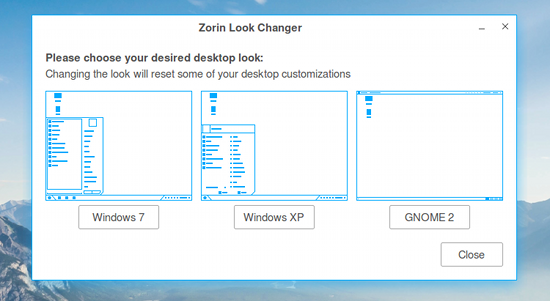
Click on the Star button and type zorin. Click on Zorin Look Changer and you can easily switch between Windows XP, Windows 7, and GNOME 2 (Figure 6). This tool does an amazing job of picking up some of the subtleties between Windows 7 and XP.
Figure 6: The Zorin Look Changer.
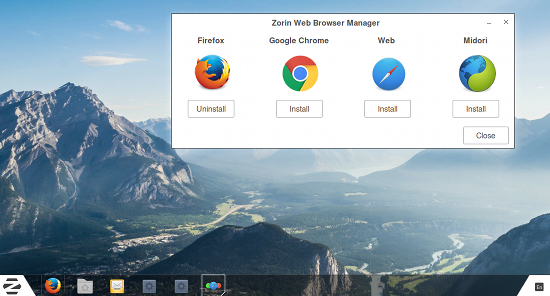
When you typed zorin in the Start menu, you should have also noticed the Zorin Web Browser Manager. This tool allows you to easily install from the Firefox (default), Chrome, Web, and Midori browsers. Click on the browser you want to install from the selection (Figure 7), click Yes when prompted, and the browser will be installed.
Figure 7: Easy browser installation from the Zorin Web Browser Manager.
How Close Can You Get?
You’ll be surprised at how closely you can get Zorin OS to look and feel like either Windows XP or 7. Out of the box, the experience is incredibly close to Windows XP. With just a little tweaking, you can be sure that Zorin OS will behave exactly how you need it. Will it serve as a perfect drop-in replacement for Windows? That all depends on what you need to get your work done.
Wine does an outstanding job of running a great many Windows applications, but you may find some applications will not run or do not work exactly as expected. To find out which apps will run on Wine, check out the Wine Application Database. If the software you need will run with Wine, Zorin OS will get you as close to Windows XP/7 as possible (and give you the added stability and reliability of the Linux platform. Now that is a serious win-win.
Let’s face it, there are instances where jumping from PC to PC is a bit of a downer – even when it’s something awesome like a Linux PC. Sure, it may not be difficult to walk across the room, but often times it’s disrupts ones workflow.
To counter this unneeded jumping around the room like a frog, I initially thought that remote desktop solutions would be the answer. As it turns out, this wasn’t the case. Using typical remote desktop software to access a computer in the same room is nothing short of overkill.
This brought me to a program called Synergy. Now some might refer you to a hardware KVM switch instead, but I’d would opt for Synergy myself. It’s cross platform, and once you set it up, you’ll never use anything else. (Read the rest)
Spam is an annoyance and there’s a multitude of ways to counteract it. However spammers also get smarter and try to bypass filters and stuff. In addition, ICANN has lately approved a great mean gTLDs (generic Top Level Domains), like .biz, .info etc. Some of those gTLDs are, in my opinion, exclusive used by spammers. Lately, I have gotten a lot of spam from the .xyz gTLD. So the question was, how to block email coming from such domains using that gTLD.
A new secure operating system called Subgraph OS aims to make resisting hacking attacks easier, even on fairly low-powered laptops.
Subgraph OS is a relatively lightweight, Linux-based operating system which comes with a slew of security features that its developers hope will be more accessible to general users. … Possibly the most interesting security feature of Subgraph OS is “Oz,†a system for isolating programs so that if an attacker successfully exploits a vulnerability in one application—such as a PDF viewer—the rest of the machine and network should remain largely unaffected.

 Founder, maintainer, and CTO of ownCloud, Frank Karlitschek, was happy to inform the world that the upcoming ownCloud 9.0 self-hosting cloud server will implement a free and secure WebRTC teleconferencing system based on Spreed.
 On February 20th, a hacker working under the handle “Peace”
 A new secure operating system called