 If you’ve paid close enough attention to the news, you know that the Mozilla Foundation has cut the cord to Thunderbird. Considering that, for years, Thunderbird has been the most user-friendly desktop email client for Linux, this could have been a disaster for the open source platform. Fortunately, there’s a new kid on the block with plenty to offer. That new kid is N1 by Nylas.
N1 is an extensible, open source email client that not only gets the job done, it does so with style and an ease of use that Thunderbird couldn’t match. N1’s feature list isn’t nearly as impressive as, say, the likes of Claws Mail. But, it makes up for that by bringing a modern UI and just enough features to make it usable for nearly anyone. The features include:
-
Fully cross-platform: N1 can work with Gmail, Yahoo, iCloud, Microsoft Exchange, IMAP, and more; as well as run on Linux, Windows, and Mac
-
Offline mode
-
Javascript plugin architecture to enable you to create your own plugins
-
Full screen mode
-
Multi-account support
-
Single or two-panel layout
-
Notifications integration (works with most notification systems)
-
Quick Replies
-
Desktop shortcuts
There is, however, one avoidable caveat to using N1. Out of the box, N1 actually works with the Nylas servers to route your email. This means all of your emails are pulled from your server (they don’t delete them, though) into the Nylas sync servers and then transmitted to the client. This is done to enable easier integration with the various types of mail services and servers.
Nylas incorporates its own Nylas Platform APIs (powered by its open source sync engine) in order to pull this off. If the idea of a third-party manipulating your email rubs you the wrong way, you can get around that by installing the sync engine on a VirtualBox host (the process is documented by the Nylas team here). But, if you’re not concerned with a third-party in your email route, then the out-of-the-box N1 client will work just fine.
Installation
The first thing we are going to do is install N1. I’ll demonstrate on a System76 Lemur, running Ubuntu 15.10. Here are the installation steps:
-
Download the .deb file from the N1 download page
-
Save the file to your ~/Downloads directory
-
Open up your file manager and navigate to the ~/Downloads directory
-
Double-click on the N1.deb file
-
Once the Software Center presents you with the Install button, click it
-
If you are presented with a “Bad Quality” warning, click Ignore and install
-
When prompted, type your user password and hit Enter
-
Allow the installation to complete
If you prefer installing via the command line, follow these steps:
-
Download the .deb file from the N1 download page
-
Save the file to your ~/Downloads directory
-
Open a terminal window and change to the ~/Downloads directory
-
Issue the command sudo dpkg -i N1.deb
-
Type your sudo password and hit enter
-
Allow the installation to complete
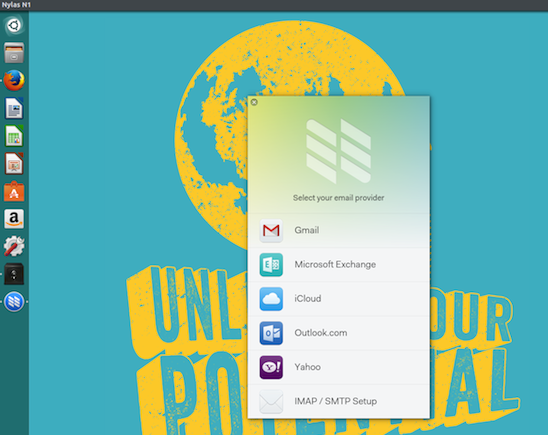
When you first run N1, you will be greeted by a welcome screen. Click through that and you’ll be able to start the account setup process. This setup wizard is incredibly simple: Select the account type (Figure 1 above), enter your account credentials, and continue to the next step of the setup wizard. NOTE: If you connect N1 to a Gmail account, you will have to give N1 permission to have offline access to your account. Also, if you’re already signed into your Gmail account (via the default web browser), you won’t have to actually enter your account credentials to set up the account.
Once the account as authenticated, you will be presented with the option to select the default layout. You can choose from a single or double panel layout. You can also select the keyboard shortcut set you would prefer to use (Figure 2).
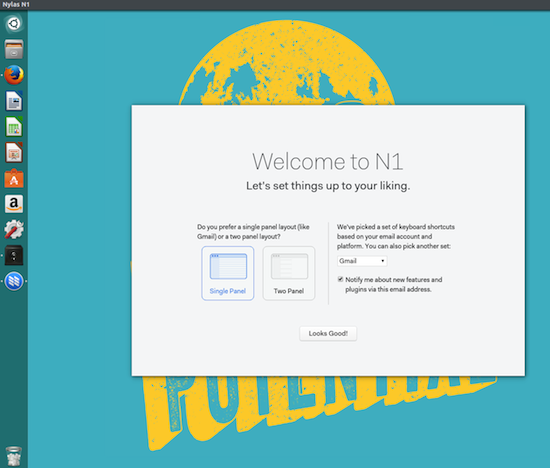 You can change both of these settings from within Edit > Preferences > General (for layout) and Edit > Preferences > Shortcuts (for keyboard shortcuts).
The next screen allows you to install from the three built-in plugins (Quick Replies, Translation, and GitHub Sidebar Info). To install these plugins, click the associated Install button (if you’re not sure what plugins you want to enable, you can enable them later from within Preferences).
N1 should now open and you’re ready to go.
Installing Plugins
During initial setup, you were able to add the three included plugins. There are, however, more plugins available (as well, it offers the ability for you to create your own plugins). How do you install them? Simple. I’ll demonstrate by installing the Nylas Jiffy Plugin (a plugin that allows you to insert gifs into email). Here are the steps:
-
Download the latest release of Jiffy
-
Extract the downloaded file into your ~/Downloads directory (you can extract the file from within your file manager by right-clicking on the file and selecting Extract here)
-
Open N1
-
Click Developer > Install a Plugin Manually
-
Navigate to the ~/Downloads/N1-Jiffy/N1-Jiffy folder (the duplication is correct)
-
Click OK
That’s it. You’ll get a message saying the plugin was installed successfully and you’re ready to use it.
Working with the Quick Replies Plugin
Another nice feature in N1 is the ability to send quick replies to emails. You had to have first enabled the plugin. If you did not do during first run, you can go to Edit > Preferences > Plugins and click the Enable button associated with Quick Replies.
Once enabled, here’s how you work with this handy feature.
-
Open N1
-
Go go Edit > Preferences > Quick Replies
-
Click on the New button
-
Give the Quick Reply template a name
-
Click Save
-
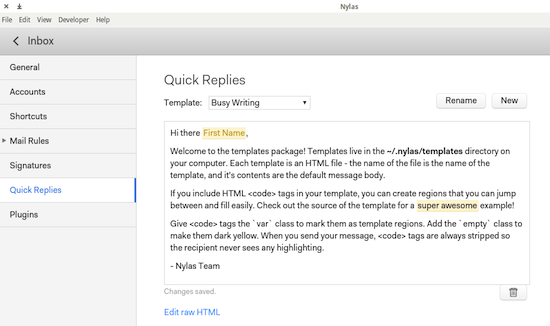
Edit the template in the template editor (Figure 3)
-
Create variables within your template by wrapping them in {{}} such as {{NAME}}
The template autosaves, so you don’t have to worry about saving your work. Your template is ready to be used.
 To use one of your quick replies, do the following:
-
Open the email to be replied to
-
Click the reply button
-
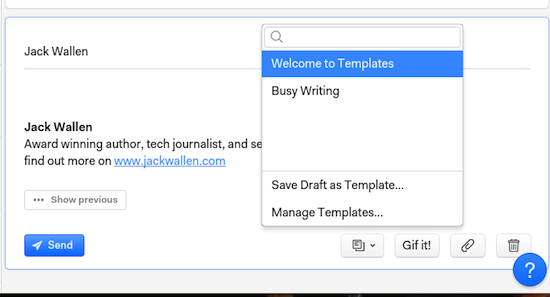
At the bottom of the reply composing window click the drop-down (Figure 4) and then select the Quick Reply template to be used
-
When prompted, click Replace contents
-
Cycle through your variables (to manually replace their content) using the Tab button
-
When finished, click Send
 Although Nylas N1 is still very much in beta, it is quite passable for everyday use. And, more plugins will be created and features added over time.
If you’re looking for a more modern desktop email client for Linux, you cannot go wrong with N1. And, if you’re not okay with your email routing through third-party servers, you can always take the time to set up the N1 Sync Engine. If you don’t want to attempt to set up the sync engine, and want to allay your fears regarding a third-party sync service, take the time to read through the Nylas security information to ease your worries.

 This week in Linux news, a major Linux vulnerability leaves Linux servers and PCs at risk, Canonical scores a contract with AT&T, and more! Don’t miss the biggest Linux headlines of the past week.
  Sometimes a security “hole” is really a tiny security “leak.” The headlines made
  A Red Hat developer has explained why asking the question “Is Wayland ready?” is wrong and why everyone else needs to be ready for Wayland. We often see this question being asked pretty much everywhere, and everyone wants to know if Wayland is finally ready to be shipped as default. It seems that the community is asking the wrong question since Wayland is prepared and has been so for a very long time. The other ones are not ready for Wayland.
  Version 1.6