
Snapper, the excellent Btrfs management tool, is yet another of SUSE Linux’s best-kept secrets.
I call SUSE the secret Linux, because it’s the most advanced Linux distribution, but hardly anyone seems to know about it. SUSE has officially supported Btrfs, the next-generation Linux filesystem, since SLES 11 SP2, and supplies the excellent Snapper tool to manage Btrfs. Grab yourself a free openSUSE download, or a free 60-day SUSE Enterprise Linux evaluation and follow along as we learn how to create and manage snapshots with Snapper.
The standard openSUSE installation should include the following packages:
-
snapper
-
yast2-snapper
-
snapper-zypp-plugin
-
grub2-snapper-plugin
snapper is the core Snapper package. yast2-snapper automatically creates snapshots when you use YaST to add, remove, or update software packages. snapper-zypp-plugin automatically creates snapshots when you use Zypper to add, remove, or update software packages. grub2-snapper-plugin automatically creates bootloader entries, so you can roll your system back to an older snapshot by simply rebooting.
On a new openSUSE installation, the installer creates a Snapper configuration for the root filesystem. The default partitioning scheme formats the home directory with XFS, so if you want to make snapshots of /home (which I think is a good thing to do) then make sure it is formatted with Btrfs.
Viewing Configurations and Status
Snapper includes both a complete set of console commands and a nice graphical interface. The default root configuration automatically makes snapshots of the root filesystem whenever it is changed by Zypper or YaST. Run snapper list-configs to see your existing configurations. This is what the default looks like:
> sudo snapper list-configs
root's password:
Config | Subvolume
-------+----------
root   | /
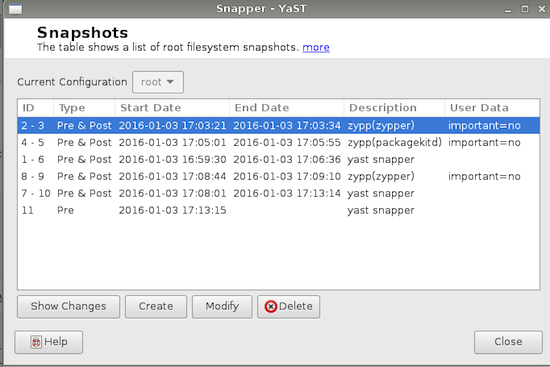 The configuration file is /etc/snapper/configs/root. Figure 1 is what a new installation looks like after YaST and Zypper run a few times.
Select any snapshot labeled Pre & Post, and click the Show Changes button to see exactly what changed (Figure 2). You can see all changed files and diffs of their contents.
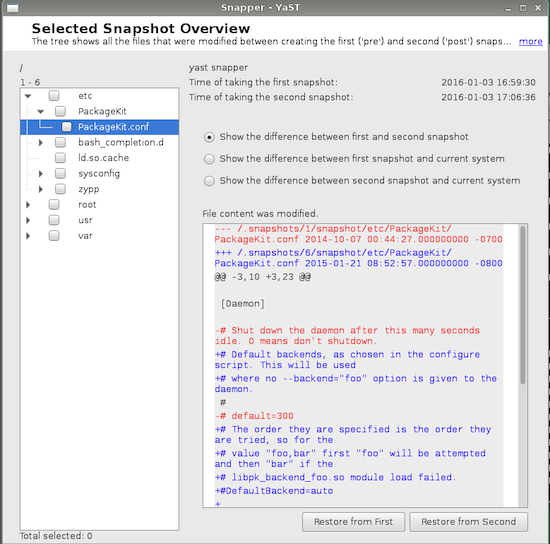 The Pre snapshots are taken before YaST or Zypper runs, and the Post snapshots are taken afterwards. single is a standalone snapshot; this is the kind of snapshot you make manually, or automatically with cron. Every snapshot has an ID number and timestamps. By default, the most recent 100 snapshots are retained. When you have more than 100, then the oldest snapshots are deleted.
snapper list shows the same information on the command line. You need root privileges (the Date column is abbreviated to make it fit):
> sudo snapper list
Type   | #  | Pre # | Date             | User | Cleanup | Description       | Userdata
-------+----+-------+------------------+------+---------+-------------------+-------------
single | 0  |       |                  | root |         | current           |
pre    | 1  |       | Fri 01 Jan 2016  | root | number  | yast snapper      |
pre    | 2  |       | Fri 01 Jan 2016  | root | number  | zypp(zypper)      | important=no
post   | 3  | 2     | Fri 01 Jan 2016  | root | number  |                   | important=no
pre    | 4  |       | Fri 01 Jan 2016  | root | number  | zypp(packagekitd) | important=no
post   | 5  | 4     | Fri 01 Jan 2016  | root | number  |                   | important=no
post   | 6  | 1     | Fri 01 Jan 2016  | root | number  |                   |
pre    | 7  |       | Fri 01 Jan 2016  | root | number  | yast snapper      |
pre    | 8  |       | Fri 01 Jan 2016  | root | number  | zypp(zypper)      | important=no
post   | 9  | 8     | Fri 01 Jan 2016  | root | number  |                   | important=no
post   | 10 | 7     | Fri 01 Jan 2016  | root | number  |                   |
pre    | 11 |       | Fri 01 Jan 2016  | root | number  | yast snapper      |
The Cleanup column indicates which type of cleanup algorithm is used, either number or timeline. number is a simple count (default 100); timeline deletes old snapshots after they reach a certain age. When you manually create snapshots, be sure to include a Cleanup value so they will automatically age out and be deleted when their time comes.
Userdata contains arbitrary comments in a key=value pair format, and you can leave this field blank or enter some text to help you remember what the snapshot contains. You may create multiple key=value pairs separated by commas.
Snapshotting /home
You can’t make snapshots of any directories until you create a configuration. New configuration files are created from /etc/snapper/config-templates/default. All of Snapper’s configuration files are nice plain text that you can edit. Create your new configuration with the snapper command:
> sudo snapper -c home create-config /home
Verify that it was created correctly with snapper list:
> sudo snapper -c home list
Type   | # | Pre # | Date | User | Cleanup | Description | Userdata
-------+---+-------+------+------+---------+-------------+---------
single | 0 |       |      | root |         | current     |
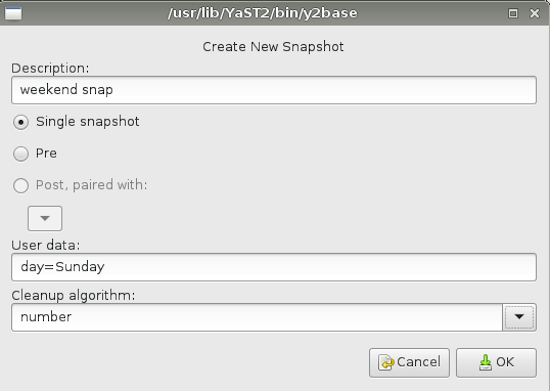
Use the Current Configuration drop-down at the top of the Snapper GUI to select which configuration status you want to see. There isn’t much to see until you create a snapshot. You can do this from the GUI, as in Figure 3. Click the Create button and fill in the fields.
 Now rerun your list command:
> sudo snapper -c home list
Type   | # | Pre # | Date             | User | Cleanup | Description  | Userdata
-------+---+-------+------------------+------+---------+--------------+-------------
single | 0 |       |                  | root |         | current      |
single | 1 |       | Sun 03 Jan 2016  | root | number  | weekend snap | day=Sunday
You may also use the snapper command to create snapshots:
> sudo snapper -c home create -d "weekend snap" -c number -u day=Sunday
Rollbacks and Undos
What if you make a mess and want to reverse your changes? That’s what filesystem snapshots are for. In the Snapper GUI select the configuration you want to use — so far, we have root and home — then select which snapshot you want to restore, and click the Show Changes button. You may select some files and directories or all of them; then just click Restore Selected (Figure 4). You’ll see a dialog listing your changes; when it looks correct, click Yes.
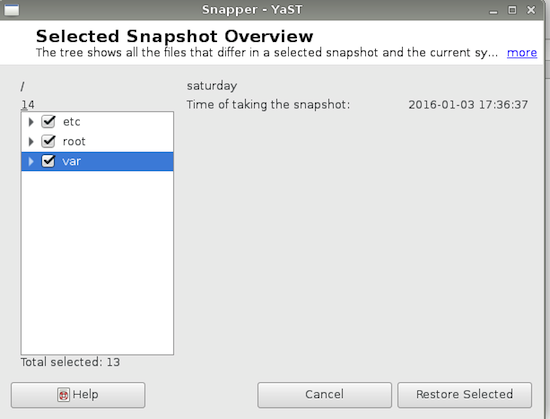 A rollback is booting your system to an earlier snapshot. Your boot menu contains a “Start bootloader from a read-only snapshot” option. Select this, and then you’ll have a list of snapshots to choose from.
Resources
Using Snapper is pretty easy, but you might be surprised at how much it can do. See System Recovery and Snapshot Management with Snapper for detailed documentation.
See How to Create and Manage Btrfs Snapshots and Rollbacks on Linux to learn about using Btrfs commands.
 A new OTA update is in the works for Ubuntu Touch and developers have already implemented a large number of features and various changes.
 In 2015 there were a variety of legal issues of importance to the FOSS (free and open source) community. Continuing the tradition of looking back over the
  The guys over the GNU Linux-libre project have had the great pleasure of announcing the release and immediate availability for download of the GNU Linux-libre 4.4 kernel on January 10, 2016.