
When you think about video editing and Linux, most likely your thoughts immediately gravitate to the likes of OpenShot, Kdenlive, or Flowblade. And with good reason. These tools are outstanding video editors that hang their hat on being open source and readily accessible for Linux users (although Flowblade has a ways to go before it’s ready for the average user). I’ve used OpenShot for years—specifically for my video blog posts and very short (and simple) movies I’ve created.
However…when you need to step up your game and do pro-level editing, OpenShot and Kdenlive might fall a bit short and Flowblade simply isn’t ready. Where do you turn? Yes, Linux has a nice collection of video editors for anyone who needs to put together a quick video for Youtube, work, family, etc. But, when you’re looking at editing the likes of a full-length film, you’ll have to turn to Lightworks (if you want to remain on Linux). Lightworks calls itself the professional editor for everyone. This particular tool is an Academy- and Emmy-award winning professional-grade non linear editor used to edit films like Pulp Fiction, Batman, and The King’s Speech.
Before you read on, there are a few things you should know:
-
Lightworks has been promising to deliver on its open source claim for a long time (it has yet to do so)
-
Lightworks has a short, but very steep, learning curve
-
Linux users will have to jump through a couple of major hoops to get it all working
That being said, once you do get Lightworks running, it’s worth the effort. With this editor, you can turn all that footage into your masterpiece. That journey to masterpiece, however, can be a bit frustrating.
I should also state that this is not a step-by-step guide to editing your creation with Lightworks. Instead, this how-to will attempt to get you up and running with the software. Once you have Lightworks working as expected, I highly recommend you take a look at these step-by-step videos (Lightworks did an outstanding job getting users up to speed with their product) before you begin the process of editing.
Now, what do you have to do before you glance at that first video? Let’s take a look.
Proprietary Drivers
This is one of the single most important things you must take care of. Lightworks simply won’t function with the likes of the Nouveau drivers. There’s more. I’ve been trying to get Lightworks to function properly on my System76 Leopard Extreme (a truly brilliant machine) for a long time. It has an NVIDIA Geforce GTX 650 video card and—even with the proprietary NVIDIA drivers—video (especially in the editing window) will not play properly regardless of the imported format. Now, on a System76 Lemur, using Intel graphics (Skylake ULT GT2), Lightworks functioned out of the box. Depending upon your graphics card, you will get varying mileage. However, should your device have proprietary drivers available, I recommend you install them before installing Lightworks.
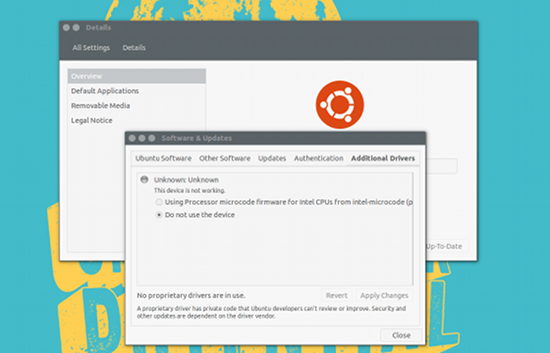 I’ll demonstrate how to install the proprietary drivers on Ubuntu. It’s quite easy:
-
Open up the Dash
-
Type drivers
-
Click on Additional Drivers
-
Allow the tool to search for additional drivers
-
If the tool locates drivers that can be applied (see Figure 1 above), select the appropriate driver, and click Apply Changes
-
Once the changes are complete, reboot
Installing Lightworks
With the video drivers out of the way, you can now install Lightworks. Fortunately, the company has made it quite easy to install the software on Linux. Here’s what you need to do (I will demonstrate on Ubuntu).
-
Download the appropriate binary file from the Lightworks Linux download page
-
Save the file in ~/Downloads
-
Open up a terminal window
-
Change into the Downloads folder with the command cd ~/Downloads
-
Install Lightworks with the command sudo dpkg -i lwks-XXX-ZZZ.deb (Where XXX is the release number and ZZZ is the system architecture)
-
Allow the installation to complete
You might well receive an error report, during or after the installation, informing you there are either unmet dependencies or recommended software needed (this will depend upon your graphics hardware). To resolve these problems, issue the command sudo apt-get install -f. This will install the remaining pieces for your setup, such that you can successfully run Lightworks.
Running Lightworks
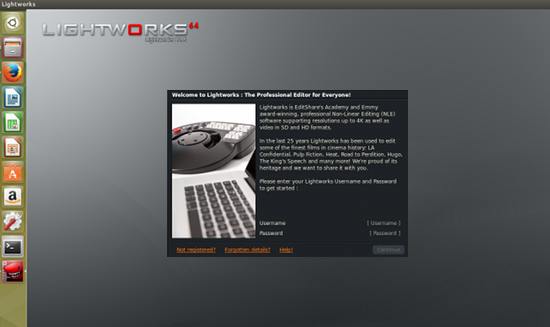
When you fire up Lightworks, you will be required to log into your Lightworks account (Figure 2). This is used to inform the software if you are using the free version or the Pro version. The free version no longer times out, but it doesn’t offer all the bells and whistles of the Pro version (check the feature comparison here).
 At this point, you may be asking yourself “Why should I buy software? This is Linux, right?” Although that is true, I highly recommend all users who can afford to purchase software on the Linux platform…do. Why? Because the more people purchase, the more companies will realize there is, in fact, a market. When developers and companies realize there is a market, they will create more software for our platform of choice. For a one-year Lightworks license, the cost will run you $174.99 USD. For anyone serious about video editing on Linux, this is an insignificant price to pay for what you get.
With Lightworks installed (and you logged into your account), you’re ready to go.
Or not. Actually there’s one more very important step you need to take—one that might make a few users less than happy.
Eyeframe
Because of the complicated nature of video editing, you need to be able to import video that Lightworks is capable of using. This means using a converter. Although there are plenty of options available (some native to Linux), you’ll want to use the Eyeframe converter. The only problem with this tool is that you won’t find a native port, which means one thing…WINE. Even so, Eyeframe makes this process much easier and the resultant files will be much more likely to work. Here’s what you need to do:
-
Download the Eyeframe installer
-
Save the file to ~/Downloads
-
Open up a terminal window
-
Install WINE with the command sudo apt-get install wine
-
Once WINE is installed, change into the Downloads directory with the command cd ~/Downloads
-
Install Eyeframe with the command sudo wine EyeFrame_Setup.exe
-
Walk through the installation wizard
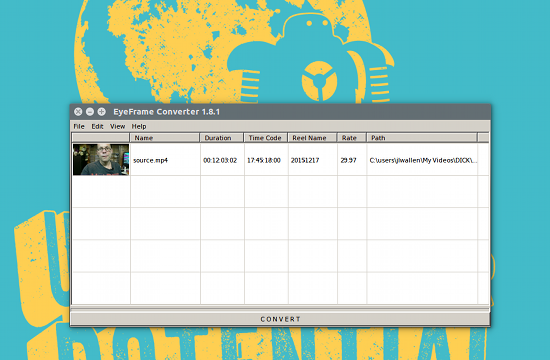
Once Eyeframe is installed, you can run the tool either from the installer wizard or from your desktop menu. You can then import your source files and convert them into a more Lightworks-friendly videos (Figure 3).
 At this point, you are ready to work. Again, you should definitely spend the time going through the instructional videos put together by the Lightworks team (trust me, you will spare yourself a lot of frustration by doing so).
Conclusion
I can happily say that the System76 Lemur does an outstanding job with Lightworks. Out of the box, I was able to install and use Lightworks with next to no problems. Couple that with the fact that the Lemur is a delightful laptop to use, and you have an outstanding combination sure to get you editing like a pro.
Lightworks is an incredibly powerful nonlinear editor—the likes of which no other Linux video editor can compete. Once you’ve installed the software and viewed the handy how-to videos, you’ll be amazed at the editing power you have at your fingertips.
 This week in Linux news, several Linux Foundation Collaborative Projects make major announcements at CES, Linux ransomware is beaten by security researchers, and more! Catch up on the busy week in Linux news with this digest:
  Remix OS is a new operating system based on the famous Android-x86 that aims to bring the Android system to the PC platform.
 Clement Lefebvre has revealed more details about Linux Mint 18, the next major release of this popular, Ubuntu-derived Linux distribution. As expected, Linux Mint 18 will be based off the Ubuntu 16.04 LTS release. Linux Mint 18 releases will be based on Ubuntu 16.04 “Xenial Xerus” Long-Term Support …
 Intel’s