
Ubuntu Linux made a lot of headway in 2015 particularly around their Unity 8 and Mir projects as part of their converged vision between mobile and desktop devices as well as in the Snappy space and the growing IoT market…
Read more at Phoronix

sudo dpkg –add-architecture i386
wget http://repos.fds-team.de/Release.key
sudo apt-key add Release.key
sudo gedit /etc/apt/sources.list
deb http://repos.fds-team.de/stable/debian/ jessie main
sudo apt-get update
sudo apt-get install pipelight-multi
sudo pipelight-plugin –update
sudo pipelight-plugin –enable silverlight
sudo pipelight-plugin –enable widevine
 The Linux Foundation’s Training Scholarship Program has awarded 34 scholarships totaling more than $100,000 in free training to students and professionals during the past five years. In this series, we share the stories of recent scholarship recipients with the hope of inspiring others.
For this installment of the series, we talked with RJ Murdok, who is 15 years old and received a Teens in Training scholarship. He is currently in high school in the United States and started studying Linux in 2012. RJ, who is legally blind, says he spends a lot of time contributing bug reports to Bugzilla when he’s not in school. One day, he would like to convert industries and schools over to Linux as well as teach a computer science class at a university.
How did you become interested in Linux and open source?
I first started using Linux about three years ago when my older brother introduced me to it. I tried multiple distributions and compared their capabilities, and to be honest it was only a year ago that I started using my distro of preference, openSUSE Tumbleweed. The issue with most distributions, for me at least with a visual impairment, has always been accessibility.
I think OpenBox is a great desktop environment as customization is limitless, but it lacks a full screen magnifier (speaking of which, why does Unity, Ubuntu’s flagship desktop environment, not have one?). So, a few months ago, I opted to use Plasma 5, which I feel gets accessibility just right while respecting the user’s freedom of customization. I contribute a bug report or two every few months or so, if I feel the issue is immediate.
Most recently, I contributed a bug report to Gnome developers about the magnifier redrawing its overview, which caused flickering and the relocation of the overview, and which as you can imagine is highly unpleasant. What interests me most is the Linux kernel itself. It’s amazing how far it’s come between 4.2 and even something as recent as 3.16.
What Linux Foundation course do you plan to take with your scholarship?
I am taking LFS201 (Essentials of System Administration), so as to have a better foundation for system management.
What are your career goals? How do you see a Linux Foundation course helping you achieve those goals?
I’m currently in high school, and I plan to start up a small business surrounding Linux technical support for money on the side. In the future, I would love to have a career within the fields of system administration or possibly even that of kernel development. Due to the open source nature of Linux, the options available are limitless.
As it stands, I’m exploring virtualization with KVM, and it’s great. I was considering creating a Linux distribution for the disabled and writing software to assist them; however, I need time and developers dedicated to the project for that.
What other hobbies or projects are you involved in? Do you participate in any open source projects at this time?
I don’t participate in any single project, however, projects I feel are the best are openSUSE, GIMP, Kdenlive, the kernel itself (obviously), Moonlight, Plasma, Chromium, and a project called Eagle Eye. I think through the course generously gifted to me via The Linux Foundation, I will go far in the career of my choosing. I really appreciate the opportunity of obtaining new knowledge that I would otherwise never received. Thanks for everything.
Read more:
Linux Foundation Scholarship Recipient: Eduardo Mayorga Téllez, Teens in Training
Linux Foundation Scholarship Recipient: Kyri’ay Vanderpoel, Whiz Kid
Linux Foundation Scholarship Recipient: Erich Noriega, SysAdmin Superstar
Linux Foundation Scholarship Recipient: Eva Tanaskoska, Women in Linux
Linux Foundation Scholarship Recipient: Enrique Sevillano, SysAdmin Superstar
Linux Foundation Scholarship Recipient: Anthony Hooper, Whiz Kid
Linux Foundation Scholarship Recipient: Yashdeep Saini, Developer Do-Gooder
Linux Foundation Scholarship Recipient: Kiran Padwal, Kernel Guru

Cloud, Cloud, Cloud – isn’t it too cloudy now-a-days! No, no it’s not about the weather, it’s the business where everything is too cloudy. Businesses have started moving towards cloud rapidly. That’s because of the benefits it offers – reliability, scalability and accessibility. There’s no doubt that the cloud computing industry is flourishing at a rapid pace and over past 5 to 10 years, there has been tremendous growth in this industry. Approximately, 72% of organizations have adopted the cloud technology and it’s likely to grow up to 91%, within three years from now.
You might think that adopting or migrating a business over to cloud platform/s would be a simple and easy process, but that’s not the case entirely. Desire to grow profit margins, competition and other business considerations keep driving entrepreneurs towards the adoption of Software-as-a-Service delivery model and cloud-based provisioning of their offerings. Though moving to cloud can be a cost-effective idea but it may also lead to failure if you don’t prepare your business well for its migration. While moving to cloud server hosting, things like capacity, security, reliability and employee training are vital, we MUST keep this in mind.
Let’s prepare ourselves by taking a look at the common mistakes when it comes to cloud migration –
All cloud services offerings are same, right? Nope, there isn’t a single point matching between them. Yes, cloud is divided basically into three categories – private, public and hybrid. But beyond these three, services are categorized as per the pros and cons too. Selecting the right cloud mix depends on your specified requirements along with the applications and infrastructure wherein you have already invested. For instance, a private cloud may offer greater flexibility and less scalability. So, at initial stage its better off working with a public cloud vendor for smoother cloud migration experience.
One of the biggest challenge in the cloud environment is the application downtime at least in a base metal infrastructure. It’s completely your responsibility to ensure that the application required is available through cloud outages and service disruptions. Remember to keep and recover backup similar to that for any mission-critical application to keep downtime to minimum.
It’s a common sense that performance of different cloud hosting providers will be different in different regions depending upon how one takes an advantage of the provider’s infrastructure and services. It might be any setup offered to you, your application is going to act in a unique manner. It depends on you, to plan for specific performance levels and prepare to twist them until your goal is reached.
Don’t make this mistake of migrating all business apps to the cloud. Instead you may choose a different approach for every application that is run. Assuming that all the apps are taken care of by the cloud service provider (CSP) is a misconception. CSPs are responsible for securing your business data but they don’t by default manage to secure your servers, virtual network, data or applications. For securing the applications companies need to plan and finance for internal resources or outside 3rd party system integrators. Once initial configuration is done, it’s the responsibility of the company to continue monitoring, managing and remediating possible security threats to their systems.
There are complex methods that are required to determine that will there be cost saving of your company with cloud but most enterprise IT shops aren’t willing to count the numbers. It is essential to have use-based accounting and cloud financial management systems available to monitor the actual cost impact and value of migrated cloud-based applications.
While moving your website to the cloud, ensure your way to access the cloud is reliable i.e. check on whether your internet connection is strong. Usually, large companies prefer to choose low storage pricing, neglecting the internet connectivity. It may happen that your current broadband is unable to keep up with the demands of cloud storage. Fiber-based products, leased lines, EoFFTC and EFM provide faster and stable connections which can meet the demands of cloud storage and they have fixed repair SLAs.
Don’t plan on short-term objectives when you are thinking to move towards cloud. Simply thinking that what cloud can do for me right now isn’t going to work. It will only limit your future capabilities and may lead to accidental design limitations which could have been easily avoided with long term planning.
As an entrepreneur, you should be ready for the various possible outcomes when you are using cloud for disaster recovery or for running application workloads. Not planning for these may lead to significant consequences from business interruption to impacts to the bottom line. For instance, what if cloud is breached? Can the cloud administrators view the confidential data? What if the cloud provider’s business goes down? All these questions should be given a thought upon.
Summarizing the content, memorize that there isn’t any harm in migrating to cloud but don’t underestimate some points before your movement. These are some of the common mistakes that entrepreneurs do repeatedly that results into downfall of business.
 In part one of this series, I described how community-backed embedded boards, home automation, and Internet of Things devices had supplanted mobile projects as the main focal points for open development. In this post, we look at some other areas where Linux and Android are either thriving (media players, TVs, drones, robots), struggling (games), or are well poised for future success (3D printers, augmented reality, wearables, and automotive).
In 2015, Linux and Android continued to cruise along in a wide range of AV-oriented consumer electronics gear including media players, set-tops, and audio systems. They’re also coming on strong in signage and videoconferencing systems and mini-PCs. Some of these included non-laptop implementations of Google’s Chrome OS.
Linux has for years been lurking inside most smart TVs, and the latest models run more advanced distributions like WebOS (LG) and Tizen (Samsung). Linux also continues strong in media streamers, with Roku boxes leading the way, although Android is the typical choice in newer platforms.
After failing with the Android-based Google TV, Google is testing the market once again with an Android TV platform. Most devices won’t ship until 2016, but the highest profile entry — the latest Nvidia Shield— has earned poor marks for its TV experience.
Gaming is proving to be a tough market to crack for both Android and Linux. A number of Steam Machines running Valve’s open source Linux-based OS showed up this fall, but they were late and bore high prices. The critical reception has been fairly brutal, with the lack of compelling new games being the main complaint.
On the Android side, Ouya collapsed and was picked up by Razer, whose intriguing Forge TV has struggled to gain traction. A new Ouya-based Cortex game store, as well as Razer’s promise of a January shipment for its delayed Turret lapboard/mouse combo may revive the product.
Blurring the lines with gaming on one side and industrial applications on the other are a number of new computer vision, virtual reality, and augmented reality head-mount platforms that were unveiled in 2015. Although many of the products won’t ship until 2016, and most are PC peripherals rather than embedded devices, several include Linux- or Android development platforms, such as Razer’s OSVR or Valve’s related OpenVR.
New head-mounted displays aimed at sports included Recon’s Android-based Jet eyewear. Most of the non-sports smart eyewear devices are aimed at industrial field workers. Google is said to be working on a new version of Google Glass that is aiming for an enterprise audience rather than risking more humiliation on the consumer front.
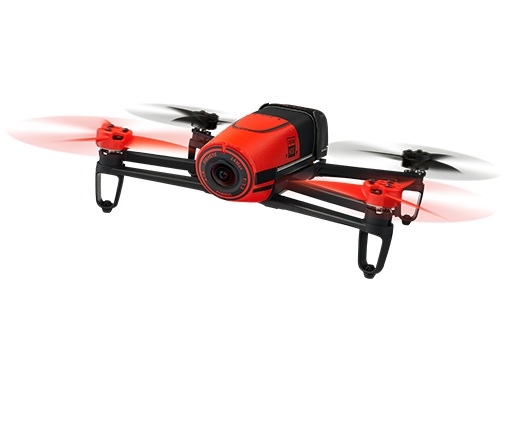
2015 was the year that Linux joined the drone conversation. In addition to high-profile launches like 3DR’s Dronecode compatible Solo and Parrot’s BeBop 2, new Linux-based Unmanned Aerial Vehicles have included Ubuntu- and Snappy Ubuntu versions of Erle Robotics’ open source Erle-Copter. Other tuxified, drone-related products include a Flyt autopilot from Navstik Labs.
Market leader DJI announced a Manifold development computer and open SDK for its high-end Matrice 100 drone that runs Ubuntu, and in 2016, Yuneec will release a drone built around Qualcomm’s Ubuntu-based Snapdragon Flight reference platform. Other Linux drones due in 2016 include the indoor-friendly Fleye drone from Belgium, and a Snappy-based drone from French firm UAVIA touted for its ability to be remotely controlled over the web.
This year was another active one for Linux-based terrestrial robots. On the high end, a humanoid, Xenomai-based DRC-Hubo robot from Korea’s Team KAIST won the $2 million DARPA Robotics Challenge Finals. High-end Linux robots demonstrated by robotics research centers included Oregon State’s speedy, bipedal ATRIAS.
In the industrial market, Rethink Robotics launched a one-armed, AI-imbued Sawyer manipulation robot for light manufacturing that runs Linux and ROS. Sawyer is claimed to be smaller, faster, stronger, and more precise than its earlier Baxter. Unbounded Robotics spinoff Fetch Robotics began shipping a Fetch picking robot and Freight hauling bot for the warehouse fulfillment market.
There have also been a number of consumer bots running Linux, such as CoroWare’s 4WD CoroBot Spark open robot platform for STEM education. Like the Dexter Industries GoPiGo, the Spark is based on a Raspberry Pi.
In newer categories like wearables and automotive. Linux and Android are faced with considerable competition. There have been only a few non-Android wearables that run Linux, with Samsung’s Tizen-based Gear watches being the main exceptions. Most of the action aside from the popular iWatch and Pebble, has been with Android Wear.
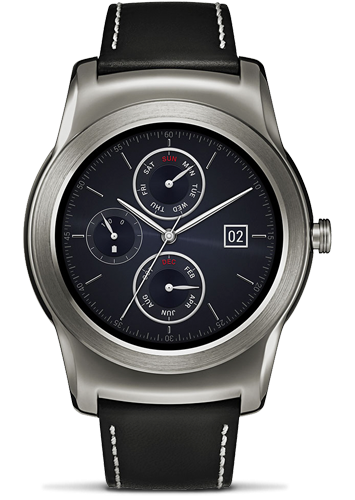
Thanks in large part to the popularity of the iWatch, Android Wear and other more autonomous watches running custom Android builds dropped to 17.4 percent of the smart wearables market in 2015, according to IDC. Yet, by 2019 Android is projected to advance to 38.4 percent share, following Apple WatchOS watches at 47.4 percent.
If smartwatches are all about getting the most out of the least computing resources, automotive computers such as in-vehicle infotainment (IVI) systems have higher power and price points to play with. Here, Linux leads Android, but both are far behind market leader QNX and even Windows Embedded Automotive in terms of shipping systems.
It may be hard to see in an automotive market marked by long development cycles, but Linux is coming on fast with IVI devices based on GENIVI or the Linux Foundation’s Automotive Grade Linux. This year, the AGL project released its first IVI specification, using Tizen for the reference platform, and a Jaguar/Land Rover implementation may not be far behind.
On the Android side, Google’s Android Auto standard, which streamlines interactions between existing IVI systems and Android devices, is likely to be followed in the coming years by a complete Android-based IVI and telematics platform. Meanwhile, Google umbrella company Alphabet plans to spin off Google’s self-driving car project, which has traditionally used Ubuntu, as a separate company. Yahoo! Autos recently reported that Google and Ford have entered into a joint venture to develop an automated ride sharing business using autonomous cars.
Linux has also been used by several other car companies testing autonomous or semi-autonomous technology. It’s too early to say how this market will sort out, not only in terms of the OS, but even the level of autonomy the market will desire. Meanwhile, is it too early to start talking about tuxified flying cars?
