
Linux Mint is among the most popular GNU/Linux-based operating systems. Although DistroWatch is not a metric of popularity, Linux Mint has claimed the #1 ranking on the website, which means it’s the most sought after distro on the site.
A Brief History of Linux Mint
Linux Mint is being developed by the Linux Mint community under the leadership of Clement Lefebvre. The OS has been around for a while, but it gained in popularity when Gnome moved to Gnome 3 Shell and Ubuntu dropped it in favor of their in-house Unity.
Both Gnome 3 Shell and Unity were in the very, very early stages of development and deviated too much from the familiar Gnome interface. To help such users, the Linux Mint community forked the Gnome Shell to create their own in-house desktop environment called Cinnamon. Because of the familiar interface and inclusion of many Gnome 2 features, Linux Mint Cinnamon became popular among those who were not happy with Gnome 3 Shell and Unity.
The first version of Cinnamon was released 4 years ago, in 2011. I used Linux Mint from time to time, but never found it stable or mature enough to make it my primary desktop. One reason behind that instability could have been that Linux Mint itself is based on Ubuntu regular releases. Every six months, there was a new release of Ubuntu, and Linux Mint developers had to stay on their toes to keep up with this ever-changing base.
That’s when, with release 17, Linux Mint decided to switch base to Ubuntu LTS. Since LTS releases were supported for long time, LM didn’t have to chase a moving target. Instead they could invest all their development efforts on further polishing the distro and adding new features to it. Post 17, each release of Linux Mint is supported till 2019. It’s good for developers and it’s good for users.
However, there is a flip side: The Linux Mint teams now have multiple releases of the 17 branch to support till 2019 — 17, 17.1, 17.2 and 17.3. Because Linux Mint is not following the release cycle of Ubuntu anymore, I think they should drop these regular releases and move to pure LTS release.
The 17.3 Release
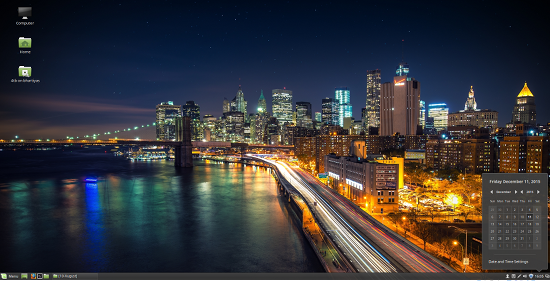
The latest version of Linux Mint (Figure 1 above) doesn’t need powerful machines; it needs a minimum of 512MB of RAM. However if you are planning to use it for regular work, I suggest at least 4GB of RAM as modern websites can be resource hogs.
Linux Mint 17.3 features a Cinnamon 2.8, MDM 2.0, Linux kernel 3.19, and Ubuntu 14.04 package base. There are both 32-bit and 64-bit versions of the distro available, and you can boot it either with BIOS or UEFI. Installation of Linux Mint is quite easy — as easy as that of Ubuntu. And, thanks to the work done by kernel developers, chances are that most of your hardware should work out of the box. Because Linux Mint has a deal with Canonical for packages, and the distro is quite liberal when it comes to drivers and codecs, you will have no problem with media playback.
Cinnamon 2.8
Linux Mint 17.3 features Cinnamon 2.8, and you will notice polish and stability throughout the distro. Cinnamon has borrowed many features from different desktop environments. Although it’s initially a fork of Gnome, it has borrowed a lot of design elements from KDE, for example. The interface looks familiar because that’s what you see in KDE Plasma Desktop or Windows.
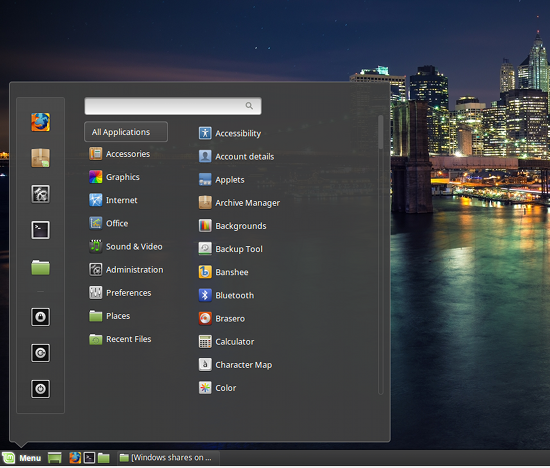 There is a start button at the bottom left (Figure 2). The bottom panel features a Window list, where you see currently running apps; you can pin any app on the bottom panel for quicker access — just drag and drop the app icon on the panel. At the right end of the panel, you will see icons displaying time, date, notification, sound, and much more. If you are not content with one panel, you can add more than one panel at the edge of the screen.
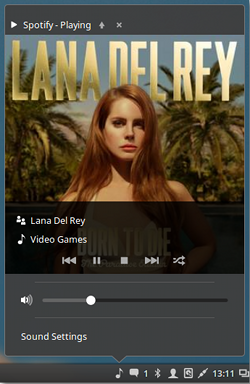
Thanks to the LTS base, developers are now able to add many user-facing features to the desktop. One of the improvements of this release is the new layout for Sound Applet. You will now see track information and media controls as an overlay on album art. Depending on the media player, you can also see the progress of any currently playing song. Clicking on the sound icon shows volume control and track information (Figure 3), right-clicking shows input controls, applications using sound, connected audio devices, and much more (Figure 4).
The power applet has also received some improvements and bug fixes. If you are using it on a laptop, or if you are using wireless peripherals, then you will see noticeable improvements while displaying the battery info of these devices.
Another minor improvement is for those using using multiple workspaces (or virtual desktops). The workspace switcher applet now shows a visual representation of your workspaces, with little rectangles corresponding to each window inside of them.
While we are still on the elements of the bottom panel, the Window list now shows window thumbnails. However I wish they would switch to showing only the icon of the running app instead of text; it would not only save space but also look more elegant. The system tray has added support for indicators, which can be turned off easily.
There are some notable improvements in system settings: If you are using multiple monitors, you will see more info about each plugged monitors. For example, you will see the name of the monitor and the output they are connected to.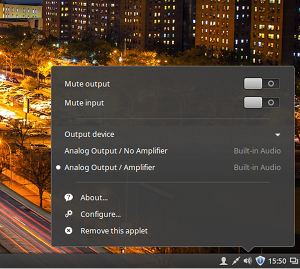
Users can now easily change their username (it won’t change the name of system user) and and password through the Account Details option. Other improvements include the ability to mute the microphone, better detection of HiDPI monitors, and improved support for Qt5 applications to make them look native in a GTK environment. You will notice that Cinnamon is loading faster after a shutdown and reboot, as they have removed “preloading” from Cinnamon 2.8. which was slowing down the system.
One of my favorite new features is bulk renaming of files. As a photographer, I take hundreds of pics and I need bulk file renaming. Because Gnome supposedly imitates Mac OS X, they kept that feature away from Nautilus, and Linux Mint inherited that “bug” from Gnome. The bulk rename is disabled by default, but it can be enabled through the preferences. However the instructions are not very clear, and I didn’t manage to get it to work. The “rename” dialog now appears but there is no further option to actually rename files. If you know how to do it, let me know in the comments below.
Other improvements include HiDPI support for the login screen. To help those who have touch-based devices, developers have also added a virtual keyboard to the login screen so users can easily log into their systems.
They have also made changes to software management. It automatically detects the fastest/closest mirror for packages so users get the best software installation experience. If you are using a mirror that has not been updated or has corrupted packages, update manager will warn you.
Conclusion
Linux Mint 17.3 is an impressive release, and the developers have fixed many issues that were plaguing this otherwise fine distro. I, however, feel that they should move away from these twice-a-year releases and stick to LTS releases. They can move to an openSUSE Leap like model where they offer major updates with the LTS release of Ubuntu and in between offer minor updates to bring the latest Cinnamon, Gnome, and other such components to their users.
All said and done, Linux Mint is undoubtedly one of the best Linux distros out there. It offers what a majority of users need. It tries to keep things simple and easy. If you are looking for a good, trusted, stable, and modern Linux distribution that is based on Debian/Ubuntu, you should look no further than Linux Mint.
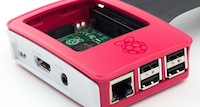 The Raspberry Pi is now a threat to thin clients. Citrix has been fooling around with the Pi as a desktop virtualisation (VDI) target for a while, even releasing a prototype
  GNOME Maps is one of the many components of the GNOME stack, and it looks like the upcoming 3.20 version will get some pretty cool features.
 Nearly one-third of those that browse shopping websites make an online purchase using their mobile phone, the survey found.