
 What do you do when you make a mistake in Git? There are many ways to get in trouble, and several good ways to get out of trouble.
Prevention
The best method is to stay out of trouble. Of course, this isn’t always possible, but there are some best practices you should use to prevent problems, and to make fixing problems easier. (For a refresher in Git basics, start with Your Real-World Git Cheat Sheet.)
-
Follow the conventions of the project you are contributing to. Hopefully, they have written style and process guides to follow. Obey them.
-
Keep your commits small, specific, and frequent. Giant commits are asking for trouble. They’re difficult to debug, and who wants to review massive commits? Small frequent commits are better than infrequent giant commits, which will fall behind and require manual conflict resolution.
-
Make detailed commit messages. A good commit message describes what your commit does, and why. Start with a brief descriptive subject line followed by a line break. Then, in the body of your commit message, describe what the problem your commit is solving — improvement, new feature, or whatever. Cite relevant issues or commits. Leave a nice backtrail that you and other contributors can follow long after you have forgotten why you did it in the first place.
-
Remember to always run git pull on your master branch, or whatever upstream branch you are using, before creating your working branch.
-
Never work directly in your upstream branch. Always make your own working branch. You can do anything you want in your working branch without affecting upstream, and if you make an unfixable mess, you can nuke it and start over.
-
Git branches are cheap and easy. Use ’em and lose ’em. No matter how small your changes are, make them in a new branch. After your commits are merged upstream, delete your working branch.
-
Make sure that your new working branch is derived from the correct upstream branch.
-
There is no shame in maintaining backups of your working branches, and copy-pasting to get out of trouble.
-
Study the Pro Git book, and search it first for answers. The Internet is full of bad Git answers, so stick with the authoritative source.
Catching Mistakes Early
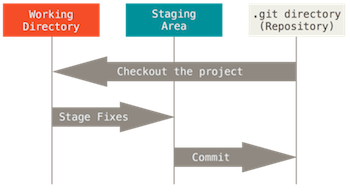
In a typical Git workflow there are four phases: editing, staging, committing, and finally, creating a pull request for review before merging. The earlier you catch mistakes, the easier they are to fix.
Editing is when you edit or create a file in your new working branch. Staging is when you use git add to stage your changes. Committing is when you use git commit to add your staged files to a commit. At this point, all of your work is local; nothing you do affects any other branches or anyone else’s work. The pull request is your last chance to make fixes before it gets merged into the upstream branch. Hopefully, there are people and automated build testers who will review your pull request and catch mistakes. Do not despair when they find problems with your work, because it is far better to fix them before they get propagated upstream, or even worse, get released into the wild and excite the wrath of users.
Pre-Staging and Staging Errors
You haven’t made any commits yet, so this is the easiest time to make fixes: Just edit your files. No muss, no fuss. You can change and git add the same file a million times, and Git won’t care.
If you have a lot of changes to undo, you can reverse all the changes in a file:
$ git reset HEAD [filename]
$ git checkout [filename]
Now you can start over.
Errors After Committing
There are multiple ways to make repairs to a commit. If you are worried about zapping changes that you might want to keep or just want a safety net, back up your files first.
1. Correct the mistake and then commit again. You can make a million commits before creating your pull request, and Git won’t care. However, a pull request made up of a large number of commits is more difficult to review and debug. A nice low-tech way to fix this is to make a backup of your final version. Copy your backup into a new branch created from the same upstream, and then you can make a single commit in the new branch.
2. You may amend a commit. This replaces the previous commit instead of adding another one. Make and add your edits, and use the –amend option:
$ git add [files]
$ git commit --amend
This action overwrites the previous commit, and you can change or keep the previous commit message.
You can un-commit a commit with git reset –soft. This doesn’t change any of your files, but rather goes back in time as though your last commit did not happen and you are still in staging. You can edit, add, or remove files, and then commit again.
$ git reset --soft HEAD^
At this point, you can even reset files all the way back to their original state.
$ git reset HEAD [filename]
Unstaged changes after reset:
M       filename
$ git checkout [filename]
3. Revert the offending commit. This method is good for a more complex commit that would take a lot of work to edit. After you make a commit, git status tells you “nothing to commit, working directory clean” even when you have not yet pushed your commits. Use git log to see your commits that have not yet been pushed:
$ git log --branches --not --remotes
commit 42c54ed7262df89f3799918c056f3dbb2d0523bd
Author: Carla Schroder < This e-mail address is being protected from spambots. You need JavaScript enabled to view it >;
Date: Tue Dec 1 13:53:55 2015 -0800
More items to append to changelog
commit 48ff152fafbb5a1d9d276277f9ac73d84a5e064b
Author: Carla Schroder < This e-mail address is being protected from spambots. You need JavaScript enabled to view it >;
Date: Tue Dec 1 13:52:58 2015 -0800
Added new items to changelog
You can use git revert to reverse a specific commit:
$ git revert 42c54ed7262d
However, this approach can lead to more problems if you made multiple commits on a single file, because you will probably have to manually resolve conflicts. You can undo git revert if it looks too messy to fix:
$ git revert --abort
The nuclear option for reversing commits is with a hard reset to move back in time to a specific commit. Use git reflog to see your recent commits from newest to oldest:
$ git reflog
d42c5e9 HEAD@{0}: commit (amend): Yet more changelog updates, plus corrections
e54b68c HEAD@{1}: commit: Yet more changelog updates
d1f8998 HEAD@{2}: commit: Additional entries to bring changelog current
48ff152 HEAD@{3}: commit: Added new items to changelog
1297eaa HEAD@{4}: checkout: moving from master to workbranch
1297eaa HEAD@{5}: clone: from https://github.com/project/project.git
Then, use a hard reset to go back in time to your chosen commit:
$ git reset --hard d1f8998
This permanently discards everything that came after your selected commit.
Fixing Pull Requests
Errors in pull requests are fixed with new commits to your pull request. If your pull request is a hopeless mess, you can nuke the whole thing. Typically, pull requests are created and managed with tools provided by a Git host such as GitHub, so deleting a pull request is done with a button click.
In addition to the Pro Git book, you can check out the reference manual and videos at git-scm.com/doc. Git is complex, so don’t let the showoff Git wizards make you feel inferior. Stick with the authoritative documentation, and you’ll do fine.
 European Union antitrust regulators charged Qualcomm on Tuesday with abusing its market power to thwart rivals, putting the world’s number one mobile chipset maker at risk of a hefty fine. The accusations by the European Commission are the latest antitrust problems for the company as regulators in the United States, China, Japan and South Korea look into its licensing model and its dominant patents in mobile networks and devices.
 A major factor that deters girls from pursuing computer science is the perception that coders are mostly white and male,
  The Open Container Initiative (OCI)
 Chapeau 23 “Armstrong,” a Linux distribution based on the Fedora 23 Workstation has been released and is now available for download.
 IBM announced Tuesday plans to open up its QRadar analytics platform to in an effort to spur the development of security applications that can be used in the battle against cyber attackers. Big Blue hopes to use the future influx of security apps to populate the IBM Security App Exchange, which the company also just announced.