
 Recently, I wrote a tutorial on Emby, a media server that allows users to stream their own media across devices. What attracted me to Emby was that it’s a fully open source project, compared to Plex which I heavily use. To learn more about the Emby project (formerly known as Media Browser), I reached out to Emby founder Luke Pulverenti. Here, he talks about choosing an open source development approach and about the Emby project’s goals for the future.
Can you tell us a bit about yourself? What do you do and where you live?
I live in New England, and as of earlier this year I work full-time on Emby. Before that I worked in the healthcare software industry and also for other startups.
When did you become interested in open source?
Before Emby, I had limited open source experience. I submitted small bug fixes here and there to different projects that I took an interest in. The Media Browser project was always fully open source, and with the re-branding to Emby we felt that was the best way for the project to continue moving forward.
What was the goal behind starting Emby?
Emby has been around since 2008, and was formerly known as Media Browser. Media Browser was a plugin for Windows Media Center and had a very distinct reputation. It did not have the feature set of other products such as Xbmc, but it had the best presentation around, and when you wanted to show off your setup, you did it with Media Browser.
 I was just an ordinary Media Browser user, and when Windows 8 was released without Windows Media Center, the team had a decision to make. Either evolve or become irrelevant as Windows Media Center fades away. That’s when I approached ebr (who was then the main developer responsible for Media Browser) about re-inventing the product with a client-server architecture that would give us a platform to become a true media server solution for both local and remote content. So, this decision was based primarily on continuing the project we love and finding a way for it to continue to thrive.
Is Emby server fully open source? If yes, what license are you using and why did you choose it to make open source?
Emby Server is fully open source under GPL V2.0. Anyone can run from source and be up and running in a matter of minutes. It’s important to mention though that our goal is to produce the best experience we possibly can. If an agreement with a potential partner were to require us to make certain modules closed source, then we would not hesitate to do that. These situations are reserved for standalone, optional features and will not prevent running the core server from source.
Is Emby a company with full-time employees, or is it a part-time project that you manage?
Yes, Emby is an LLC, and there is a very small number of us working full-time. The project has grown to the point where it needs full-time attention in order to be able to support users and be competitive with other products.
What infrastructure do you use for publishing the source code and what infrastructure are you using to offer compiled binaries?
Our source code is on GitHub, along with documented build scripts for Windows and Linux. Several of the Linux packages are using the Open Build Service, while others are maintained by volunteering community members. We are currently working on getting packages released for QNAP, Synology, and other NAS devices.
I found it strange that Emby is not available for openSUSE, what’s the reason?
We’d like to be on every distribution that we possibly can. It is only a matter of time and resources. In the meantime, until there is a dedicated openSUSE package, the Docker installation is a great alternative.
The Emby Connect service is similar to Plex Pass. What are the additional features users can get?
Emby Connect is a completely free service that makes it easy to sign into your apps when away from home and manage connections to multiple servers.
Normally, signing into a server requires three pieces of information — the server IP address, along with a username and password. With Emby Connect, you no longer need to know a server’s IP address in order to connect.
How do you fund the development?
We have subscription services that we call the Emby Supporter membership. We use these for bonus features that we think users will find value in purchasing. They help fund the project and allow us to compete with other products.
What’s your long-term goal with Emby? Where do you want to see it?
Our goal is to continue to evolve with the industry and become the best way to consume and manage personal media. As new technologies emerge, we want our users to be confident that we’re going to be there bringing them the integration they’re looking for. In 2015, cloud services and storage have become more affordable for mainstream users. In 2016, I expect they’re going to really begin affecting the way we use apps on a daily basis, and Emby will be there to help you take advantage of it. Conversely, as client devices continue to become more powerful, so too will the in-app experiences.
 ODPi, a nonprofit organization accelerating the delivery of Big Data solutions by powering a well-defined platform called ODPi Core, today announced new members, technical milestones, its formal governance structure and that it will be hosted at The Linux Foundation as a
  The famous Quantum Artificial Intelligence Lab
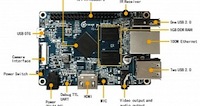 The guys over Orange Pi have announced a new, cheaper version of their well-known Orange Pi 2 SBC (Single-Board Computer), which is dubbed Orange Pi PC, it’s open source, and it’s available for only $15 (€13).
 Canonical’s Oliver Grawert had the great pleasure of announcing the general availability of the new and improved Raspberry Pi 2 image of the Ubuntu Snappy Core 15.04 operating system.
 Spun off from VMware and EMC in 2013,
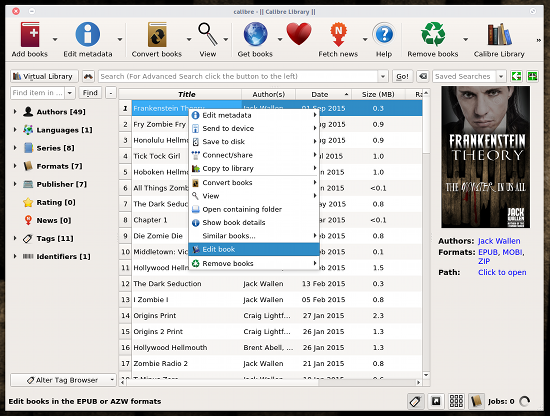 If you’ve worked with e-books, you know that editing them can be a work-flow nightmare. You format the book, save it, convert it, and check it out. When you find issues, you then must reformat, save again, reconvert, and recheck. This can become quite tedious when you run into stubborn or numerous formatting errors that slip through the cracks.
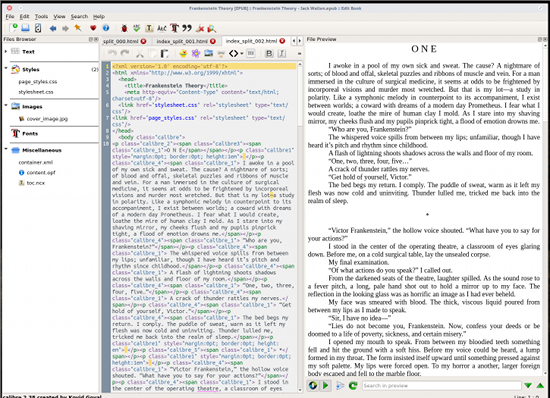 When you double-click on a chapter in the left navigation, it will open up in a new tab in the editing pane. You can also open up the document style sheet. This makes for a handy reference point as you work through the files (or should you need to make changes to one or more of the styles). As you make changes (to either a chapter or to the style sheet), they will appear in the live preview window. As you switch tabs in the editor window, the preview window will automatically switch to preview what is being edited.
 The editor pane also has several buttons (Figure 4) that allow you to easily insert tags, images, hyperlinks, formatting, colors, and even a button for beautifying the current working file.
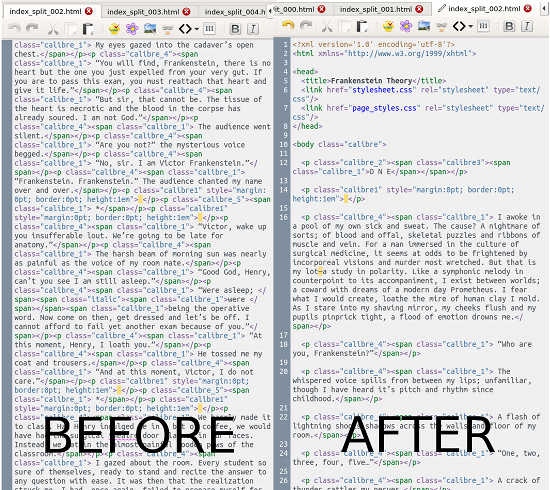 When you complete the editing (and beautifying), I highly recommend you run the Check Book tool. In the main toolbar you’ll see the ladybug icon—click it to run the checker. If it reports errors, address them and rerun the checker. You can also run the built-in spell checker from the Calibre main toolbar (Figure 6).
  Once you’ve completed the entire editing process, all you have to do is click the Save button (or Ctrl+S) and the epub (or azw3) file will automatically reflect your changes.
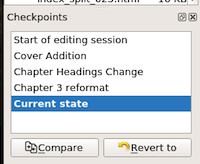 To create a Checkpoint, simply click the thumbtack icon in the toolbar and give the Checkpoint a name. If you find yourself in a situation where you need to revert, click on the Edit menu and you should see the last Checkpoint created. If you’ve created more than one Checkpoint, you can click the View menu and check the box for Checkpoints. This will add an additional preview pane (in the bottom of the left navigation—Figure 7) so you can jump to whatever Checkpoint you need.