Home Blog Page 1006

Ubuntu Developers Discuss the Future of Snappy Personal, Unity 8, Mir, Convergence

ubuntu-developersCanonical’s David Planella announced a few days ago the there will be an Ubuntu Community Team Q&A with Kevin Gunn, the leader of the team of Ubuntu developers over Canonical responsible for the convergence implementation, on Ubuntu on Air.

As one might have expected, the Ubuntu on Air session with Kevin Gunn has been recorded and it is available to anyone who wants to learn… 

Android Media Player Features 4K Video and Optimized Kodi 15

Cloud Media’s “Open Hour Gecko” is an $89, quad-core Android media player with an optimized Kodi 15 app that supports HD audio passthrough and 4K H.264/265. Last month, Cloud Media tackled the higher end of the media player market with its $449, dual-boot Linux and Android Popcorn Hour A-500 Pro. 

Read more at LinuxGizmos

Red Hat’s ​Ceph and Inktank Code Repositories Were Cracked

Red Hat reports that the Ceph community project and Inktank download sites were hacked last week and it’s possible that some code was corrupted.

Red Hat had a really unpleasant surprise last week. Its Ceph community site, which hosts development for the open-source Ceph distributed object store, and the Inktank download site, the commercial side of Ceph, had both been hacked. What happened? Was the code corrupted? We still don’t know. Red Hat reports, “While the investigation into the intrusion is ongoing..

Read more at ZDNet News

Continuous Delivery: Getting Started

contdel img1When you look at the release schedules from big software companies (Apple, Microsoft, Oracle, and so on), you typically find releases about once a year, or every two years, or sometimes even every three years. In the past, although users weren’t necessarily patient, they put up with this release schedule. Even smaller companies used this kind of scheduling. In this scenario, the only time a release came out sooner was to fix bugs. No new features would be included. Of course, software wasn’t delivered online back then. Instead, products were shipped on disk or CD.

Now compare that to today’s apps in the Google and Apple stores. Because of online delivery, if there’s a show-stopping bug, the developer can quickly update the app, and customers will receive the app within days or hours of the new release. On the other hand, because of this, customers start to expect rapid releases. If a year passes and an app doesn’t receive an update, users tend to assume the app has been abandoned. If they paid for the app, they get angry; and, whether they paid or not, they’ll likely move on to a competing app.

But, there’s another difference. Look at the sheer size of something like Microsoft Word. Regardless of whether all the features in Word are truly necessary, there are allegedly hundreds of developers working on Word at any given moment. Most Android and iPhone apps don’t have nearly that many developers working on them. The apps are generally much smaller and built by smaller teams. Either way, the new online culture of apps being delivered faster and faster has caused changes throughout the software industry. People simply want their software delivered more often. Additionally, they want a quick way to report a bug and see quick responses to the bugs. This mindset has moved into corporate culture as well when dealing with internal software.

With today’s software delivered online, in theory, developers could release their software as they’re working on it. Each day, as they add a new feature or fix a few bugs, they could upload it for release. More reasonably, this could happen once a week or once a month, but that’s provided the software actually works and is in a state that it can be delivered. Therein is the catch: The only way the software can be delivered this often is if you maintain some build that pulls in the changes, and only the changes that are fixed and working.

This has all resulted in a concept called “continuous delivery.” So, how do you, as a developer learn it?

Getting Started with Continuous Delivery

The first thing is to understand what exactly it is. Unfortunately, this concept has been adopted by many people throughout the software world who want to get in on the action and thus the term has become clouded with market-speak. But, if we look to the companies that are pioneering the continuous delivery concepts through tools they’ve built, we start to see some common themes.

Software development guru Martin Fowler has provided some ideas on it as well, with the help of his team at Thoughtworks. Essentially, the idea encompasses three ideas:

  1. Your software is deployable throughout its process, and you maintain it in such a state.

  2. The system provides feedback on its readiness for deployment.

  3. The software can be deployed easily, or, as Fowler says, it provides “push-button deployments.”

Let’s focus on the first and third of these topics.

The Software Is Always Deployable

Anyone who has worked on a team building a large software system knows that at any given moment, different developers will have different branches of the software on their machines, and that at times the master branch might not be fully functional. Although we try to make sure the master branch always works, the reality is we’re not always there. This is one aspect we work to change with continuous delivery.

Consider this scenario: The customer suddenly calls and says, “Let’s see what the product looks like right now.” A typical response might be, “Um… it was working last week, but right now I’m in the middle of adding a new feature, and so you can’t really see it run, because it just doesn’t work.” Well, can you just show the customer what you had in the previous working state before you started adding the new feature? Maybe, or maybe not. It depends on your process.

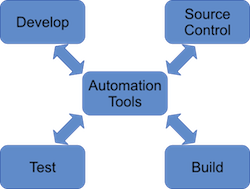
By using automated processes in conjunction with a careful set of policies and procedures, your software is always in a state where it can be deployed. Or, more accurately, you always have a branch that can be deployed. As you make changes, branches get merged, human testers and automated test tools verify the changes work, and the changes get merged into the master branch (or some branch deemed as the deliverable branch). That means the deliverable branch is always in a functional state. And, this leads to push-button deployment, where you can quickly spin up a virtual machine and show it to your client when asked (and deploy it for real to the masses). See Figure 1 above.

Push-Button Deployments

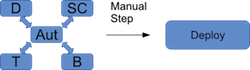
The push-button concept refers to the idea that with a single or couple of commands, the software can be deployed. A key concept people at companies like Puppet Labs have pointed out is that your software is always in a state whereby it <i>can</i> be deployed. It’s not actually continually deployed; it doesn’t get pushed out every hour or so. You’re still in charge of when actual deployments go out. But, you use automation tools to make all this happen. Then, when your customer wants to see it right here, right now, you can spin up a virtual server, enter a command or two, and the software will be loaded and configured on the virtual server, ready for the customer to see the latest changes.

Similarly, when you’re ready to do an actual release, you will use similar tools and commands to do the release. This will, of course, depend on where your software gets released. If it’s a service, you might push the changes to multiple virtual servers. If it’s in an app store, you might push the changes to iTunes or Google Play. And, if it’s an internal application, you might push the changes to a server that gets configured and then a new image is built based on this configuration. Then, future virtual servers that get spun up will use the updated image. The automation tools make all this fast and easy (Figure 2).
contdel img2

The Big Picture

The big picture of development becomes one that uses traditional agile techniques with a great deal of automation and provides for far more frequent releases, along with feedback mechanisms whereby customers and clients can respond with bugs and feature requests. As before, testing is performed on each unit before the unit is added into the master branch. Now, however, the automation tools prevent the branch from being merged in if it doesn’t pass the tests. Yes, there’s a lot of “in theory” to all this, and the marketing folks pushing for continuous delivery may not always truly understand the complexity of software development processes. But, the idea really is sound, and it’s vital in today’s world where we’re dealing with massively scalable software that may run on millions of devices that need quick updates.

Tools

There isn’t enough room in this short article to explain everything you need to know about continuous delivery. But one of the most important aspects is that you make use of the right tools. Two popular such tools are Chef and Puppet in conjunction with the tools you’re already using, such as Git. If you consider how in the older scenarios, developers were stuck working on different boxes that would likely become very different, these tools help enforce consistency between machines. That alone could cause potential headaches, which is why your development process may need to be modified to fit within that model. Also, in realistic terms, the machines won’t always be identical; when you’re working on a branch, you don’t need that branch to exist on another developer’s machine until the merge takes place. (This is where the fuzzy nature of the marketing-speak has to come to grips with the realities of development.)

Conclusion

Continuous delivery takes existing processes and adapts them to today’s mobile (and possibly impatient) customers who want to see updates now. It’s not just to their benefit, however; it’s to our benefit as developers as well, because we can quickly get releases out the door and get feedback from users. Then, if there’s a problem, we don’t need to force our users to sit and wait weeks for a patch. Instead, we can use our automation tools to either get a patch out quickly or immediately roll back to the previous release. In either case, we get the release out quickly so customers don’t complain.

Big software companies are already using many of these processes, although I suspect it’s not always quite as beautiful and perfect as they would like us to believe. But they’re showing that the idea works, and you can use these techniques to get your software out the door.

Now where do you go to learn more? There are lots of sources. The two big companies pushing the tools have pages on it: Chef and Puppet Labs. ThoughtWorks, who pioneered the idea, has a lot of good information on its website. As a final note, I wanted to add some links to articles that were critical of continuous delivery, and provide them here as sort of a counterpoint, but I’m not finding much. It looks like people are generally having good luck with it.


Future Software Supply Chain Thoughts

“Almost always, great new ideas don’t emerge from within a single person or function, but at the intersection of functions or people that have never met before.”  — Clayton M. Christensenlogo lf new

As the pace of technology and innovation continues to accelerate, we’re seeing more security issues emerge that have a wider and wider scope of impact. At the RSA conference in April 2015, Amit Yoran started his keynote [1] with the statement, “We stand in the dark ages of Information Security. Things are getting worse not better.” He then challenged the audience to rethink how security is being done. In one of his closing thoughts, he pointed out:

“Threat intelligence is available to us, let’s leverage it in machine readable format for increased speed and agility. It should be operationalized into our environment, into your security operations and tailored to meet your organization’s needs. Align it with your organization’s assets and interests so the analysts can quickly respond and identify those threats which might matter most to the organization.”    

One of the key reasons behind the pace of technology and innovation continuing to accelerate is the pervasive use of open source software.   Open source software is able to build on the work of other projects due to the choice of using an open source license. This has spurred collaboration and the tremendous rate of innovation; as a result, however, the foundations and critical infrastructures are continually shifting and changing. Tracking these core and foundational pieces is a challenge. The Linux kernel is one such core package that is easily identified; however, there are many others whose roles are not as clear until something breaks. Layered on this environment is the problem of hidden dependencies between packages and different behaviors for specific versions of packages. Another challenge involves identifying developers who are able to fix security flaws and maintain software projects that were created in the past. The Core Infrastructure Initiative (CII) program at the Linux Foundation [2] was designed to address the identification of core projects and improve the transparency of the health of open source projects, but there are still problems to overcome as new technologies emerge.

Software or Information security has become its own specialized field, with its own language and processes, as well as documented best practices for identifying problems, finding fixes, and designing strategies to improve security. NIST’s National Vulnerability database [3] tracking the Common Vulnerabilities and Exposures (CVEs) [4], provides a key piece of infrastructure for coordinating the existing efforts and linking these vulnerabilities to specific products through the use of Common Platform Enumerations (CPEs) [5]. Unfortunately, a motivated group of people is always looking for ways to exploit bugs and take advantage of gaps between open source components that make up products.

Proactive identification and avoidance of security issues at the product level is going to be needed. But let’s face it, there’s always going to be a bug that slips through and needs to be fixed once products are deployed in the field. A clear understanding of the provenance of ALL the software that makes up a product will be key to rapidly assessing what needs to be fixed and by whom. Consumer products today include software applications, the underlying operating system those applications run on, and the firmware that interfaces the system software to the hardware; and can be influenced by the software used to build specific instances.  

In the manufacturing field, supply chain management for safety critical devices (such as, cars, medical, etc.), has many processes in place so that every hardware component can be traced back to its original source in an efficient manner. When problems occur, the key component can be isolated and a remediation process (recall, etc.) can be put into place. The trend to shift increasing amounts of functionality from hardware to software allows innovation to occur at a rapid pace but also creates challenges for accurate supply chain tracking.

Today, the processes for tracking software origins to this level have not been standardized effectively across the industry with a common language that permits identification of the dependencies and vulnerabilities to the needed level of detail. Most of the key information for understanding is contained in the build options when a binary is created, but what gets tracked is usually the binary itself (as a product). Reconstructing what specific version of the software sources was used, determining any software dependencies (libraries linked in, etc.), and knowing which compiler was used to do the build can be difficult once a problem is identified in a product and people are scrambling to find a solution quickly. Joshua Corman’s talk at Øredev conference in November 2014 [6] provided some compelling examples to illustrate the argument that, from a security perspective, it’s time for a software supply chain.

On a similar note, open source licensing compliance is undergoing a similar set of problems in terms of not being able to keep up with the rate of change. Gartner estimates that “By 2016, at least 95 percent of IT organizations will leverage nontrivial elements of open source technology in their mission-critical IT portfolios, and fewer than 50 percent of organizations will have implemented an effective strategy for procuring and managing open source.” All too often, the developers creating an application, service, library are building on work done by others.

They may be unaware of the licenses and obligations and just want to get the functionality working by the deadline for the project. Agile development cycles, for example, focus on the next goal and fuel rapid innovation. Accurate tracking and investigation to figure out if the license is compatible with the use case can become an afterthought, if done at all.

These 3 areas (security, product manufacturing, and license compliance) all have a similar problem with rate of change, and the processes in place today are not keeping up. Some partial solutions are emerging now based on recognition made 6 years ago by the SPDX team that the tracking of licensing and copyright information at the software file level was needed. Being able to clearly articulate the relationship between sources and their binaries is important for drawing the connection. Information about aggregation of software that makes up a release, what patches have been applied after the initial release, and so forth are an important part of the solution as well.

Making it easy to share accurate licensing and security information through the supply chain needs to be the goal.  Ensuring that the information can be automatically collected as well as accurate is going to be necessary to keep up with the rate of change. SPDX 2.0 [7] is an open standard that has been developed by teams from the legal, business, and technical communities to help with this supply chain and license tracking problem. However, it has been missing a clean way to link into the rich language and infrastructure that is important for tracking security. Once a security problem is identified in a software component, tracking the scope of impact must be automated so that all products that may contain this component (even indirectly) can be notified. To help with this, SPDX 2.1 is looking at adding links to NIST’s CPE’s and other emerging security and software assurance standards that will permit accurate mining of that information as well.

If you have thoughts on how to help make this automatable tracking of security, licensing, and copyright information available to the supply chain, ideas are most welcome. We’ll be having a Supply Chain Mini-Summit [8] in Dublin on Oct. 8th, and those interested in exploring this further are welcome to attend.

References

[1] https://www.rsaconference.com/events/us15/agenda/sessions/1946/escaping-securitys-dark-ages

[2] https://www.coreinfrastructure.org/

[3] https://web.nvd.nist.gov/view/vuln/search

[4] https://cve.mitre.org/cve/identifiers/index.html

[5] http://scap.nist.gov/specifications/cpe/

[6] http://www.sonatype.org/nexus/2014/11/17/open-season-on-open-source-why-its-time-for-a-software-supply-chain/

[7] http://spdx.org/sites/spdx/files/SPDX-2.0.pdf

[8] http://events.linuxfoundation.org/events/linuxcon-europe/extend-the-experience/supply-chain-summit

Seven Years of Malware Linked to Russian State-Backed Cyber Espionage

For the past seven years, a cyber-espionage group operating out of Russia—and apparently at the behest of the Russian government—has conducted a series of malware campaigns targeting governments, political think tanks, and other organizations. In a report issued today, researchers at F-Secure provided an in-depth look at an organization labelled by them as “the Dukes,” which has been active since at least 2008 and has evolved into a methodical developer of “zero-day” attacks,

Read more at Ars Technica

Oracle Plots Exadata As a Cloud Service at OpenWorld

CTO Larry Ellison says Exadata as a service will provide a cloud option that can mesh with on-premise deployments and appear as one computing pool to enterprises.

The gist is that Exadata as a service will take the technology that’s optimized for Oracle’s database and deliver it as a service. The goal is to allow enterprises to mix and match Exadata on-premise and cloud deployments and manage them as one asset pool.

Read more at ZDNet News

How To Wakeup Backup Nas Server and Mirror Files Using Rsync in Linux

I’ve a critical data stored on my small home server. I backup my Desktop, Laptop and a remote VPS server to my home nas server powered by Debian Linux using rsnapshot backup utility. In the event that my main nas server has a hardware (hard disk failure) problem, having mirrored files provides some sort of peace of mind. How do I mirror /backups/personal (total 100GB and growing everyday) to a secondary nas Linux server located in my network?

Read more…

Managing User Accounts and Passwords

While reviewing the video that goes along with this article, my mind drifted back to my first real paying job in radio. It was a big station with a big news department and what makes it pertinent to this discussion is the fact that they had a mini computer running Unix. This machine kept up with stories coming in off the UPI and AP news wires and the reporters used it to write local stories. There was a terminal in each on-air studio and more back in the newsroom. I can still remember the meeting I had with the sysadmin to get my very own user account on the system. Believe it or not, I can also still remember the password I chose after nearly 30 years. And no, I’m not telling.

Up to that point, my experience with computers mainly consisted of playing games on a Commodore 64 and typing term papers into my brother’s Tandy 1000. At the time, I remember thinking that it was cool to have access to a “real computer.” This was before the Internet. It had no GUI and the printers were tractor-fed dot matrix that could only print plain text. It was basically a giant word processor. What I found fascinating about it was the way I could sit down at any terminal in the building and login to find all my stuff just the way I left it. I could write a story, save it to a file, and send it to a printer all while the guy in the next studio was doing something else with the same system. (Read the rest at Freedom Penguin)

How To Install & Use TrueCrypt In Ubuntu Linux To Encrypt Files & Folders


Truecrypt encrypt files in ubuntu

If you are little interested obtaining higher level of security for you data, then I’m sure you would like this little software. Perhaps you have heard of encryption, if not, encryption is just the way to transform plain text files into Cipher text. To be more clear, encryption just makes the normal files like, songs, movies, documents etc. into something that human can’t understand, only machines can understand after inserting a secret key.  We can too encrypt our secret files with TrueCrypt, still safe to work with. Let’s see how to do that in Ubuntu Linux and other derivative OS.

Read At LinuxAndUbuntu