Out of the box, Linux is one of the most secure computing platforms you will ever use. For most users, that out-of-the-box experience is good enough. For some, however, there is plenty of fine-tuning that can be done to make the desktop distribution even more secure or more flexible. If you’ve made the switch to elementary OS Freya, you’ll be pleased to know there’s a new GUI tool that makes working with the firewall quite easy.
Like most all Linux distributions, Freya works with iptables to lock down the platform. The iptables system is an incredibly powerful tool that let you configure the tables provided by the Linux kernel firewall. For most Linux admins, iptables is second nature; adding policies and chains can be done during REM sleep. For most desktop users, however, iptables tends to fly over their heads. That’s why the elementary OS Freya firewall tool is so important—it makes editing the iptables policies a snap.
What You Need to Know
Although you do not have to fully grasp the ins and outs of iptables to work with the elementary OS Freya firewall tool, it doesn’t hurt to at least understand the fundamentals of firewalling. At the bare minimum, you should know:
-
A firewall can block traffic going in and out of a machine
-
A firewall blocks using port numbers and protocols
-
A firewall can reject/deny/allow/limit incoming and outgoing TCP and UDP traffic
-
You must be a member of the sudo group to work with the Elementary OS Freya firewall tool
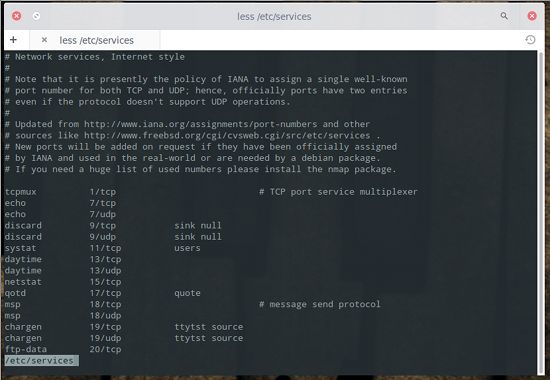
That is the bare minimum you must know before you start using this tool. If you’re unsure of what protocols you want to work with, you can look at the file /etc/services to see an entire listing of the networking ports used by Linux. If you issue the command less /etc/services you can comb through the full listing (see Figure 1 above).
The elementary OS Freya firewall tool is, ultimately, a front end for Uncomplicated Firewall (UFW). UFW is a “user-friendly” command line front end for iptables found in the Ubuntu distribution. The Elementary OS Freya firewall tool (and, by association, UFW) doesn’t have nearly the power of iptables, but it does a good enough job for the desktop.
Finding the Tool
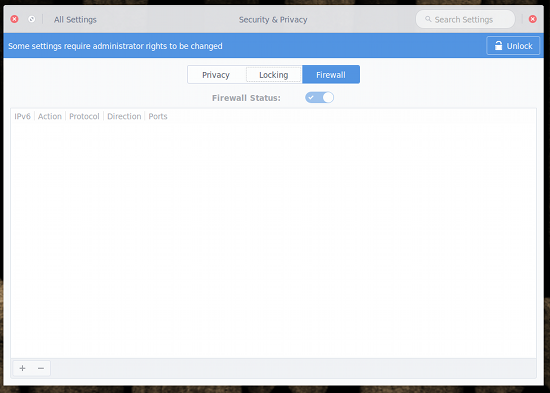
The firewall GUI isn’t tucked too deeply away from view. If you open up the Settings tool and then click on Security & Privacy, you’ll see the Firewall tab. Click on that tab and you’ll see that the firewall isn’t activated. When you click on the Firewall tab, you will see an unlock button in the upper right corner (Figure 2). To do anything with the firewall tool, you must click that button and then enter your sudo password to continue.
Using the Tool
Now that you’ve unlocked the firewall tool, it’s time to use it. You can begin adding your rules and then enable the firewall, or you can enable the firewall and then add your rules. Let’s enable the firewall first. Do this by clicking the Firewall Status slider to the right. When the firewall is enabled, the slider will turn blue. With the firewall enabled, you can start adding to the iptables chain. Let’s say, for instance, you want to allow incoming vnc traffic on ports 5800, 5900, and 6000 but want to block incoming vnc traffic on ports 5801, 5901, and 6001. Here’s what you need to do.
From the firewall tool window, click the + sign in the bottom left corner. In the pop-up window (Figure 3), enter the details for the first rule. For example, to allow vnc port 5800 you’d enter the following:
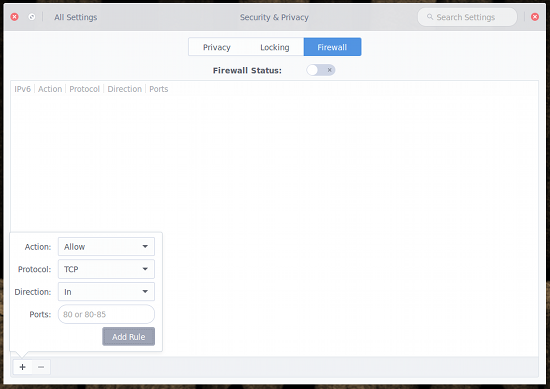 Go through the same steps to add ports 5900 and 6000. Once you’ve done that, you’ll add the rules to block incoming traffic for ports 5801, 5901, and 6001. The only difference when you add this new set of rules is that you’ll select Deny from the Action drop-down.
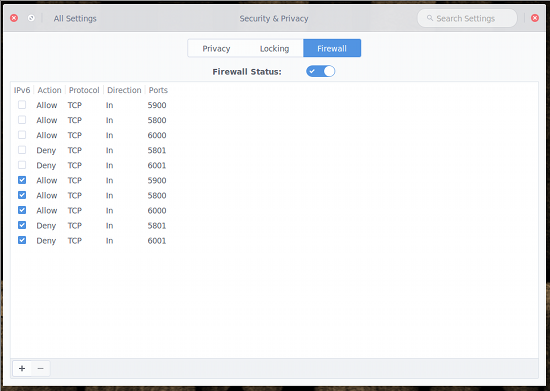
If you haven’t enabled the Firewall Status by this point, go ahead and do so now. At this point, all your rules should appear in the listing (Figure 4). If you notice duplicate entries listed, understand that the firewall tool adds both IPv4 and IPv6 entries for each rule.
 As you might expect, you will need to have a fundamental understanding of firewalls. Why? You could easily add rules into the chain only to find network traffic stops running. The nice thing about the tool is you can quickly enable/disable the firewall so that you can work with your iptables chain until you get it right. The good news is that you don’t have to dive into the deep waters of iptables. You can get enough information from reading about UFW (check out the official page) to have the Elementary Freya OS firewall tool working smoothly.
Do note. Simply by enabling the firewall tool, the firewall chain will change. By default, the out-of-the box iptables policy is to ACCEPT INPUT, FORWARD, and OUTPUT… and that is it. The second you enable the firewall tool, a number of new entries are added to the chain, such as:
Chain ufw-before-input (0 references)
target prot opt source destination
ACCEPT all -- anywhere anywhere
ACCEPT all -- anywhere anywhere ctstate RELATED,ESTABLISHED
ufw-logging-deny all -- anywhere anywhere ctstate INVALID
DROP all -- anywhere anywhere ctstate INVALID
ACCEPT icmp -- anywhere anywhere icmp destination-unreachable
ACCEPT icmp -- anywhere anywhere icmp source-quench
ACCEPT icmp -- anywhere anywhere icmp time-exceeded
ACCEPT icmp -- anywhere anywhere icmp parameter-problem
ACCEPT icmp -- anywhere anywhere icmp echo-request
ACCEPT udp -- anywhere anywhere udp spt:bootps dpt:bootpc
ufw-not-local all -- anywhere anywhere
ACCEPT udp -- anywhere 224.0.0.251 udp dpt:mdns
ACCEPT udp -- anywhere 239.255.255.250 udp dpt:1900
You might even notice, after enabling the firewall and without adding any rules, web traffic no longer works. To remedy that, you might have to add an outgoing rule rule for DNS. In that case, you’ll add a rule with the following parameters:
-
Action: Allow
-
Protocol: UDP
-
Direction: Out
-
Ports: 53
You now know enough to navigate the elementary OS Freya firewall tool. As I mentioned earlier, if you need to get more out of the firewall, you should read up on UFW. For even more power, check out the full-on iptables tool, and you can create an incredibly powerful firewall for either your desktop or server.

 Smartphones now come with vast amounts of storage — if you’re willing to pay extra, at least — and the thought of using physical media with one sounds anachronistic in the extreme. But Japanese startup Beatrobo thinks that we’ve lost something in the transition, and has produced the Pico Cassette to fill in the blank: it’s a video game cartridge that you can plug into your phone’s headphone jack.
 As expected, Linus Torvalds released a few minutes ago, September 20, the second Release Candidate (RC) build of the upcoming Linux 4.3 kernel series, due for release later this year.
 The campaign may only be 15 days old, but thousands of sites are already infected and there are no signs of slowing down. A new, active malware campaign has compromised thousands of WordPress websites in a matter of days, placing visitors at risk.