 The Linux desktop is full of interesting features. In fact, users are often surprised at just how many handy tools the various iterations of the open source desktop there are. One such tool is the Calendar. Although most users are content with working straight out of Google Calendar, or Thunderbird’s Lightning (or any other calendaring tool), what happens when you don’t want to mess with opening a web page or email client to get to your calendar? Lucky for you, plenty of options are available in panels and system trays—all ready to make accessing your calendars a cinch.
Of course, because there is so much variety, every option/combination will be different (as will the success of app/applet integration with your calendar of choice). To simplify this, for the sake of instruction, I’m going to discuss only those apps that are able to gain access to Google Calendars and live on the desktop… as built-in elements of either a panel or system tray. Thus, I will be looking at KOrganizer, Elementary OS desktop calendar, and the Ubuntu Unity desktop calendar.
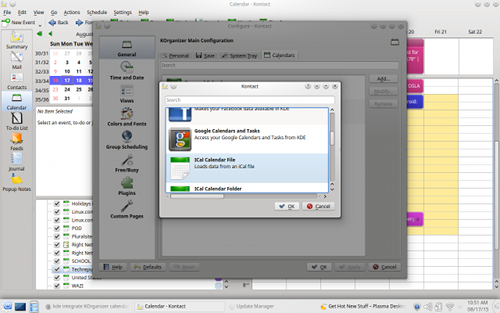
Before we dive into these efficient calendar tools, I need to help you understand how to connect them to your Google account. Some of them (such as KDE’s KOrganizer) make connecting to a Google account incredibly simple. All you have to do is open up KOrganizer, click on Settings > Configure KOrganizer > General and then click on the Calendars tab. From there, click the Add button, select Google Calendars and Tasks from the list (see Figure 1 above), and then click OK.
In the new window, click Add and then walk through the process of authenticating with your Google account. If you have two-step authentication setup, worry not, because KOrganizer supports two-step authentication.
Other Linux calendar tools aren’t so lucky. For the likes of the Elementary OS default calendar, you have to set up an app password for calendar integration. To do this, head on over to the Google App passwords page, create a new 16-digit app password, and use it for the password when connecting the default Elementary OS calendar to Google.
With that said, let’s take a look at how to make the most out of these desktop calendar tools.
KOrganizer
Once you’ve connected KOrganizer to your Google Account (or whatever online calendar you use), you’ll want to take care of a few details. The first step is to change the refresh rate of the calendar. I tend to be a Google Calendar power user, so I am constantly working with one or more calendars. This means I need my Google Calendar and KOrganizer to be in constant sync. To that end, I always set the refresh rate to be more frequent than the default 60 minutes. To do this, follow these steps:
-
Open up KOrganizer
-
Click Settings > Configure KOrganizer
-
Select your Google calendar from the list and click Modify
-
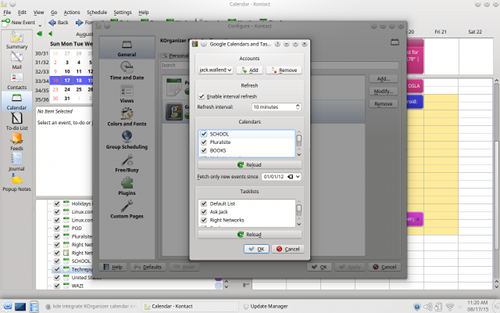
In the new window (Figure 2), make sure Enable interval refresh is checked
-
Set the Refresh interval to your desired time
 Once you have KOrganizer set up, click on the Calendar app in the KDE system tray. At first, you’ll notice nothing showing up, in the way of events. Now that you’ve clicked to open the app for the first time, it will now sync with your Google Calendar. Give it a moment and the events will populate.
In the same window you set the Refresh interval, you can also enable/disable your various Google Calendars. If you are a power user (with multiple Google Calendars), I suggest you disable those lesser-used calendars, as the system tray app can get a bit challenging with too many calendars present.
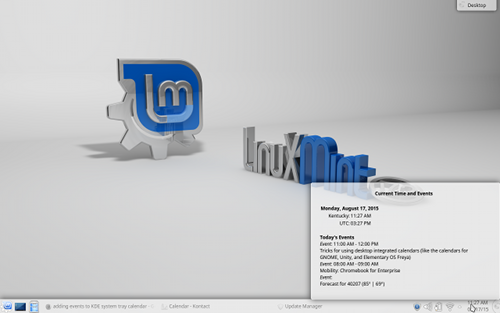
Unfortunately, you cannot add events from within the KDE system tray calendar. You can, however, get a quick view of upcoming events simply by hovering your mouse over the calendar app in the system tray (Figure 3).
 To add/modify events, you have to open up KOrganizer and manage them from there.
Elementary OS Desktop Calendar
With the Elementary OS iteration of the tool, you must authenticate to your Google account with an app password. As soon as you authenticate, you will quickly learn one of the shortcomings of the built-in calendar—it can only sync your default Google calendar. For some, this is fine. For power users, this will only lead to frustration. However, the developers of Elementary are working on this and hope to bring multiple Google calendar support to the app soon.
You will also find, as of this writing, the desktop app does little more than indicate on what days you have events (not even what the events are). Thankfully, there is a solution for this… one that is also available for the Ubuntu Unity desktop (the installation and usage is the same in both). Let’s take a look.
Ubuntu Unity
Out of the box, the Ubuntu desktop calendar app behaves similarly to that of Elementary OS… in that you cannot interact with the notification area applet. In fact, the default calendar app is (like that of Elementary OS) fairly useless—outside of just seeing dates.
Fortunately, a much more interactive applet has been created. The calendar-indicator applet allows you quick access to your Google Account—such that you can quickly see what’s coming up and also add events—all from the applet.
To install the calendar-indicator applet, follow these steps:
-
Open up a terminal window
-
Add the necessary repository with the command sudo add-apt-repository ppa:atareao/atareao
-
Update apt with the command sudo apt-get update
-
Install the applet with the command sudo apt-get install calendar-indicator
Once installed, run the app from the Unity Dash, authenticate with your Google account, and you’re ready to go.
Click on the new calendar icon in your Unity panel and you’ll see all of your upcoming events. Click on the Add new event entry (Figure 4) and then fill in the details for the event.
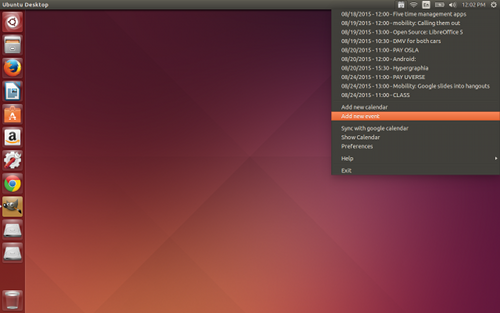 The calendar-applet also includes a full calendar that you can view (click the calendar-indicator icon and then select Show Calendar). This calendar will actually display all of your Google calendars (so if you’re using Elementary OS, this is the best route to getting multiple Google calendars (until the developers add this feature to the default app).
Plenty of other calendar apps and applets are available for Linux… all of which are not created equal. If you happen to be a power user (especially of Google calendar), it is quite easy to bring a level of efficiency to the Linux desktop that’s not found out of the box.
Have you found a trick to using Linux desktop integrated calendars for your distribution/environment of choice? If so, share with your fellow Linux.com readers.


 A year ago this week, we launched our Linux Foundation Certification Program. Since then, we’ve had thousands of people sign up to take these performance-based exams, and more and more employers are asking for these distribution-neutral performance-based certifications.
 Grsecurity is a well-known set of patches for the Linux kernel, which greatly enhance the ability of the system to withstand various security threats. As you can imagine, there are many companies that want to use Grsecurity, and they need to follow the accompanying GPL license. They are not doing that, and now Grsecurity needs to take some drastic action.