
Home Blog Page 1031

Samsung Unveils Android Phablets — And Teases a Tizen Watch

Note5-GALAXY-S6edgeAround the time of the iPhone’s 2007 release, Intel convinced OEMs to try out a new 4- to 6-inch tablet form-factor called Mobile Internet Devices (MIDs). These Linux- and Windows CE-based devices never made it very far, and were almost unknown in the United States.  One reason cited for their demise was the belief that Intel had chosen the wrong size. Indeed, in the first part of this decade, smartphones tended to range from 3.5 to 4.5 inches, while tablets went from 7  to 13 inches. The gap in between was considered a no-fly zone.

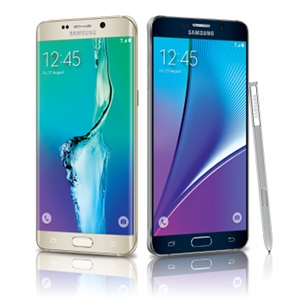
Yesterday, Samsung launched a 5.7-inch Galaxy Note5 and almost identical, stylus-free Galaxy S6 Edge+ phone, hoping to continue its success in the same no-fly zone. The Korean CE giant also formally announced its Samsung Pay mobile payment service and tipped a round-faced, Tizen-based Gear S2 smartwatch. Three weeks ago, amid rumors of a quad-core Samsung Z3 phone running Tizen 3.0, the company tipped a version of Tizen for the Internet of Things (see below).

In 2011, when Samsung had only recently emerged as the leading Android vendor with its Galaxy phones, it surprised the industry by unveiling the 5.3-inch Galaxy Note. Considered too large for a phone, the device also broke with the iPhone chic look by offering a stylus, a device thought to be extinct with the arrival of capacitive touchscreens.

After four popular Note offerings, the latest of which pushed the size to 5.7 inches, Samsung continues to lead the way in the hot 5- to 6-inch phablet market. Phablets — many of them with styluses — now dominate high-end smartphones.

“When we first came out with the Note, people called us crazy,” said Samsung CEO JK Shin’s at yesterday’s New York City launch of the Note5 and S6 Edge+. Justin Denison, VP and Head of Mobile Products at Samsung Electronics America, added: “To say there was doubt and market skepticism is a bit of an understatement. But what was once called a gimmick has now become the norm.”

Both new Galaxy phones stick with the Note4’s 5.7-inch dimensions. However, following the lead of the 5.1-inch Galaxy S6 Edge phone released earlier this year, the S6 Edge+ literally pushes the screen over the edge with a display that curves over the 6.9mm-wide sides of the device. The Note5 has no curved screen, but it feels more compact than its 5.7-inch specs would suggest due to its narrower metal bezel and curved back.

By contrast, the MIDs of last decade were thicker and bulkier, with screens framed by up to an inch of plastic on all sides. There’s a fine line between a 5- to 6-inch device that can fit in one hand and slide into your pocket and a 6- to 7-inch device that can’t.

64-Bit Octa-Core SoC and 4GB of DDR4

Reflecting the maturity of the smartphone market, there are few noteworthy hardware additions to the Note5 and S6 Edge+, which largely mimic the Note4 or S6 Edge. That’s not to say the specs aren’t impressive. They continue to offer Super AMOLED, 2560×1440 screens and Samsung’s much praised 16- and 5-megapixel cameras, which support 4K video capture.

Both phones run Android 5.1 on an octa-core Samsung Exynos 7420, the 64-bit system-on-chip that debuted in the Galaxy S6 and S6 Edge. Interestingly, Samsung made no mention of the processor at yesterday’s Samsung Unpacked event, despite the fact that the 14nm-fabricated, Cortex-A53 (1.5GHz) and Cortex-A57 (2.1GHz) octa-core would seem to be a fairly significant upgrade over the Note4’s octa-core Cortex-A15/A7-based Exynos 5433 (international) or Snapdragon 805 (North America). Samsung did, however, crow about the phones’ 4GB of DDR4 RAM, up from 3GB on the Note4 and S6 Edge. The company also touts the phones’ much faster wireless charging.

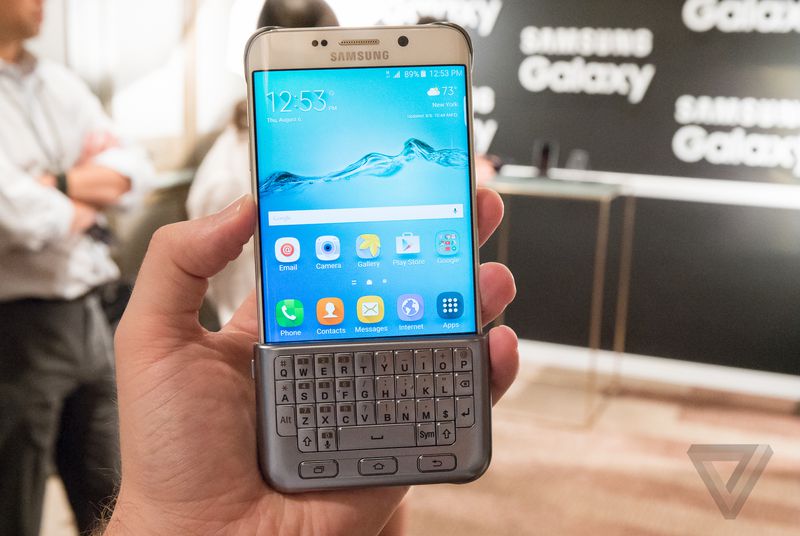
Samsung also added an unusual, $80 keyboard cover accessory that slides over the bottom part of the screen to provide a mini-QWERTY keyboard. When you’re not using it, you can store in on the back of the phone where it’s protected by an additional back cover. The keyboard cover works with both phones, as well as the earlier Galaxy S6 and S6 Edge.

The Galaxy phones’ latest software improvements, meanwhile, include a Live Broadcast app that live streams video direct to YouTube. Because it’s built into the native camera app, Live Broadcast is said to be more convenient than third-party apps (such as Periscope).

The S6 Edge+ adds an Apps Edge feature, which expands upon the earlier People Edge feature to let you swipe from the screen’s side to bring up quick-launch apps. The Note5 has its own new trick: A more accurate version of the S Pen stylus lets you write and capture notes even when the screen is turned off.  

Both phones will ship August 21. Pre-orders are said to be available now.

Samsung Pay

Another interesting addition is a Magnetic Secure Transmission (MST) device compatible with MST readers found in Point of Sale equipment. The feature is designed to work with the newly announced Samsung Pay, which debuts September 28 in the United States. Thanks to MST, Samsung Pay will work with many more retailers than Apple Pay or Android Pay, claims Samsung.

Samsung Pay is also claimed to be more secure, as it’s built on the latest version of Samsung’s Knox security solution, which includes fingerprint scanning. Both the payment service and the Galaxy phones also support the NFC technology used by the Apple and Google services.

Round Tizen Watch Tipped Amid Z3 Phone Rumors

The only appearance of Samsung’s other Linux-based operating system came at the end of the Unpacked event. Samsung flashed an image of a round-faced watch with a tip for a September 3 unveiling. The displayed interface, as well as the lack of “Galaxy” in the name, reinforces the earlier rumor that the watch is Tizen-based, the heir to the Gear S.

Until recently, the prospects of smartphone success for the Linux Foundation hosted Tizen OS seemed to have faded, even while it was invading Samsung Smart TVs and watches.  Yet, on June 29, Samsung announced that it had sold more than one million units of its flagship Z1 phone in India, Bangladesh, and Sri Lanka.

In late July, SamMobile reported on an upcoming, Tizen-powered Z3 phone that it says will launch later this year in in India, Bangladesh, and Nepal. The 5-inch phone will offer a faster quad-core Spreadtrum SoC compared to the dual-core Z1, and offer higher-end features including Tizen 3.0, 1.5GB of RAM, 8GB of storage, and 8- and 5-megapixel cameras, said the story. We may find out more at the September 3 Gear S2 event in Berlin at IFA.

It’s unclear when Samsung might expand its Tizen phone efforts beyond South Asia. More than a quarter of all Tizen app developers live in India, and Samsung will no doubt want to build upon its success. Samsung benefits from the fact that no company has yet dominated the fledgling, although potentially huge, Indian smartphone market.

Google’s Android One project, which launched almost a year ago in India, has underperformed, according to the Financial Times. Google is said to be working with OEM partners like Micromax to launch Android One phones that cost a half to a third the price of the current $70 to $100 models.

Still, the previously announced figure of 700,000 units sold during the first 100 days suggests Android One is doing better than Tizen’s Z1. Google’s competition here isn’t so much Tizen or Firefox OS, whose partners’ single-core, Spreadtrum-based “$25 phones” have been withdrawn from the market. Instead, Indian phone vendors are increasingly loading up CyanogenMod’s Android builds or are rebadging low-cost Android clones from China.

Tizen for IoT

On July 30 at the Tizen Development Summit in Bangalore, India, Samsung announced the release of Tizen SDK 2.3.1 for wearables. For the first time, the SDK enables the development of native apps, as well as HTML5-based web apps. The SDK also supports rumored Gear S2 features like a circular display and bezel interface.

Samsung also released a Tizen SDK 2.4 beta, which covers phones and TVs as well as wearables. Version 2.4 is said to offer a richer GUI, more contextual triggering support based on user behavior, and a new 3D engine named DALi (Dynamic Animation Library). There’s also a “Cloudbox” cloud feature.

Additionally, Samsung said it will invest $100 million to create an IoT version of Tizen that will run on all of its household appliances by 2020. There were few details and no indication of how this might intersect with Samsung’s acquisition of home automation company SmartThings or work with its IoT-focused, Yocto Linux-ready Artik modules.
LinuxCon Preview: Q&A with IBM’s Ross Mauri

IBM-logoAs a preview to next week’s LinuxCon, we spoke with Ross Mauri, General Manager, IBM z Systems, about how open infrastructures drive innovation and IBM’s commitment to open ecosystems. 
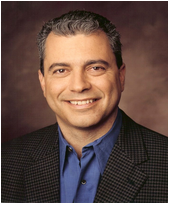
For more from Ross Mauri, check out his keynote presentation at LinuxCon “Unleashing the Full Potential of Linux and Open Technologies​ ​ ​to Fuel New Innovation​.” In this presentation, Mr. Mauri, along with Dr. Angel Diaz (Vice President of Cloud Technology and Architecture, IBM), will discuss the opportunities Linux offers to optimize workloads with enterprise platforms and why an open infrastructure matters now more than ever.  

Linux.com: What does being open mean in IT infrastructure?

Ross Mauri: One of the strongest trends in IT infrastructure is the move towards building strong, open ecosystems that drive innovation and share the benefits from those innovations. In the context of IT infrastructure, this means building an open architecture to enable choice, adopting standards to ensure interoperability and using open technologies to benefit from and contribute to community innovation.  

Open is about how organizations, companies and even countries can address disruptions and technology shifts to create a fundamentally new competitive approach. No one company alone can spark the magnitude or diversity of the type of innovation we are going to need so that organizations have the flexibility and capabilities to meet their specific needs. In short, we must collaborate not only to survive…we must collaborate to innovate, differentiate and thrive.

Linux.com: What does it mean to be open by design?  

Ross Mauri: Open by design is all about infusing the open concept throughout your organization. It is about creating a culture in which the support of open technologies and open standards is woven into the company’s DNA. It includes ensuring open governance for projects, contributing code to open source software and building solutions on open technologies.

Linux.com: How is IBM adapting to this new model of collaboration in IT?

Ross Mauri: At IBM, we have long been on a mission to open doors for enterprises to usher in new innovation, foster interoperability and now, more than ever, engage developers. We have been closely involved in Linux and open source activities for almost two decades. We’ve adapted by building a world-class open source development organization – the Linux Technology Center – with IBM programmers and engineers working on open source projects as part of the community.

We’ve learned how to work collaboratively with organizations who may also be competitors in order to achieve shared goals. And we’ve opened up our intellectual property by making major contributions to open source projects, such as the original Eclipse code. IBM is also a founding member of the Open Stack Foundation, Linux Foundation, OpenPOWER foundation, and Open Virtualization Alliance. More than 500 IBM programmers work as part of open source communities.

Within IBM z Systems, we enabled Linux for the mainframe 15 years ago and have seen adoption grow with 40% of mainframe clients now running Linux. We will be making some exciting new announcements at LinuxCon that greatly advance our commitment to open ecosystems.

Linux.com: What are some of the main ways that Linux is optimizing workloads on these new open platforms?

Ross Mauri: Cloud, big data and analytics, mobile and social are all demanding much more of the underlying infrastructure – more performance, more data bandwidth, more security.  Linux makes it much easier to choose the best platform for each workload in order to get the optimal solution.  For example, IBM’s z Systems is able to scale to support up to 8,000 virtual Linux machines. We’re also able to leverage the mainframe’s core capabilities for the Linux environment to provide the highest levels of speed, security and availability.

We continue to expand the mainframe into the open ecosystem so clients have access to the best solution for their needs. We recently enabled Apache Spark for Linux on z Systems, making it easier for more organizations to leverage the mainframe’s advanced analytic capabilities to gain insights faster than ever.

Linux.com: Why is open infrastructure more necessary today than ever before?

Ross Mauri: It is clear that in IT infrastructure, the era of one-size fits all companies or solutions is over.  Open infrastructure is the only road to future innovation and higher value. Let me give you three reasons why this is so.  First, because of the growing connections between systems, organizations and people, you need to be open in order to interconnect successfully.  Second, due to the contributions of so many bright people in the open communities, open technologies are delivering innovations at a very fast rate. And third, because the new workloads – cloud, big data, analytics, mobile and social –are all driven by open technologies.    

R-MauriRoss A. Mauri is the General Manager for z Systems. In this capacity, he is responsible for all facets of IBM’s z Systems business worldwide including strategy, architecture, operations, technology development and overall financial performance. Mr. Mauri is a member of IBM’s Performance Team and Growth & Transformation Team. He is co-leader of IBM’s Global Enablement Team that is focused on business development and Smarter Solutions for economic growth in emerging markets.  
Mycroft Is an AI for Your Home Powered by Raspberry Pi 2 and Ubuntu Snappy

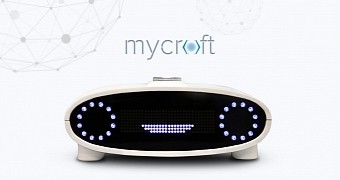
Mycroft-AIMycroft is what you would describe as a house computer, a device connected to your house, which acts like a virtual artificial intelligence. In this case, it’s a clever mini PC named Mycroft, which is based on Raspberry Pi 2 and runs Ubuntu Snappy Core.
Mycroft is not the first attempt that aims to make a house smarter, but it’s definitely one of the most promising ones. The difference is that the prices for the hardware necessary for building a smart house concept… (read more)

Pixar Is Making Another In-House Animation Tool Free for Anyone to Use

Last year, Pixar made its in-house animation software RenderMan free for non-commercial use, giving would-be filmmakers a powerful tool to get started with animated shorts and films. Now, it’s following this up by making another piece of in-house software not only free, but also open source. Pixar’s Universal Scene Description tool (USD) acts as an assembly station for input from various animation apps, making it easier to combine characters and objects into a single “scene graph” — a basic layer of the animation — for smoother workflow. Unlike with Renderman, though, Pixar doesn’t want to empower just amateur filmmakers, but also create an industry standard that it hopes will drive innovation. 

Read more at The Verge

Unity 8 to Get Hotspot Support and Improved Performance for Thumbnails

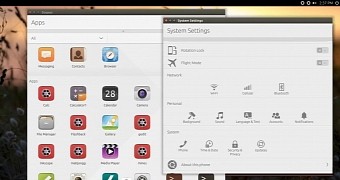
Unity8Details about progress made with Unity 8 have been shared by Canonical, and it looks like some pretty interesting new features will land very soon although it’s not a big update.
Canonical is still working on Unity 8, both for the desktop and the mobile platform, and developers have revealed details about what they have accomplished in the past couple of weeks. If you’re hoping to see some huge changes being made, you’re going to be disappointed. 

Founder of Open Source Hardware Association Shares Her Story

Alicia Gibb has a passion for hardware hacking—she founded and is currently running the Open Source Hardware Association (OSHWA). Also a member of the ADA Initiative Board, Defensive Patent License Board, and the Open Source Ecology Board, she got her start as a technologist from a combination of backgrounds: informatics and library science.

Alicia formerly worked as a researcher and prototyper at Bug Labs where she ran the academic research program and the R&D lab. 

Read more at OpenSource.com

Facebook’s Parse Open Sourcing All SDKs for App Development

After debuting at F8 in March, Parse boasted its SDKs already power more than 800 million active app-device pairs. If there is any hot topic in tech that Facebook likes to share about most (besides mobile anything), it’s open source.

Read more at ZDNet News

Automating Processes with Chef

chef-screen1Recently, Chef (along with Puppet and other tools) has been getting plenty of coverage in the areas of DevOps and continuous delivery. Big companies, including HP, have embraced Chef as an important tool in automation. This automation stretches through the entire hardware and software lifecycle, and Chef has become an integral part of it.
Clearly, knowing Chef is vital these days, whether you’re a software developer, an IT administrator, a database administrator, or any mix thereof. But how do you learn Chef? The key to learning Chef is to first understand what it is. The next key is to learn a bit of Ruby. You don’t need to be a Ruby master, though.

What Is Chef?

So what exactly is Chef? Chef is a tool for which you write scripts that are used to automate processes. What processes? Pretty much anything IT-related. Think about some of the tasks you might do repeatedly. Here’s a random list:

  • Install an operating system on a new computer

  • Upgrade the operating system on a new computer

  • Install software libraries

  • Install Apache

  • Modify an existing Apache configuration

  • Upgrade MySQL

  • Add a user to MySQL

  • Generate SSH keys on a server

  • Upgrade MySQL on all development servers

  • Pull files down on a server from source control

 See where this list is going? In a million different directions. No matter what your specialty, there’s a good chance you’ll be able to benefit from automation. Consider my own line of work: I work on a team of software developers, creating a web-based application in node.js. The application runs on replicated servers. As demand grows, new servers need to be allocated. You can see the repetitive process there. That’s for the live servers; however, the development servers similarly have repetition.

Over and over, we find ourselves needing to provision a clean development server to do unit testing on. Whereas, in the old days, we software developers would ask the IT team to help us find an available computer to start clean with, now we simply allocate a virtual server on a cloud platform. Once we have a clean server with a fresh operating system installed, we need all our tools. We’re using node.js, which needs all the runtime tools for node, along with a few other things we need. Who wants to install this over and over?

Yes, we could just start with an image. But, the reality is that as our software evolves, at least once a week we would need to modify the image. That doesn’t buy us much. Plus, each virtual server has a unique IP address and name, and additional unique parameters such as SSH keys, and so on.

So, we use an automation tool instead. The tool will allocate the virtual server on the cloud platform, which includes installing the operating system; install the node.js tools and other programs we need (e.g., both MySQL and MongoDB); configure all the software; configure some individual files; and so on. Because it’s a dev server, we need to have Git installed, and it needs some SSH keys so it can do a pull, and the list goes on and on.

Chef and other automation tools take care of this. Using Chef, you can write simple scripts (called recipes in Chef parlance), and then Chef will handle the automation for you. You can use Chef for small, simple tasks or for huge tasks such as automating massive datacenters. To get started, it’s best to learn some small tasks so you can get a handle on the basics. The good people at Chef have put together a pretty decent website to help you learn Chef, and I recommend you start with the tutorial. I worked through the Ubuntu version (there are also Red Hat Enterprise Linux and Windows versions), but I want to provide some additional notes here beyond what the website provides.

One thing to keep in mind is that although you’re using a virtual machine to work through the examples, when doing your own exploring separately, you’ll want to create two virtual machines: One is the machine you’re doing your Chef development on; the other is the machine that you’re going to configure and monitor with Chef. The second machine might be the machine you need all your main software installed on — either your programming tools for your test machine, or Apache for a live website, for example. The first machine does the monitoring and configuring; the second machine might be one of many servers you’re managing. In the case of this tutorial, you’re actually doing both on a single virtual machine, which is why it’s important to remember the big picture and how things would be arranged in a larger environment.

Next, with Chef you can manage resources. The resource might be the second machine, but it really can be any number of things, including something as simple as a file, which is exactly what you manage in the first exercise. Resources can represent anything you might need to manage, whether that is software (e.g., applications including Apache and MySQL), hardware (e.g., networking devices), or virtual hardware.

Why Automate Simple Tasks?

As you proceed through the tutorial, bear in mind that what you’re doing is automating processes. At one point, you install the Apache web server. While it’s true that you can easily install Apache through a simple shell-based call to a package utility (e.g., apt-get), installing Apache is likely to be a small part of a larger set of configuration. So, Chef includes the ability to install Apache for you.

Also, consider the approach you’re taking here. Remember that although Ruby is a complete, general-purpose programming language, to use Chef you don’t need to be a Ruby master. The idea with Chef is that you declare the state you want your resources in. In the first exercise, for example, you declare what the state of the file should be (it should have a single line of text, “Hello World”). With a traditional programming approach, you might write an app that opens the file, checks if the contents are not what they should be, and then, if the contents are wrong, replace them with the string Hello World, write the file out, and finally close the file.

That’s a procedural approach where you define the procedure that takes place. With Chef, however, you take a declarative approach, where you declare what the contents should be and let Chef handle the details of how it to do it. Or, in the case with Apache, you’re not so much as saying “Please install Apache,” as you’re saying, “Make sure Apache is installed.” Even more succinctly, you can specify the state of your server that you desire: “Apache is installed with this setup configuration.”

In other words, you’re not saying to do something and how to do it; you’re simply stating what your system must look like, what state it must be in. And, if the system is not in that state, Chef will make it so.

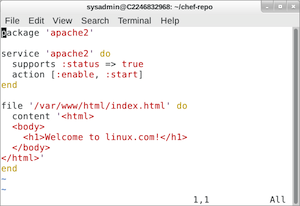
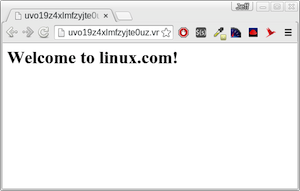
Figure 1 (above) is a screenshot of my terminal window as I was working through the tutorial. I have the vim editor open, and I typed in the recipe. But, this recipe doesn’t describe what to do; it describes the state the server that I’m managing needs to be in. Then, when I opened up my browser and connected to the running server, I saw the result (Figure 2), just as the tutorial says I should.

chef-screen2This demonstrates that the server is in the state that I asked it to be in: Apache is running, and the index file contains HTML to display the words Welcome to linux.com. Remember that as you work: Your computer is in a state; and if it’s not in the state you want it, you need a tool to get it back to the correct state. That’s where Chef comes in.
But Wait, There’s More

Here, I’ve looked at how to automate some processes with Chef, but there’s much more to what Chef can do. One aspect is managing existing systems. It can manage both Linux and Windows computers (which Chef calls nodes). It can manage applications as well as servers. And, as I mentioned earlier, it’s powerful enough to manage an entire datacenter. Learning Chef starts with learning the basics of what it is, and how to write some recipes. Want more? Take a look at the Learn Chef website and soon you’ll have this tool mastered.

Conclusion

So, who all should learn configuration management tools such as Chef? These days, pretty much anyone who works in a computer field. Certainly, IT people who manage networks and datacenters. But software developers, too. Today, software needs to be very aware of its own infrastructure, which means software developers need to write code that’s infrastructure-aware. Chef can help.

Android’s Stagefright Bug Will Live On For Longer Than We Thought

android

The patch process for Android’s Stagefright vulnerability hasn’t gone quite as smoothly as Google hoped. Just eight days after Google, manfacturers and carriers rushed out a fix for Stagefright, researchers at Exodus Intelligence are saying there’s a problem with one of the patches, and phones could still be vulnerable under the right circumstances. After the patch was deployed, Exodus was able to trigger a system crash in one phone by attacking it with an appropriately encoded mp4 file over MMS. It’s unclear whether the bug could be exploited for code execution as well as system shutdown.

Reached for comment, Google confirmed the findings, and said a second patch was already being sent out. “We’ve already sent the fix to our partners…

Read more at The Verge

Samsung Resurrects The Dream of a Hardware Keyboard

samsung-keyboard

If there’s one thing that’s missed more than anything else in today’s smartphones, it might be the hardware keyboard. Once a staple on every smartphone produced, the physical keyboard has all but disappeared, showing up on a handful of BlackBerry devices that no one actually buys. Some companies, like the Ryan Seacrest-backed Typo, have tried to bring the hardware keyboard to modern phones, but without much success.

Never content to sit on the sidelines, Samsung is now trying its hand at blending yesterday’s hardware keyboard with today’s modern, slab-style phones. A new accessory for the just-announced Galaxy Note 5 and S6 Edge+ brings back those tactile keys that so many people long forgotten.

Read more at The Verge