
Home Blog Page 1045

Must-Know Linux Commands For New Users

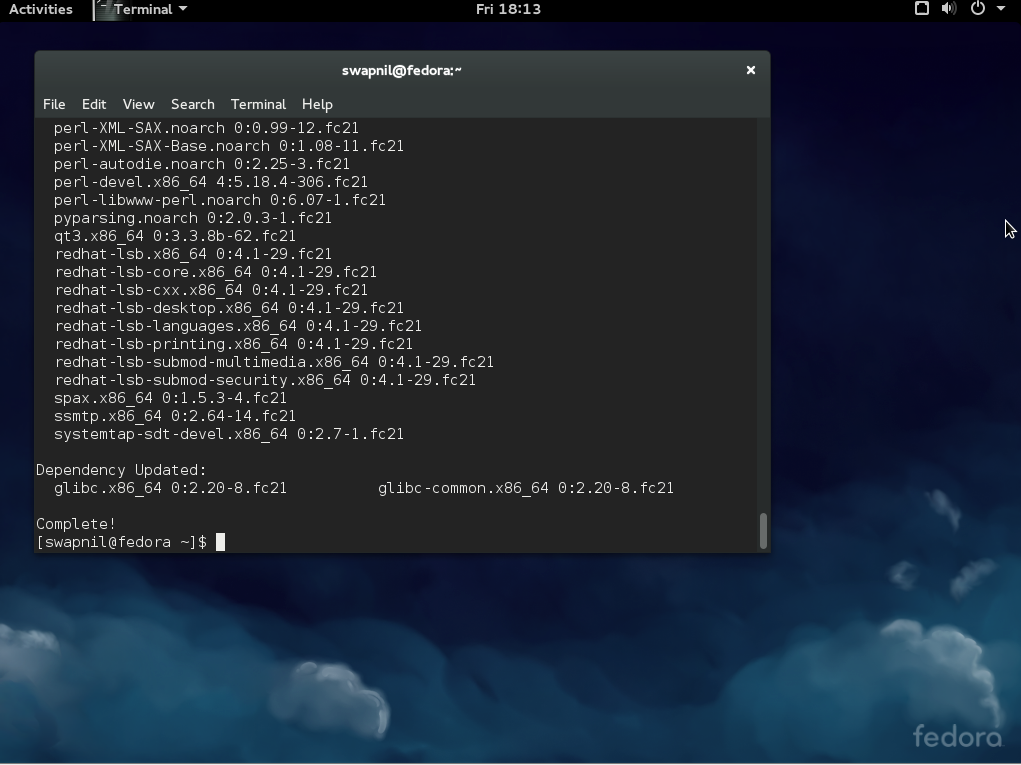
fedora cli

One of the beauties of Linux-based systems is that you can manage your entire system right from the terminal using the command line. The advantage of using the command line is that you can use the same knowledge and skills to manage any Linux distribution.

This is not possible through the graphical user interface (GUI) as each distro, and desktop environment (DE), offers its own user interfaces. To be clear, there are cases in which you will need different commands to perform certain tasks on different distributions, but more or less the concept and ideas remain the same.

In this article, we are going to talk about some of the basic commands that a new Linux user should know. I will show you how to update your system, manage software, manipulate files and switch to root using the command line on three major distributions: Ubuntu (which also includes its flavors and derivatives, and Debian), openSUSE and Fedora.

Let’s get started!

Keep your system safe and up-to-date

Linux is secure by design, but the fact is that all software has bugs and there could be security holes. So it’s very important to keep your system updated. Think of it this way: Running an out-of-date operating system is like being in an armored tank with the doors unlocked. Will the armor protect you? Anyone can enter through the open doors and cause harm. Similarly there can be un-patched holes in your OS which can compromise your systems. Open source communities, unlike the proprietary world, are extremely quick at patching holes, so if you keep your system updated you’ll stay safe.

Keep an eye on news sites to be aware of security vulnerabilities. If there is a hole discovered, read about it and update your system as soon as a patch is out. Either way you must make it a practice to run the update commands at least once a week on production machines. If you are running a complicated server then be extra careful and go through the changelog to ensure updates won’t break your customization.

Ubuntu: Bear one thing in mind: you must always refresh repositories (aka repos) before upgrading the system or installing any software. On Ubuntu, you can update your system with the following commands. The first command refreshes repositories:

sudo apt-get update

Once the repos are updated you can now run the system update command:

sudo apt-get upgrade

However this command doesn’t update the kernel and some other packages, so you must also run this command:

sudo apt-get dist-upgrade

openSUSE: If you are on openSUSE, you can update the system using these commands (as usual, the first command is meant to update repos)

sudo zypper refresh
sudo zypper up

Fedora: If you are on Fedora, you can use the ‘dnf’ command which is ‘kind’ of equivalent to zypper and apt-get:

sudo dnf update
sudo dnf upgrade

Software installation and removal

You can install only those packages which are available in the repositories enabled on your system. Every distro comes with some official or third-party repos enabled by default.

Ubuntu: To install any package on Ubuntu, first update the repo and then use this syntax:

sudo apt-get install [package_name]

Example:

sudo apt-get install gimp

openSUSE: The commands would be:

sudo zypper install [package_name]

Fedora: Fedora has dropped ‘yum’ and now uses ‘dnf’ so the command would be:

sudo dnf install [package_name]

The procedure to remove the software is the same, just exchange ‘install’ with ‘remove’.

Ubuntu:

sudo apt-get remove [package_name]

openSUSE:

sudo zypper remove [package_name]

Fedora:

sudo dnf remove [package_name]

How to manage third party software?

There is a huge community of developers who offer their software to users. Different distributions use different mechanisms to make third party software available to their users. It also depends on how a developer offers their software to users; some offer binaries and others offer it through repositories.

Ubuntu heavily relies on PPAs (personal package archives) but, unfortunately, there is no built-in tool which can assist a user in searching PPAs. You will need to Google the PPA and then add the repository manually before installing the software. This is how you would add any PPA to your system:

sudo add-apt-repository ppa:<repository-name>

Example: Let’s say I want to add LibreOffice PPA to my system. I would Google the PPA and then acquire the repo name from Launchpad, which in this case is “libreoffice/ppa”. Then add the ppa using the following command:

sudo add-apt-repository ppa:libreoffice/ppa

It will ask you to hit the Enter key in order to import the keys. Once it’s done, refresh the repos with the ‘update’ command and then install the package.

openSUSE has an elegant solution for third-party apps. You can visit software.opensuse.org, search for the package and install it with one click. It will automatically add the repo to your system. If you want to add any repo manually, use this command:.

sudo zypper ar -f url_of_the_repo name_of_repo
sudo zypper ar -f http://download.opensuse.org/repositories/LibreOffice:Factory/openSUSE_13.2/LibreOffice:Factory.repo LOF

Then refresh the repo and install software:

sudo zypper refresh
sudo zypper install libreoffice

Fedora users can simply add RPMFusion (both free and non-free repos) which contain a majority of applications. In case you do need to add a repo, this is the command:

dnf
config-manager --add-repo http://www.example.com/example.repo

Some basic commands

I have written a few articles on how to manage files on your system using the CLI, here are some of the basic commands which are common across all distributions.

Copy files or directories to a new location:

cp path_of_file_1 path_of_the_directory_where_you_want_to_copy/

Copy all files from a directory to a new location (notice the slash and asterisk, which implies all files within that directory):

cp path_of_files/* path_of_the_directory_where_you_want_to_copy/

Move a file from one location to another (the trailing slash means inside that directory):

mv path_of_file_1 path_of_the_directory_where_you_want_to_move/

Move all file from one location to another:

mv path_of_directory_where_files_are/* path_of_the_directory_where_you_want_to_move/

Delete a file:

rm path_of_file

Delete a directory:

rm -r path_of_directory

Remove all content from the directory, leaving the directory folder intact:

rm -r path_of_directory/*

Create new directory

To create a new directory, first enter the location where you want to create a directory. Let’s say you want to create a ‘foundation’ folder inside your Documents directory. Let’s change the directory using the cd (aka change directory) command:

cd /home/swapnil/Documents

(exchange ‘swapnil with the user on your system)

Then create the directory with mkdir command:

mkdir foundation

You can also create a directory from anywhere, by giving the path of the directory. For example:

mkdir /home/swapnil/Documents/foundation

If you want to create parent-child directories, which means directories within other directories then use the -p option. It will create all directories in the given path:

mkdir -p /home/swapnil/Documents/linux/foundation

Become root

You either need to be root or the user should have sudo powers to perform some administrative tasks such as managing packages or making changes to the root directories or files. An example would be to edit the ‘fstab’ file which keeps a record of mounted hard drives. It’s inside the ‘etc’ directory which is within the root directory. You can make changes to this file only as a super user. In most distros you can become root by ‘switching user’. Let’s say on openSUSE I want to become root as I am going to work inside the root directory. You can use either command:

sudo su -

Or

su -

That will ask for the password and then you will have root privileges. Keep one point in mind: never run your system as root user unless you know what you are doing. Another important point to note is that the files or directories you modify as root also change ownership of those files from that user or specific service to root. You may have to revert the ownership of those files otherwise the services or users won’t be able to to access or write to those files. To change users, this is the command:

sudo chown -R user:user /path_of_file_or_directory

You may often need this when you have partitions from other distros mounted on the system. When you try to access files on such partitions, you may come across a permission denied error. You can simply change the ownership of such partitions to access them. Just be extra careful, don’t change permissions or ownership of root directories.

These are the basic commands any new Linux user needs. If you have any questions or if you want us to cover a specific topic, please mention them in the comments below.


Researchers Have Found a New Texting Vulnerability in Android

This morning, researchers at Zimperium Mobile Security announced a new vulnerability in Android, targeting the multimedia messaging system. Dubbed “Stagefright,” the vulnerability roughly 950 million Android devices worldwide, according to researcher estimates, although the most vulnerable devices are those running pre-Jelly Bean versions of Android. Google has released a patch for the vulnerability to manufacturers, but most have not yet pushed that update to customers.

Zimperium hasn’t released all the details of the attack, pending a more detailed presentation at the Black Hat conference next month, but it appears to target how Android processes video, specifically in the phone’s MMS messaging capability. Attackers could exploit that…

Continue reading…

Read more at The Verge

Meizu MX4 Ubuntu Edition Gets Big Improvement for Battery

The Meizu MX4 Ubuntu Edition is now available for purchase, and anyone can get one from the official website, and the latest update for the Ubuntu Touch that’s powering it has brought some serious improvements to it.

Ubuntu for phones is constantly being improved on, and major patches are published all the time. Each new update brings new functionality, new features, improvements, and too many fixes to count. It’s also true that the OS is still young, and there is a lot of … (read more)

QEMU Vulnerability Exposes The Host Through Emulated CD-ROM Drive

Back in May was the big “VENOM” security vulnerability affect QEMU whereby VM security could be escaped through QEMU’s virtual floppy disk drive. In June was a PCNET controller buffer overflow allowing a guest to escape to have host access. Today there’s a similar security vulnerability going public about its virtual CD-ROM drive…

Read more at Phoronix

The Companies That Support Linux: MariaDB

MariaDB VP Roger LevyMariaDB Corporation is a provider of open source database solutions for SaaS, cloud and on-premise applications that require high availability, scalability, and performance. Built by the founder and core engineering team behind MySQL, MariaDB has more than 2 million users globally and over 500 customers in more than 45 countries — most of whom are running Linux.

MariaDB recently joined The Linux Foundation as a new corporate member along with CloudLinux and Solace Systems. Here, Roger Levy, VP of Products at MariaDB and former GM of Novell’s SUSE Linux business unit, tells us more about MariaDB; how and why they use Linux; why they joined The Linux Foundation; and how they are innovating with Linux and open source.

Linux.com: What does MariaDB do? 

Roger Levy: MariaDB is the database platform that powers billions of users on sites including Google and Wikipedia. It’s an open-source, transactional, ACID-compliant RDBMS platform that allows organizations to build web-scale databases for applications in public, private, or hybrid SaaS deployments. Our customers’ database applications are agile and achieve continuous uptime with reliable connections that scale up to meet huge demand. 

We provide an enterprise subscription offering, MariaDB Enterprise, which includes curated and hardened server binaries based on the leading open-source MariaDB community server, along with tools, connectors, subscription services and a customer portal that meet the needs of mission-critical applications. MariaDB Enterprise offers users the option to deploy MaxScale™, a database-aware proxy platform that provides capabilities such as load balancing, sharding, and firewall protection without the need to modify existing applications. The bottom line is MariaDB delivers high availability, scalability, and security beyond MySQL and other databases.

Our company, MariaDB, was founded by the creator and core engineering team behind MySQL, who collectively have more than 400 years of MySQL-related experience. Today MariaDB is the new “M” in LAMP, having displaced MySQL as the default database in the Red Hat and SUSE Linux distributions. MariaDB is also included in Pivotal Cloud Foundry, Rackspace, and other cloud stacks, and it is the database of choice for IBM POWER8 and IBM’s Turbo LAMP stack.

How and why do you use Linux?

Levy: Linux is the main development and production environment for MariaDB and for our customers because it is malleable yet offers a stable environment. We and our customers value the continued innovation in operating system functionality from Linux as well as its low total cost of ownership (TCO). We have more than two million users in more than 45 countries, and a majority of our 500+ customers are running Linux.

Why did you join the Linux Foundation?

Levy: MariaDB and the Linux Foundation are aligned in our commitment to an open-source model. Linux is the leading open-source operating system, and MariaDB is the leading open-source relational database. Linux is absolutely integral to our development program, so joining the Linux Foundation was a natural next step in ensuring that we would be part of the evolution of Linux and the future of open-source technologies.

We’re also looking forward to enabling our customers to benefit from access to the Linux Foundation’s online community with its continuous stream of innovation, broad developer ecosystem, and multitude of emerging Linux-based technologies. We’ve seen how valuable online communities can be from our own vibrant open-source community, which has contributed to MariaDB Enterprise with significant security and performance enhancements as well as collaborations with Google, Wikipedia, and Facebook. The Linux Foundation promises similar community-based benefits and provides phenomenal stewardship of Linux and its associated technologies. 

What interesting or innovative trends in data centers and storage are you witnessing and what role does Linux play in them?

Levy: We’re seeing more migration to cloud architectures, growing interest in alternative consumption models such as Platform-as-a-Service and containerization, and a veritable tsunami of data and all data types which is driving greater storage virtualization and adoption of software-defined storage. Linux is the dominant OS behind many of these trends and is fundamental to the evolution of technology solutions and the DevOps efforts linked to them. We believe increasing adoption of these emergent technologies will drive even more widespread adoption of Linux. 

How is your company participating in that innovation? 

Levy: MariaDB is enabling our customers to adopt these new virtualized and cloud-based technologies with innovations in security, scalability, replication, and performance.

Our customers with cloud databases or other cloud infrastructure demand top security, scalability, and replication capabilities. Together with Google we have built strong security features on MariaDB 10.1, and we’re building even more. ​For scalability, we’ve developed MaxScale™, a database-aware proxy platform with scalability features including read/write traffic splitting, load balancing, and schema-based sharding without the need to modify existing applications. MaxScale also delivers significant advances in replication, including innovative parallel replication and multi-source replication. ​ 

To increase database performance, MariaDB has also created optimized server binaries. These binaries—the result of careful profiling and compiler optimization for typical use cases— can increase overall database performance by more than 15 percent.

What other future technologies or industries do you think Linux and open source will increasingly become important in and why?

Levy: Linux and open-source technologies will play a key role in building platforms for machine learning, virtualization, data analytics, and devices in the IoT, such as wearables and self-driving automobiles.

As software becomes increasingly pervasive in the world, technologies and industries will need a robust operating system as their foundation. Linux is the open-source operating system of choice, with a proven track record in Internet and cloud-based technologies. Linux is proven and mature, with a huge base of knowledgeable engineers who know how to make it work in diverse applications.

Maybe even more important, Linux is also tremendously malleable, with extensive feature functionality and a wealth of compatible components. We believe Linux is well-positioned to help define the future of technology, both for those technical reasons and also thanks to its large, expert, and vibrant open-source community, which drives ongoing innovation.

Anything else important or upcoming that you’d like to share?

Levy: We have a new CTO on board, Nishant Vyas, who is helping us further the capabilities of MariaDB to make it one of the most rapidly adopted open-source database platforms worldwide. His broad, web-scale engineering experience with multiple database-related technologies will help us continue to deliver innovation for our cloud-focused and enterprise-scale IT customers.

Plus, we recently announced the release of MariaDB Enterprise Summer 2015, which accelerates deployment of open-source DBMS applications and better integrates into our customers’ DevOps environments. 

Interested in becoming a corporate member of the Linux Foundation? Join now!

Ubuntu MATE Is Dropping The Ubuntu Software Center

Ubuntu MATE developer Martin Wimpress announced this weekend that they’ll be removing the Ubuntu Software Center from their default install of Ubuntu MATE 15.10…

Read more at Phoronix

Enterprise Cloud Economy Booming, Driven by Big Data

The SteelBrick report analyzes how enterprise companies are selling to customers and also examines B2B selling trends compared to this time last year.

Read more at eWeek

Manjaro Linux 0.8.13 Update with All the Latest Linux Kernels

Manjaro Linux 0.8.13 has received a fresh update pack and the developers have upgraded some of the supported Linux kernels, a number of important packages have been updated, and some important fixes have been implemented.

Manjaro is a Linux distribution based on Arch Linux, but it’s not following the same release model. Instead of being a rolling release distro that gets upgraded all the time, the Manjaro devs have decided to make intermediary releases and publish big patch… (read more)

Microsoft Releases Source For Its GDB/LLDB Debug Engine

Sliding under the radar last week was Microsoft releasing the source code to its debug engine for the GNU GDB and LLVM’s LLDB Debugger…

Read more at Phoronix

The Dronecode Foundation Aims to Keep UAVs Open

Unmanned Aerial Vehicles’ (UAV) applications and capabilities are advancing at a phenomenal rate, and the cost of these systems is decreasing at an equally impressive rate largely because of the open source. In many cases, open source projects are outpacing the development of their equivalent closed source systems. To further accelerate these developments, in late 2014 several companies came together to form the Dronecode Foundation, a nonprofit organization that brings together existing open source drone projects and assets under one umbrella organization governed by The Linux Foundation.

read more

Read more at OpenSource.com