John Mark Walker is the Open Source Ecosystems Manager at Red Hat. This is part 4 of 4 in this series.
Disclaimer
I ply my trade for Red Hat but am not speaking for my employer in this series of articles, yada yada yada, on with the show.
How Open Source Won
I’ve been saying for some time now that open source was not about innovation, but rather freedom. It was the freedom to deploy what you want, when you want it that led to the massive global adoption of open source platforms. I get more than a little peeved, then, when I still see references in mainstream media circles about ragtag groups of conscientious hippies who don’t care about money and sing about sharing software. Don’t get me wrong, I *love* singing about sharing free software, but the false implication of this narrative is that there’s no money in free software. This is what Paul Krugman would call a “zombie lie” – an argument that just won’t go away no matter how many times you kill it with facts.
When you add up all of the software vendors, service providers, consultants, systems integrators, enterprise IT veterans, and everyone else who works with free software, you’re talking about a total ecosystem that measures in the TRILLIONS of dollars, world-wide. We’re talking an economy that, if measured as a nation-state, either comes close to or eclipses that of the United States GDP. The sheer amount of financial transactions, internet business, government agencies, archives and every type of industry dependent on free software is staggering.
And yet, we still hear about how open source’s success is all just about price – something that couldn’t be sold because no one would pay for it. In my talks about open source innovation, I always like to point out that open source and free software are not *just* about price, although that is certainly influential. The reason we know it’s not just about price is that we can easily compare results with a well-known product marketing tactic, the “freemium” model. The freemium model is all about giving away something of limited value to be consumed and, hopefully, lead the user to buy the full product in the future. There is certainly a place in the world for freemium products, as Splunk has shown, but freemium didn’t win the day – open source did. When you do any basic analysis of customers and how they acquire solutions, it’s easy to see why: as a potential customer, why on earth would I ever handcuff myself to a single vendor when I’m not even sure I like your product? And to invest any time in a freemium product means necessarily losing all of that effort if I then decide to go on to something else. It’s much better to spend time and effort that can be recouped should I decide to go with something else. It’s this value – freedom – that makes open source software, even open source software you pay money for, inherently more valuable and cheaper over the long-run than freemium products. Thus, we know that the act of open sourcing your software carries with it inherent value for the end user or developer.
This is what the open core folks completely miss – they see open source as just another freemium distribution tool, when it’s so much more than that. By devaluing the open source platform, they devalue the very thing that customers actually want. They think about open source solely as a distribution method or, worse, as a way to get free labor so that others will perform the mundane labor of “whitewashing our fence.” Word to the wise: NO ONE is going to whitewash your stupid fence, mkay? You don’t get value in return without first giving up some control.
Now that we’ve settled that, let’s get on with making the sausage, shall we?
Source Code Nuts and Bolts
You may be thinking to yourself, it’s all well and good that free software has inherent value, yada yada yada, but how can I use that value to profit handsomely? As we turn our eyes to the making of the sausage, we know that the making of the sausage is never pretty, even if we do rather fancy the final product. Making open source products is no different. I’ve written the following as a suggestion of how to do it, not necessarily the only or even best way.
Now that we’ve investigated the idea of productization (see part 3 in this series), how does it impact engineering practices? For one thing, if you’re creating a product with full test suites and certification tests, you probably can’t simply use the same release branch as the open source platform. This is another mistake many companies frequently make – they think that productization is as simple as packaging up the open source bits and, presto-change-o, let that money maker roll! The road to hell is littered with the carcasses of a thousand companies that thought productization was just a few sexy demos and some packaging of the bits.
Productization of open source software requires a bit of process hacking and, yes, complexity. First, a diagram of how many open source projects release code:

The open source process will be continuously producing new versions with multiple branches of code. You, the product vendor, must make some interesting choices:
-
How do you decide which branch(es) to use for your product?
-
How do you decide what to do with the source code changes you make?
-
OMG, aren’t you making it easier for people to take your hard work and use it free of charge????
The answers, in order:
-
It depends.
-
You commit your changes, bug fixes and improvements to their respective upstream branches.
-
Maybe.
Again, the object here is not to cripple the upstream open source project. Doing so would badly damage your own product, seeing as how you depend on the open source code. You also don’t want to maintain your source code changes privately, carrying them forward in your locked source repository, however valuable they might be, because then you end up with a continuous code fork that’s never merged back into the open source code, and you’ll be maintaining that code fork for all eternity.
You may think that this is no big deal, but rest assured, the last thing you want to saddle your development and product management teams with is an inordinate amount of technical debt that grows substantially over time. You made the decision to create a product from an open source project, now deal with it. That means working to simultaneously improve the open source project in addition to your product. The good news is that by making the decision to occupy a separate product namespace, you no longer have to “prove” which version is the product that you’re selling. You’re free to continue to work on both project and product, with both evolving, without cannibalizing your product efforts. Remember, you’re selling a product that provides value for your customers, not source code. While source code *does* provide some value, it’s not the only thing you’re selling.
Once you have the engineering processes all worked out, it should look a bit like this:

The key point: “Bar” remains a stable branch that you do all of you testing, certification, QA/QE, packaging, product marketing, etc. It remains relatively static, especially in comparison to the upstream branches. This is a feature, not a bug. The open source releases will probably function similarly to your product branch, but without the QA/QE testing and other hardening that you’ve baked into your productization process, there’s no guarantee that it will work in all the environments you sell into. Again, it’s about the *process* more than just the code. I’ll leave it as an exercise for the reader as to what your specific process should be. You’re selling a product that is certified against many other software products and hardware configurations.
To further visualize this, forget the source code branches for a bit and imagine the platform as a wholly contained thing:
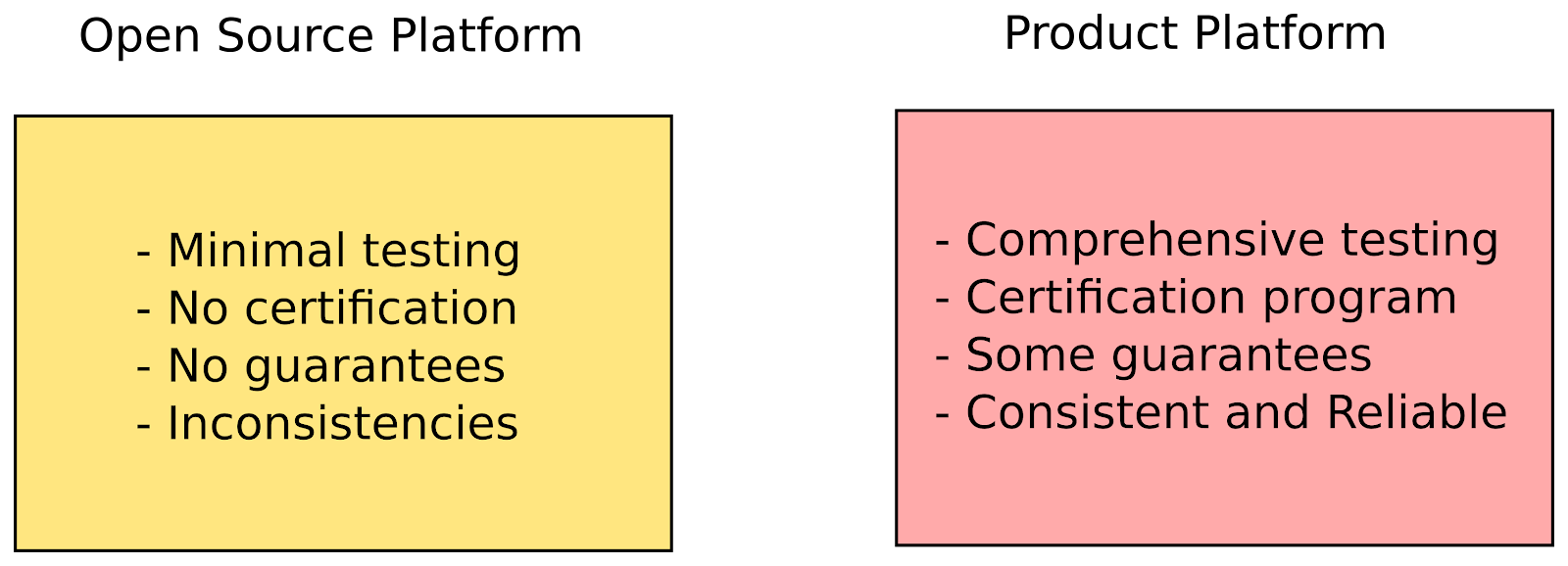
With that in mind, your customers are rewarded because the product experience will be highly consistent, stable and not shift under their feet, especially between releases. Your ISVs and other external developers that rely on your product will also appreciate the fact that the API won’t be undergoing sudden switches, and the testing suites will help to maintain that level of consistency. And you, the vendor, will be rewarded, because it’s much easier to provide product support for something that doesn’t change much over time, until of course, it’s time to release a new version.
The advantages are obvious, after you start down this path. You’re still building and maintaining your open source code, and you’re creating a place for customers to come and benefit from all the open source contributions you’ve made. One anecdote to share here: Back in the day, a certain software vendor split its community product from its enterprise product. At the time, it was a controversial move, but as one salesperson who was there related to me, the “split” allowed her to focus on selling products to customers who wanted to buy, instead of spending time debating the merits of the GPL with people who were never going to buy anything. Everyone won: The market was less confused about what was sold and what was free, the company won because its product became a runaway success, customers won because they benefited from open source innovation, and the community won because they got a great free product that was produced in the open source way with transparent governance..
A Mixed Approach
By now, you may think that I, as a free software bigot, would never endorse a proprietary strategy around free software. After all, that’s why I dislike open core, right? Actually, I dislike open core because it doesn’t work, not because it’s ideologically “impure.” As I mentioned, what I wrote above is not the only way to write and sell software, but it gives you a good start. Just to prove a point, I’m going to show you a way to utilize open source methodologies while selling proprietary software.
“But wait!” I hear you asking, “Didn’t you just say that the open core and hybrid approaches were unsuccessful? Why would we do that?” I’m going to advocate that you start from the position of the valuable open source platform as product and then build on top of that, instead of ignoring the value of the platform as one would do in open core. In other words, the core revenue driver is still the open source platform, and whatever proprietary bits you put together to sell with it serve to create a positive feedback loop, where open source platform adoption creates more potential value for your proprietary add-ons, and the more successful your proprietary add-ons, the more the open source platform becomes a larger center of gravity for its ecosystem. Of course, in this scenario, your add-ons could also be open source – after all, I just showed you how to make an open source product, right?
If you begin with the premise that open source platforms have great value, and you sell that value in the form of a certified software product, that’s just a starting point. The key is that you’re selling a certified version of an open source platform and from there, it’s up to you how to structure your product approach. If, in addition to selling the open source platform, you still want to sell proprietary applications, that’s entirely up to you, as long as you don’t choose an approach that devalues the platform itself – that is the key underlying difference between successful and unsuccessful approaches. Remember, successful open source platforms are very, very valuable, and enterprises appreciate (and pay for) that value.
The Big Reveal
This is not an easy process, and I would never tout it as such, but no successful product process ever is. Creating a successful product is always hard, whether open source or proprietary, but at least after reading this series, I hope you have a better idea of how to take advantage of open source innovation and processes. At least this way, you’ll be using methodologies that are known to work.
The key is to make it crystal clear to your audience and market what you’re selling (and not selling), anticipate and remove potential confusion, and make sure your target audience understands the inherent value of your open source product. The open source and mixed approaches outlined above allow you, the vendor, to provide clarity, which allows your customers and community members to self-select, and makes you, and the wider ecosystem, more efficient.
Read more:
Part One: How to Make Money from Open Source Platforms
How to Make Money from Open Source Platforms, Part 2: Open Core vs. Hybrid Business Models
How to Make Money from Open Source Platforms, Part 3: Creating a Product

 Valve has revealed some details about the upcoming Steam Link, the small device that will let you play your favorite PC games on the TV with the help of streaming technology. And, from the looks of it, one of the recommendations is to have at least Ubuntu 12.04 LTS.
 Once again, Arne Exton had the great pleasure of informing us about the availability of a new build for his Fedora-based Exton|Defender Linux distribution, which is now based on the recently released Fedora 22 operating system.
 Believe it or not, more and more hardware companies are making waves by selling all sorts of computers powered by a GNU/Linux distribution, such as Ubuntu, which is the world’s most popular free operating system.