Home Blog Page 1100

Why Companies That Use Open Source Need a Compliance Program

compliance paperCorporate use of open source software is now the norm with more than 60 percent of companies saying that they build their products with open source software, according to the 2015 Future of Open Source survey. But that same survey also revealed that most companies that use FOSS in their products don’t have formal procedures in place for ensuring that their software complies with open source licenses and regulations.

This is a dangerous trend for these companies and the open source community as a whole. Open source compliance failures leave companies, their suppliers and customers, vulnerable to lawsuits and often require costly engineering solutions to fix the problem. See the 2013 Fantec decision in Germany as an example of the potential liability for not managing a supply chain appropriately. Companies that don’t manage compliance also erode an open source community’s trust, which can diminish a company’s influence in the projects they rely on for their products and inhibit open source developer recruitment and retention — a critical competitive edge.

What is FOSS Compliance?

Most companies that have successfully integrated free and open source software (FOSS) and practices into their products create a FOSS compliance program. In its simplest definition, FOSS compliance means that users of FOSS must observe all the copyright notices and satisfy all the license obligations for the FOSS they use in commercial products. The complexity of achieving FOSS compliance increases slightly because you may also want to protect your intellectual property or possibly a third party supplier’s (whose source code is included in your product) from unintended disclosure.

FOSS compliance is typically more of an operational challenge related to execution and scaling than a legal challenge. Achieving compliance requires the aggregation of policies and processes, training, tools and proper staffing that enables an organization to effectively use FOSS and contribute to open source projects and communities. The goal is a FOSS compliance program that enables your business while respecting the rights of copyright holders who have offered you the ability to use the code freely. The R&D savings alone associated with the benefit your company derives would likely cover the internal process costs associated with complying with license obligations, and at the same time helping create a chain of compliance trust between your customers and suppliers.

The key to many successful FOSS compliance programs is a centralized core team, typically called something like the “Open Source Review Board” (OSRB). This team is usually comprised of knowledgeable experts in FOSS (e.g. from development and legal) plus representatives from engineering, product teams and supply chain. Well run programs often have a Compliance Officer (or sometimes called Director of Open Source) who owns the mission of compliance for the organization and who coordinates between product teams and business units. In addition to the core OSRB team, you may also find benefits from establishing an extended team that consists of various individuals across multiple departments (Documentation, Corporate Development, IT, Localization, etc.).

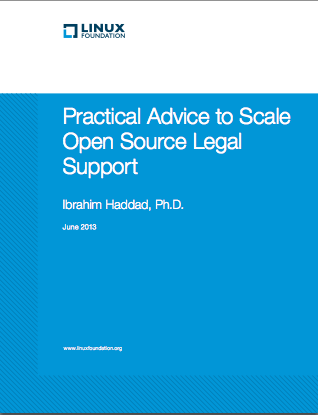
In this arrangement, legal counsel often provides practical advice to the software development team that enables developers to make daily decisions related to open source licenses without having to go back to the legal counsel for every single question. Much of this has been covered in our white paper, “Practical Advice to Scale Open Source Legal Support” where Ibrahim Haddad (now at Samsung Research Americas) discussed the role of legal counsel in ensuring FOSS compliance. He also examined practical advice that attorneys can provide to the software development team.

Free FOSS Compliance Resources

There are also several free resources available to help companies address the operational challenges of FOSS compliance, including:

The Linux Foundation offers hands-on training from compliance experts for individuals and companies responsible for achieving compliance with open source licenses and establishing an open source compliance program, as well as for those who simply want to learn more about compliance. Options available include live onsite training in addition to instructor-led live remote training. A certificate is provided to all who complete the training.

Developed by the SPDX workgroup hosted by the Linux Foundation, the specification helps facilitate compliance with free and open source software licenses by providing a standard format for communicating the components, licenses and copyrights associated with a software package.

A new Linux Foundation work group that aims to create a set of compliance best practices for companies to use not only internally, but with their supply chain. OpenChain seeks to embed best practices for FOSS compliance into supply chains, using a shared standard and best practices that form an auditable standard for FOSS compliance.

Developed by the Linux Foundation, the FOSS Bar Code Tracker, Dependency Checker Tool, and Code Janitor Tool are among several open source compliance tools available to help track important information on the FOSS stack contained in a product.

Each of these tools address topics on their own. Over the next few months I hope to dive deeper into various aspects of FOSS compliance that we often see multiple companies struggling to address. Further, I’d like to hear how your company is handling compliance and what areas in the industry could use more focus. You can find me on Twitter at @mdolan.

Download the full white paper, Practical Advice to Scale Open Source Legal Support.

Read Part 2: 5 Essential Duties of Legal Counsel in an Open Source Compliance Program

Part 3: 5 Practical Ways for Legal Counsel to Advise Developers on Open Source

Google’s Project Vault Is A Secure Computing Environment On A Micro SD Card, For Any Platform

Project Vault is a secure computer contained entirely on a micro SD sized device. Google’s ATAP said the micro SD format made sense because there’s already advanced security features on your phone, contained in the SIM card, which protects the things important to carriers. Vault is designed to be an equivalent, but designed to project a user’s important content…

Said file system includes just two files, one for read and one for write, that any app has to go through in order to communicate with Vault. This also means that it works with any operating system, including Android, Windows, OS X and Linux, since essentially it’s just a generic storage device to the host computer or phone.

Read more at TechCrunch.

Raspberry Pi As Your Next Linux PC

Can a machine as basic as the Raspberry Pi actually provide enough function for the average user?

Read more at Datamation

Project Ara’s Head Engineer Leaves Google to Start Airbus’ New Silicon Valley Office

Google’s Advanced Technologies and Projects (ATAP) skunkworks, the star of Google I/O last week, is a tough place to work: after two years, projects are expected to either become real businesses or die. In the case of the Project Ara modular smartphone, the deadline has been extended — but rather than keeping the team around, ATAP is bringing in some fresh blood. And that means that Paul Eremenko, Ara’s technical lead, was bound to leave the group one way or another.

Continue reading…

Read more at The Verge

11 Things to do After Installing Fedora 22

Fedora 22 is certainly an exciting release for the hard core Fedora fans. And it has more than enough glitter to attract a potential new user.

One of the most notable improvements includes the arrival of DNF which replaces the aging Yum. In my own experience DNF is faster and more memory efficient than Yum. It looks like we have an answer to apt-get in Fedora land.

Since Fedora is primarily a Gnome distro, you will notice the brand new and shiny Gnome 3.16. There are massive improvements in Gnome 3.16 including the brand new notification system, the improved Nautilus (Files) and image viewer which removes all the chrome to focus on the image itself.

One of the most exciting tools in Fedora is the introduction of Vagrant which helps developers in getting started with virtualized environments quickly and easily.

As usual it’s a polished release of the distro with a lot of news features which we will cover in a detailed review next week.

Every operating system whether it be Mac OS X, Windows or Fedora needs some work to customize to serve its user. However, unlike its proprietary counterparts, Fedora comes with quite a lot of software pre-installed so you won’t have to do that much work.

Here are some of the things that I do after installing Fedora on a system. None of it is mandatory and most of it is targeted to an average user. You will be able to use Fedora without doing any of it, but these tips can help improve your experience with the distro. So without further ado let’s get started.

Update your system

First of all we need to update the system. A lot of packages have received updates in the time between this latest update and when you installed Fedora on your system. To ensure your system is safe and secure you must keep your system up-to-date. With Fedora 22, ‘yum’ is on its way out and ‘dnf’ is replacing it, so we will be using ‘dnf’ instead of ‘yum’ to perform many tasks.

To install updates on your system run the following command:

sudo dnf update

Install extra repositories

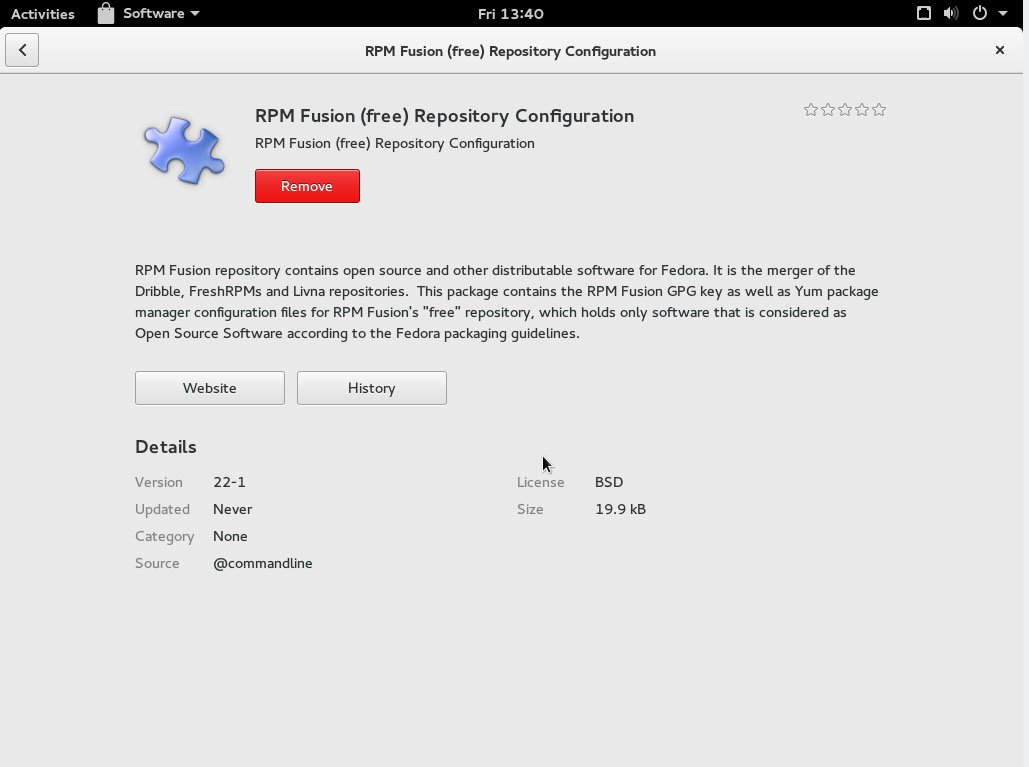
As it’s widely known, many Linux distributions can’t ship a variety of packages through official repositories due to licences and patents. On a Fedora system you can get access to such packages by installing RPM Fusion repository.

You have to install two repositories – Free and Non-free. It’s extremely simple to add these repositories to your system; just open the RPM Fusion website. There you will find links for different versions of Fedora. Click on the link for your version of Fedora and it will install that repo on your system through the ‘Software’ app. It’s recommended to first install the ‘Free’ repo and then the ‘Non-Free’ one.

fedora rpmfusion

Once these two repos are installed we now have access to many more applications.

Install VLC Media Player

VLC is the the swiss knife of media players. It can play virtually every media format out there. Since the RPMFusion repos are already installed you can install VLC using ‘dnf’:

sudo dnf install vlc

Install Clementine

As much as I like Gnome, the default desktop environment of Fedora, I am not a huge fan of the painfully simple Rhythmbox. I always install the ‘Clementine’ music player which not only has a nicer interface, but also comes with more features. You can install Clementine by running:

sudo dnf install clementine

Install MP3 codecs

Fedora’s focus on FOSS-only software packages does make it more challenging to get stuff like mp3 files to work. I used to install gstreamer plugins for mp3 support, but I faced some problems in Fedora 22. So I resorted to another nifty tool called Fedy. Since Fedy does more than installing codecs, I will talk about it separately.

Get Fedy, before you get fed-up

Fedy is a ‘jack of all trades’ kind of tool. Install Fedy using the following command:

$ su -c "curl https://satya164.github.io/fedy/fedy-installer -o fedy-installer && chmod +x fedy-installer && ./fedy-installer"

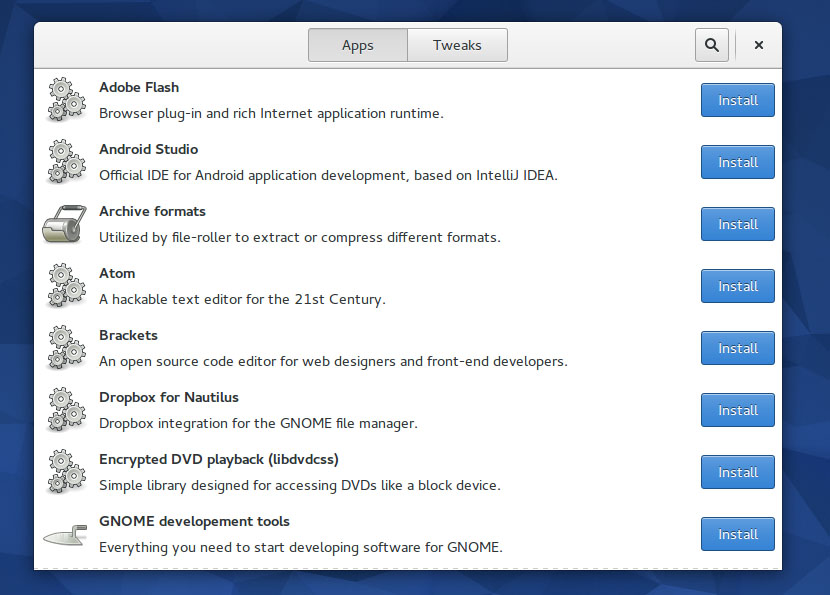
Once installed, you will see there are broadly two kinds of tasks you can perform using Fedy: install new packages and tweak the system. Under the ‘Apps’ tab you will find the option to install ‘multimedia codecs’ which will also bring ‘mp3’ support to your system.

Just scroll through it and see what else you want to install. Two of my favorite packages, in addition to codecs, are Microsoft fonts (for better font rendering) and Sublime Text.

fedora fedy

There are chances that a font may look ugly in Fedora. This problem isn’t unique to Fedora; I have the same issue with Arch Linux, openSUSE or Kubuntu as well. I spend a considerate amount of time fixing fonts on these systems. Fedy has made it extremely easy to make fonts look good under Fedora with just one click. Under ‘Tweaks’ one of the most important options is ‘font rendering’, which will fix font issues on your system.

Install Gnome Tweak Tool

Gnome is the default desktop environment of Fedora and the overall Gnome experience heavily rely on extensions. And Gnome Tweak Tool is an important tool go get a pristine Gnome experience. It’s surprising to see that Tweak Tool doesn’t come pre-installed on Fedora. Comparatively openSUSE does a better job by pre-installing Tweak Tool and some useful extensions. You can install Tweak Tool in Fedora by running this command:

sudo dnf install gnome-tweak-tool

Once the tool is installed, you can manage your extensions from there. I wish the tool was able to search and install new extensions too. Currently you have to visit the Gnome Extensions site to install new extensions. Once the extension is installed, you can enable it, configure it and disable it from the Tweak Tool.

Since I have a multi-monitor set-up I grab the extension for Multiple Monitors. I also recommend ‘Dash to Dock’ which allows a user to configure the Dash. You can disable Dash from ‘autohiding’, you can change the icon size, you can even choose the location of the dash. Last, but not least, you can also extend the dash to the length of the screen just like the one in Unity. For the users of multiple monitors, there is a nifty option to show the dash on the desired monitor. It’s a must-have extension.

Install Chrome to watch Netflix

Fedora tends to offer the vanilla Gnome experience, but instead of Web, the default web browser of Gnome, it comes with Firefox. However Firefox sill doesn’t support DRMed content on Linux so you can’t watch Netflix. That’s where Google Chrome comes in handy. You can install Chrome by either downloading it from the Google site or from Fedy.

Download and install Chrome from the official site.

Cloud in your hands

If you are running your own private cloud — and you must in order to safeguard any sensitive data — you can grab the clients for Seafile or ownCloud for your system. But if you use Google Drive or Dropbox you can also use them easily on Fedora.

There are official clients for all commercial cloud services including Dropbox, with Google Drive being an exception. One of the easiest ways to get Google Drive on Linux is inSync; while it does have more features than the Google Drive client, it costs money to use. You can install inSync by downloading the official client from their website. Once installed, connect it to your Google account, point it to the location where you want your files to be saved, and you are good to take Google for a drive.

Online accounts

Despite being a Plasma user I envy the Online Accounts feature of Gnome. It makes it extremely easy to configure communication tools such as email, calendars, address book and IM.

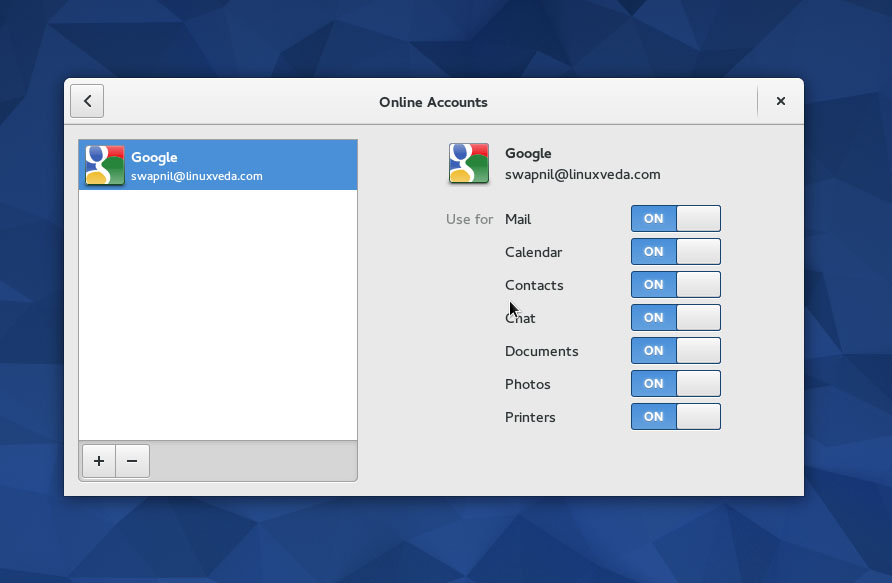
Gnome’s Online Accounts supports more than half a dozen services including Google, Facebook, Flickr, ownCloud, etc. Open Online Accounts from the Dash and choose the service you want to configure. Once you are connected to an account, you can choose what kind of service you want to enable for that account. In case of Google, for example, I enabled all these services.

fedora online accounts

The beauty is that when I open Evolution, the default email client in Fedora, it’s already configured with that email account.

Getting non-free drivers for GPU

It’s really hard to get non-free software to work with Fedora. I use Arch Linux and I find it much easier to install Nvidia drivers on Arch than it is on Fedora. The fact is you will not need non-free drivers under Fedora as your graphics card will work out-of-the-box. However if you do need them (why would you buy an expensive Nvidia card if you can’t take full advantage of it?) then you have to do some hard work. I broke my previous Fedora installs due to non-free drivers so gave up on them. If you want to install such drivers on the Fedora box I would suggest this RPMFusion page. My free advice to you would be, don’t try it at home.

Getting your printer to work in Fedora

It’s a non-issue nowadays, depending on the make of your printer. In most cases when you run the Printer’s tool, Fedora will detect and configure your printer with one click.

That’s most of what I do on my Fedora system. A few things, mostly related to non-free software, do look more complicated under Fedora. That’s mainly due to Fedora’s policy to use and promote FOSS. Once you cross that river Fedora is a pleasant OS to use.

Now tell us what things you do after installing Fedora on your system.

SanDisk Rolls Out USB Type-C Portable SSDs, Data Center drive

SanDisk at Computex is launching new drives designed to reach creative pros, data centers and folks who like a few gigabytes in their pockets.

Read more at ZDNet News

Intel Buys Altera for $16.7 Billion

Intel says it plans to integrate Alteras field-programmable gate array chips with its own Xeon processors, resulting in more flexible computing and server products.

Read more at ZDNet News

Why You Should Want a Nintendo Android Console

Could Nintendo really switch to Android?

Japan’s most respected business newspaper, the Nikkei Shimbun, today raised the possibility that Nintendo’s mysterious upcoming system — codenamed NX — may be based on Google’s Android operating system. The report is curiously sourced to a single anonymous insider, and takes the form of a column, not a typical news story; moreover, the Nikkei has a spotty record with Nintendo in particular.

But that doesn’t make the proposition any less fascinating, and it’s one I’ve been considering myself for some time. Although it would be an unusual move for the Japanese giant, which is famously hesitant to cede control over any aspect of its products, there are a lot of reasons why it might make sense —…

Continue reading…

Read more at The Verge

Fedora 23 May Feature Cinnamon Desktop Spin & “Netizen” Version

Fedora 23 might be featuring some new ISO spins of the Linux distribution, including one with the Cinnamon Desktop and a “Netizen” spin focused on “Internet citizenship and citizen engagement.”..

Read more at Phoronix

The Intel Graphics Changes For The Linux 4.2 Kernel

While for weeks we’ve already been writing about the forthcoming Linux 4.2 development cycle, including the Intel DRM kernel improvements, Daniel Vetter of Intel OTC has provided a nice overview of what’s coming to Linux 4.2 for Intel graphics…

Read more at Phoronix