
Digia / The Qt Company has finally managed to get Qt 5.5 into a shape for branching and as a result the alpha version is now available for early testing…
Read more at Phoronix
 The ext4 filesystem causes a number of scaling and performance issues which Jan Kara, Linux kernel engineer at SUSE, addressed in his presentation at The Linux Foundation’s Vault storage conference last week.
Ext4 represents the latest evolution of the most-used Linux filesystem, ext3. In that regard, ext4 can be considered a deeper improvement over ext3 than ext3 was over ext2. (Ext3 was mostly about adding journaling to ext2.)
Ext4 modifies important data structures of the filesystem and the failure to pay attention to these structures, such as inodes, can cause a variety of mostly minor problems as well as scaling challenges, Kara said. Still, these can impact performance, which automatically should raise their importance.
He and other ext4 developers have done some work to improve these issues, including reducing contention resulting from handling of inodes, using shrinker to alleviate memory constraints, and more.
Kara began by addressing the orphan list, the list of inodes that simply haven’t been properly closed. With ext4 much revolves around inodes. In a file system, inodes consist roughly of 1 percent of the total disk space, whether it is a whole storage unit or a partition on a storage unit. The inode space is used to track the files stored on the hard disk and it stores metadata about each file, directory, or object. It does not, however, store the data. It only points to those structures.
The usual solution to cleaning up the unprocessed orphan inode list is by unmounting and remounting the file system. This should be pretty straightforward. Simply generate the list of inodes for tracking unlinked open files and files with truncate in progress. It only gets complicated in the event of a crash when you may have large numbers of orphaned inodes. In that case you need just “find the orphans, finish the truncates, and remove unlinked inodes,” Kara explained.
The orphan list can become unwieldy so Kara described some work he did with developer Thavatchai Makphaibulchoke. The problem is that the list handling can be inherently unscalable; in effect becoming unsolvable without disk format changes. “Still, you can do a few things”, he suggested:
Remove unnecessary global lock acquisitions when inode is already part of an orphan list (inode modifications itself is guarded by inode-local lock).
Make critical sections shorter.
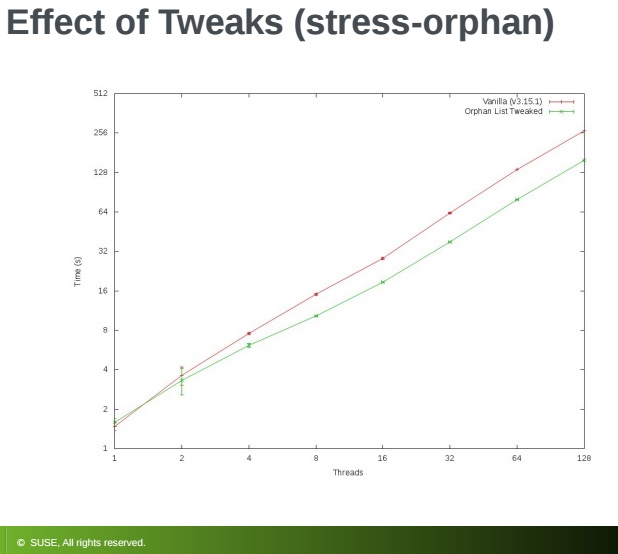
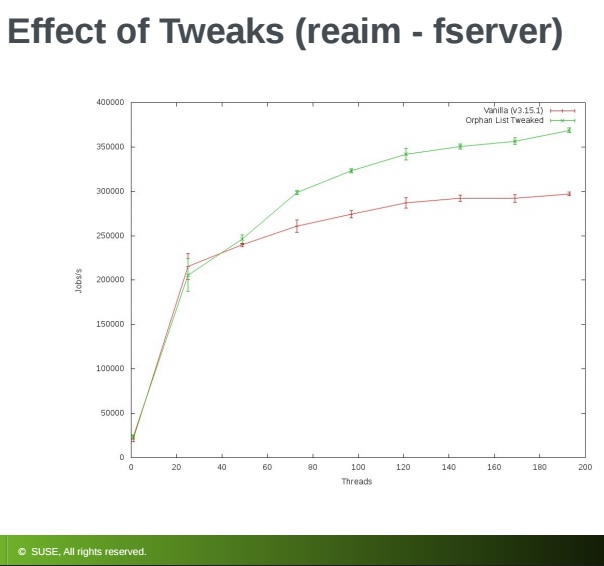 Kara made some changes to the orphan list along the lines he recommended and tested for the effect of the changes by running what he referred to as a stress-orphan micro-benchmark and a reAIM new fserver workload. There were clearly noticeable gains with the orphan stress test and even larger gains in the reAIM fserver test resulting in a measurable increase in jobs per second, he reported.
Kara went on the run some experiments with orphan file patches, which entailed reallocating system files which store numbers of orphan inodes. For this, “there is a real fix—improve jbd2 reduce overhead, especially if the block already is in the correct state. You also can skip journaling block if the block is part of a running transaction.”
From there he looked at orphan slot allocation strategies. He found two choices, simple or complex:
Simple way—search for free slot in a file using sequential search from the beginning under a spinlock
More complex—use hash CPUID to a block in the orphan file (can have easily more blocks for a CPU) and then start searching at that block.
His efforts to measure the various orphan file approaches for performance, however, did not produce clear winners. “It was hard to tell,” he noted. In the end, “it doesn’t matter which strategy you use,” he concluded.
Although the subject was ext4 filesystem scaling, often you experience memory constraints and need to free some entries. That’s when Kara turns to shrinker. Memory management calls shrinker and asks it to scan N objects and free as much as possible. “The objective is to find entries to reclaim without bloating each entry too much,” he said.
When doing this Kara recommends keeping the timestamp of when last reclaimable extent was used in each inode. On reclaim request scan RB (Red/Black) trees of inodes with oldest timestamps until desired number (N) of entries are reclaimed. Note: your scanning may need to skip many unreclaimable extents.
Kara has been working jointly with developer Zheng Liu to improve shrinker. This has involved walking inodes in round-robin order instead of LRU to avoid the need for list sorting. Also, he recommends adding simple aging via an extent REFERENCED bit.
In a test of shrinker for improving latency he wanted to see what could be accomplished with shrinker in a 5-minute run with as many files as time allowed. Kara was able to achieve a maximum latency reduction from 63132 us to 100 us. As with any tests, your results will vary depending on the amount of memory, speed of the write, and whether your data is cached.
Kara wrapped up with key takeaways:
Even if you cannot fundamentally improve scalability, just reducing length of critical sections can help.
Doing things lockless is still faster.
Ultimately, you have to strike a balance between sophisticated but slow or simple and fast, he concluded.

FFmpeg Converting Guide
I noticed some people have problems with ffmpeg very basic commends so I decided to make an article that will provide with very basic information and commends that will help people use ffmpeg.
First we need to get FFmpeg for our system, there are multiple ways to get it but I would recommend getting the binary files you can get it from here (Windows, Linux, Mac) This video will help you understand how we will use our ffmpeg
Second understand the difference between Digital container format (.mkv, .mp4, .avi) and video compression format / Audio compression format (H.264, Vp9, AAC) Container format is a thing were you put your compression format in. Note that not every compression format can be placed in any container formats.
Third lets look at very basic commends
-b:v -Target video bitrate
-b:a -Target Audio bitrate
-r -specify frame rate of video example -r 60 (video frame rate will be 60)
-vf scale=1920:1080 -change the resolution of the video (16:9 or 4:3 resolutions)
-aspect 16:9 -force aspect ration, even though you might have 4:3 resolution you can force aspect ration like this
1) Convert video file to Audio file
example video to mp3
ffmpeg -i input_movie.mp4-acodeclibmp3lame -b:a 192k output.mp3
libmp3lameis a audio compression format (mp3) you can change to a different one but make sure that you put it a the correct container format.
example:
AAC – Advanced Audio Coding – libvo_aacenc
ffmpeg -i input_movie.mp4-acodeclibvo_aacenc -b:a 192k output.aac
ogg – Vorbis – libvorbis
ffmpeg -i input_movie.mp4-acodeclibvorbis -b:a 192k output.oga
You can go on and go on like this For compression format just change lib* file to a different one and for bit rate just change 192k to what ever you want for example 128k, 256k,
2) Convert a video file into a different one
example to x264
ffmpeg -i input_movie.mp4-c:v libx264-b:v 2567k -c:alibmp3lame-b:a 192k output.mp4
libx264Is a video compression format just like in audio compression format you can change this as well, and you can change the audio compression format as well.
make sure that you put it in a correct container format.
example:
mpeg2 – mpeg2video
ffmpeg -i input_movie.mp4-c:v mpeg2video-b:v 2567k -c:alibmp3lame-b:a 192k output.mpg
Vp9 – libvpx-vp9
ffmpeg -i input_movie.mp4-c:v libvpx-vp9-b:v 2567k -c:a-b:a 192k output.mkvlibvorbis
x265 – libx265
ffmpeg -i input_movie.mp4-c:v libx265-b:v 2567k -c:a-b:a 192k output.mkvlibvorbis
xvid – libxvid
ffmpeg -i input_movie.mp4-c:v libxvid-b:v 2567k -c:a-b:a 192k output.mkvlibvorbis
You can go on and go one like this as you can see it is very simple just change lib* to what ever you want and for bit rate just change 192k to what ever you want for example 128k, 256k,
One more thing lats make one commend a bit hard to show you how easy it really is
ffmpeg -i input_movie.mp4-vf scale=640:480-aspect 16:9-r 120 -c:v libx264 -b:v 13976k -c:a libmp3lame -b:a 192k output.mkv
-vf scale=640:480
With this I resized the video resolution to 640:480
-aspect 16:9Even though 640:480 is a 4:3 aspect ration resolution with -aspect 16:9 I forced the video to be 16:9
-r 120I changed the video frame rate to be 120 FPS
See how easy it is.
3) Cut (Change) video length
ffmpeg -i in.mp4 -ss [start] -t [duration] -c:v copy -c:a copy out.mp4 Example
ffmpeg -i in.mp4 -ss 00:01:15 -t 00:00:10 -c:v copy -c:a copy out.mp4
Running this command will not encode your video it will copy the video and the only difference will be the durations of the video as you specified
4) Extract an image out of your video
ffmpeg -i input_movie.mp4 -ss 00:00:05 -f image2 -vframes 1 imagename.png 5) Create Video Thumbnails ffmpeg -ss 00:00:01 -i yourvideofile.avi -frames 1 -vf "select=not(mod(n,240)),scale=512:288,tile=4x7" out.jpg – ss 00:00:01 means that it will start from first second of course you can tweak it
yourvideofile.avi this is where you should put your video file it can be .avi .mp4 just about any format because ffmpeg supports a lot of formats
240 means that it will take a screenshot every 240 frames of caures you can adjust to your preferences. for example if your video is 30 fps and you have 240 then it means that it will take a shoot every 8 seconds.
512:288 now this is a scale of every individual image in the gallery you can adjust it but note that if your video is 16:9 you should select a resolution that is 16:9 see this list if your video is 4:3 look at this list make sure to select proper aspect ratio.
4×7 this means that it will put 4 horizontal and 7 vertical images on the final outputted imag. of course you can edit this
out.jpg here you can use other image compression methods like .png etc..
make sure the spacing the latter cases are exactly the same
6)Join Video and Audio files
ffmpeg -i video.mp4 -i audio.mp3' -c:v copy -c:a copy -map 0:v:0 -map 1:a:0 output.mp4
You can see how easy it is to work with ffmpeg, all of this is not even scratching the boom of the ffmpeg capabilities and the Internet is a great place to get more information.
Video compression format comparison.


