Home Blog Page 1180

Check Out Cyanogen’s New Boot Animation – Video

As you have probably heard by now, Cyanogen is looking to make some major changes to its custom ROM platform in an attempt to make it accessible not only to Android tweakers.

The team already showcased their new logo design not long ago and this week we are getting a sneak peak of the upcoming CyanogenOS 12.

As you can see for yourself in the video embedded below, the designers at Cyanogen are aiming to impress you with a clean, sleek animation centered around the brand … (read more)

Read more at Softpedia News

Qt 5.5 Alpha Finally Released

Digia / The Qt Company has finally managed to get Qt 5.5 into a shape for branching and as a result the alpha version is now available for early testing…

Read more at Phoronix

Dell’s Linux PC Sequel Still “Just Works”—But it Adds 4K Screen and Rough Edges

Almost two years ago, we closed out our review of Dell’s first Linux-powered Developer Edition laptop with some words of wisdom from my former uber-sysadmin mentor, a fellow named Rick with whom I worked at Boeing for many, many years. Rick is now retired and living the life of an itinerant world-traveling SCUBA master, but he’s been hacking on Linux since around the time Linus first dropped the kernel on comp.os.minix. I lamented to Rick that I was having a hard time coming up with an angle or hook for the XPS 13 Developer Edition, because it all just worked—Dell got it right, and it was a great piece of kit. It was maybe even a bit boring.

“Isn’t that what you’re looking for in a mainstream product?” Rick told me over e-mail. “In 1996 it was: ‘Wow look at this, I got Linux running on xxxxxxxx.’ Even in 2006 that was at times an accomplishment… When was the last time you turned on an Apple or Windows machine and marveled that it ‘just worked?’ It should be boring.”

Rick was right—he usually is right, which is why he made such an awesome mentor. His words echoed in my head all over again when I recently lifted up the big M3800’s lid. Dell has expanded its Developer Edition offerings, taking what started out as an internal unofficial side-project of sticking Ubuntu onto the new M3800 workstation laptop and making an actual, official supported configuration that you can purchase. Like the XPS 13 Developer Edition before it, the M3800 Developer Edition comes straight from the factory with an Ubuntu LTS desktop release—14.04 this time around, rather than the previous XPS 13’s 12.04 LTS. Everything “just works.”

Read 44 remaining paragraphs | Comments

Read more at Ars Technica

How to deploy OnlyOffice on server with ease using Docker service

A couple of wordsabout the product

OnlyOffice groupware is aimed at small and medium business and consists of the following tools: Project and document management; Gantt Chart;CRM and Invoicing;Mail Aggregator. Moreover, it implies third-party services integration such as Box, Sharepoint,OwnCloud to create a single workspace.

The product is cross-platform and you can choose the appropriate installation file + take a screentour here: https://www.onlyoffice.com/open-source.aspx

Docker service

Working on the Linux version we tried to do our best to simplify this process and used Docker as an Aladdin’s lampopen-source project that automates the deployment of applications inside software containers.

To work correctly ONLYOFFICE requires some additional components to be installed on the machine, like Mono version 3.2 or later, MySQL version 5.6 or later etc. (the full system requirements list can be found here).

Docker container comprises not only ONLYOFFICE but also all dependencies necessary for its correct work. All you need besides love is to execute one single command.

Good news: OnlyOffice installation process takes just a few minutes – music to Linux new comers ears, and for eyes as well: https://www.youtube.com/watch?v=LvFffFIawa8.

Installing ONLYOFFICE

Run Docker and execute the following command:

sudo docker run -i -t -d -p 80:80 ascensiosystemsia/onlyoffice-commonserver

This command will download the dockerfile from Docker Hub and launch the container running ONLYOFFICE and all the dependencies necessary for its work.

Configuring ONLYOFFICE

If you wish to run ONLYOFFICE on a different port, change the value of the -p command. For example, to run your office on 8080 port, use the following command:

sudo docker run -i -t -d -p 8080:80 ascensiosystemsia/onlyoffice-commonserver

To prevent unauthorized access to the information, you can secure the access to ONLYOFFICE using SSL (HTTPS). To do that, execute the following command:

sudo docker run -i -t -d -p 80:80 -p 443:443 -v /opt/onlyoffice/Data:/var/www/onlyoffice/Data ascensiosystemsia/onlyoffice-commonserver

In this case you will need to create and install the following files:

/opt/onlyoffice/Data/certs/onlyoffice.key

/opt/onlyoffice/Data/certs/onlyoffice.crt

The step by step instructions on how it can be done are available on the ONLYOFFICE profile page of Docker official website.

Running ONLYOFFICE

After everything is installed, you can open your portal in the web browser at the localhost address (http://127.0.0.1) on the local machine. The Welcome page will open.

Enter a password and specify the email address you will use to access your ONLYOFFICE the next time. To complete the activation process, just follow the link provided in the email that will be sent at the specified email address.

That is all! Djinn is out – you can start working in your office!

Share your experience with us if it was a kind of magic for you too.

If Djinn got stuck in thelamp, we invite you to visit ONLYOFFICE Developers forum: http://dev.onlyoffice.org/

State of VoIP in Linux

Like most people, I find myself using the same VoIP options everyone else is using. Thankfully, these days there are far more options available than what we might think. Today, I’ll look at these options and also explore up-and-coming alternatives as well.

Skype

Coming from any other platforms, Linux VoIP clients often find themselves being compared to Skype. Foss advocates are usually quick to point out the flaws in trusting Skype with your voice calls, yet the fact is that this is what most people use.

Read more at Datamation

Ext4 Filesystem Improvements to Address Scaling Challenges

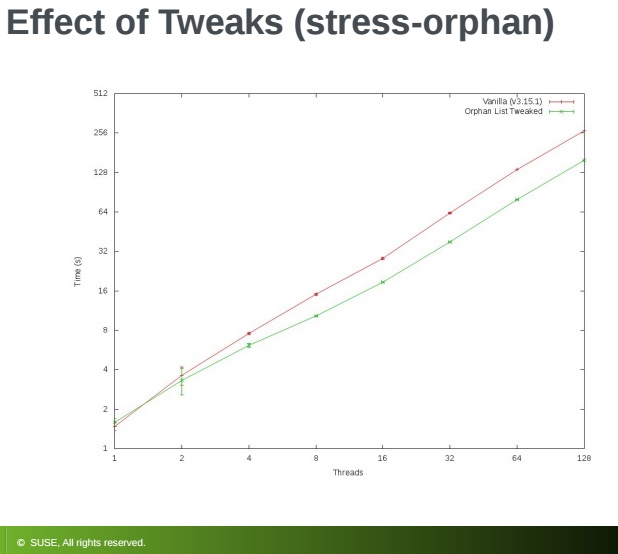
ext4 orphan test graphThe ext4 filesystem causes a number of scaling and performance issues which Jan Kara, Linux kernel engineer at SUSE, addressed in his presentation at The Linux Foundation’s Vault storage conference last week.

Ext4 represents the latest evolution of the most-used Linux filesystem, ext3. In that regard, ext4 can be considered a deeper improvement over ext3 than ext3 was over ext2. (Ext3 was mostly about adding journaling to ext2.)

Ext4 modifies important data structures of the filesystem and the failure to pay attention to these structures, such as inodes, can cause a variety of mostly minor problems as well as scaling challenges, Kara said. Still, these can impact performance, which automatically should raise their importance.

He and other ext4 developers have done some work to improve these issues, including reducing contention resulting from handling of inodes, using shrinker to alleviate memory constraints, and more.

Dealing with inodes

Kara began by addressing the orphan list, the list of inodes that simply haven’t been properly closed. With ext4 much revolves around inodes. In a file system, inodes consist roughly of 1 percent of the total disk space, whether it is a whole storage unit or a partition on a storage unit. The inode space is used to track the files stored on the hard disk and it stores metadata about each file, directory, or object. It does not, however, store the data. It only points to those structures.

The usual solution to cleaning up the unprocessed orphan inode list is by unmounting and remounting the file system.  This should be pretty straightforward. Simply generate the list of inodes for tracking unlinked open files and files with truncate in progress. It only gets complicated in the event of a crash when you may have large numbers of orphaned inodes. In that case you need just “find the orphans, finish the truncates, and remove unlinked inodes,” Kara explained.

The orphan list can become unwieldy so Kara described some work he did with developer Thavatchai Makphaibulchoke. The problem is that the list handling can be inherently unscalable; in effect becoming unsolvable without disk format changes. “Still, you can do a few things”, he suggested:

  • Remove unnecessary global lock acquisitions when inode is already part of an orphan list (inode modifications itself is guarded by inode-local lock).

  • Make critical sections shorter.

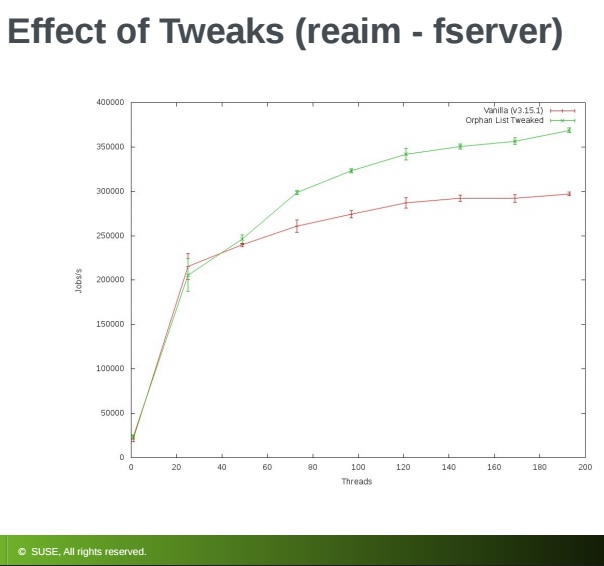
ext4 reaim test graphKara made some changes to the orphan list along the lines he recommended and tested for the effect of the changes by running what he referred to as a stress-orphan micro-benchmark and a reAIM new fserver workload. There were clearly noticeable gains with the orphan stress test and even larger gains in the reAIM fserver test resulting in a measurable increase in jobs per second, he reported.

Kara went on the run some experiments with orphan file patches, which entailed reallocating system files which store numbers of orphan inodes. For this, “there is a real fix—improve jbd2 reduce overhead, especially if the block already is in the correct state. You also can skip journaling block if the block is part of a running transaction.”

From there he looked at orphan slot allocation strategies.  He found two choices, simple or complex:

  • Simple way—search for free slot in a file using sequential search from the beginning under a spinlock

  • More complex—use hash CPUID to a block in the orphan file (can have easily more blocks for a CPU) and then start searching at that block.

His efforts to measure the various orphan file approaches for performance, however, did not produce clear winners. “It was hard to tell,” he noted. In the end, “it doesn’t matter which strategy you use,” he concluded.

Using shrinker

Although the subject was ext4 filesystem scaling, often you experience memory constraints and need to free some entries.  That’s when Kara turns to shrinker.  Memory management calls shrinker and asks it to scan N objects and free as much as possible. “The objective is to find entries to reclaim without bloating each entry too much,” he said.

When doing this Kara recommends keeping the timestamp of when last reclaimable extent was used in each inode.  On reclaim request scan RB (Red/Black) trees of inodes with oldest timestamps until desired number (N) of entries are reclaimed. Note: your scanning may need to skip many unreclaimable extents.

Kara has been working jointly with developer Zheng Liu to improve shrinker. This has involved walking inodes in round-robin order instead of LRU to avoid the need for list sorting. Also, he recommends adding simple aging via an extent REFERENCED bit.

In a test of shrinker for improving latency he wanted to see what could be accomplished with shrinker in a 5-minute run with as many files as time allowed. Kara was able to achieve a maximum latency reduction from 63132 us to 100 us. As with any tests, your results will vary depending on the amount of memory, speed of the write, and whether your data is cached.

Kara wrapped up with key takeaways:

  • Even if you cannot fundamentally improve scalability, just reducing length of critical sections can help.

  • Doing things lockless is still faster.

Ultimately, you have to strike a balance between sophisticated but slow or simple and fast, he concluded.

Ffmpeg media converting guide


FFmpeg Converting Guide


 I noticed some people have problems with ffmpeg very basic commends so I decided to make an article that will provide with very basic information and commends that will help people use ffmpeg.


 First we need to get FFmpeg for our system, there are multiple ways to get it but I would recommend getting the binary files you can get it from here (Windows, Linux, Mac) This video will help you understand how we will use our ffmpeg


 Second understand the difference between Digital container format (.mkv, .mp4, .avi) and video compression format / Audio compression format (H.264, Vp9, AAC) Container format is a thing were you put your compression format in. Note that not every compression format can be placed in any container formats.


 Third lets look at very basic commends


-b:v  -Target video bitrate
 
-b:a  -Target Audio bitrate


-r    -specify frame rate of video example -r 60 (video frame rate will be 60) 


-vf scale=1920:1080   -change the resolution of the video (16:9 or 4:3 resolutions)
 
-aspect 16:9    -force aspect ration, even though you might have 4:3 resolution you can force aspect ration like this


1) Convert video file to Audio file 

example video to mp3


ffmpeg -i input_movie.mp4 -acodec libmp3lame -b:a 192k output.mp3


libmp3lame

is a audio compression format (mp3) you can change to a different one but make sure that you put it a the correct container format.


example:


AAC – Advanced Audio Coding – libvo_aacenc


ffmpeg -i input_movie.mp4 -acodec libvo_aacenc -b:a 192k output.aac


ogg – Vorbis – libvorbis


ffmpeg -i input_movie.mp4 -acodec libvorbis -b:a 192k output.oga


You can go on and go on like this For compression format just change lib* file to a different one and for bit rate just change 192k to what ever you want for example 128k, 256k,


2) Convert a video file into a different one

example to x264


ffmpeg -i input_movie.mp4 -c:v libx264 -b:v 2567k -c:a libmp3lame -b:a 192k output.mp4


libx264

Is a video compression format just like in audio compression format you can change this as well, and you can change the audio compression format as well.

make sure that you put it in a correct container format.


example:


mpeg2 – mpeg2video


ffmpeg -i input_movie.mp4 -c:v mpeg2video -b:v 2567k -c:a libmp3lame -b:a 192k output.mpg


Vp9 – libvpx-vp9


ffmpeg -i input_movie.mp4 -c:v libvpx-vp9 -b:v 2567k -c:a libvorbis -b:a 192k output.mkv


x265 – libx265


ffmpeg -i input_movie.mp4 -c:v libx265 -b:v 2567k -c:a libvorbis -b:a 192k output.mkv


xvid – libxvid


ffmpeg -i input_movie.mp4 -c:v libxvid -b:v 2567k -c:a libvorbis -b:a 192k output.mkv


You can go on and go one like this as you can see it is very simple just change lib* to what ever you want and for bit rate just change 192k to what ever you want for example 128k, 256k,


One more thing lats make one commend a bit hard to show you how easy it really is


ffmpeg -i input_movie.mp4 -vf scale=640:480-aspect 16:9-r 120 -c:v libx264 -b:v 13976k -c:a libmp3lame -b:a 192k output.mkv


-vf scale=640:480 

With this I resized the video resolution to 640:480


-aspect 16:9

Even though 640:480 is a 4:3 aspect ration resolution with -aspect 16:9 I forced the video to be 16:9


-r 120

I changed the video frame rate to be 120 FPS


See how easy it is.


3) Cut (Change) video length


 ffmpeg -i in.mp4 -ss [start] -t [duration] -c:v copy -c:a copy out.mp4
 

Example

 ffmpeg -i in.mp4 -ss 00:01:15 -t 00:00:10 -c:v copy -c:a copy out.mp4
 

Running this command will not encode your  video it will copy the video and the only difference will be the durations of the video as you specified


4) Extract an image out of your video


 ffmpeg -i input_movie.mp4 -ss 00:00:05 -f image2 -vframes 1 imagename.png
 
5) Create Video Thumbnails 
 
ffmpeg -ss 00:00:01 -i yourvideofile.avi -frames 1 -vf "select=not(mod(n,240)),scale=512:288,tile=4x7" out.jpg


 – ss 00:00:01 means that it will start from first second of course you can tweak it


yourvideofile.avi this is where you should put your video file it can be .avi .mp4 just about any format because ffmpeg supports a lot of formats


240 means that it will take a screenshot every 240 frames of caures you can  adjust to your preferences. for example if your video is 30 fps and you have 240 then it means that it will take a shoot every 8 seconds.


512:288  now this is a scale of every individual image in the gallery you can adjust it but note that if your video is 16:9 you should select a resolution that is 16:9 see this list if your video is 4:3 look at this list make sure to select proper aspect ratio.


4×7 this means that it will put 4 horizontal and 7 vertical images on the final outputted imag. of course you can edit this 


out.jpg here you can use other image compression methods like .png etc..


make sure the spacing the latter cases are exactly the same


6)Join Video and Audio files


ffmpeg -i video.mp4 -i audio.mp3' -c:v copy -c:a copy -map 0:v:0 -map 1:a:0 output.mp4


You can see how easy it is to work with ffmpeg, all of this is not even scratching the boom of the ffmpeg capabilities and the Internet is a great place to get more information.


Video compression format comparison.


FFmpeg man page

Data Center Managers Struggle to Fill Linux Admin Jobs

It’s a great time to be an IT pro with Linux skills.

The rise of open cloud platforms has had a positive impact on the Linux admin jobs market, with data center managers doing their best to attract and retain Linux talent.

Nearly all of the over 1,000 IT managers surveyed by Dice, an IT career website, and The Linux Foundation said they plan to hire professionals with Linux skills.

Read more at Tech Target.

Xtra-PC Distro Helps Non-Technical People Install Linux on an Old PC

If you still have an old PC, you’re in luck. A new Linux distribution based on Lubuntu will give any old PC a new lease on life, designed for non-technical users and optimized for popular web sites.

We covered some ways of installing Linux on an old Windows XP computer before, but Xtra-PC makes the process easy for non-technical people—and it comes with a lot of popular stuff set up out of the box. You can run the product off the DVD, a flash drive, or install it directly to the hard drive (erasing the old operating system). I tried it on a few different XP-era computers and didn’t need any drivers. Even wireless and Ethernet worked perfectly.

Read more at Lifehacker.

More Intel Skylake Graphics PCI IDs Get Revealed

Intel’s open-source Linux development crew continues working on next-generation Skylake hardware support in a steadfast manner…

Read more at Phoronix