Home Blog Page 1201

Microsoft Office on Your Android Tablet? Not Yet – If Intel’s Inside

Office for Android doesn’t yet run on devices with an Intel processor. Here’s a list of tablets to avoid if you need to use Office right now.

Read more at ZDNet News

Wayland’s Weston Gets A Surface-Shooting API

One of the early additions past the recent Wayland 1.7 release to the Weston reference compositor is a surface-shooting API to be used for debugging…

Read more at Phoronix

More Proof That Allwinner Is Violating The GPL

Allwinner has been accused multiple times in the past of violating the GPL license by not providing Linux/Android kernel source code or U-Boot source, along with using LGPL-licensed code within their binary blobs, etc. Today there’s new “definitive proof” of Allwinner’s GPL violations…

Read more at Phoronix

DragonFlyBSD Radeon Driver Ported To Linux 3.10 Level Of Support

Last month the Intel DRM driver on DragonFlyBSD was ported to match the upstream Linux 3.10 level of support and features after being based on Linux 3.9 previously in their porting of this open-source Intel graphics driver to BSD. The Radeon DRM driver is in the process of a similar bump with the DragonFlyBSD kernel catching up to this AMD Radeon kernel graphics driver from its Linux 3.10 state…

Read more at Phoronix

3 Key Elements That Define Every Open Source Project

Open source has come a long way in the past 30 years and is entering the consciousness of most modern cultures. When thinking of open source projects, people categorize them several ways: governance structure, type of product platform, programming language, utility, technical details (language written in), industry sponsored or fully independent, and more.

But what truly defines any open source project, making it a unique entity different from all other open source projects? I would propose that there are three key elements of any open source project that frame, define, and differentiate that project from all others: the code, the community, and the brand.
read more

Read more at OpenSource.com

Open Source Control Tower for Drones, by 3D Robotics

Last 10th of February, 3D Robotics launched on Play Store their app to control copter and plane drones, Droidplanner: “3D Robotics, the largest U.S.-based drone manufacturer, announced the launch of its open-source Tower flight control app for drone copters and planes on Android phones and tablets. The app gives users a few new ways to […]

Continue Reading

 
Read more at Open Electronics

How to Limit the Network Bandwidth Used by Applications in a Linux System with Trickle

Have you ever encountered situations where one application dominated you all network bandwidth? If you have ever been in a situation where one application ate all your traffic, then you will value the role…

 
Read more at TecMint

Tails 1.3 Out Now, Introduces the Electrum Bitcoin Wallet

Tails, the Amnesic Incognito Live CD distribution of GNU/Linux based on Debian and used by Edward Snowden, has reached version 1.3 on February 24, 2015. This release introduces new applications, updates core components, and fixes annoying bugs from previous releases of the product.

According to the official release notes, Tails 1.3 introduces Electrum, an open… (read more)

Read more at Softpedia News

Distribution Release: KaOS 2015.02

Anke Boersma has announced the release of KaOS 2015.02, a brand-new version of the project’s rolling-release Linux distribution featuring the Plasma 5 desktop: “KaOS is very proud to announce the availability of the February release of a new stable ISO image. This release brings the end of KDE….

Read more at DistroWatch
How to burn .iso to USB drive

CD/DVD drives have gone obsolete and USB drives have become more popular and cheaper now. Thats the reason we prefer to use USB drives instead of CD or DVD to install a new system. 
 
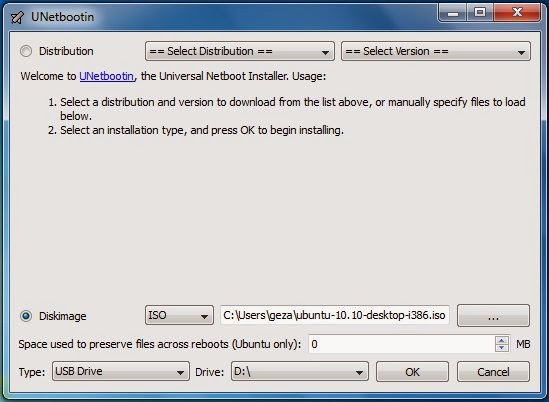
There are many utilities available which can do this. UNetbootin (http://unetbootin.sourceforge.net/) is one of them. UNetbootin allows you to create bootable Live USB drives for Ubuntu, Fedora, and other Linux distributions without burning a CD. The best part of it is that it runs on Windows, Linux, and Mac OS X. You can either let UNetbootin download one of the many distributions or supply your own Linux .iso file. It has a very simple user interface.
 
unetbootin-windows7
 
For Command Line Lovers
For command line lovers like me the best utility to burn a .iso to USB drive is “dd”. 
  • Insert the USB drive and open terminal (Ctrl+Alt+T)
  • better be a root (sudo -i), don’t be afraid believe in yourself
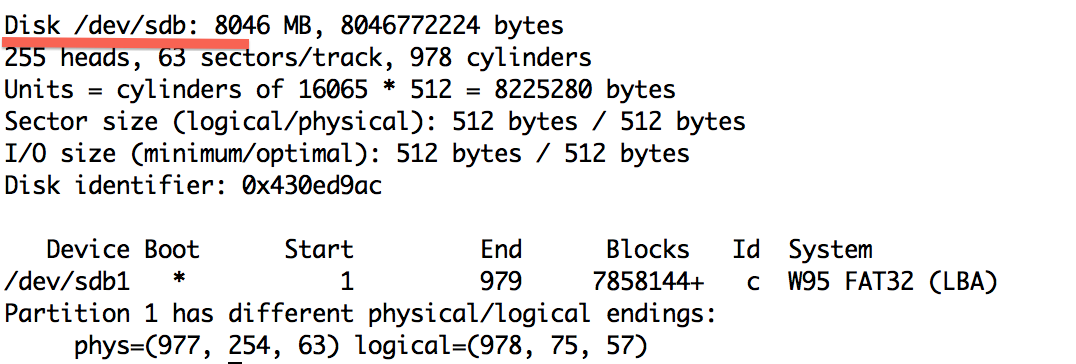
  • use “fdisk -l”  to find the USB device

fdisk-before


  • So in our case its /dev/sdb
  • Make sure the USB device is unmounted
umount /dev/sdb1
  • Assuming the .iso file is in your current working folder, type the below command and wait for it to finish.
dd bs=4M if=ubuntu-12.04.2-server-i386.iso of=/dev/sdb

dd

  • ubuntu-12.04.2-server-i386.iso is your .iso file
  • bs=4M” is optional. Its just to make it faster
Testing Time….
 
To test if everything has gone right, boot your system from the USB drive. To do so you will have to reboot your system. QEMU can help you in this. What?! Yes QEMU is a machine emulator and virtualizer. 
  • Make sure qemu is installed (apt-get install qemu)
  • run the below command and you will see a virtual machine booting from your USB Drive
qemu -hda /dev/sdb