Home Blog Page 1232

TNH2 Boards Get Online on Huawei MSTP OSN 500 Unsuccessfully

Huawei transmission board TNH2 is researched and released based on Huawei MSTP product OSN 550 V100R003 and TNH2 boards are used on OptiX OSN 500 V100R002 to replace TNH1 boards. TNH2 boards are applied to OptiX OSN 500 V100R002 by using hardware independent technology. V100R002SPC305 is developed later than OptiX OSN 500 doesn’t include the driver for TNH2 boards. The NEs dynamically load the driver stored in the flash memory of TNH2 boards. Then the NEs use the interface that is used to access the driver of TNH1 boards to access the driver of the TNH2 boards. In this circumstance, TNH1 boards can be replaced by TNH2 boards without any change on the NE software. The driver stored in the flash memory of TNH2 is called the hardware independent driver.

But when a TNH2SL1D board is installed in the extended slot of the NE, the board failed to go online and the physical board cannot be queried on the NMS. After a TNH2SP3D board is installed, the NE becomes unreachable. After the TNH2SL1D board or TNH2SP3D board is installed on an OptiX OSN 500 V100R002C01SPC305 (5.62.02.16) or later, the board goes online normally.
Identification method:

This issue is triggered when both of the following conditions are met:
1. The OptiX OSN 500 version is earlier than V100R002C01SPC305 (5.62.02.16).
:ver
BIOS 8.26.21T01 20131122 14:00:56 inactive
ExtBios 9.26.21T01 20131122 14:03:21 active
NeSoft(P) 5.62.02.12P03 20110907 00:29:05
Platform(D) 5.00.13.B221 20100105 10:37:20
Logic (U301)230
Dsp
2. The independent driver version of the TNH2SL1D board or TNH2SP3D board is 120.

If the board is installed in slot 3, the address for querying the independent driver version is 0×53460090. If the board is installed in slot 4, the address for querying the independent driver version is 0x53C60090.
For the TNH2SL1D board, the three digits after tnh2slxd.hwx indicate the independent driver version.
:dm:0x53c60090
53c60090 31 71 53 64 38 35 30 32 2e 6f 20 2d 3e 20 74 6e 1qSd8502.o.->.tn
53c600a0 68 32 73 6c 78 64 2e 68 77 78 00 31 32 30 00 4c h2slxd.hwx.120.L
53c600b0 75 53 4c 31 51 31 31 30 54 30 32 5f 45 6e 74 72 uSL1Q110T02_Entr
53c600c0 79 00 5d 00 00 10 00 b9 c1 05 00 00 00 00 00 00 y.]………….
53c600d0 3f 91 45 84 68 34 8a 09 0a 41 50 57 dc 0c b6 b3 ?.E.h4…APW….
53c600e0 d0 7f 14 61 52 c8 fe 2f 1e 75 98 3a 5f f6 6b f8 …aR../.u.:_.k.
53c600f0 be d4 42 91 d5 be c9 0b 73 be 05 51 33 61 3d 2f ..B…..s..Q3a=/
53c60100 0b 1c cb 85 79 d8 a2 0d c2 67 18 79 b1 f4 25 a7 ….y….g.y..%.
53c60110 42 52 88 f8 51 c0 a8 ca 6b a1 d1 9c d3 de a9 cf BR..Q…k…….
53c60120 94 18 2f fb d3 c0 96 ef 95 ff b7 13 c2 6c 65 19 ../……….le.

For the TNH2SP3D board, the three digits after tnh2sp3d.hwx indicate the independent driver version.
:dm:0×53460090
53460090 33 44 53 64 35 39 37 2e 6f 20 2d 3e 20 74 6e 68 3DSd597.o.->.tnh
534600a0 32 73 70 33 64 2e 68 77 78 00 31 32 30 00 54 75 2sp3d.hwx.120.Tu
534600b0 53 50 33 44 31 31 30 54 30 32 5f 45 6e 74 72 79 SP3D110T02_Entry
534600c0 00 5d 00 00 10 00 18 0d 04 00 00 00 00 00 00 3f .]………….?
534600d0 91 45 84 68 34 8a 09 0a 41 50 57 dc 0c b6 b3 c7 .E.h4…APW…..
534600e0 d5 86 19 0b ce 72 2c 71 ea cf af fb 52 aa d3 99 …..r,q….R…
534600f0 04 8c 14 4f 68 70 7b 2d 02 74 fc 7a bb 2f 8e 42 …Ohp{-.t.z./.B
53460100 51 8e cc 90 d6 e8 9c 45 07 93 31 4c 20 36 66 20 Q……E..1L.6f.
53460110 09 fa 2a 2a a1 28 4c 4d 46 9d 11 5b fd 01 76 ac ..**.(LMF..[..v.
53460120 e2 0c 9e 6f 03 9e 33 1b a5 46 23 01 bd da e5 58 …o..3..F#….X

[Root Cause]
If the NE version is earlier than V100R002C01SPC305 (5.62.02.16), the NE software does not contain the driver for the TNH2SL1D or TNH2SP3D board. The NE must load the independent driver from the flash memory of the board. If the independent driver version of the TNH2SL1D or TNH2SP3D board is 120, the driver interface defined by the driver is different from that defined by the NE. Therefore, the board fails to go online, or NE tasks are suspended.
[Impact and Risk]
After a TNH2SL1D board is installed, the board fails to go online. After a TNH2SP3D board is installed, the NE becomes unreachable.

[Measures and Solutions]
Recovery measures:
Remove the TNH2SL1D or TNH2SP3D board.
Workarounds:
Before installing a TNH2SL1D or TNH2SP3D board, upgrade the OptiX OSN 500 to V100R002C01SPC305 (5.62.02.16) or later.

Preventive measures:
Upgrade the independent driver or the OptiX OSN 500 software.
1. Upgrade the independent driver:
Upgrade the independent driver of the TNH2SL1D board to version 131, and that of the THN2SP3D board to version 130. For details, see the attachment
《OptiX OSN 500 Independent Driver Upgrade&Downgrade Guide》.
2. Upgrade the Huawei MSTP OptiX OSN 500 software:
Upgrade the NE software to V100R002C01SPC305 (5.62.02.16) or later.
How to Install and Update Software on openSUSE Like a Pro

There are so many reasons why you might be considering the migration to SUSE or openSUSE. For some, it’s the logical step to integrating Linux into a business environment (SUSE paid support is phenomenal and the openSUSE community is always at the ready to help). To others, it’s one of the most power-user friendly Linux distributions on the market.

Regardless of why you are considering a move to the SUSE ecosystem (be it through SUSE or openSUSE), it’s best you know the tools of the trade before you make the leap. Fortunately, as with the whole of the Linux landscape, package management is an incredibly user-friendly task ─ when you know what you’re looking for.

Some distributions make the process of managing software incredibly easy. Take, for instance, Ubuntu Linux. Front and center on the Launcher is the Ubuntu Software Center icon. Click that icon and search hundreds of thousands of apps to install. With openSUSE, you won’t find that launcher so up front and center, but the tool is easy to locate and easy to use.

Let’s dive into the world of package management with openSUSE, from the GUI perspective. After giving this a read, you should be able to easily install software, update your machine, and even add repositories (so you can install third-party applications).

YaST2 is all you need

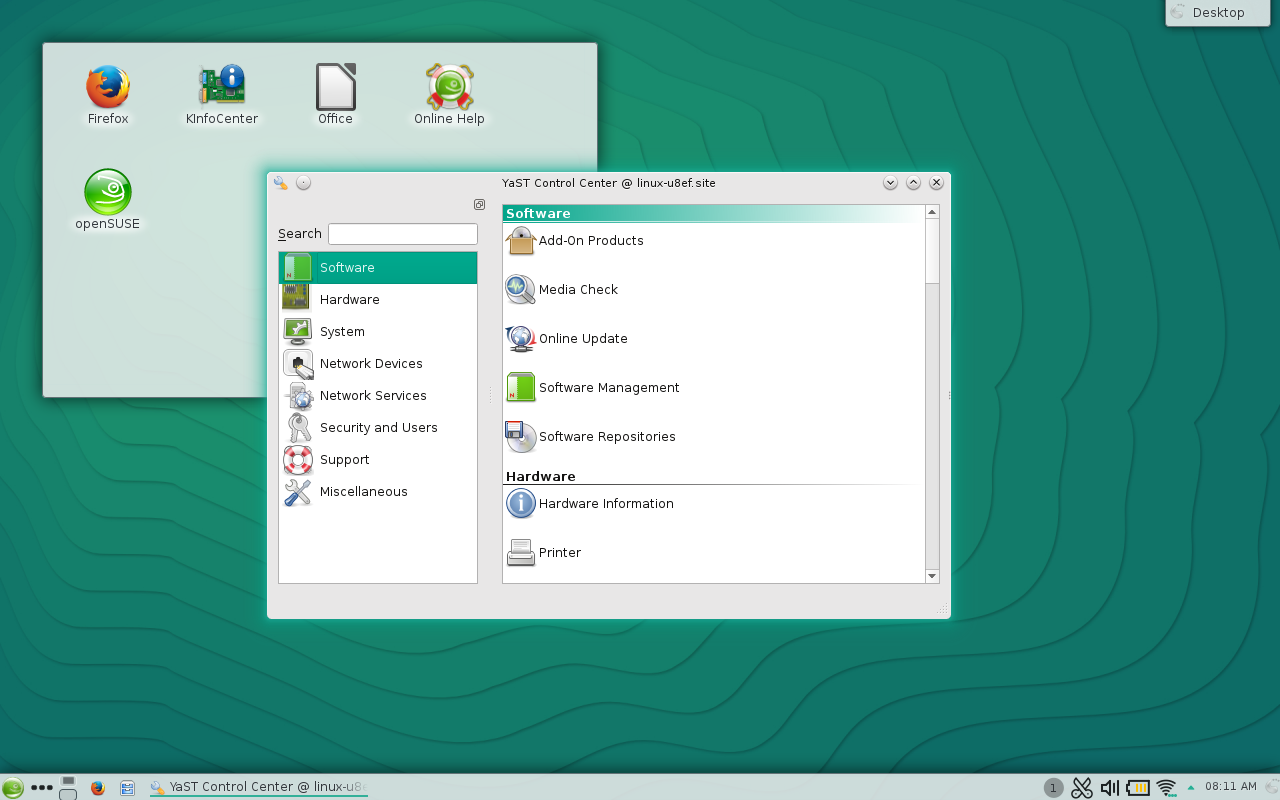
One outstanding element of the SUSE-verse, is they centralize the vast majority of their system management into a single tool called YaST2 (Yet Another Setup Tool). From within YaST2 you can do a great many things ─ one of which is manage the software on your system.

I’m going to be working with the latest release of openSUSE (13.2) and the KDE desktop. If you’ve opted for the GNOME desktop environment, this will not change YaST (only how you get to YaST2).

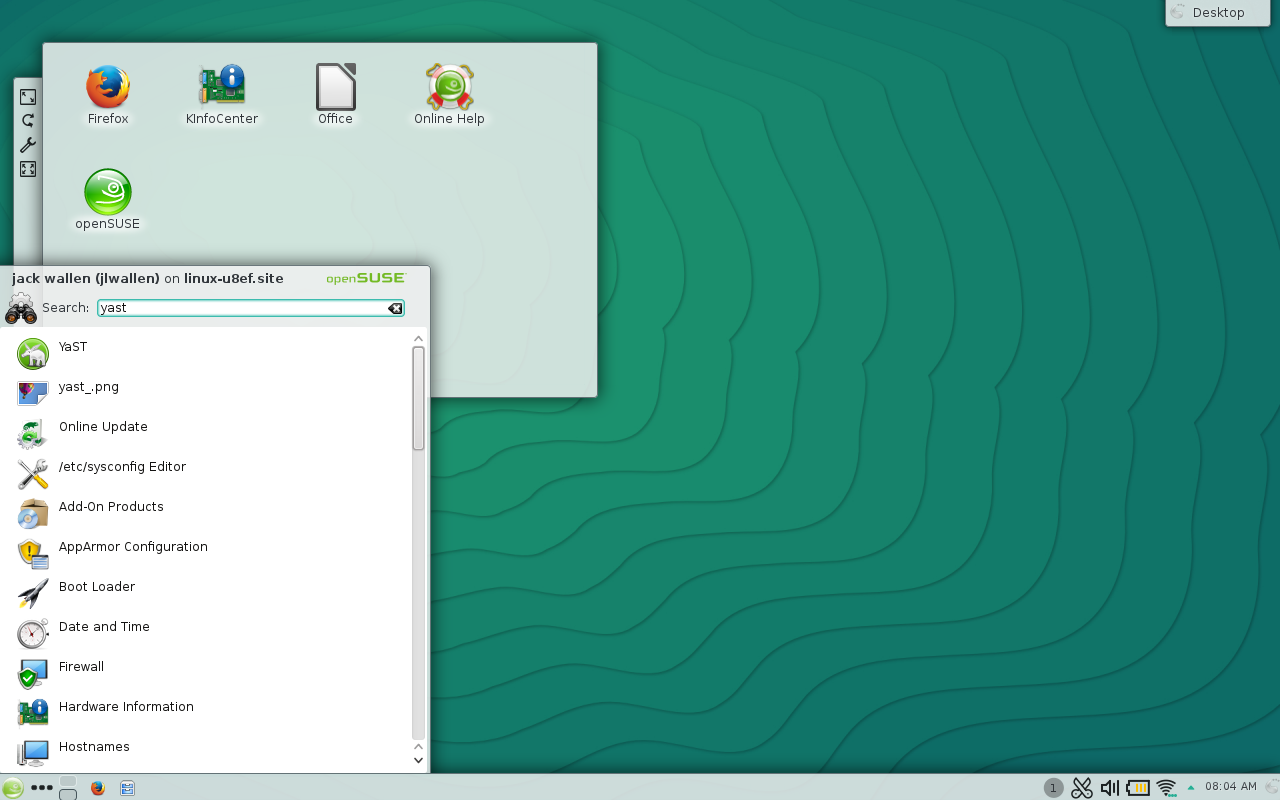
The easiest way to get to YaST2 is to open up the KDE “K” menu and type “yast” in the search field (Figure 1). When the YaST2 entry appears, click it to fire up the tool.

yast 1

 Once YaST2 is open, click on the Software entry in the left navigation (Figure 2) to reveal all of the available software-related entries.

yast 2 

Installing software

The first thing I want to demonstrate is how to install a piece of software. This is quite simple. From with the Software section of YaST2, click the Software Management and wait for the software management system to open. 

  1. Enter the title of the software you want to install in the Search field.

  2. Click Search.

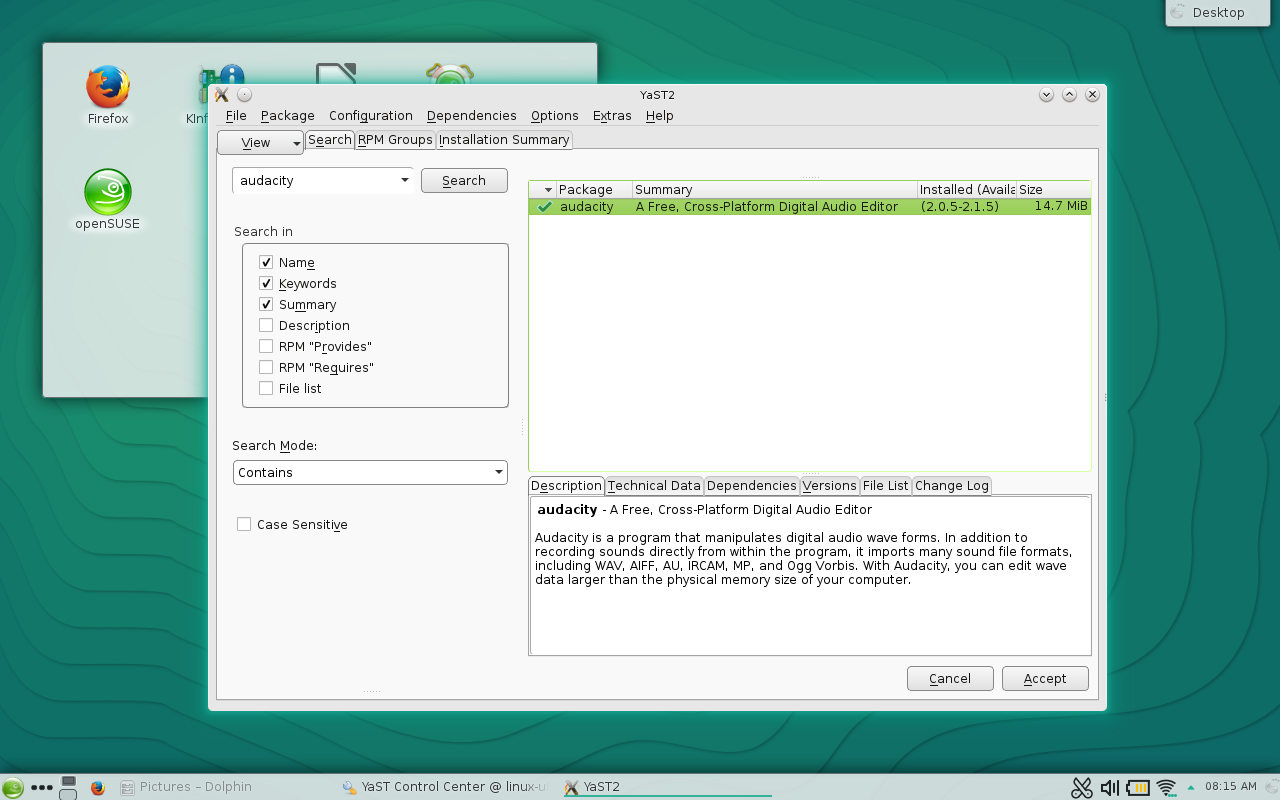
  3. When the software appears in the main panel, click the associated check box (Figure 3).

  4. Click Accept.

  5. Read through the dependencies (a popup will appear).

  6. If the dependencies are acceptable, click Continue.

  7. Allow the installation to complete.

  8. When the software is complete, click Finish.

yast 3

That’s it! You’ve officially installed your first piece of software on openSUSE.

Updating software

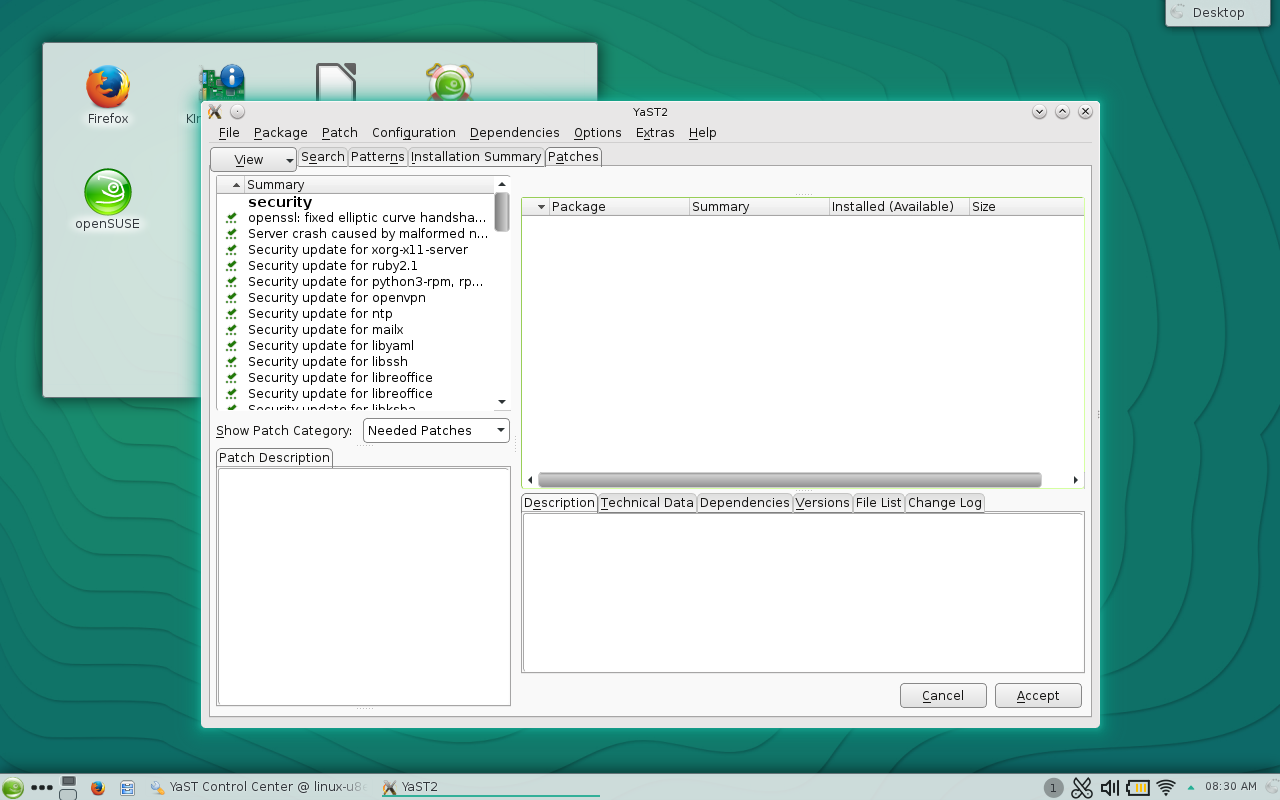
One of the most important things you can do with YaST2 is update your system. Updates are crucial as they often contain security patches and bug fixes. Updates are handled from within the same YaST2 sub-section (Software). Within that sub-section, you will find an entry called Online Update. Click that and YaST2 will check for available updates. When the check is complete, you will be presented with a full listing of what is available (Figure 4).

Upgrading your system with YaST2.

By default, all available upgrades will be selected for processing. You can comb through the package listing and de-select any packages you might not want to upgrade. However, if you opt to remove packages, from the upgrade list, know that they can impact other upgrades as well. If you’re okay with the list, click Accept and the upgrade will begin.

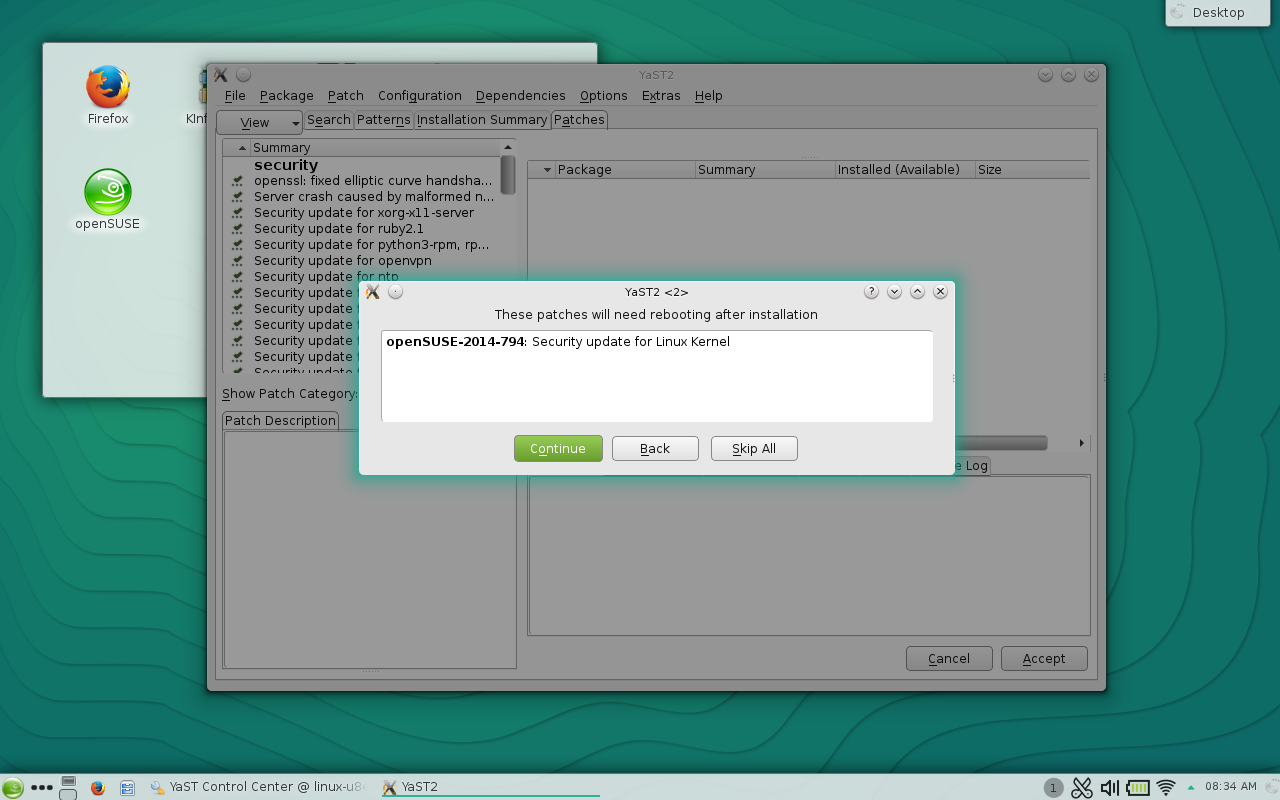
NOTES: In some instances (as with the upgrade of any Adobe packages), you may have to accept an End User License Agreement (EULA). There may also be conflict resolution to deal with. To resolve any issues, click Continue when presented with the dependency resolutions. If the kernel is being updated, YaST will inform you that a reboot will be necessary. To continue after this warning, you must click Continue (Figure 5).

yast 5

Depending upon how many updates are available, the process can take a while. Sit back and enjoy or go about administering your other machines or network. Once the update completes, reboot the machine (if prompted) and enjoy the latest iteration of your software packages.

Adding repositories

Now we get into something that may be a bit more challenging to newcomers. First and foremost, what is a software repository? Software repositories are simply online locations that house packages for installation. The openSUSE platform has its own, official, repositories and many other applications have their own. When you search for a piece of software to install within YaST2 ─ a software title you know exists for Linux ─ and it doesn’t appear in the search results, most likely YaST2 simply doesn’t know where to find it. Because of this, you have to tell YaST2 where that software can be found: a software repository.

Let’s say, for instance, you want to install the Google Chrome browser onto openSUSE. To do this, you will have to first add the official Google repository. Here are the steps:

  1. Open YaST2

  2. Click on Software (left panel)

  3. Click on Software Repositories (right panel)

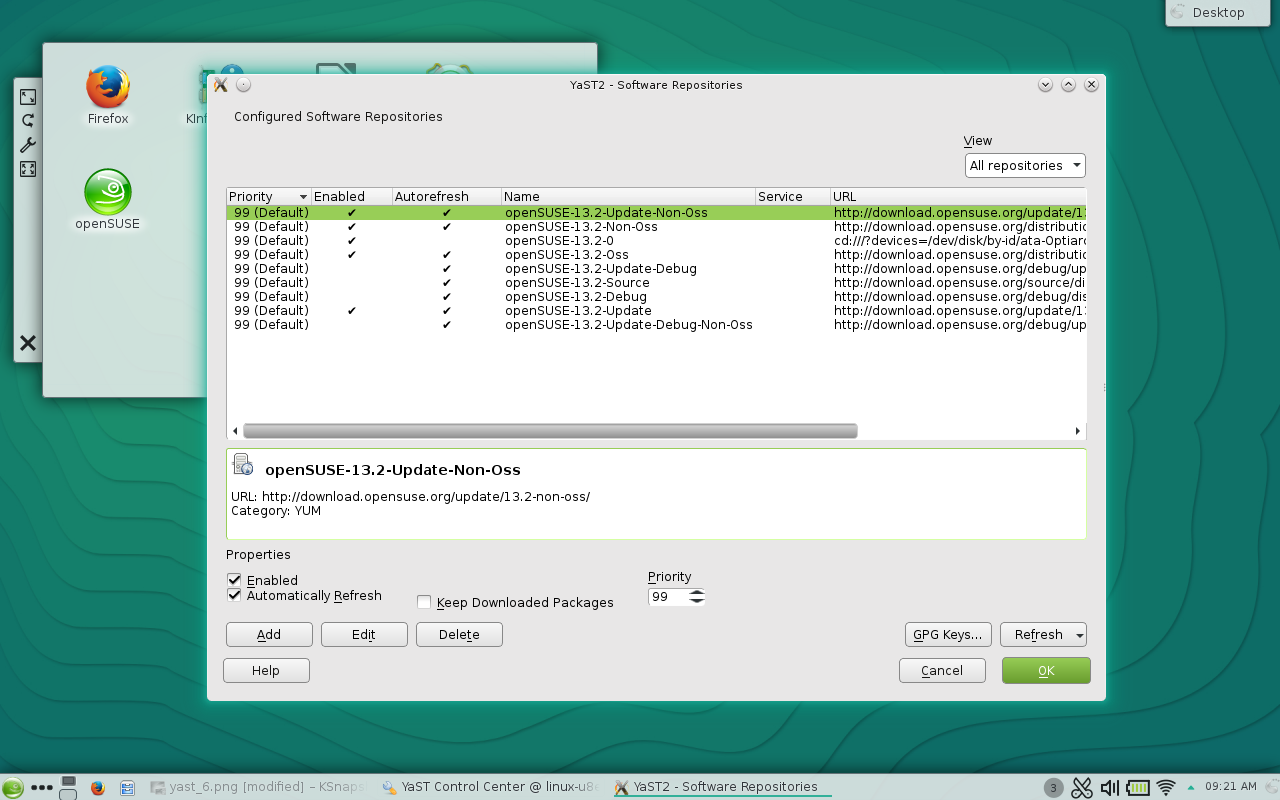
  4. From the Software Repositories click Add (Figure 6)

    Figure 6: Adding a new software repository.

  5. Select Specify URL and click Next

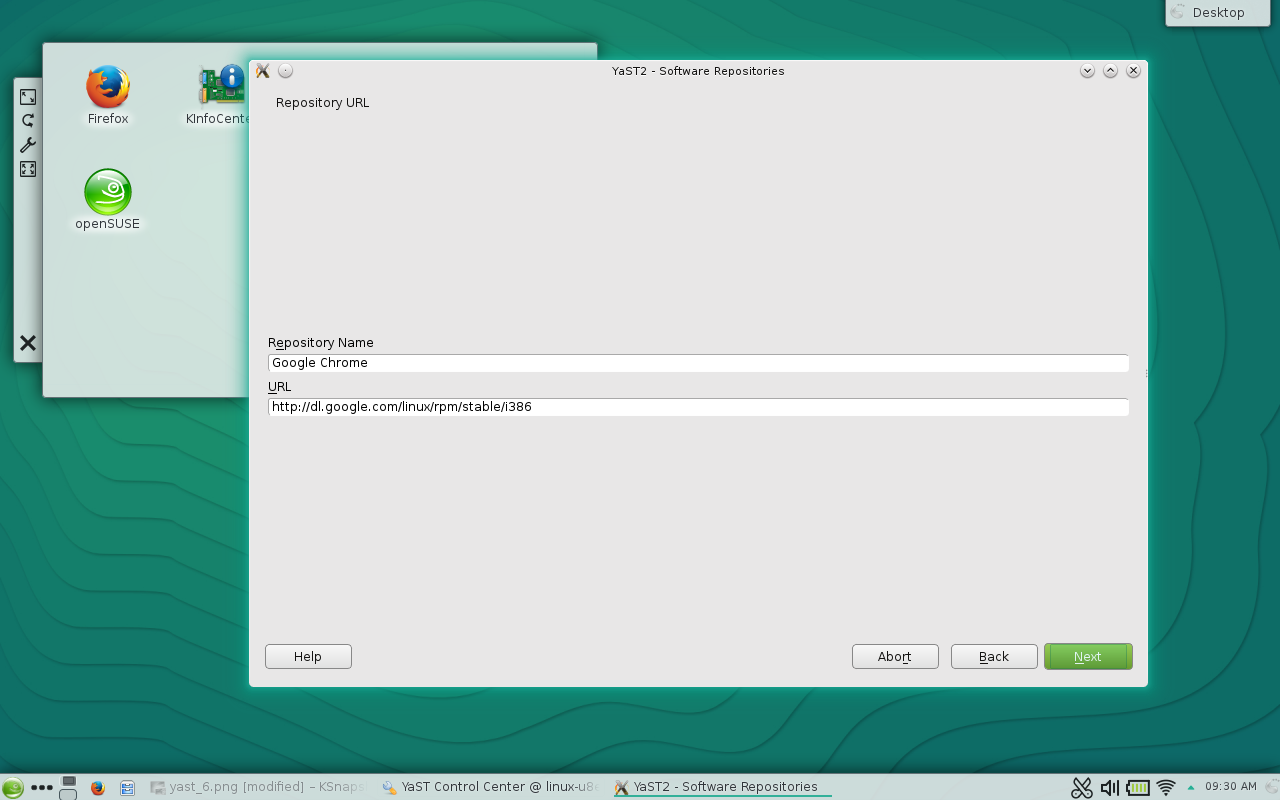
  6. Name the repository Google Chrome

  7. Enter the url http://dl.google.com/linux/rpm/stable/i386 (Figure 7)

    yast 7

  8. Click Next

  9. Click OK

  10. Click Yes (when prompted) to accept the GnuPG Key.

NOTE: If you are using a 64-bit machine, the above URL would change to http://dl.google.com/linux/rpm/stable/x86_64

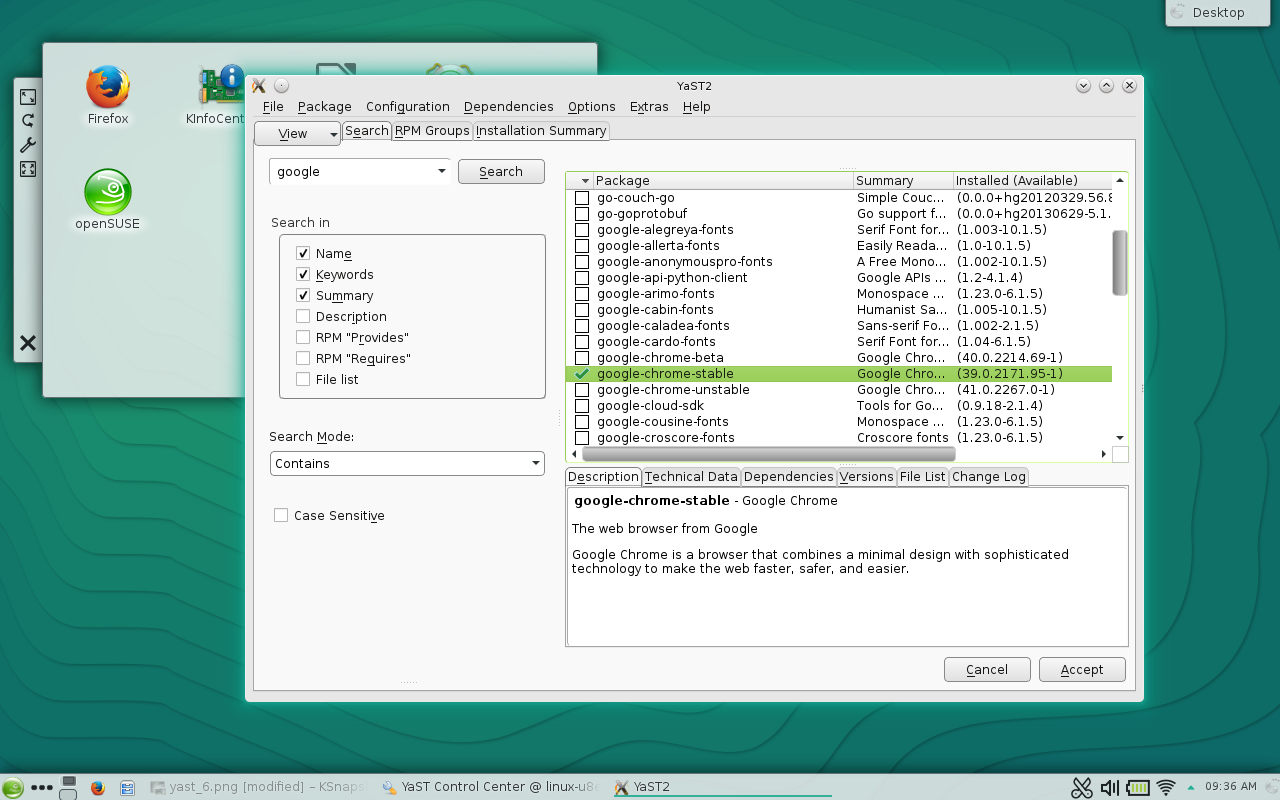
At this point, you can now go back to the Software Management section, search for Google Chrome, and install (Figure 8).

Figure 8: You can now install Google Chrome on openSUSE.

If you find a package you want to install on openSUSE, and it doesn’t show up in YaST2, a bit of googling should locate an available repository for the platform.

Managing software on openSUSE is not in the least bit challenging. Once you know where to look and what to do, you can be installing and updating software like a pro.


The Companies That Support Linux: Planisys

Carlos HorowiczAs cloud computing expands beyond the data center to include all connected devices, technologies are rapidly changing to meet the need. Cloud services provider Planisys recognizes this trend and has built its business on Linux in order to stay adaptable, says Carlos Horowicz, CEO and co-founder of Planisys.

By using Linux containers and Linux-based orchestration tools, Planisys is able to stay flexible amid changing hardware and networks, which in turn has helped the company to scale and stay competitive, he says. Planisys recently joined the Linux Foundation as a corporate member in order to better support the community that supports their business.

“We are fully aware, that our business model is completely based on Linux and this would not be possible without the strong Linux community behind the scenes,” Horowicz said.

Here he tells us more about Planisys, how they use Linux, why they joined the foundation, and the role of Linux and containers in current cloud computing trends.

Linux.com: What is Planisys?

Carlos Horowicz: Planisys is a Cloud Services Provider headquartered in Argentina with its hardware and connectivity infrastructure mainly in U.S. data centers.

Planisys provides businesses with CDN, DNS, and transactional e-mail services focusing on clients with high-traffic requirements like latin american online newspapers.

How and why do you use Linux?

Horowicz: We run almost every piece of software within a Linux Container, either as our management software or as part of a service. This way we have the flexibility to maintain, update and adopt new software in a consistent platform that always provides paths for upgrades and evolution to ensure business continuity.

The Linux-based orchestration tools, used in conjunction with containers, have made it possible for our company to grow in scale and be more competitive.

We are fully aware, that our business model is completely based on Linux and this would not be possible without the strong Linux community behind the scenes.

Why did you join the Linux Foundation?

Horowicz: We joined the LF as a strategy to help support the Linux community in its many different ways of contributing to different projects we rely on for our business. We emphasize our commitment to Linux, and desire to be known as a Linux and open source based company for talent recruitment.

Linux continuity is key to our business.

What interesting or innovative trends are you witnessing in cloud computing and what role does Linux play in them?

Horowicz: In the Latin American market, we are seeing that users are eager to adopt cloud-based standard technologies and are increasingly interested in the transparency and usefulness of cloud services, represented by its ease of use, understandable metrics and more intelligent monitoring alerts and logs.

This is being made possible by Linux as a consistent platform underneath.

How is Planisys participating in that innovation?

Horowicz: Planisys is striving to accomplish the transparency and usability trend by developing new user interfaces for its services that are more flexible and understandable to more people. This means also developing new abstractions related to the already successful Linux container model that reflect increasingly complex connectivity scenarios and container dynamics.

What other future technologies or industries do you think Linux and open source will increasingly become important in and why?

Horowicz: There seems to be a trend in deploying Linux and thus containers on different hardware platforms, cell phones are just one example, as the world becomes increasingly “software defined.” We will have to adapt to new and more diverse hardware and connectivity scenarios.

We expect also that the concept of cloud will not be limited to well-connected data centers, but rather extended to any area where there is an intelligent device and protocols for transmitting and sharing information.

Planisys sees a role in this future as a company that can manage, deploy, maintain, and update applications on containers, and provide new cloud services based on different hardware platforms and diverse connectivities.

What else is new or upcoming at Planisys that you’d like to share?

Horowicz: Throughout 2015, Planisys will be expanding its connectivity to U.S. and Europe peering points with strong commitment to IPv6, Anycast and Geo-based DNS, and implementing new user interfaces to its

CDN, DNS and Transactional e-Mail services to provide automated provisioning, better metrics and assertion-based alerts.

Interested in becoming a member of the Linux Foundation? Join now!

Tizen Starts 2015 With a Bang

The Samsung Z1 running Tizen.

As many of you know, I’ve been involved with Tizen for quite some time. I manage Tizen at the Linux Foundation, which means I get a unique perspective on the project. And as anybody who has talked with me about what I do, I am a huge supporter of the Tizen platform and its goals, and am a general optimist (including but not limited to Tizen, of course).

2014 was a big year, with Tizen wearables and cameras hitting the market, Tizen IVI 3.0 achieving GENIVI 7.0 compliance, and a lot of interesting platform work on Tizen:Common. 2015 has really gotten off to a great start as well, with the announcements at CES that all new Samsung Smart TVs released in 2015 will run Tizen, starting in February.

Last week was a special milestone, though. All new Samsung Smart TVs released in 2015 will run Tizen, staring in February.As you may have seen, the Samsung Z1 was released in India. I believe I speak on behalf of many when I say this was a day we’ve been waiting for, and it’s great to see it finally arrive.

As I said, I’m a huge supporter of this platform, not just because I have spent the past three years working on it, but because of what it represents. Let me put this into context.

Linux in general has been very successful in the embedded industry, partly due to its flexibility but also to the general economics of using open source. A lot of this success also is thanks to being in the right place at the right time. The Samsung Gear S smartwatch runs Tizen.Looking back over the last decade and a half, we as a society are quite fortunate that Linux hit a level of maturity right at the time that Unix was getting long in the tooth, when bandwidth was cheap and accessible, and when the capabilities of commodity hardware were really taking off. A large community of really smart people suddenly discovered they had an itch to scratch, and came together to create something that reflected their own current needs, not just those of systems designed years ago. Linux was truly a breath of fresh air for the entire IT and consumer electronics industry, and we’ve all been reaping the benefits of that. Even if you’re using something that doesn’t use open source (and where on earth did you dig up that old fossil?), chances are good they’ve had to scramble to keep relevant as their competitors increasingly use open source components. The economics of open source are unforgiving to those who don’t embrace them. These communities tend to innovate quickly, so you really can’t afford not to use it.

In many ways this mirrors the spirit of Tizen. In the embedded industry there’s a very clear itch – everybody needs to release better products faster, and nobody wants to pay to reinvent the wheel each time. The economics of rolling your own code on a project-by-project basis (even when it’s mostly open source) just are’t enough to guarantee success anymore.

I say Tizen is in the right place at the right time because it was designed to address this specific need, and makes use of components that scale well, from phones to cars to wearables to cameras to TVs and onward.

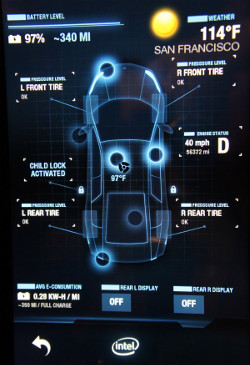
The Tizen In-Vehicle-Infotainment system.

From the beginning, the goal with Tizen has been to create a flexible, extensible body of code that could be used (and reused) for a huge range of devices, reducing the amount of device-specific adaptation as much as possible. Obviously at the kernel level Linux has been doing this for years, but the goal is to take this model several steps further. One of the main objectives is to identify and integrate a common set of software components above and beyond the kernel (called “Tizen:Common” from Tizen 3.0 onward), and then add specialized layers on top that are specific to the product.

While this may sound like a no-brainer strategy, in the world of embedded device engineering it’s harder to implement than it sounds. The power and performance budgets of embedded devices are usually very tight, capabilities vary greatly, user expectations are very high, and switching costs are low.

And yet power management and performance are where Tizen has done well, to date. This is due in part to the ongoing focus on power management and performance in the Linux kernel, but it also helps greatly that Tizen is a fresh look at what a mobile operating system should be for today’s devices. As a result it is significantly less encumbered by designs that made good sense years ago, but we probably wouldn’t do over again.

Samsung's NX1 digital camera runs on Tizen.Like many large, modern open source projects Tizen is a composite, constructed from other open source software components. We can pick and choose from the best of the best open source components, and design a system that reflects all of this open source innovation from the past few years. And so far, it’s paying off. Across the board, Tizen devices so far have done extremely well against their peers on things users actually care about, like performance and battery life.
The takeaway is that when building an embedded device for the mass market, there’s real value in using the right tool for the job. In this case, the right tool should reflect the realities and constraints of modern embedded system design. It’s far better than continuing to try and pound a square peg into a round hole.

So in light of this, I’m excited. Between Tizen TV, the Samsung Z1, all of the work going into Tizen:Common, a forthcoming release of Tizen IVI, and who knows what else, this is going to be a good year.

A Look at Pentoo Linux and Its Security Analysis Tools

Pentoo 2015 RC 3.7 provides updated tools and features, including the ability to verify that the distribution files have not been corrupted.

Read more at eWeek

Ubuntu Snappy Leads Mobile Linux Migration to IoT

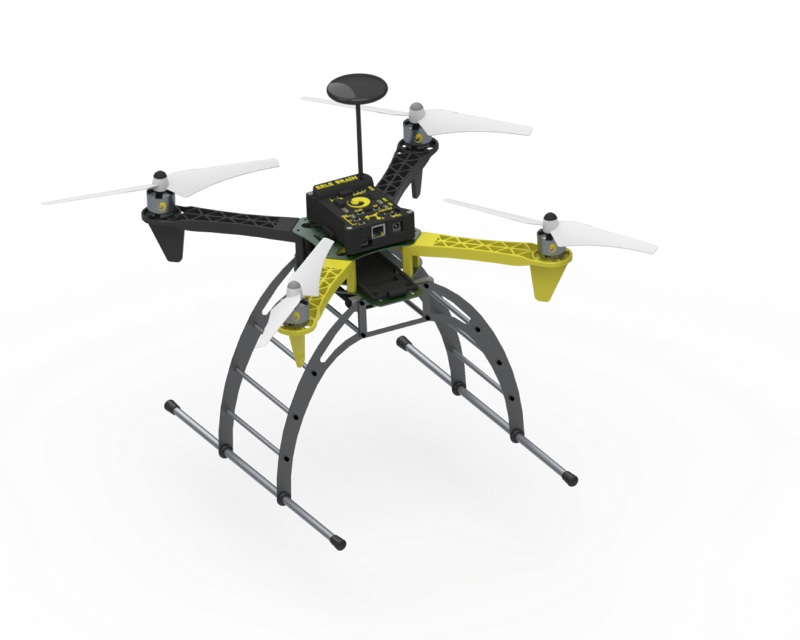
erlecopter droneThis week’s announcement of an Internet of Things version of Canonical’s lightweight Snappy build of Ubuntu Core is another sign that mobile Linux distros will find their biggest success not on phones but on embedded devices. Both the IoT- and almost identical cloud version of Snappy, which was announced last month, are based as much on Ubuntu Touch as Ubuntu Core. In particular, they borrow the mobile interface’s secure, automatic-updating package manager and app store support.

Snappy for IoT, which initially targets robots, drones, and home automation gear, differs from most of the other Linux distributions used in Internet of Things applications in that it has a cloud-based doppelganger that it can interact with. It also offers the same container support — specifically, Docker. Snappy appears to offer a more fully formed cloud strategy than most, which should prove important as companies face the challenge of managing thousands of wireless-enabled IoT endpoints. Canonical’s expertise with Ubuntu running on cloud platforms may well give it an edge here.

Like Ubuntu Touch, the IoT version of Snappy is a lightweight version of Ubuntu, and will be similarly folded into the mainstream Ubuntu framework this April with Ubuntu 15.04 (Vivid Vervet), which was just released in Alpha 2 form. Yet, it’s even lighter than Touch, requiring a 600MHz CPU, 4GB of flash, and 128MB RAM. Only 40MB of the RAM is used by the system while the remainder is used for apps.

“This is the smallest, safest Ubuntu ever, on devices and on the cloud,” wrote Ubuntu founder Mark Shuttleworth in his blog announcement.

Snappy on ARMv7, x86-64

Snappy integrates a hardware abstraction layer for hosting platform-specific Linux kernels, and features a “WebDM” web device manager that enables consistent boot procedures and app-store access across devices.

WebDM’s Ubuntu Touch-based update mechanism offers streamlined, automatic updates, and also helps block unauthorized updates, says Canonical. It uses a transactional systems management approach, so updates either deploy exactly as intended or not at all, claims the Ubuntu sponsor. Further security is added via AppArmor and other techniques, and Snappy’s OS and application files are kept in separate silos, and are read-only to block tampering.

Unlike Mozilla’s lightweight, and similarly alpha-stage, PiFxOS version of Firefox OS, Snappy does not support the ARMv6 Raspberry Pi, but it does support ARMv7 and x86-64 platforms. The BeagleBone Black and Odroid-C1 SBCs are the recommended ARM development platforms, while any x86 computer or VM should do the trick on the x86 side. (Here’s a Dustin Kirkland tutorial on loading Snappy on the BeagleBone Black.)

ninjasphereSeveral other community-backed ARM board projects are included on the list of 21 supporters, as well as chip vendor Allwinner and various IoT frameworks. The most important partner here, however, is the Open Source Robotics Foundation (OSRF), which maintains the Robot Operating System (ROS), a popular open source robotics platform that recently announced ARM Linux support. Ubuntu may not know much about robots, but combine it with ROS, and you’re well on your way. (Here’s a Martin Pitt tutorial on using Snappy with ROS.)

A testimonial from OSRF CEO Brian Gerkey suggests that Snappy’s app store was a key attraction. The app store “creates a market for innovation and competition in smart robotics, with apps and updates delivered straight from developers to a new class of open, intelligent robots powered by open platforms and open protocols,” stated Gerkey.

The first Snappy-fueled systems include the Erle-Copter drone, which supports both ROS and the first Linux version of APM (ArduPilot), the technology behind the Linux Foundation’s Dronecode project. In addition, the Ninja Sphere home automation hub runs Snappy.

Mobile Linux shifts to IoT

Canonical and others pushing mobile Linux distros are not giving up on mobile devices, but they no longer appear to be the main priority. The first Ubuntu phone running Ubuntu Touch is now expected to arrive in early March in conjunction with Mobile World Congress, and Samsung finally pushed its first Tizen phone out the door last week with its modest, India-targeted Samsung Z.

Mozilla’s hardware partners have been shipping Firefox OS phones since July 2013 in dozens of countries around the world, targeting the space between feature phones and low-end Android phones. Yet, Firefox OS does not appear to have made much of a dent in market share.

Meanwhile, Android continues to consume more of the mobile market, and Google has lowered Android’s RAM requirement to play better on lower end devices. It has also launched its Android One line of budget smartphones to try to head off any invasions from below.

As the smartphone begins to look less attractive due to Android’s continuing dominance and the growing saturation in affluent markets, embedded Internet of Things gizmos such as wearables, drones, home automation hubs, and smart TVs have emerged as easier targets for the mobile Linux contenders. Thanks largely to HTML5, Tizen and Firefox OS can still beat Android’s performance on lower end hardware. Meanwhile, LG has squeezed the formerly mobile-oriented WebOS into a successful line of smart TVs, and Samsung is baking Tizen into all of its 2015 smart TV line.

In conjunction with the Z1 phone release, Samsung made its strongest commitment yet to Tizen, stating in a blog entry that the Z1, as well as Samsung’s Tizen based smartwatches and cameras, represented “just the tip of the iceberg.” The company hinted that many, if not most, of its appliances would run Tizen, including vacuum cleaners and washing machines. Yet, the company barely mentioned mobile devices, which will likely stick primarily with Android for the near future as Samsung waits for the Tizen app library to grow.

Many are frustrated with the delays and cautious rollouts on new mobile Linux phones. General embedded developers, however, should be excited by the prospect of several sophisticated, standardized development platforms that are ready to roll with app stores, enhanced security, and other benefits. And the mobile Linux backers must be heartened by the knowledge that they’re entering embedded territories where mainstream Linux still dominates over the Linux-based Android — and where they are on a more equal footing with Google, Apple, and Microsoft. 

A Comprehensive Guide to Building a Scalable Web App on Amazon Web Services – Part 1

It seems like everyone today wants to build the next great scalable web app. And, at least according to Gartner, Amazon Web Services has emerged as the undisputed leading cloud provider where you should build it.

But AWS can look overwhelming. There are now over 40 different AWS services, and many concepts to think about when building your app. AWS provides excellent documentation on each of their services, helpful guides and white papersreference architectures for common apps, and even a program specially for startups where startups can receive one month free to speak with AWS Cloud Support Engineers, and in select cases, free AWS credits.

But how do you put it all together? What’s the relationship between, say, the Elastic Load Balancer (ELB) that you hear about that “just works” and the seemingly unrelated DevOps concept of Service Discovery? When does it make sense to use a non-AWS solution (e.g. using nginx instead of an ELB)?

Also, how do you balance the need to build an app quickly and inexpensively today, but that’s scalable for tomorrow?

My goal in this guide is both to answer these questions, and, more importantly, provide an overall framework you can use to think about how to answer these questions.

Read more at Airpair.

LXC Container Networking Deep Dive

This post is to consolidate all our LXC networking guides and also explore some advanced container networking that have limited use but are interesting nonetheless hence the Flockport labs monicker. 

We previously looked at basic LXC container networking; bridging, NAT, static IPS, public IPs etc and then at connecting LXC containers across hosts with GRE tunnels or secure Tinc orIPSEC VPNs. We also covered basic failover and load balancing with Keepalived and Nginx and with LVS. These networking guides apply to both LXC and VM networking in Linux in general with KVM or Xen for instance.

This would be a good time to brush up. This guide explores a few advanced LXC networking possibilities that depend on a fair understanding of LXC and VM networking.

Read more at Flockport Labs.

Kubuntu Vivid Alpha 2

The second Alpha of Vivid (to become 15.04) has now been released!
The Alpha-2 images can be downloaded at: http://cdimage.ubuntu.com/kubuntu/releases/vivid/alpha-2/
More information on Kubuntu Alpha-2 can be found here: https://wiki.ubuntu.com/VividVervet/Alpha2/Kubuntu

Read more at Kubuntu

Red Hat Is Hiring More Developers To Work On Wayland, Open-Source Graphics

Red Hat is hiring more developers that will focus on Fedora, especially the Fedora Workstation product, that in turn will flow back into RHEL and Red Hat Enterprise Linux Workstation. Among the type of work that Red Hat is looking for in the candidates include experience with Wayland, LLVMpipe, X.Org, compiler optimizations, graphics driver enablement, etc…

Read more at Phoronix