
 In the recent series on ARM single board computers I have covered the BeagleBone Black, MaRS, TI’s OMAP5432 Board, the Radxa, a few of the ODroid ARM machines, and many more. On the Intel desktop side I’ve covered the NUC and MinnowBoard. I’ve learned that outright performance is faster on the Intel NUC than any ARM machine reviewed so far — the tradeoff, of course, is cost. This time around we’ll see whether the ASRock Q1900DC-ITX motherboard retains the high performance characteristic of an Intel board but also dips down to the low cost and lower power draw of the ARM world.
The ASRock Q1900DC-ITX is one of the first Mini-ITX boards with an Intel® Celeron® J1900 (Bay Trail) processor. It costs around $100, including the CPU which provides four cores and can address up to 8 GB of RAM. Though it’s a traditional motherboard that one would mount in a desktop machine case, it can be considered in the light of a single board computer (SBC).
The Q1900DC has many of the things one would expect on a desktop motherboard: a few RAM slots, multiple on board graphics outputs, high channel sound support, SATA3 and USB3 ports, and PCIe/mini-PCIe. But the fairly low cost, small form factor, the ability to use a laptop power supply, and having the CPU as part of the motherboard makes it tempting to consider the Q1900DC as a competitor to SBCs based around the ARM CPU.
Many ARM SBCs come with RAM and storage built in. So to compare apples to apples you have to add the cost of a laptop power supply, some RAM, and storage to the Q1900DC. At the time of writing a 4 GB DDR3 SODIMM started at around $35 to $40. A case might also be a wise purchase depending on your environment.
Comparing Cost and Features
Costing storage to compare with ARM SBC is difficult because the storage used on the SBC varies and is normally in the range of 4-16 GB. For example, the Hardkernel ODROID-XU3 includes an eMMC interface to provide rather fast storage, some SBCs opt to use only SD cards to keep the cost down. So storage cost for the Q1900DC can range from a $10 USB pen drive to a $100 small capacity SATA3 SSD drive. This leaves the price range for the Q1900DC starting at $150 (plus laptop power supply) for an extremely minimal system.
Instead of using a traditional desktop power supply, the Q1900DC has a barrel plug and can be driven with a laptop power supply or another DC power source in the range of 9 to 19 Volts. Using a laptop power supply and low power SODIMM DDR3 memory, down to 1.35 V, should help to keep the power consumption figures down.The DC jack used to supply power to the ASRock Q1900DC has a 5.5 mm outer diameter and 2.5 mm inner diameter. As one would expect, ground is the outer shell contact and power the inner contact. The manual recommends a 30 Watt power supply for use with a single RAM stick and a single hard disk. This increases to around 80 W for two RAM sticks and four hard disks.
Desktop computer power supplies include many connectors to power a combination of molex and SATA disks. The ASRock Q1900DC includes several power cables which allow you to run normal SSD and hard disks by drawing power from connectors on the motherboard.
The most economical Intel® NUC Kit comes with the Celeron® processor N2820 and retails for around $150. Relative to the ASRock Q1900DC-ITX, a NUC includes a case and power supply among other differences. The N2820 CPU used in the NUC can scale up to the same speeds as the J1900 at around 2.4 Gigahertz. In a similar way the N2820 can burst its GPU up to 756 Megahertz compared to the J1900 at 854 Mhz in burst. A big difference is that the N2820 has only two cores, compared with the four that you get in the J1900. The ASRock Q1900DC-ITX also has many more connectors for SATA3 and USB3 than a NUC. Which machine is more appealing will depend on your application.
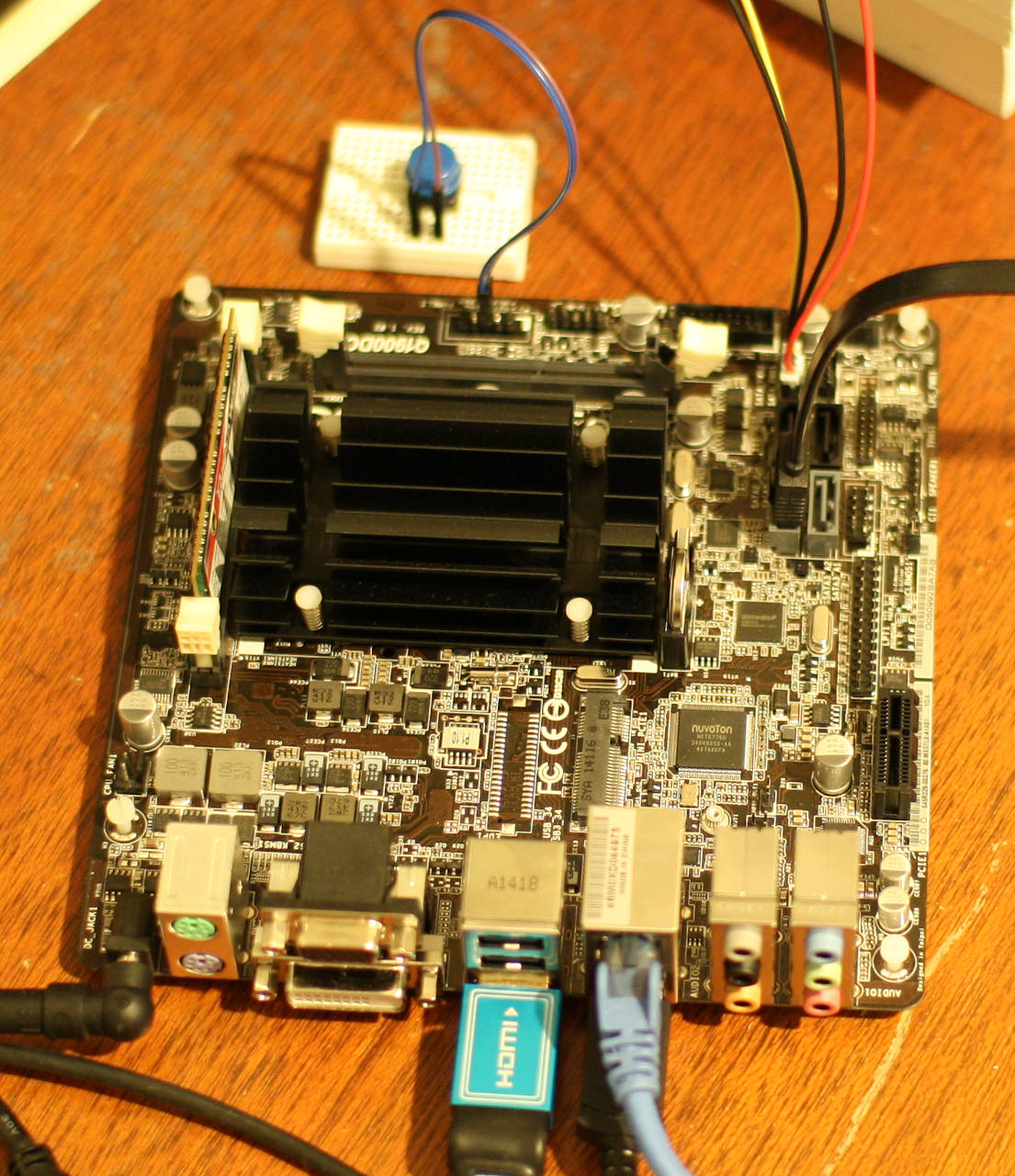
To use the ASRock Q1900DC without a case I had to use the system panel header to tell the Q1900DC to turn on. I found that using a button to temporarily ground the power button header on the system panel made the Q1900DC jump to life. This setup is shown at the top of the image of the Q1900DC. I offer this information about the system panel header without warranty of any kind for use at your own risk.
Performance with Ubuntu
The current long term support release of Ubuntu, 14.04.1, installed on the ASRock Q1900DC without issue. For testing I used a single stick of G.Skill 4G DDR3-1866 1.35 V memory and a used OCZ vertex 2 SSD. The gigabit network came up as expected and the desktop worked at 1080p without adjustment. I found that some OpenGL applications were quite sluggish with a default installation. This problem was resolved by installing a Linux kernel with more up-to-date graphics drivers. At the time of writing I used linux-image-3.17.0-997-generic.
I used an Intel 2600K CPU as a desktop processor to give some contrast of the performance that you might expect from the ASRock Q1900DC-ITX. The 64-bit version 32.0.3 of Firefox was used on both machines with the Octane Javascript benchmark. The Intel 2600K gave an overall figure of around 21,300 while the Q1900DC came in at around 5,500 overall.
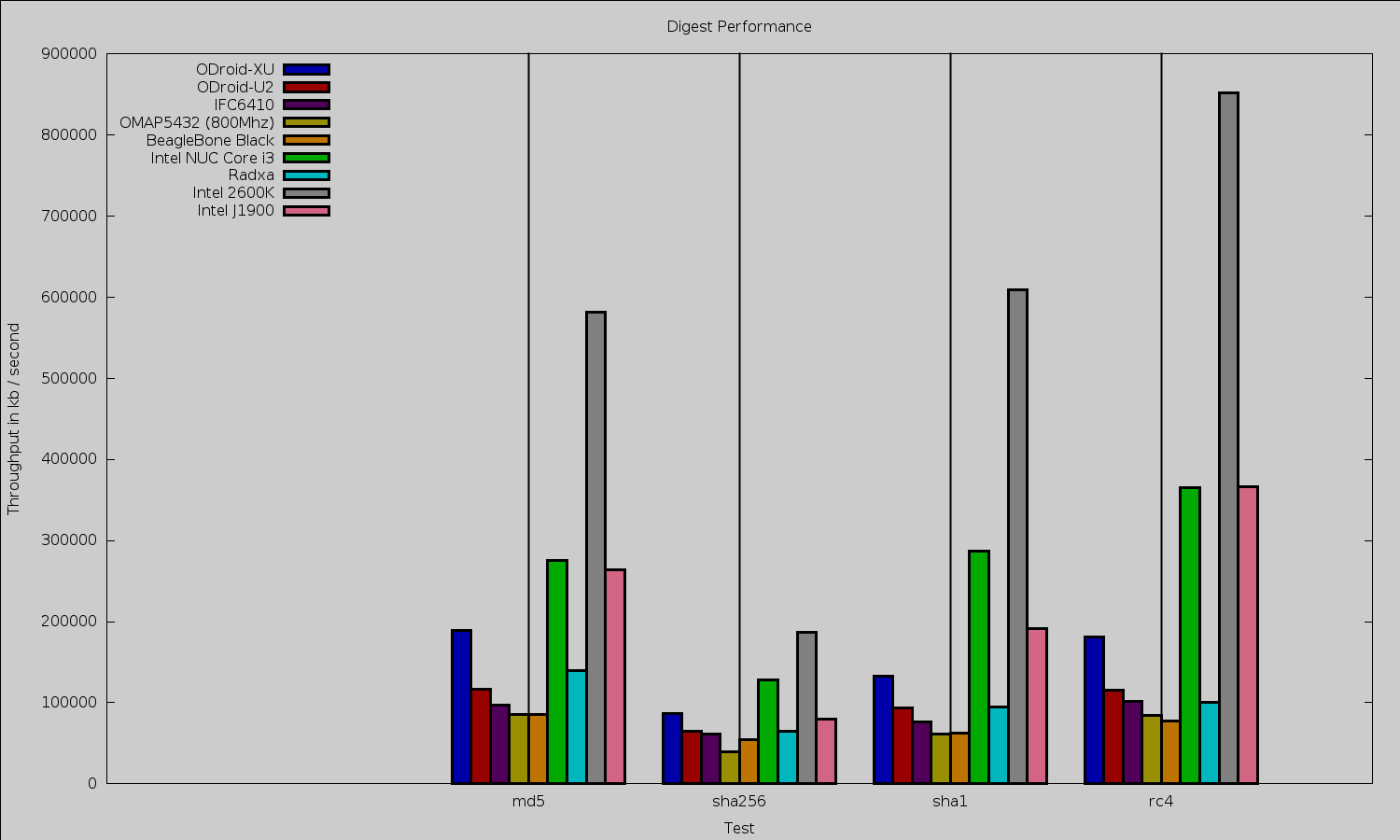
The openssl 1.0.0e “speed” benchmark results are shown below. First the digest performance. The relative similarly of the NUC and J1900 suggests that the digest test might be limited by RAM speed. Both the J1900 and NUC were tested using a single stick of low-voltage RAM.
I found an interesting disparity on the cipher test. For AES 256 CBC encryption, the J1900 ranged from 31,000 to 90,000 kilobytes/second. This was broken into the same performance on 16, 64, and 256 bytes, and the higher performance on 1024 and 8192 bytes. The Intel 2600K was more stable at 81,000 up to 87,500 kbytes/sec on the same tests. Given the break in performance at the 1024 byte size on the J1900 it is tempting to investigate if the gcc compiler has recently included a new optimization which the J1900 is taking advantage of.
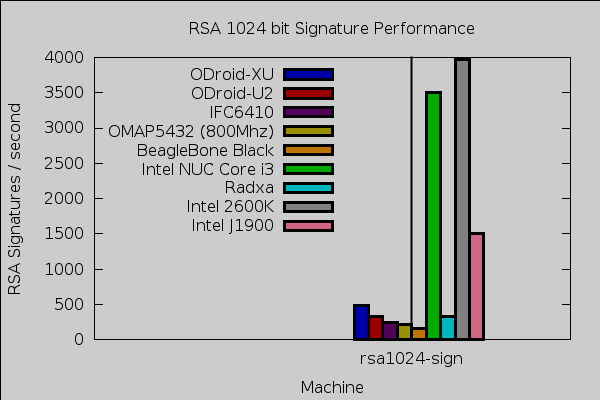
RSA signature performance is shown below. As can be seen the J1900 is well above the ARM boards and in the range of 2-3 times slower than the other Intel processors.
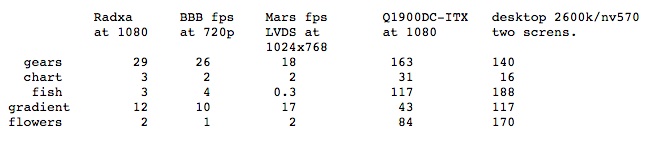
To test 2D graphics performance I used version 1.0.1 of the Cairo Performance Demos. The gears test runs three turning gears; the chart runs four line graphs; the fish is a simulated fish tank with many fish swimming around; gradient is a filled curved edged path that moves around the screen; and flowers renders rotating flowers that move up and down the screen. For comparison I used a desktop machine running an Intel 2600K CPU with an NVidia GTX 570 card which drives two screens, one at 2560×1440 and the other at 1080p. Clearly, if you require Cairo graphics performance then the Q1900DC-ITX is a very appealing choice. The chart and gears tests ran faster on the Q1900DC-ITX than an NVidia backed desktop machine.
Playback of Big Buck Bunny at 1080 with VLC ranged up to 120 percent of a CPU core with purely software decode. Installing the i965-va-driver package the CPU usage moved down to the 50-60 percent range.
Testing Power Usage
As for power usage, when plugged in and turned off the Q1900DC-ITX drew 4 W. After boot up to a default Ubuntu desktop the Q1900DC-ITX idled at 12 W (with the OCZ SSD, and a USB keyboard and mouse attached). A pm-suspend sleep dropped power consumption to around 4.5 W. During a make -j 4 compile (up to four jobs at once) of openssl power ranged up to 17 W. While running the Javascript Octane benchmark power usage ranged up to around 15 W. While running openssl speed power usage was around 14 W. Running three instances of openssl speed at once resulted in between 15 and 16 W used.
It is common to find ARM machines which can run an idle desktop in 2-4 W. By contrast the Q1900DC-ITX wanted about 12 W for an idle desktop. The Q1900DC-ITX is also powering an SSD which was not the case for the ARM machines. Having the Q1900DC-ITX consume 4 W when it is not even turned on is very suspicious. I tried disconnecting the SSD while the machine was off but the power draw remained at 4 W. Perhaps using a different DC source might eliminate some or all of that wasted power.
Wrap up
The ASRock Q1900DC not having an on-board on/off switch is a good indication that it is not aimed at being run on the benchtop like many of the ARM Single Board Computers. If you are happy to play around with some leads and a button and cobble together a case (or no case) of your own design then the ASRock Q1900DC can provide a fast machine at very low cost. The Intel graphics are very impressive when you install the correct Linux kernel.
Relative to some of the ARM machines you do not get multiple built in SPI and TWI interfaces to interact with other hardware. For some interactions using an Arduino on a USB port might cover your needs.
 Recently,
  As we approach the end of 2014, one of the biggest open source stories of the year has to be the rise of open platforms for cloud computing. OpenStack, in particular, grabs most of the headlines in this area, but CloudStack and other platforms are seeing much adoption as well.