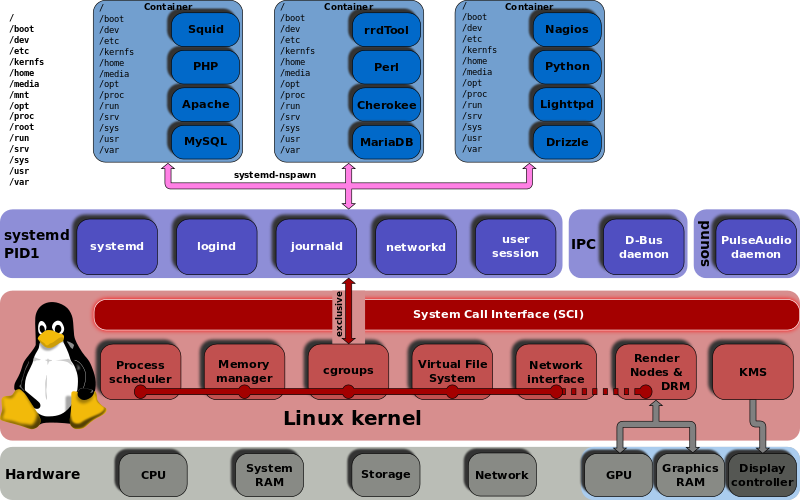
In olden times we had static runlevels. systemd has mechanisms for more flexible and dynamic control of your system.
Before we get into learning more useful systemd commands, let’s take a little trip down memory lane. There is this weird dichotomy in Linux-land, where Linux and FOSS are always pushing ahead and progressing, and people are always complaining about it. Which is why I am taking all of this anti-systemd uproar with a grain of salt, because I remember when:
- Packages were evil, because real Linux users built everything from source code and kept strict control of what went on their systems.
- Dependency-resolving package managers were evil, because real Linux users resolved dependency hells manually.
- Except for apt-get, which was always good, so only Yum was evil.
- Because Red Hat was the Microsoft of Linux.
- Yay Ubuntu!
- Boo hiss Ubuntu!
And on and on…as I have said lo so many times before, changes are upsetting. They mess with our workflow, which is no small thing because any disruption has a real productivity cost. But we are still in the infant stage of computing, so it’s going to keep changing and advancing rapidly for a long time. I’m sure you know people who are stuck in the mindset that once you buy something, like a wrench or a piece of furniture or a pink flamingo lawn ornament, it is forever. These are the people who are still running Windows Vista, or deity help us Windows 95 on some ancient, feeble PC with a CRT monitor, and who don’t understand why you keep bugging them to replace it. It still works, right?
Which reminds me of my greatest triumph in keeping an old computer running long after it should have been retired. Once upon a time a friend had this little old 286 running some ancient version of MS-DOS. She used it for a few basic tasks like appointments, diary, and a little old accounting program that I wrote in BASIC for her check register. Who cares about security updates, right? It’s not connected to any network. So from time to time I replaced the occasional failed resistor or capacitor, power supply, and CMOS battery. It just kept going. Her tiny old amber CRT monitor grew dimmer and dimmer, and finally it died after 20+ years of service. Now she is using an old Thinkpad running Linux for the same tasks.
If there is a moral to this tangent it escapes me, so let’s get busy with systemd.
Runlevels vs. States
SysVInit uses static runlevels to create different states to boot into, and most distros use five:
- Single-user mode
- Multi-user mode without network services started
- Multi-user mode with network services started
- System shutdown
- System reboot.
Me, I don’t see a lot of practical value in having multiple runlevels, but there they are. Instead of runlevels, systemd allows you to create different states, which gives you a flexible mechanism for creating different configurations to boot into. These states are composed of multiple unit files bundled into targets. Targets have nice descriptive names instead of numbers. Unit files control services, devices, sockets, and mounts. You can see what these look like by examining the prefab targets that come with systemd, for example /usr/lib/systemd/system/graphical.target, which is the default on CentOS 7:
[Unit]
Description=Graphical Interface
Documentation=man:systemd.special(7)
Requires=multi-user.target
After=multi-user.target
Conflicts=rescue.target
Wants=display-manager.service
AllowIsolate=yes
[Install]
Alias=default.target
So what do unit files look like? Let us peer into one. Unit files are in two directories:
- /etc/systemd/system/
- /usr/lib/systemd/system/
The first one is for us to play with, and the second one is where packages install unit files. /etc/systemd/system/ takes precedence over /usr/lib/systemd/system/. Hurrah, human over machine. This is the unit file for the Apache Web server:
[Unit]
Description=The Apache HTTP Server
After=network.target remote-fs.target nss-lookup.target
[Service]
Type=notify
EnvironmentFile=/etc/sysconfig/httpd
ExecStart=/usr/sbin/httpd/ $OPTIONS -DFOREGROUND
ExecReload=/usr/sbin/httpd $OPTIONS -k graceful
ExecStop=/bin/kill -WINCH ${MAINPID}
KillSignal=SIGCONT
PrivateTmp=true
[Install]
WantedBy=multi.user.target
These files are fairly understandable even for systemd newcomers, and unit files are quite a bit simpler than a SysVInit init file, as this snippet from /etc/init.d/apache2 shows:
SCRIPTNAME="${0##*/}"
SCRIPTNAME="${SCRIPTNAME##[KS][0-9][0-9]}"
if [ -n "$APACHE_CONFDIR" ] ; then
	if [ "${APACHE_CONFDIR##/etc/apache2-}" != "${APACHE_CONFDIR}" ] ; then
	        DIR_SUFFIX="${APACHE_CONFDIR##/etc/apache2-}"
	else
	        DIR_SUFFIX=
The whole file is 410 lines.
You can view unit dependencies, and it’s always surprising to me how complex they are:
$ systemctl list-dependencies httpd.service
cgroups
cgroups, or control groups, have been present in the Linux kernel for some years, but have not been used very much until systemd. The kernel documentation says: “Control Groups provide a mechanism for aggregating/partitioning sets of tasks, and all their future children, into hierarchical groups with specialized behaviour.” In other words, it has the potential to control, limit, and allocate resources in multiple useful ways. systemd uses cgroups, and you can see them. This displays your entire cgroup tree:
$ systemd-cgls
You can generate a different view with the good old ps command:
$ ps xawf -eo pid,user,cgroup,args
Useful Commands
This command reloads the configuration file of a daemon, and not its systemd service file. Use this when you make a configuration change and want to activate it with least disruption, like this example for Apache:
# systemctl reload httpd.service
Reloading a service file completely stops and then restarts a service. If it is not running this starts it:
# systemctl restart httpd.service
You can restart all daemons with one command. This reloads all unit files, and re-creates the whole systemd dependency tree:
# systemctl daemon-reload
You can reboot, suspend, and poweroff as an ordinary unprivileged user:
$ systemctl reboot
$ systemctl suspend
$ systemctl poweroff
As always, there is much, much more to learn about systemd. Here We Go Again, Another Linux Init: Intro to systemd and Understanding and Using Systemd are good introductions to systemd, with links to more detailed resources.
