Home Blog Page 1310

Android Creator Andy Rubin is Leaving Google

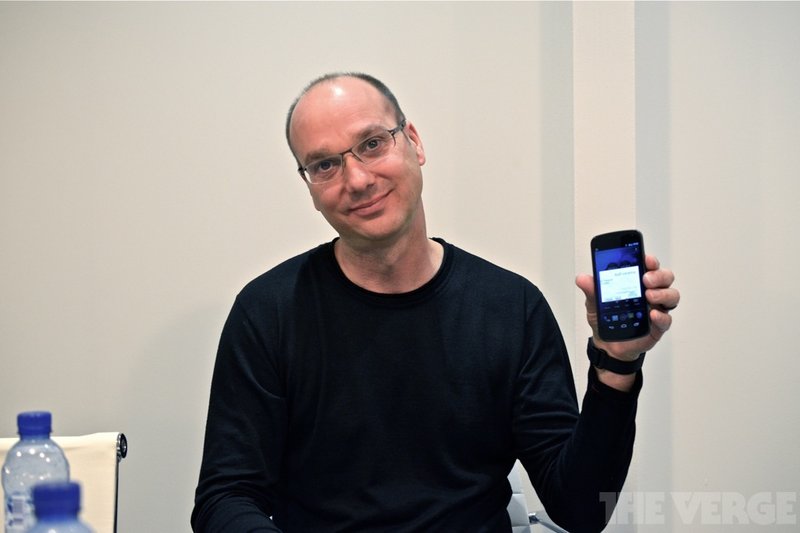
Andy Rubin, who co-founded the Android project, is leaving Google. According to The Wall Street Journal, Rubin’s departing to create an incubator for hardware startups. His role heading up the company’s robotics will be taken up by James Kuffner, a research scientist at the company and a professor at Carnegie Mellon University.

In a statement, Google’s CEO Larry Page thanked Rubin for his work. “I want to wish Andy all the best with what’s next,” Page said in a statement. “With Android he created something truly remarkable-with a billion plus happy users. Thank you.”

Continue reading…

Read more at The Verge

CoreOS Offers Private Docker Container Registries

Your containers, your data center, behind your firewall

Container-loving Linux vendor CoreOS has made its on-premises Docker container registry software available as a standalone product.…

Read more at The Register

Atom-Based Ubuntu Touch Tablet Specs Leaked

Specs have been leaked for a 10.1-inch Ubuntu Touch tablet called “UT One” that runs on an Intel Atom Z3735D SoC, with shipments expected in December. The UT One tablet was revealed by Phoronix, which said the leak came from Andrew Bernstein, a Linux developer who had previously launched a failed Arch Linux spinoff called […]

Read more at LinuxGizmos

Microsoft Unveils Second-Generation Open Server Design

At the Open Compute Project event in Europe, Microsoft officials rolled out server specs that include a dual-chip design and flash memory support.

Read more at eWeek

Six in 10 Experts Expect Major Cyber-Attack by 2015: Pew Study

Respondents to a Pew Internet study say a major cyber-attack by 2025 is likely. Security experts have ideas on how the risk might be mitigated.

Read more at eWeek

MariaDB Practical How-to for Linux Admins

Mariadb logoShe who rules databases rules the world. Even if you don’t want to rule the world, knowing a good set of database commands will make your life easier.

Most likely you won’t be performing many manual operations on your MariaDB database, such as creating tables and adding data, because it will be manipulated by other programs that use database backends. The following commands are more real-world, and show how to recover a root password, see what is in your database, how to get help, and how to search for a particular text string.

Lost Root Password

When you install MariaDB on Linux you have the option to create a root password. Chances are you immediately forgot it. No worries, because as long as you have Linux root access you can get into MariaDB.

First stop your database if it’s running. On Red Hat Linux, CentOS, and Fedora use the systemctl command:

$ sudo systemctl stop mariadb.service

On Debian, Ubuntu, and Linux Mint you can still use the service command:

$ sudo service mysql stop
 * Stopping MariaDB database server mysqld  

Next, restart MariaDB with the mysqld_safe command, which is the safest way to start MariaDB. --skip-grant-tables starts the server with no user restrictions, so it’s wide open:

$ sudo mysqld_safe --skip-grant-tables --skip-networking &
[1] 11278
carla@studio:~/Documents/1articles/linuxcom$ 141029 19:37:57 mysqld_safe Logging to 
syslog.
141029 19:37:57 mysqld_safe Starting mysqld daemon with databases from /var/lib/mysql

The --skip-networking option prevents anyone from sneaking in over the network. Obviously, don’t use this if you’re logging in remotely. Now you can reset the root password by using the mysql command shell. Login to MariaDB, select the mysql database, reset the root password, and then immediately exit:

$ mysql -u root
Welcome to the MariaDB monitor.  Commands end with ; or g.
Your MariaDB connection id is 1
Server version: 5.5.39-MariaDB-0ubuntu0.14.04.1 (Ubuntu)
Copyright (c) 2000, 2014, Oracle, Monty Program Ab and others.
Type 'help;' or 'h' for help. Type 'c' to clear the current input statement.
MariaDB [(none)]> use mysql;
Reading table information for completion of table and column names
You can turn off this feature to get a quicker startup with -A
Database changed
MariaDB [mysql]> update user set password=PASSWORD("new-password") where User='root';
Query OK, 4 rows affected (0.00 sec)
Rows matched: 4  Changed: 4  Warnings: 0
MariaDB [mysql]> flush privileges;
Query OK, 0 rows affected (0.00 sec)
MariaDB [mysql]> exit
Bye

Now try logging in with your new password:

$ mysql -u root -p
Enter password: 
Welcome to the MariaDB monitor.  Commands end with ; or g.
Your MariaDB connection id is 2
Server version: 5.5.39-MariaDB-0ubuntu0.14.04.1 (Ubuntu)

Use this one-liner to change the password of any user without logging in to the MariaDB shell:

$ mysqladmin -u carla -p 'old-password' password 'new-password'

Debian’s Back Door

Debian stores the clear-text password for its system MariaDB user in /etc/mysql/debian.cnf:

# Automatically generated for Debian scripts. DO NOT TOUCH!
[client]
host     = localhost
user     = debian-sys-maint
password = LofpsiQCKOcGzoqJ

You can log in with this user and do whatever you want, including reset the root password. The permissions on this file should be read-write for root only.

Seeing What’s Inside

Be careful when you’re monkeying around with your database, because some things need to be there, such as certain system users. Log in, select the mysql database, and list your database users:

$ mysql -u root -p
password:
MariaDB [(none)]> use mysql;
Database changed
MariaDB [mysql]> SELECT user, host, password FROM user;
+------------------+------------+---------------+
| user             | host       | password      |
+------------------+------------+---------------+
| root             | localhost  | *F6FE8C583C17 |
| root             | 127.0.0.1  | *F6FE8C583C17 |
| root             | ::1        | *F6FE8C583C17 |
| debian-sys-maint | localhost  | *21B2FE94870C |
5 rows in set (0.00 sec)

If you did not set a root password then root’s password field will be empty. Unlike the debian-sys-maint password in the configuration file, these are all encrypted. Why so many root users? Because MariaDB cares about where users make connections from, so root gets all the local ones by default.

You can see all of your databases:

MariaDB [mysql]> show databases;
+--------------------+
| Database           |
+--------------------+
| information_schema |
| mysql              |
| owncloud           |
| redbooks           |
| bluebooks          | 
| performance_schema |
+--------------------+
4 rows in set (0.00 sec)

information_schema, mysql, and performance_schema are all internal MariaDB databases. Do not delete or change them, or you will be very sorry. You can look inside them and see all of their table names:

MariaDB [mysql]> show tables;
+---------------------------+
| Tables_in_mysql           |
+---------------------------+
| columns_priv              |
| db                        |
| event                     |
| func                      |
| general_log               |

You can view the table structures, which shows all the columns in the tables, and all the variables that can assigned to users:

MariaDB [mysql]> describe user;
+------------+------------+------+-----+---------+-------+
| Field      | Type       | Null | Key | Default | Extra |
+------------+------------+------+-----+---------+-------+
| Host       | char(60)   | NO   | PRI |         |       |
| User       | char(16)   | NO   | PRI |         |       |
| Password   | char(41)   | NO   |     |         |       |
| Select_priv| enum       | NO   |     | N       |       |
| Insert_priv| enum       | NO   |     | N       |       |
| Update_priv| enum       | NO   |     | N       |       |

Now you see how we knew which fields to select when we listed database users. What if you want to see the data in the table? This example shows all of it:

MariaDB [mysql]> select * from user;

This will look like crap because there are so many fields, and you’ll need a giant screen for the output to display correctly. So let’s narrow it down and see who has superuser privileges:

MariaDB [mysql]> SELECT user, super_priv FROM user;
+------------------+------------+
| user             | super_priv |
+------------------+------------+
| root             | Y          |
| root             | Y          |
| root             | Y          |
| root             | Y          |
| debian-sys-maint | Y          |
| carla            | Y          |
| layla            | N          |
| toshi            | N          |

Now you know how to see which fields are in a table, and how to filter your searches with them.

Searching MariaDB For Arbitrary Text Strings

One way to search for an arbitrary bit of data is to dumb your databases into a text file, and then search the text file. This example formats the dump file with line breaks, so it is human-readable and grep-able:

$ mysqldump -u user -p --extended-insert=false --all-databases  > dbdump.txt

Of course you may dump selected databases:

$ mysqldump -u user -p --extended-insert=false --databases db2 db3 > dbdump.txt

Then grep the dumpfile for your search string, like this search for pinecones:

$ grep -i pinecones  dbdump.txt 
INSERT INTO `forest` VALUES (4,'PINECONE');
INSERT INTO `forest` VALUES (11,'PINECONES');
INSERT INTO `mountain` VALUES (21,'PINECONE');

This tell you which tables your search term is in– forest and mountain in this examples– and lists every occurrence of the search term.

MariaDB has detailed built-in help:

MariaDB [mysql]> help contents
You asked for help about help category: "Contents"
For more information, type 'help ', where  is one of the following
categories:
   Account Management
   Administration
   Compound Statements
   Data Definition
   Data Manipulation

MySQL isn’t going away, but MariaDB is quickly becoming the default database in Linux distros, and non-Oracle fans are replacing MySQL as fast as they can. Please visit MariaDB.com to read a lot more good documentation, and Moving from MySQL should be helpful to MySQL users who want to make the switch.

Stable Kernels 3.17.2, 3.16.7, 3.14.23, and 3.10.59

Greg Kroah-Hartman has announced the release of four new stable kernels: 3.17.2, 3.16.7, 3.14.23, and 3.10.59. As always, they contain important fixes and users of those series should update. Note that 3.16.7 is the last stable kernel in the 3.16 series; users should upgrade to 3.17 soon.

Read more at LWN

KVM Matures, and the Use Cases Multiply

KVM forum group photo 2014

LinuxCon Europe and KVM Forum were recently held in Dusseldorf, and the conferences this year reflected the changes taking place in the Linux ecosystem generally – and particularly around KVM.

Now that it has been a few weeks since the events and I have had time to reflect on what took place, there are a few prominent messages that came through. In case you were not able to be there, I’ll share some of the salient points in my view that emerged from the events.

LinuxCon Europe was Big

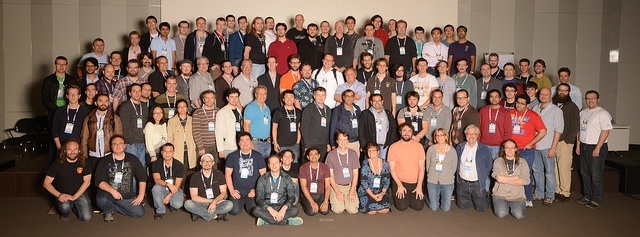
First of all, the conference was big. LinuxCon Europe was quite a bit larger than LinuxCon Europe last year. With the array of co-located events, including KVM Forum, there were over 2,000 delegates at LinuxCon. This really shows the strength of interest in Linux and also in the related open source projects such as KVM.

The Importance of KVM and OpenStack to the Open Cloud

At LinuxCon Europe, Mike Kadera from Intel and I presented a session on KVM, OpenStack and the Open Cloud to a standing room-only crowd. We discussed the architecture of KVM (Kernel-based Virtualization Machine), and looked at the requirements for building open clouds. KVM is one of a number of possible hypervisors available with OpenStack, but it is the default – and most commonly used – hypervisor with OpenStack.

In our view, there are 3 key reasons KVM is so frequently used for OpenStack:

  1. KVM excels at the choice criteria for a hypervisor, which are cost, scale and performance, security, and interoperability

  2. There is a development affinity between KVM and OpenStack. There are both open source projects – and KVM is the default hypervisor for OpenStack development.

  3. Because of the first two reasons, there is also a deployment affinity as well, which means that KVM is the best supported, easiest to deploy and most full-featured driver

In our presentation, Mike also shared Intel’s experience with KVM and OpenStack in terms of building the company’s internal IT cloud and talked about Intel’s goals for high utilization, as well as velocity resulting from automation and self service, along with zero business impact. He also reflected on the benefits the company has seen in performance and stability, and the lessons learned about implementing it and how management, enabled by OpenStack, becomes key.

We also looked at new and emerging developments in KVM and OpenStack. From a KVM point of view, we are expecting heterogeneous processor support spanning – ARM, POWER, System z and GPUs; network function virtualization; as well as additional performance improvements. OpenStack has also just released Juno, which adds automated provisioning and management of big data clusters using Hadoop and Spark.

New IDC White Paper on KVM

At the conference, a new IDC white paper “KVM – Open Source Virtualization for the Enterprise and Open Stack Clouds” authored by Gary Chen, was also released. Sponsored by the Open Virtualization Alliance (OVA), the white paper examines the current state of KVM, and identifies the critical elements to the future of KVM success.

“KVM plays a key role as the open source virtualization underpinning for both enterprise virtualization under traditional virtualization management, as well as in next-generation applications that are run on new cloud infrastructures such as OpenStack,” the white paper points out. The paper goes on to observe that KVM is rapidly increasing its market share and that “innovative projects like OpenStack continue to open more doors for KVM.”

Powerful New KVM Use Case –Network Function Virtualization

KVM Forum was also considerably bigger than last year, with lots of interaction and conversation.

KVM use cases are expanding beyond being simply virtualizing Linux servers. Network function virtualization is a cutting-edge use case for KVM that is being embraced by Telcos.

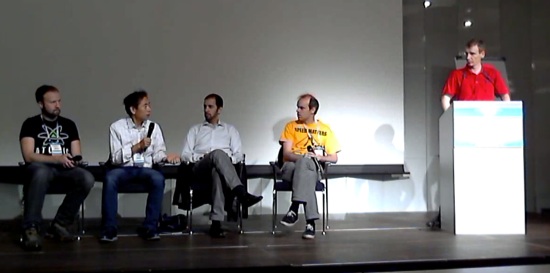
To shed light on this new trend, on the last day of KVM Forum, the OVA sponsored a KVM panel discussion. As the name implies, network function virtualization is about moving away from networking run on specific hardware to instead being virtualized on general-purpose hardware, thereby increasing flexibility and reducing cost.

KVM OVA panel 2014

In the past, communications networks have been built with specific routers, switches and hubs with the configuration of all the components being manual and complex. The idea now is to take that network function, put it into software running on standard hardware.

The discussion touched on the demands – in terms of latency, throughput, and packet jitter – that network function virtualization places on KVM when it is being run on general purpose hardware and used to support high data volume. There was a lively discussion about how to get fast communication between the virtual machines as well as issues such as performance and sharing memory, as attendees drilled down into how KVM could be applied in new ways.

Watch the video, below, for a replay of the panel discussion.

The Takeaway

As I look back in the rear view mirror at the conferences now, the key takeaway for me is that KVM use is rapidly expanding. From first being used to virtualize Linux servers, it has now evolved to form the basis of the open cloud, being used for emerging new uses such as network function virtualization, and running on many more processor architectures.

Thanks to the Open Virtualization Alliance for providing thought leadership and facilitating the conversation around these important issues at LinuxCon Europe through the LinuxCon breakout, IDC white paper, and KVM Forum panel discussion.

https://www.youtube.com/watch?v=60Ick60FU4E” frameborder=”0

Adam Jollans leads the worldwide, cross-IBM Linux and open virtualization strategy for IBM. In this role he is responsible for developing and communicating the strategy for IBM’s Linux and KVM activities across IBM, including systems, software and services.

He is based in Hursley, England, following a two-year assignment to Somers, NY where he led the worldwide Linux marketing strategy for IBM Software Group. He has been involved with Linux since 1998, and prior to his U.S. assignment he led the European marketing activities for IBM Software on Linux.

Windows 8.1 vs. Ubuntu 14.10 With Intel HD Graphics

For those curious how the latest open-source Intel Linux graphics driver is performing against Intel’s newest closed-source Windows OpenGL driver, we’ve put Ubuntu 14.10 (including a second run with the latest Linux kernel / Mesa) against Microsoft Windows 8.1 with the newest Intel GPU driver released earlier this month.

Read more at Phoronix

GNOME 3.15.1 Released

The first development snapshot for the GNOME 3.15 cycle is now available, which will end up being GNOME 3.16 come next March…

Read more at Phoronix