Home Blog Page 1327

Slideshow: The Linux Community Celebrates Ada Lovelace Day

Ada Lovelace portraitYesterday we celebrated Ada Lovelace, the mathematician and daughter of the poet Lord Byron who is often referred to as the world’s first programmer. In 1843, Lovelace wrote the first published description of an algorithm for Charles Babbage’s Analytical Engine, and was the first to express the potential for computers to be useful beyond mathematics. For this, she is also called the “prophet of the computer age.”

In celebrating Ada Lovelace, we recognize all of the women who were, and continue to be, pioneers and contributors in the advancement of computer science. In honor of the day, we asked Linux community members attending LinuxCon and CloudOpen Europe this week to show their appreciation by sporting Ada Lovelace pins during the conference. We captured a few of them in this slideshow.

Gallery


View Gallery
(9)


Intel’s Baking TPM 2.0 Support For Linux

Jarkko Sakkinen of Intel has published his revised patch series for providing Trusted Platform 2.0 (TPM2) support for the Linux kernel…

Read more at Phoronix

New Paper Available Today: State of KVM

ova logoOver the last decade, virtualization has drastically transformed the way software and services are provisioned and delivered. Coupled with open source hypervisors like Kernel-based Virtual Machine (KVM), these technologies have given way to amazing innovations in cloud computing, storage and more. The introduction of container technologies like Docker are also surfacing new opportunities as well as introducing new complexities, like any new technology.

According to IDC, more than 80 percent of new server shipments are virtualized a number that will increase to 88 percent by 2017. With a Compound Annual Growth Rate (CAGR) of 42 percent over the last three years, KVM is among the fastest growing hypervisors. With open virtualization and KVM as key elements of many of today’s server shipments and with new technologies, the time is right to more deeply understand the state of development and the opportunities for KVM users.

The Linux Foundation’s Collaborative Project Open Virtualization Alliance has sponsored a paper written by research firm IDC titled “KVM: Open Source Virtualization for the Enterprise and OpenStack Clouds.” It outlines the state of open virtualization and key opportunities for the KVM hypervisor.

This is the first such paper of its kind and includes important sections that cover the following:

– A KVM primer that describes the hypervisor and its role.

– How Virtual Machines (VMs) and containers stack up to each other. The paper defines both the VM and container technology and helps users understand where each is best optimized.

– Keys for KVM success in the market, including a look at KVM management, training and documentation, the hardware and software ecosystem and the role of KVM in OpenStack.  

– KVM opportunities and challenges. The paper points to management and cloud software, OpenStack adoption and Linux’s success in the server market as opportunities for the hypervisor. Potential challenges cited in the paper include strong incumbents in the hypervisor space, as well as continuing to grow the hardware and software ecosystem.

To download the full paper for more detail, please visit the Open Virtualization Alliance website. 

KVM Forum is happening this week with LinuxCon and CloudOpen Europe, so if you’re interested in learning even more about where KVM is today and where it’s headed, please drop by.

Women in Open Source Award Open for Nominations

We are proud to announce that Red Hat is now accepting nominations for the Women in Open Source Award. This award is the first of its kind, created to shine a spotlight on women making important contributions to an open source project, to the open source community, or through the use of open source methodology.

read more

Read more at OpenSource.com

A brief tour of new features in the management console for UCS 4.0

UCS 4.0 will be released in November. The second milestone, released last week, already includes the completely redesigned and restructured Univention Management Console (UMC).

People who are interested in finding out more about the new design and the motives behind it, are invited to read the article from Alexander Kläser, product developer at Univention, who explains it all in there.

The second milestone of UCS 4.0 is available to download for anyone and feedback for the improvement of this next major release is more than welcome.

http://blog.univention.com/new-features-umc-ucs-4-0/

For beginners – 3D assisted drawing

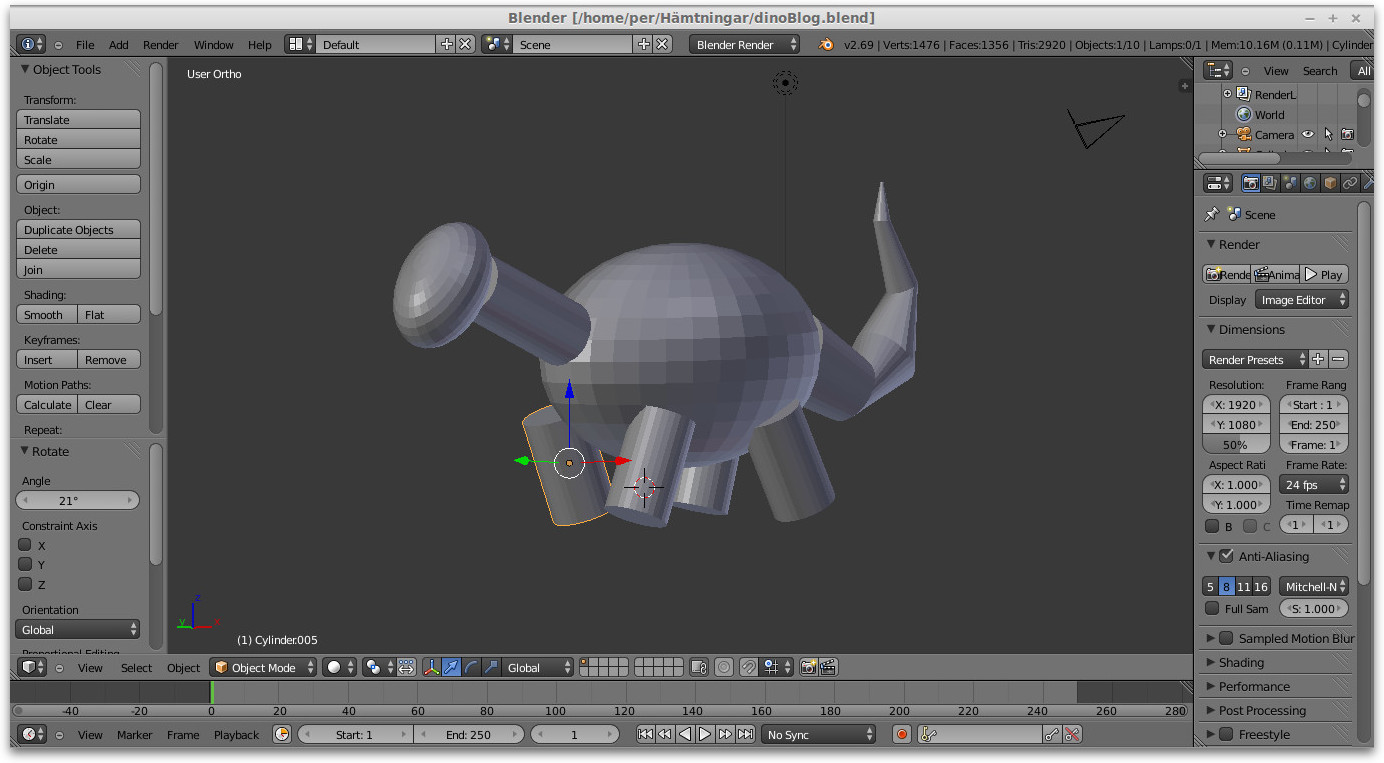
Have just tested a simple idea to make drawing easier. Basically I used the 3D software Blender to make a simple model of what I was going to draw. The model as in the screenshot below consists only of primitives and is very crude. First I thought of using an armature in the software but this was unnecessary. Just move and rotate the various body parts. Since I’m not trained at all in drawing I just put a piece of paper over screen and begin following contours. Then it was easy just to correct the drawing.


sBlenderDino


Blender 3D assisted sketch of the dino.

sDino

s


Interbrand top-100, Huawei becomes the first Chinese brand on the list

Inter-brand released the 15th annual Best Global Brands on Oct. 9, and a Chinese company broke into the list for the first time throughout history.

Huawei, a Chinese telecommunications and transmission network equipment manufacturer and the world’s third largest smartphone provider was listed No. 94 and is one of five new entrants on the Best Global Brands ranking this year. Maybe Huawei is more of a household name in Asia than in Western markets, but it has got its popularity and reputation globally with its rapid growth and long-term investments and earned its place in this year’ Best Global Brands ranking.

Focused on innovation and aggressive globalization, Huawei strategically utilizes its resources in accordance with market demand. Huawei is quickly becoming one of the world’s largest telecommunications equipment manufacturers with 65% of its revenue coming from outside of China.

Proved its strategy is prosperous, this transnational networking and telecommunications company is rapidly becoming the market leader in Latin America and Central Asia, and a major player in Canada. With the new marketing approach–getting closer to more customers which is to support its ambitions, the brand has recently launched a more consumer-friendly face. Its work that cooperated with telecom operators around the world is being leveraged as a way to show how much impact Huawei has on the world they live in. with these customers in mind, Huawei plans to eliminate 80% of the low-cost Mobile device this year. The goal is to develop products to meet consumer demand, instead of meet the minimum costs and operational specifications. Huawei’s star product line—Ascend is clearly shows that the company is trying to change their image in the mobile phone market, transform low-cost alternatives into a more advanced one. With smart phone sales volume go up since the first quarter of 2014, and the current 20% global market share is in the best brands place, Huawei is at its full speed and making its mark to the world.

Jono Bacon: Open Source is Where Society Innovates

Jono Bacon

Throughout history, social and technological progress has been the result of people working together for change. Today community is just as important and instrumental as ever – enabled by the internet and social media, said Jono Bacon, senior director of community at XPRIZE and former Ubuntu community manager, in his keynote Tuesday at LinuxCon and CloudOpen Europe in Dusseldorf.

From political movements such as the Arab Spring, to the democratization of manufacturing through 3D printing and increased open source adoption in the enterprise, online communities have, very literally, incited revolution within the past five years, Bacon said.

The Linux and open source communities are well-versed now in this form of collaboration. But the rest of the world is still in the early stages of online community-driven innovation, Bacon said.

“For those of us who know about open source and communities, we have the opportunity to be the first movers,” he said.

Bacon challenged open source managers and developers to set “bold and audacious” goals, using their knowledge of community to innovate on a grand scale.

“Open source is where society innovates; where we explore and create things that haven’t yet hit the mainstream,” Bacon said.

The XPRIZE, for example, just launched a $15 million global learning challenge for developers to create an open source software platform that will help kids teach themselves reading, writing and math on a tablet computer. The goal is to mobilize the open source community to increase global literacy.

How to Grow Community

No matter what problem is addressed, or in what industry, the principles are the same for growing open source communities. People need a sense of purpose, a level of empowerment, and a sense of belonging in order to produce sustained contributions to the community, Bacon said.

“Every person on this planet wants to live a life of dignity; We need to feel a sense of self worth and that we contribute in some way to society,” Bacon said. “To contribute we need to have access. This is the critical piece.”

This is not easy to achieve, but it’s possible through strategic community leadership. Here’s how to build a structured community, according to Bacon:

-Define the bold and audacious mission.

– Map a strategy, have goals and objectives and success criteria.

– Deploy infrastructure for collaboration and communication where people can work together.

– Create engagement on-ramps. Think about all the ways people can participate in the community and provide a simple journey for how they participate.

– Keep score.

– Execute honestly. Look at both successes and failures and learn from them.

Computing from a browser’s point of view

ChromeOS is starting to grow on me. Though it does not have the makings of a traditional desktop system, it is quite amusing to use. I have read and heard lot of news surrounding google’s browser OS system, though never used it. To my surprise, I spotted the system being used at a near-by town library.

Time for an adventure. I did not plan on spending much time on the machines, just testing. Perhaps is does have a hypnotic effect; whenever I travel to the library, I would pray a few systems were available.

Just a reminder, ChromeOS is a browser-based operating system, designed by google, that uses a web browser as the user interface to access only the internet and take advantage of web apps. The applications used on this OS are provided through a browser or from the google playstore. Imagine a general purpose desktop with only a web browser installed. The activities common to a desktop are now executed in your browser.

When I booted one of the systems, I was presented with a sign-in screen. Once signed in, the chrome browser automatically executes. Closing the browser signs you out of the session.

The system had a launcher panel with the most used web applications, chrome, gmail, google drive, and youtube. Clicking any one of these launchers opens itself in a new browser tab. You can also change the position of the web apps by clicking and holding one of the apps and drag them to a new location on the panel. At the beginning of the panel is a start-menu button. It lists all the installed web apps with a few other programs like a file browser, a google search app, and google’s playstore, like the ones installed on an android device.

What really caught my eye was the size of the computer hardware ChromeOS was installed on. All I saw was a small, black box-shape device. It was small enough to fit in your pocket. It was manufactured by Asus and only used USB ports for  device integration. Even the monitor was connected via a USB.

If your most important apps could be accessed via a browser, then your computer would be nothing more than an Internet terminal. You might even call your web browser a graphical command-line interface that allows you to click commands rather than typing them.

Cloud computing is accessing computer services from the Internet through a browser. A type of computer service accessed from a browser is known as SaaS(software as a service). Rather than installing software on your local computer, it is accessed only from a browser. Actually one of the early forms of browser-based software was the web-based email client. Never thought gmail and yahoo would have siblings. The software can either be accessed freely or with a cost. For computer services that require cost, check out AWS(Amazon Web services) http://aws.amazon.com/, or the open source cloud operating system “Openstack” http://www.openstack.org/software/.

I like to have the best of both worlds; own a traditional desktop and have it take advantage of web-based computing. When online, I utilize the web apps. Offline, my locally installed applications keeps me productive.

ChromeOS is a system that takes advantage of SaaS. It is also straight forward. If you spend most of your computer activities on the Internet, no need for a full blown desktop system. You just need something electronic that has an Internet browser.

“As people use more and more web applications, the operating system becomes less important and it makes no sense to pay for it. The desktop mail client could be replaced by Gmail, the calendaring application could be replaced by Google Calendar, the office suite has lightweight alternatives: Google Docs and Zoho, it makes more sense to use an online feed reader like Google Reader, your scientific calculator is less powerful than Wolfram Alpha and you’ll rarely need a video player when you have YouTube, Hulu and other video sites” (Alex Chitu)

(AlexChitu , http://googlesystem.blogspot.com/2009/07/google-chrome-operating-system.html)

This quote came from a blog written about chromeOS back in July of 2009 by Google’s CEO Sundar Pichai:

“Speed, simplicity and security are the key aspects of Google Chrome OS. We’re designing the OS to be fast and lightweight, to start up and get you onto the web in a few seconds. The user interface is minimal to stay out of your way, and most of the user experience takes place on the web. And as we did for the Google Chrome browser, we are going back to the basics and completely redesigning the underlying security architecture of the OS so that users don’t have to deal with viruses, malware and security updates. It should just work. Google Chrome OS will run on both x86 as well as ARM chips and we are working with multiple OEMs to bring a number of netbooks to market next year. The software architecture is simple — Google Chrome running within a new windowing system on top of a Linux kernel. For application developers, the web is the platform. All web-based applications will automatically work and new applications can be written using your favorite web technologies. And of course, these apps will run not only on Google Chrome OS, but on any standards-based browser on Windows, Mac and Linux thereby giving developers the largest user base of any platform” (Sundar Pichai)

(Sundar Pichai, http://googleblog.blogspot.com/2009/07/introducing-google-chrome-os.html)

Google is very innovative and very proactive. There is something working behind the scenes that inspired such developments like ChromeOS, AWS and Openstack. Perhaps, what we are starting to see is a new operating system in its infant stages, the browser. I have used some open source browsers that act like file managers when installed on a GNU/Linux operating system. From that browser, you can get a view of everything stored on your hard drive.

Cloud computing is still growing but gaining lots of interest. It is great to have access to the latest technology. Yet it is a must to learn how and why the technology was invented. Then look where it is going. There has been talk about an Internet based operating system in the past. I was trying to imagine what that would look like. Perhaps I don’t have to imagine anymore.

References:

http://googleblog.blogspot.com/2009/07/introducing-google-chrome-os.html

http://googlesystem.blogspot.com/2009/07/google-chrome-operating-system.html

http://static.highspeedbackbone.net/pdf/Chrome%20OS%20User%20Guide.pdf

 

Where New European Commission Leaders Stand on Open Source

At this writing, the European Parliament is wrapping up committee hearings and votes to approve or reject the proposed slate of new European Commissioners and Vice Presidents put forward in September by European Commission (EC) President-elect Jean Claude Juncker. These men and women (one from each of the 28 countries in the European Union), if approved by the Parliament, will lead and manage the activities of the Directorates General (DGs), which function as the EC’s departments or ministries.

read more

Read more at OpenSource.com