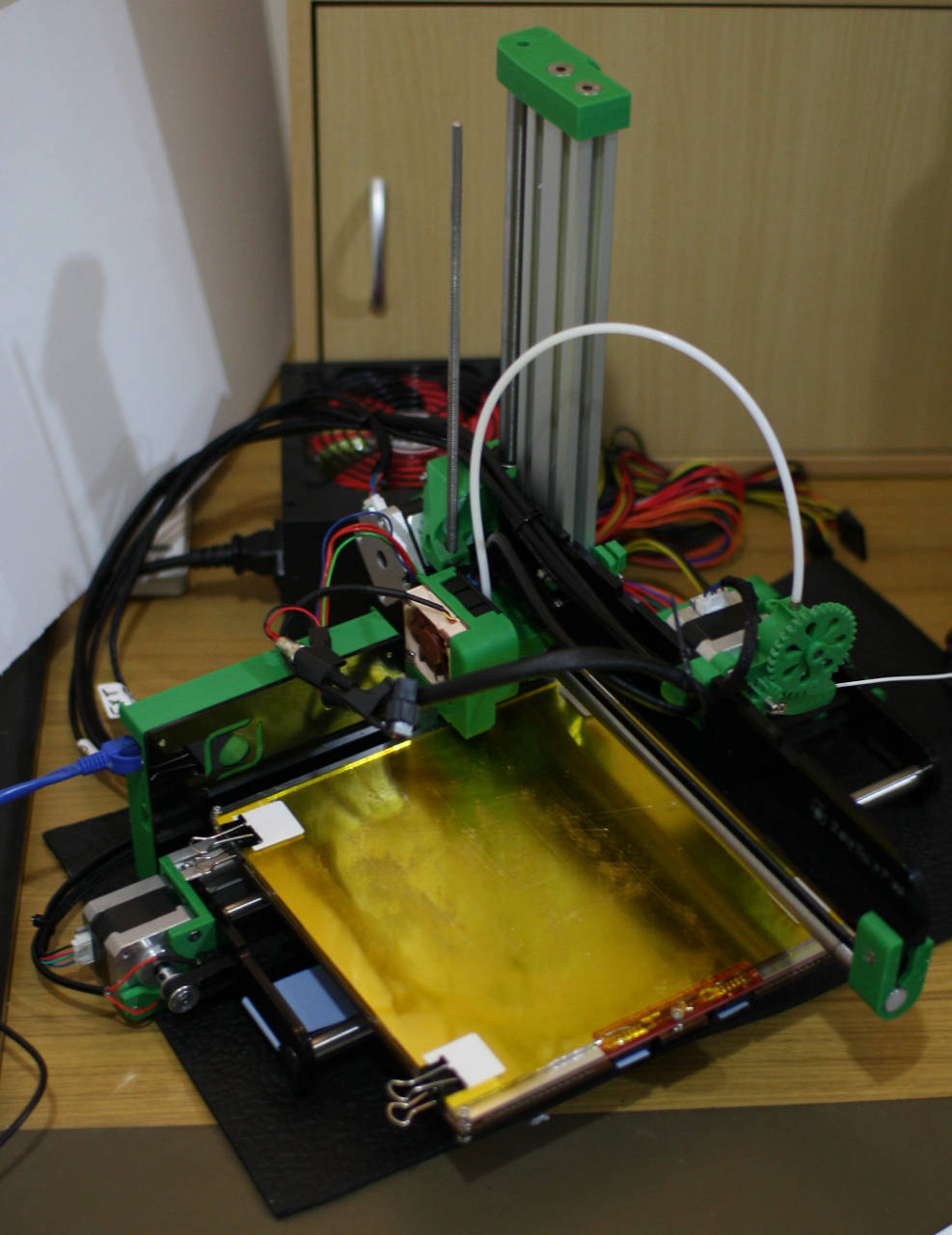
It is difficult to describe the joy of watching an object that you have designed being materialized in front of your eyes. Even more satisfying is watching it print on a machine you built yourself with open source hardware and control with open source software on Linux.
A 3D printer creates things by laying down plastic a little bit at a time to build the object up in layers. Technically there are many ways to “3D print” an object. At the moment the most popular method is using a reel of plastic which is fed to a hot end that can heat up the plastic and deliver a given amount of it at a specific location.
The process of slowly adding material allows you to create objects which are difficult to create if you were starting with a block of material and removing the pieces that you don’t want. 3D printing also allows you to create things relatively cheaply; a tablet stand that precisely fits on a space on the kitchen bench might only cost you 50 cents in plastic.
Another big advantage of 3D printing is the ability to design and create things without requiring the training, experience, and risk of physical damage that comes with using various tools to manually construct with wood or metal.
The RepRapPro Ormerod is a recent addition to the Reprap line of 3D printers. It uses open source software to drive open hardware. The controller board on the Ormerod is Duet. The Duet board uses the same core chip as the modern Arduino Due board and also includes stepper motor controllers, hotbed controlling, Ethernet, and a microSD card slot. Along one side of the Duet is a row of headers which you can use to extend the system. The primary power source of the Ormerod is a 12-Volt line taken from a computer power supply.
The entire process from designing your objects, slicing them up so the printer understands how to print them, through to controlling and streaming the files to print to the 3D printer is done using open source software on your Linux machine.
The plastic used in the construction of the Ormerod is itself printed on an Ormerod printer. You can download the source files to these plastic pieces and print your own, or make modifications to them to update your printer. The laser cut acrylic parts also have their source files available should you wish to create more or modify those parts. I built mine using a kit and tools I had on-hand.
Construction
A major advantage to putting together your own 3D printer is familiarity with the hardware. If a timing belt comes off then you know how to put it back because it’s the same procedure you used to get it there in the first place. Customization is also an option – and the temptation to tinker is great (see below).
The Ormerod is sold in an all-inclusive kit which includes all of the pieces that you need to get your printer going. The kit even includes some PLA plastic filament so you can start printing right away. It is assumed that you have a small collection of tools in order to put the Ormerod kit together. The official tools list is the reference for what mechanical and 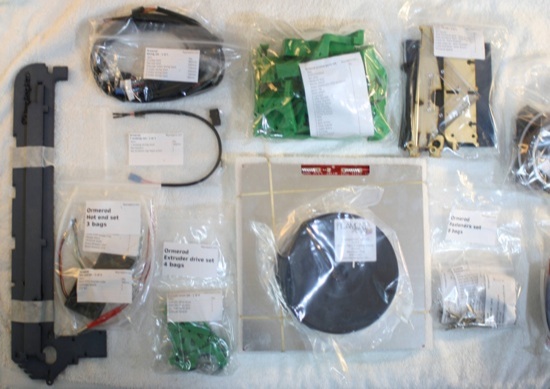 electrical tools you should have on hand to build the kit. The following is a shortlist with thoughts:
-
Either a crimping tool or soldering iron (and solder) to connect the hotbed thermistor. I used the later and didn’t need a crimping tool.
-
A quality set of metric hex wrenches from 1.5mm through to 4mm in size. Better wrenches tend to form a tighter connection in the bolt.
-
Some drill bits to hand operate in order to clean up some 3d printed parts. Some 3d printed parts might need a little 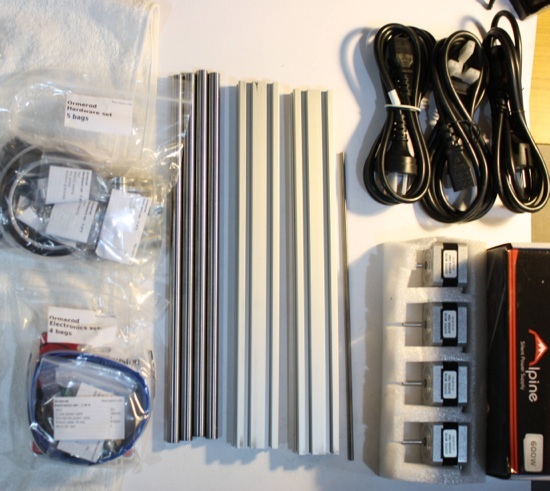 finishing work, removing a little excess plastic from the part.
-
A rubber mallet might be useful for inserting the 12mm metal rods into the base acrylic. That operation also calls for some small offcuts of wood which you might not have on hand.
-
Screwdrivers: While most of the bolts in the kit need a metric wrench, there are times when a screwdriver is called for such as removing a Phillips head screw from a stepper motor.
-
An adjustable spanner is useful to stop some nuts from turning while you tighten a connection. Many of the nuts fit into nut traps in the plastic parts so do not require any holding while you tighten the bolt.
-
Some scissors.
-
Items not on the official list: a Dremel or other rotary tool might be useful if you have it. Using a low RPM to avoid melting the plastic parts as you work on them.
-
Items on the list that you might not need: I don’t recall needing a Digital Multimeter during the construction, though I have one so might have used it. I avoided using a crimping tool in the one place that called for it. Other items that are on the reprap Pro tools list that I didn’t have one hand are Vernier or digital callipers, or any sort of vice.
I had the kit built and printing within a week. This was comprised of two full days of construction and several evenings of finishing work. It is useful to have two people building the printer on the first day as there are times when three or four hands in a single operation makes things much simpler. The best way to get a feeling if you will be comfortable constructing the kit is to read over the construction manual. There is also a 2 minute time lapse video of the process on YouTube.
The parts are shipped in many resealable bags. Having the parts for the extruder and hot end in their own bag helps to reduce clutter during the early stages of the build. Many of the bags shown contain smaller bags, each with a label showing the contents and number of each item. The bolts and fasteners are also grouped into smaller bags arranged to help you find the items you need for each build step, for example, a single bag of M3 nuts, and another with countersunk bolts. The Duet board that controls the printer is in a bubble wrap bag and is shipped alongside the power supply inside the power supply box. The two large rectangular extrusions which run along the Y-axis and up the Z-axis are shown next to the four stepper motors.
One factor which has an impact on how well 3D printing works is how repeatable the process is. If the printer can flex and move around then the plastic might not be placed in the exact spot that it should be. The Y axis (along the base of the printer parallel to the print surface) and the Z axis of the Ormerod are based on a very solid aluminum extrusion. These two rectangular aluminum blocks meet each other at 90 degrees and form a very solid core to the machine. A forum thread shows some examples of the quality of print that is possible using the Ormerod.
Tips for Easier Construction
The contruction manual contains many pictures showing you what to do at each step. Each section starts by showing a detailed list of the parts used to complete the section. At times the construction manual makes use of euphemisms; when you read that something is a ‘tight fit’ and ‘some force may be needed’ you might find that a fairly decent amount of force is required to complete the step.
A few other tips the manual doesn’t include:
– Although the instructions mention that a crimping tool is useful I found it was only called for when wiring up the thermistor connector for the hotbed. Instead of crimping I used two jumper wires with Male and Female connectors. I cut each jumper in half and soldered the halves to the thermistor and ribbon cable so that there was no direct hard-soldered connection and I could remove the hotbed if desired. The jumpers were held together with cloth tape.
– One setback that might happen early in the build is inserting the metal rods into the acrylic end plates. The manual describes the acrylic as quite brittle and the rods have to fit into tight holes in these acrylic end plates. For me, one of the end plates cracked from the rod hole to the edge of the plate while I was inserting one of the rods. This is unfortunate because it happens early in the build process and such an early setback might dishearten the builder. Luckily you don’t have to deal with acrylic again until much later when constructing the X-axis. The design files for the end plates are available so you can create new ones if you crack them badly. Another possibility might be using methyl ethyl ketone to cold weld the acrylic and repair the crack.
– The biggest recommendation I have for future kit builders is to have a quality set of metric hex wrenches with a long reach. Some of the bolts are recessed in the plastic quite a bit and a longer wrench is a great help. Using an electric tool to start tightening hex bolts would also reduce the build time a little.
– You will also want to apply some lubrication to the threaded rod on the z axis. I didn’t notice that instruction in the construction manual, though without lubrication I found that the parts were being ground down. Perhaps this is assumed knowledge, perhaps they are meant to grind down.
– The forums also recommend replacing the top nut on the threaded rod with a longer brass nut. Because brass is softer than stainless steel the wear should be mostly on the nut which is simpler and cheaper to replace than the threaded rod.
The Software Stack
It can be a little overwhelming dealing with so many new tools and file formats when you are getting started in 3D printing. At the lowest level is gcode files, which use an instruction set that the electronics board on a printer knows how to execute. Examples of gcode commands are “G1 X60 Y0” which moves the print head to x-axis ordinate 60 and y-axis ordinate 0. There are other movement commands, ways to turn on and off heaters such as on the hot bed and printer head, and commands to extrude a certain amount of plastic at a certain rate.
Higher up the chain of file formats is the STL format. This is likely the format of files you will find on websites like Thingiverse. Higher up the chain again are OpenSCAD files. In the next article I’ll go into these files, the programs that operate on them, and how to convert them down into gcode for printing with the Ormerod .
Updating the firmware on the Ormerod is done using the Arduino IDE. The IDE must be version 1.5.7 or later in order to have Arduino Due support. Although the Arduino IDE is included in the package repositories of most Linux distributions, you might find that only an older version of the IDE is packaged that way. While there are precompiled packages for 32- and 64-bit Linux at the time of writing there was no precompiled Arduino IDE for Linux ARM. So if you are hoping to control your Ormerod from a small ARM machine you might find it simpler to first update the firmware on the Ormerod from a laptop.
The Pronterface software lets you control the printer and print files and connects to the Ormerod over a USB cable. You can run the latest Pronterface by cloning its git repository and executing the ./ormerod.sh file. Some Python dependencies need to be installed such as pyserial and wxpython but they should be available in your Linux distribution’s repositories.
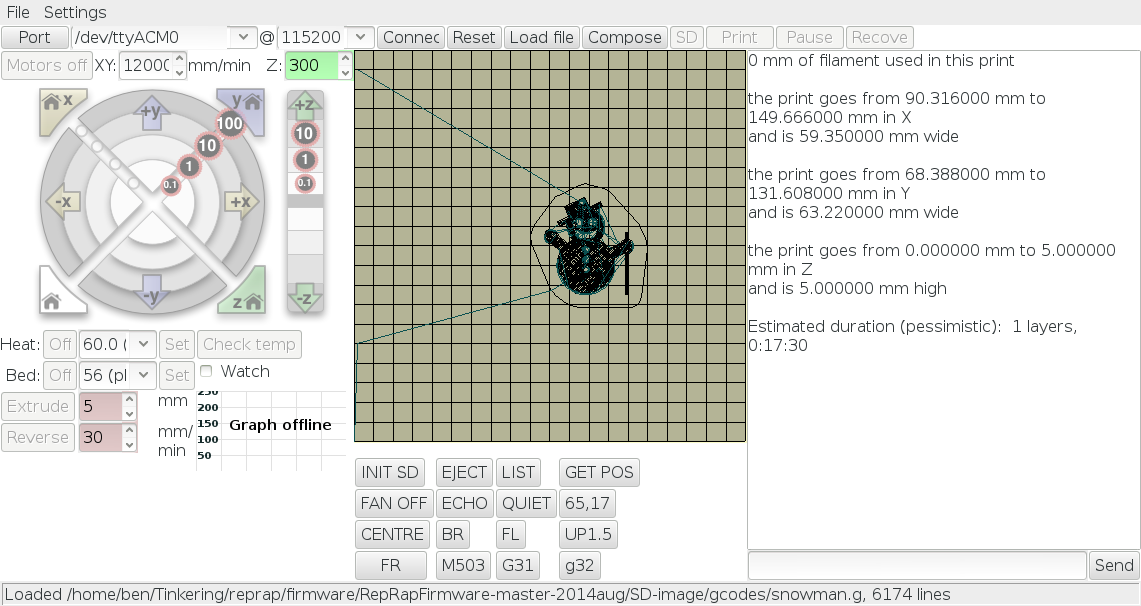
A screenshot of Pronterface is shown in this section. In the lower left side of Pronterface you can see the current temperature of the print head (Tool) and hotbed. Checking the Watch box will graph the temperatures over time. You can also set a target temperature for both temperatures and explicitly turn off the heaters. The circular interface in the top left of Pronterface lets you move the print head around. This is in distances from 0.1 to 100 millimeters (mm). The +y/-y move the hotbed towards the y-axis motor (+) or away (-). A positive x-axis movement is away from the z-axis. The z-axis movement is shown next to the circular interface. The three home buttons around the circular interface let you home each axis. Homing an axis will move it to a known point. For example, homing the y axis will move the platter to one end, when the microswitch is engaged the printer will know the platter is right at one end and will then move the platter to the other end of the y axis.
Shown in the middle of the interface is a layer from the current gcode that was loaded. Clicking on that image brings up another window and shift+mouse wheel will let you scroll through the layers in the print job. On the right side of Pronterface is the dialog with the printer and a text box allowing you to type in gcode commands to send to the printer. Some common gcode commands are shown in buttons in the bottom middle of the screen. The G31 button will ask the printer what value the proximity sensor currently has. The “GET POS” button asks the printer what coordinates it thinks the printer head is currently at.
The First Print
I had a few unanswered questions when I was facing my first print. How far should the filament be moved towards the nozzle before I start the print job? Is there any specific assumed location that the printer should be in prior to starting the print? And a few others. In some ways the first print is a bit of a leap of faith. You have homed all the axes and played around so you know that the printer head will move to where the computer tells it to go. But the first time plastic is moved out of the printer head is when the machine can start to be called a printer.
To answer the above questions, the filament can be easily back 3-5 mm from the hot end when you start a print. Most prints will include a border run around the perimeter of the object. If the filament was initially retracted then only part of that border will be printed. Most gcode files include axis homing at the start of the file, so the print head can be anywhere, but I found relatively low and close to the x-axis home was convenient. The gcode will also include positioning on the hotbed for the print, and after homing, will move the print head to that location before starting to print.
Some gcode files are distributed on the SD Card image including an axis compensation model and a snowman. I found the snowman very useful for testing if the print nozzle is low enough and the print head is at the correct angle. During the initial stages of print there are some times when the print head is raised and undergoes fast print head movements. If the heatsink duct on the hot end is too low it will collide with the printed object at sufficient speed to dislodge the partially printed snowman from the print bed. This will initiate the process of creating a ball of random plastic structure instead of a snowman.
I had to adjust the runner bearing on the x-axis carriage in order to set the angle of the hot end correctly so the snowman remained on the hotbed. When doing that, it is most useful to use a small screw driver to push the nut in the nut trap inwards while tightening the bolt again. I found that attempting to move the bolt head and bearing inwards only from the top was less effective. As the MR93ZZ bearing used to set the angle of the x-axis is 9 mm in diameter I found it a good idea to replace that bearing with one of slightly larger outer diameter rather than trying to move the original bolt and bearing combination inwards. A collection of similar bearings of 10, 11, 12, and 13 mm diameter should only set you back $10-$15.
The process of Z axis homing involves bringing the print head down very close to the print bed and telling the printer that you are now at “Z = 0”. I found it quite hard to judge small distances against the reflective glass surface. The process of using a piece of paper and moving the paper as you slowly bring down the printer head helped a lot. Once the printer head grips the paper a little bit you can assume that you are at Z=0.1 (because the paper itself is around 0.1mm thick).
The Temptation: Making Modifications
One of the major upsides to building a printer which is so open is that you can try out customizations that you dream up. Other than not using a crimping tool for the hotbed temperature sensor, two things I did in fairly short order were to move the filament spool and replace the rather noisy stock 40 mm hot end fan.
I replaced the default 40mm fan on the hotend with a much quieter 40mm fan from Noctua. Note that the default fan that comes with the Ormerod moves 8.1 CFM (13.8 m³/h) of air and the Nocuta I used only moves 4.8 CFM (8.2 m³/h). I did notice that the cool down curve took longer with the Noctua than with the default fan. But the difference in noise level was night and day. I will seek a quiet fan which has airflow closer to or above the default fan for a future update. Using the 60mm Noctua fan with a custom fan duct seems like a good candidate. Having similar airflow through the hot end fan is going to be very important for printing ABS plastic which has a hotter melting point and thus the fan must remove this additional heat.
The default location for the filament spool is on the side of the electronics box. This blocks the view of the electronics board which I didn’t want. Luckily there are many designs for filament holders on Thingiverse so printing a spool holder is a fun first task.
Hack your Pronterface
The Ormerod has feedback mechanisms which are used to home its x, y, and z axis. The y axis has a microswitch at one end of the axis. The x and z axis share the use of an infrared proximity sensor. Homing the X and Y axis can be done without any additional work when you turn on the printer. I found that the values given for the infrared proximity sensor to home the Z axis change quite a bit. Things like room lights and if a curtain are open can have an impact on how much infrared light is seen by the sensor on the Ormerod. This lead me to calibrate the Z axis homing each time I turned on the printer.
To streamline this process you might like to open your pronterface/.pronsolerc-ormerod file and add some custom buttons to it. For me, I move the print head to X60 and Y0 before homing the Z axis, so button 16 can be used to do that without typing. Button 17 (labeled as “ZH 0.1” will tell the printer that the print head is 0.1 mm above the glass. All that remains is to manually issue the G31 command to tell the printer what sensor value to expect to see when the print head is a few millimeters above the print bed. I’m hoping to make that later command a button too, but that involves running some commands on the printer to find out the current position and sensor reading to use when issuing the G31 command.
button 16 "ZH xy" G1 X60 Y0^M
button 17 "ZH 0.1" G92 Z0.1^M
Improvements in Ormerod 2
The Ormerod includes a heated print bed and can print PLA and ABS plastic. Printing ABS requires a hotter print head temperature and a much hotter print bed. The 3D printed parts that are on the Ormerod are made of PLA. It is recommended that you print updates to some parts of the Ormerod in ABS if you plan to print ABS.
I found that I had to recalibrate the extrusion stepper motor when I inserted a new roll of PLA into the Ormerod. The new PLA was from a different supplier and I am not sure yet if calibration is needed after each change of roll or only because the PLA supplier was changed. If you get bursty print output after changing your filament roll then you might be extruding too much plastic and need to recalibrate.
There are many improvements to the base parts available for the Ormerod. This is a good sign that the community is active in making customizations. Some replacement parts in alloy, like bed support and a replacement for the acrylic parts on the x axis. A discussion is also underway on replacing the infrared sensor with a HAL effect sensor for Z-axis homing. You might also like to 3D print an update to Double Helix Z-Gears or browse the list of improvements.
As you can see there is a decent investment in time to construct and tune a 3D printer. I found that when I encountered a new issue I could get good feedback from the forums and IRC channel on what I might do to resolve things. The next article in the series will show how to design your own models and prepare them for printing on a Reprap Ormerod. I’ll also take the Web interface that the Ormerod provides for a spin.
The Ormerod 2 also became available while this article was being written. The enhancements over the Ormerod 1 include improved Y-axis belt setup, easier bed level adjustment, and the Z-axis probe being differential, among other updates. The Z-axis probe update will help cut down the time it takes from when you switch on the Ormerod to when you are printing. Being differential, the probe should be less susceptible to fluctuations in ambient light and so your setting for the sensor value at 2.5 mm above the hotbed should not vary as much as with the Ormerod 1. Note that there is also a differential IR sensor upgrade for the Ormerod 1 printer.
I would like to thank RS Components for supplying the RepRapPro Ormerod used in these articles. The RepRapPro Omerod and RepRapPro Omerod 2 printers are available for purchase on RS Components’ Australian website while stocks last, or through RS Components’ main website, if you’re ordering internationally.

 GitHub last month reported that the number of government employees using the code sharing platform had tripled in the past year, to reach more than 10,000 users from 500 organizations. The accompanying graph (re-published here with permission) shows a steep adoption curve that perfectly illustrates a larger trend toward government use of open source practices and workflows over the past five years.
 Though he had at one point been hoping for an early release, Linus Torvalds unleashed version 3.17 of the Linux kernel on Sunday, thereby sticking to the “normal” schedule after all.
 waiting to another device,” developer Maarten Lankhorst