
Home Blog Page 1357

Why the Convergent Desktop is So Important to Linux

convergence desktop

There is one truth that all the Linux faithful hold near and dear to their hearts — that Linux is a leader when it comes to innovation. No other platform has been able to stake that claim for such a long period of time. Even when a different platform unveils something new, many times that innovation can be traced back to Linux.

One such technology is the convergent desktop. The idea behind the convergent desktop is simple — a seamless transition from mobile to desktop (or laptop). This all started, for better or worse, with Ubuntu Edge. The idea behind Ubuntu Edge was brilliant: A high-end smartphone that, when plugged into a dock, would serve as a traditional desktop. Although the project ultimately failed (due to an inability to raise the $32 million dollars necessary to bring Ubuntu Edge to life), the idea stuck and now every platform is in a race to deliver the convergent desktop.
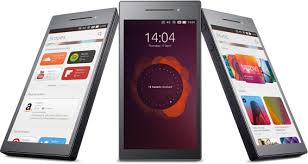
ubuntu phoneFirst off, why is this idea even considered to be of importance? That answer is simple. Mobile devices have overtaken the desktop in both usage and sales. For example, in 2013 desktop sales totalled (in the thousands of units) 315,229, whereas smartphone sales totalled 1,875,774. That is a sizable difference. Clearly, people (especially younger generations) depend upon their smartphones more than their desktops. Because of that, the transition between mobile device to desktop will eventually need to become seamless. The desktop and the mobile experience will have to become one — otherwise, the desktop will continue to stagnate and users will, more often than not, defer to the platform they know best — the smartphone. To that end, convergence has to be a crucial factor for desktop OS designers/developers.

The Linux community understands this — as was made clear by Canonical’s first efforts with Ubuntu Edge. With that project scrapped, Canonical is now looking at the Ubuntu Unity interface being the primary driving force behind the convergent desktop. When Canonical made the controversial switch to Unity, their goal was one interface for all devices — from smartphone, to tablet, to laptop, to desktop, to server. If you knew Unity, you could use any device. Simple.

Why is convergence important?

The big question, however, turns back on itself and asks “Why is convergence so important to Linux?” Although many may argue the importance of convergence, it cannot be denied this technology will be a giant leap toward bridging the gap between mobile and desktop devices. The ability to simply dock a smartphone and have all files and data instantly and automatically in sync is the golden ring of mobile efficiency — even beyond the cloud. The first platform to grab that ring will immediately be launched to the head of the pack.

But for Linux, it’s about more than just leading the march, it’s about claiming its right as a leader in innovation. For so many years, the competition has borrowed technological advances from Linux and called them theirs. Those “innovations” have led the world to see the competition as superior — when, in so many instances, they are just copying what Linux has brought to the table. At this moment, that is all in the past and the one innovation Linux needs to be known for is convergence. It was the Linux community that dreamed up the idea of melding the mobile and desktop platforms together and should they (read Canonical) fail to succeed and another platform achieve the goal, Linux will be seen, again, as the “little platform that could”. We’ll get a pat on the back, a “nice effort”, and not much more. Linux needs to bring convergence to light before any other platform to prove itself a leader, to establish itself at the head of the class in innovation — a title it should already enjoy.

Convergence is Linux’s baby to birth and Canonical already stands above the competition in development. But should either Apple or Microsoft succeed in bringing to market a convergent desktop before Linux, we’ll be faced with another failure…another year in the 1 percent market share range… and this time, it could stick. A failure to produce convergence could also equate to Linux smartphone failure.

Good Timing

The timing for the Linux convergent desktop could not be better. With a Linux-based mobile platform already ranked #1 in the world (Android achieved 85% market share in Q2 of 2014) and another Linux-based platform (ChromeOS) helping to drive sales of another platform (Chromebooks) to number one, Linux could not be better primed for a major success. If Canonical delivers both the Ubuntu Phone and the means to converge it with the Ubuntu desktop, the success this would bring can not be overstated.

Much to the chagrin of a good portion of the Linux community, the importance of this rests squarely on the shoulders of Canonical and Ubuntu. Regardless of your opinion toward Canonical and Ubuntu, they are closer than any other company or distribution to realizing the goal of either the pure Linux phone or the convergent desktop. And imagine how this would go over: With Android, with Chromebooks, and with the convergent mobile-to-desktop experience of Ubuntu — Linux would become the technological desktop force most of us already know it to be.

Linux needs convergence, not just as a badge of honor or to say “We did this first!”, but to have both consumers and businesses take Linux seriously (as both a desktop platform and a leader in innovation). No matter where your opinion of convergence or Ubuntu stands, if you want Linux to continue moving forward (and gaining significant moment in the upcoming years), you should want this for your platform of choice.

23 Years of Terrible Linux Predictions

Minix message

We recently celebrated the 23rd birthday of Linux – with the original announcement of our beloved kernel having appeared, as if by magic, on August 25th, 1991.

[Incredibly important side note: Later that same day, Cheers would win its fourth Emmy award for Outstanding Comedy Series. This is important for two reasons. The first being that I just remembered how much I loved that show…. I should watch it again. The second reason is that I spent two minutes of my life looking up and verifying this information. Now you are spending two minutes of your life reading about it. That’s the circle of life, boys and girls.]

Nostratuxus predictionsTwenty-three years old. That got me thinking, “That means Linux will be 25 years old in just two years. A quarter of a century. What will happen to Linux between now and then? I should write down my predictions in an article and send it over to those swell chaps at Linux.com.”

Then I realized that, if I did that, two years from now people would look up my predictions and mock their astounding inaccuracy. Because of the fact that I am a complete and total coward, I thought better of this course of action. Instead, opting to write a far safer article. An article that jives with my natural predisposition towards the aforementioned cowardice.

I’m going to look back at other people’s old Linux predictions… and I’m going to make fun of them.

[20/20 hindsight. Monday Morning Quarterback. Call it what you will, but this sounds a whole heck of a lot easier than coming up with original predictions.]

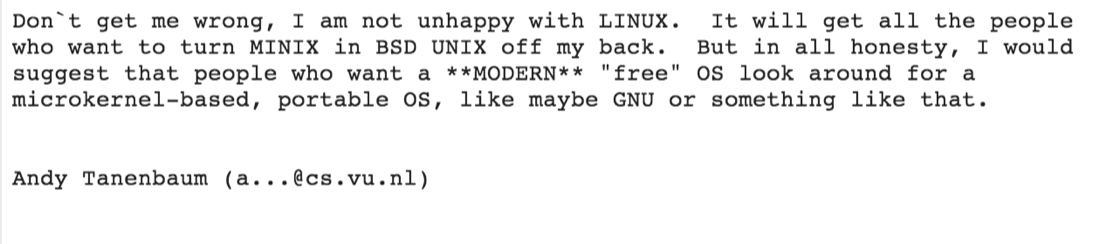
For the first prediction, I have decided to kick things off with a doozy. What, for obvious reasons, is a clear candidate for “Most Astoundingly Wrong Linux Prediction Of All Time”. Back on the 29th day of January, in the year Nineteen Hundred and Ninety-Two, on that beacon of knowledge known as Usenet… a post was made with the following title:

“Linux is obsolete”

[Ok. Technically the title was “LINUX is obsolete”. But having “Linux” in all caps feels wrong. So I fixed it. I fixed history. You’re welcome.]

That post was made by none other than Andrew Tanenbaum, the creator of MINIX and one half of the most entertaining software architecture flame war of all time.

His declaration of obsolescence was at least 22 years off (and counting). But, hey. It was Usenet in the 90’s. Everyone had at least 17 different crazy posts there that they would live to regret having ever typed out – and that was even before the Eternal September. So we’ll let this one slide, Andrew.

Flash forward seven years to the autumn of 1999. The person that originally ran Linux.com at the time, Trae McCombs, graced the pages of Maximum Linux magazine with the following words:

“In five years we’re going to sit around and laugh that we even had operating system wars; there’s just going to be Linux. We’re going to take over.”

The best, most straight forward, way I can think of to describe this is “undeniably bonkers levels of didn’t happen.” But, now in Trae’s defense on this one, I think I’ve made similar predictions nearly every year, myself. And, really, Linux isn’t doing too gosh darned shabby. Complete domination of the super-computer world. And servers. And set top boxes. And I hear it’s also doing pretty swell on those new-fangled cellular gizmos the kids keep raving about.

But, alas. As much as I would have loved for the optimistic words of Trae McCombs to have proven accurately prophetic… for 2006 to have actually been a year where the majority of every-day computing devices, in the hands of average people, were powered by Linux. Oh what a glorious year that would have been.

Oh well. He was only off by a few years.

You know what? Enough with going through one prediction at a time. One forward looking statement, proven to be factually incorrect, after another. It’s enough to drive even the strongest of men to the brink of insanity. [What dullard wrote this article anyway?]

Let’s cut to the chase and jump to the most prophetic of all Linux prophesies ever to be prophesied.

“XXXX will be the Year of the Linux Desktop.”

We’ve all heard it. We’ve all said it. And, if we’re going on market-share numbers (and I think we all know we should be), we’ve all been wrong about it.

And it’s all Dirk Hohndel’s fault.

Dirk claims to be the first person to prophesy that an upcoming year would be “The Year of the Linux Desktop”. A refrain that gave lazy technology journalists, from here to Timbuktu, at least one really easy article to write each and every year.

[Sorry for giving away one of our trade secrets guys. I promise to keep the whole “we don’t actually report the tech news, we manipulate the tech world like evil puppet masters” thing quiet. Mums the word.]

Last year, Dirk revised his original prediction with the following:

“If I changed it from the year of Linux desktop and changed it to a decade and a half from now client computing will be mostly Linux, which has happened.”

Two critical things strike me about that.

First… he’s right. That happened. Roughly a decade and a half on from 1999 and we have reached a point where client computing devices (mobile gadgets, set top boxes, TV’s, embedded systems, PC’s, etc.) truly are mostly Linux-based. That, right there, is terribly cool.

Second… he just… wait… did he say something akin to, “You know that prediction I made that didn’t happen? If I had made a completely different prediction that actually was accurate… then it would would have been accurate.”… ?

Yes. Yes, he did. This guy’s got moxie. I think he’s my new hero.

Oh, and 2015 will be the Year of the Linux Desktop.

Bryan Lunduke is Social Media Marketing Manager at SUSE.

Minix 3.3 Released With Cortex-A8 ARM Support, NetBSD Userland Compatibility

Andrew Tanenbaum and his crew have released a significant update to Minix. The Minix 3.3.0 release comes with x86 and ARM support, is mostly compatible with the NetBSD user-land while its kernel is less than 13k lines of code, and it’s BSD-licensed…

Read more at Phoronix

More Intel DRM Changes Queued For Linux 3.18, Including Old i830M Fixes

With the drm-next merge window for Linux 3.18 closing, Intel’s open-source developers have submitted another round of changes for ultimately landing with the Linux 3.18 kernel…

Read more at Phoronix

Micron Launches New PC SSDs, Aims to Boost Longevity, Speed

Micron Technology launched new solid-state drives for PCs and touted longevity to appeal to those worried about SSDs that die too early.

Manage Multiple Logical Volume Management Disks using Striping I/O

In this article, we are going to see how the logical volumes writes the data to disk by striping I/O. Logical Volume management has one of the cool feature which can write data over multiple disk by striping the I/O. What is LVM Striping? LVM Striping is one of the feature which will writes the…

[[ This is a content summary only. Visit my website for full links, other content, and more! [[

 
Read more at TecMint

SUSE Linux Owner Attachmate Gobbled by Micro Focus for $2.3bn

Merger will lead to mainframe and COBOL powerhouse

Attachmate, the software shop that headhunted Novell and SUSE Linux, is itself being bought out by Micro Focus International.…

Read more at The Register

Scripting made fun

I have never been a fan of programming or scripting. Thought is was a skill I was unable to learn. When learning to administer a Linux system, scripting can not be avoided.

One of the skills every sysAdmin must learn is scripting. The benefit of scripting is to automate a task or job that is constantly run every time a system is running. A sysAdmin can make that job run on its own and concentrate on other tasks that are not so easily automated. These scripts are either written using a text editor, the shell, or, scripting language.

I was not automating anything, just getting used to writing scripts. When I was studying “Linux essentials” in preparation for the Linux certification, I was practicing passing variable values. That is, printing the value of one of my system’s default variables. I had a crazy thought. What if I actually ran a script using a variable. I soon learned, Linux is what you make of it.

There are default variables already set on a Linux system. To find what these variables are, you simply type this command in a shell or terminal emulator, “printenv”

This is a screen shot of the default variables on my Linux Mint 17 system.

XDG_VTNR=7

SSH_AGENT_PID=1808

XDG_SESSION_ID=c1

TERM=xterm

SHELL=/bin/bash

XDG_SESSION_COOKIE=9f6e6efa3c8a79091dbec7c85403e053-1410643266.227255-1746036259

WINDOWID=35651588

GNOME_KEYRING_CONTROL=/run/user/1000/keyring-ccaIQh

USER=x

LS_COLORS=rs=0:di=01;34:ln=01;36:mh=00:pi=40;33:so=01;35:do=01;35:bd=40;33;01:cd=40;33;01:or=40;31;01:su=37;41:sg=30;43:ca=30;41:tw=30;42:ow=34;42:st=37;44:ex=01;32:*.tar=01;31:*.tgz=01;31:*.arj=01;31:*.taz=01;31:*.lzh=01;31:*.lzma=01;31:*.tlz=01;31:*.txz=01;31:*.zip=01;31:*.z=01;31:*.Z=01;31:*.dz=01;31:*.gz=01;31:*.lz=01;31:*.xz=01;31:*.bz2=01;31:*.bz=01;31:*.tbz=01;31:*.tbz2=01;31:*.tz=01;31:*.deb=01;31:*.rpm=01;31:*.jar=01;31:*.war=01;31:*.ear=01;31:*.sar=01;31:*.rar=01;31:*.ace=01;31:*.zoo=01;31:*.cpio=01;31:*.7z=01;31:*.rz=01;31:*.jpg=01;35:*.jpeg=01;35:*.gif=01;35:*.bmp=01;35:*.pbm=01;35:*.pgm=01;35:*.ppm=01;35:*.tga=01;35:*.xbm=01;35:*.xpm=01;35:*.tif=01;35:*.tiff=01;35:*.png=01;35:*.svg=01;35:*.svgz=01;35:*.mng=01;35:*.pcx=01;35:*.mov=01;35:*.mpg=01;35:*.mpeg=01;35:*.m2v=01;35:*.mkv=01;35:*.webm=01;35:*.ogm=01;35:*.mp4=01;35:*.m4v=01;35:*.mp4v=01;35:*.vob=01;35:*.qt=01;35:*.nuv=01;35:*.wmv=01;35:*.asf=01;35:*.rm=01;35:*.rmvb=01;35:*.flc=01;35:*.avi=01;35:*.fli=01;35:*.flv=01;35:*.gl=01;35:*.dl=01;35:*.xcf=01;35:*.xwd=01;35:*.yuv=01;35:*.cgm=01;35:*.emf=01;35:*.axv=01;35:*.anx=01;35:*.ogv=01;35:*.ogx=01;35:*.aac=00;36:*.au=00;36:*.flac=00;36:*.mid=00;36:*.midi=00;36:*.mka=00;36:*.mp3=00;36:*.mpc=00;36:*.ogg=00;36:*.ra=00;36:*.wav=00;36:*.axa=00;36:*.oga=00;36:*.spx=00;36:*.xspf=00;36:

OPENDVD=eject /dev/sr0

SSH_AUTH_SOCK=/x

PLAYMEDIA=vlc /dev/sr0

SESSION_MANAGER=x

USERNAME=x

DEFAULTS_PATH=/usr/share/gconf/default.default.path

XDG_CONFIG_DIRS=/etc/xdg/xdg-default:/etc/xdg

PATH=/usr/local/bin:/usr/bin:/bin:/usr/bin/X11:/usr/games

DESKTOP_SESSION=default

GDM_XSERVER_LOCATION=local

PWD=/etc

GNOME_KEYRING_PID=1585

LANG=en_US.UTF-8

MANDATORY_PATH=/usr/share/gconf/default.mandatory.path

MDM_XSERVER_LOCATION=local

GDMSESSION=default

SHLVL=1

XDG_SEAT=seat0

HOME=/x/x

XDG_SESSION_DESKTOP=default

LOGNAME=x

XDG_DATA_DIRS=/usr/share/default:/usr/share/xfce4:/usr/local/share/:/usr/share/:/usr/share/mdm/

DBUS_SESSION_BUS_ADDRESS=unix:abstract=/tmp/dbus-ONZKNCkspd,guid=10fed374626ed9dae74c359c5414b544

MDMSESSION=default

TEXTDOMAIN=im-config

WINDOWPATH=7

XDG_RUNTIME_DIR=/run/user/1000

DISPLAY=:0.0

MDM_LANG=en_US.UTF-8

TEXTDOMAINDIR=/usr/share/locale/

COLORTERM=xfce4-terminal

XAUTHORITY=/x/x/x

_=/usr/bin/printenv

Take a close look at the bold text above. These are my custom variables I set to run some custom scripts.

OPENDVD=eject /dev/sr0 is used to open my laptop’s DVD disc drive.

PLAYMEDIA=vlc /dev/sr0 is used to play a DVD using VLC.

Of course I could have just written the scripts using a text editor. I wanted to make things more interesting by try something different. Also, doing this helped me learn and appreciate environmental variables much more. I find them really fun to play with.

Always remember this syntax, “command argument”. The command is what you want to run, the argument is what you want it to run on. The command “VLC” opens the VLC media player program. The argument “/dev/sr0” is the DVD disc drive I want it to open. Typing this in your terminal will do just that.

If you look at the subfolder “etc”, you will notice a file named “environment”. You can actually use this filie to create and store your own custom declared variables. On some Ubuntu based systems, you might noticed the default “PATH” variable is also located there. A little F.Y.I.

Once you set your desired variable, and save the file, restart your system. Run the “printenv” command and you will see your variables listed.

To set a variable, type in all caps, the name of the variable, then after that, the “=” sign and then the value that the variable will relate to. Like this, VARIABLE=value. In my case I typed, OPENDVD=”eject /dev/sr0”. The quotes surrounding the command indicates that the command should be treated as one value.

Once this is written, I had reset my mint system. Once logged in, and the terminal was opened, I called the value of the new variable. This is when you tell your terminal to print the value of a variable. The command to do this is, prompt<$VARIABLENAME>.When I typed, “$OPENDVD”, my dvd disc drive opens. Your system will recognize a variable when it starts with a dollar sign followed by a name in all caps as in, “$OPENDVD“.

I was not big on programming. Yet, scripting, using variables, not only makes Linux even more interesting but programming as well. I already have a large list of scripts I want to experiment with. When I think about it, scripting might actually be my thing. I went beyond just learning what a variable is. I begun learning how to talk to Linux using my own language.

Distribution Release: Raspbian 2014-09-09

Eben Upton has announced the availability of an updated release of Raspbian, a Debian-based distribution designed for the Raspberry Pi single-board mini-computer: “If you head over to the downloads page, you’ll find new versions of our Raspbian image and NOOBS installer. Alongside the usual firmware and kernel improvements,…”

Read more at DistroWatch

‘Windows 9’ Leak Suggests Microsoft Has Caught Up With Linux

Multiple desktops and live tiles in restored Start button star in new vids

New videos of a Windows variant thought to be Windows 9 have emerged, and to this hack’s eyes they look to have brought Windows up to speed with tricks Linux on the desktop has been doing for at least half a decade.…

Read more at The Register