Home Blog Page 1369

Is Systemd as Bad as Boycott Systemd is Trying to Make It?

From just a purely end-user perspective, systemd is an application that I’ve come to like a lot. And I think that its adoption by all Linux distributions will make it easier to manage Linux systems.

But it has come under heavy criticism from some quarters – for trying to be a Swiss-army-knife-type application. One that does practically anything and everything, which the critics claim is against the UNIX/Linux philosophy of coding an application to do one thing and do it well.

Read more at Linux BSDos.

GNOME 3.14 Beta 2 Released

The second beta release to the GNOME 3.14 desktop stack due out later this month is now available…

Read more at Phoronix

Steam Beta Update Adds Streaming From Linux Hosts

A new Steam beta update was released yesterday that adds support for streaming from Linux hosts…

Read more at Phoronix

Acer Chromebook 13 Review

The best Chromebooks all have one thing in common: they’re small. The most popular Chromebooks have small, low-resolution 11.6-inch displays. They may offer a low price, stellar battery life, and fast performance — but sometimes you just want a bigger computer.

Acer’s new Chromebook 13 appears to be just that computer, at least on paper. It’s got a 13.3-inch display, same size as the 13-inch MacBook Air, with an optional 1080p resolution. The $299 1080p Chromebook 13 is both bigger and…

Continue reading…

Read more at The Verge

Best Android Tablets (September 2014 edition)

Given the broad choice, and combine that with rock-bottom prices, there’s never been a better time to pick up a new Android tablet! Here are my picks of the best Android tablets for September 2014.

Can This Free Software Company Secure the Future of Linux for the City of Munich?

There are many solved problems in open source. Groupware is not one of them.

How else would you explain the number of migrations that fail on average ingroupware? The Swiss canton of Solothurn is just one example among many as a result of groupware vendors who have given up and transitioned to Outlook or the web to meet their needs. Kolab does things differently. For one, Outlook will never be the client for the Linux desktop. And, the web is a good answer for a lot of things, but not all.

read more

Read more at OpenSource.com

Samsung’s Tizen-Based Gear S Throws a Curve at Smartwatch Market

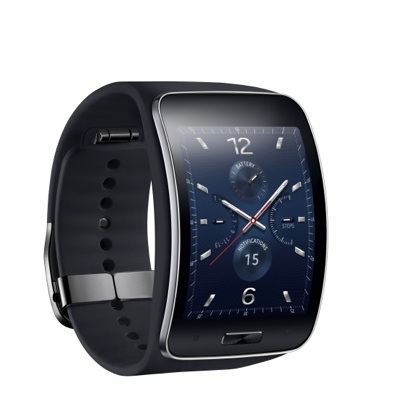
Samsung Gear S Tizen watchPrior to this week’s IFA show in Berlin, Samsung showed off its third Tizen Linux-based smartwatch. The Gear S offers several innovations compared to the Tizen-based Gear 2 and Gear Neo smartwatches, including autonomous operation and a curved screen. The Gear S will ship in Korea in October, followed by a global launch. According to this mostly favorable CNET Gear S hands-on, there are no current plans for a U.S. launch.

Unlike the flagship Gear models, as well as the Android Wear devices that have been announced so far this week, such as the Asus ZenWatch and Sony Smartwatch3, the Gear S integrates WiFi and 3G radios, and can act as a standalone wrist-phone when you’re out of Bluetooth range of your smartphone. The other major innovation is the curved Super AMOLED screen, which at 2.00 inches and 480 x 360 pixels, is larger and higher resolution than the flat, 1.63-inch displays on the earlier Tizen watches, which were limited to 320 x 320 pixels. These include the original, Android-based Galaxy Gear watch, which as of July, is available with Tizen as well. Samsung also has a new Android Wear offering — the Gear Live— which has a similarly flat 1.63-inch screen.

Like its predecessors, the Gear S runs Tizen on a 1GHz, dual-core processor, once again with 512MB RAM and 4GB flash. Other similar features include IP67 water-proofing, fitness sensors, and a 300mAh battery. Samsung has added a 350mAh battery recharger option that snaps onto the back. One feature missing from the original models, however, is the 2-megapixel camera.

The Gear S lets you make and receive phone calls, swap texts, and view notifications on its own via 3G or WiFi. With the help of the watch’s built in GPS/GLONASS transceiver and the HERE navigation service, you can also listen to turn-by-turn directions. A tiny onscreen QWERTY keyboard is available along with S Voice commands for input. The Gear S can also act like a typical Bluetooth accessory, but as before, it unfortunately requires a Samsung phone with Android 4.3 or higher.

The Gear S may not be as feature-rich as some lower profile Android smartwatches that appeared before the Android Wear trend, such as the Neptune Pine and Omate TrueSmart. However, it appears to have found a nice balance while keeping the watch fairly stylish. Although the screen size is pushing the limits of the sartorially acceptable, the curved screen makes it look more like a normal watch.

According to Samsung, some 1,000 Tizen apps will be available for the Gear S when it ships in October. The company released a Tizen software development kit back in March.

The Gear S isn’t the only smartwatch to offer a curved screen. The Asus ZenWatch announced this week at IFA with a 199 euro (about $262) price, has a slight curve to its screen. However, the IP55-protected Android Wear watch is not as curvy as the Gear S, and it’s limited to a 1.63-inch, 320 x 320 AMOLED display.

Sony just announced a SmartWatch 3 Android Wear watch with another flat, 1.6-inch 320 x 320 display. The IP68 protected watch is notable, however, for its 1.2GHz, quad-core Cortex-A7 processor.

Samsung Galaxy Note and Gear VR Headset

The Gear S was just one of many Samsung announcements this week, but it was the only one so far involving Tizen. The Russia-destined Samsung Z Tizen phone announced earlier this summer appears to have been postponed indefinitely. Tizen is on the move in other areas, however. Over the last year Samsung has added Galaxy Note 4Tizen to several consumer electronics devices, including a camera and refrigerator, and although Samsung is not involved, Tizen-based in-vehicle infotainment systems are winding their way toward a release, perhaps as early as next year. We’re also waiting to see if Samsung adds Tizen to the hub offered by SmartThings, a home automation firm it is acquiring for $200 million.

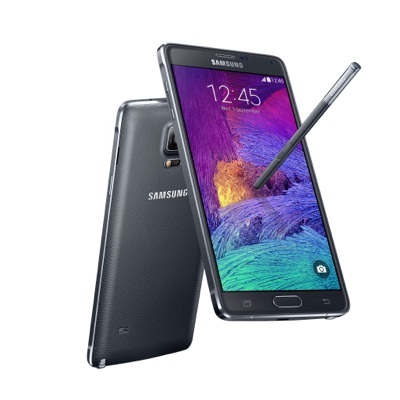
At IFA, most of the Samsung news was about Android. The main event was the unveiling of the Galaxy Note 4 Android 4.4 phablet, which offers a 5.7-inch, 2560 x 1440 Super AMOLED screen. The large phone features either a 2.7GHz quad-core Snapdragon 805 or a 1.9GHz Octa-core processor depending on the market, and supplies both 16- and 3.7-megapixel cameras. It’s also available in an unusual Edge version that features a 5.6-inch screen that curves around the side edge of the device. This provides an additional thin, horizontal screen providing information such as weather and time.

Other Samsung announcements include a Bluetooth headphone accessory called the Gear Circle, as well as a Gear VR headset that incorporates Oculus virtual reality software. The Gear VR lets you plug in your own Galaxy Note 4 phablet to act as the device’s main computer and display. This will supposedly reduce the price of the goggles themselves when they ship in the fall.

Fedora’s New Project Leader Plots What’s Next

On June 3, Matthew Miller was named as the new Fedora Project Leader, succeeding the outgoing Robyn Bergeron. Over the last several months, Miller has settled into his role of running Red Hat’s community project and is overseeing one of the biggest changes in the project’s history.

In a video interview with eWEEK, Miller details what’s currently going on at the Fedora project and how it is changing. Miller noted that there has been a cognitive dissonance within Fedora for years in that Fedora’s original user base was typically server system administrators coming from Red Hat. In contrast, Fedora itself has somewhat of a desktop operating system perception. 

Read more at eWeek

A Linux Accessibility Advocate’s Top 3 LinuxCon Takeaways

Jonathan Kuniholm Every year, I look forward to attending LinuxCon North America, and felt honored (and ecstatic) to speak for the second time about an issue that both on a professional and personal level means a lot to me. While I may return home exhausted and a bit overwhelmed by it, I also come home with a renewed sense of drive, to not give up, and realizing that I’m not alone.

Chicago has many outstanding qualities, and provided an excellent backdrop to this year’s LinuxCon. Three things stuck out this year that were significant to my own experience:

1. Keynotes

While having keynote speakers isn’t new, a few choices stood out and held my attention – even though they all were pretty awesome. A crowd favorite was Solomon Hykes, founder of Docker, discussing what Docker is and how using containers can make our work easier. I’m embarrassed to state this, but I came to Chicago without knowing what Docker was – or even how popular it was among the Linux community. My only wish is that I would have found out sooner, as I find Docker very cool and a novel, innovative solution, and I can’t wait to try it on my own system.

Anthony Moschella with Makerbot and Jay Rogers with Local Motors were not only impressive, but fed my curiosity and geeky desire to build and create whatever I need. 3D printing is cool – not only for fun and hobby purposes, but for serious ones such as health, environmental and technological as well. As someone who sees a possibility for 3D printing to assist people with disabilities to create their own assistive technology, I was impressed. Of course, Jay Rogers had a strikingly good presentation, even though I raved about how cool it was for a company to help you build your own car – something that I’ve wanted to do since I started driving, and even more so after the Rally Fighter debuted some years ago.

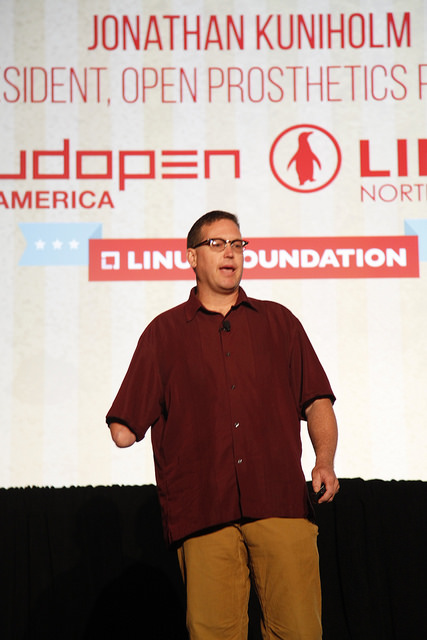
My favorite keynote, though, was Jonathan Kuniholm’s presentation about open-sourcing prosthetics design. It was the one I was looking forward to the entire conference; he confirmed some of what I knew, and brought real-life experience and evidence to the table concerning 3D-printed limbs. It was the information I wanted and needed. Jonathan had an excellent talk that captured everyone’s attention, and shed light on a subject that is rarely discussed outside of charity events and organizations. I hope that such attention is not fleeting, and that communication stickersKuniholm was able to gain more support and contributors to the Open Prosthetics Project.
2. Badges and Communication Stickers

Sure, this seems insignificant in comparison to the keynotes, but a durable, informational, high quality badge can really make a difference over three short days. The lightweight, laminated badges this year included information about the wi-fi network, as well as evening events and location information on the back. Ingenious.
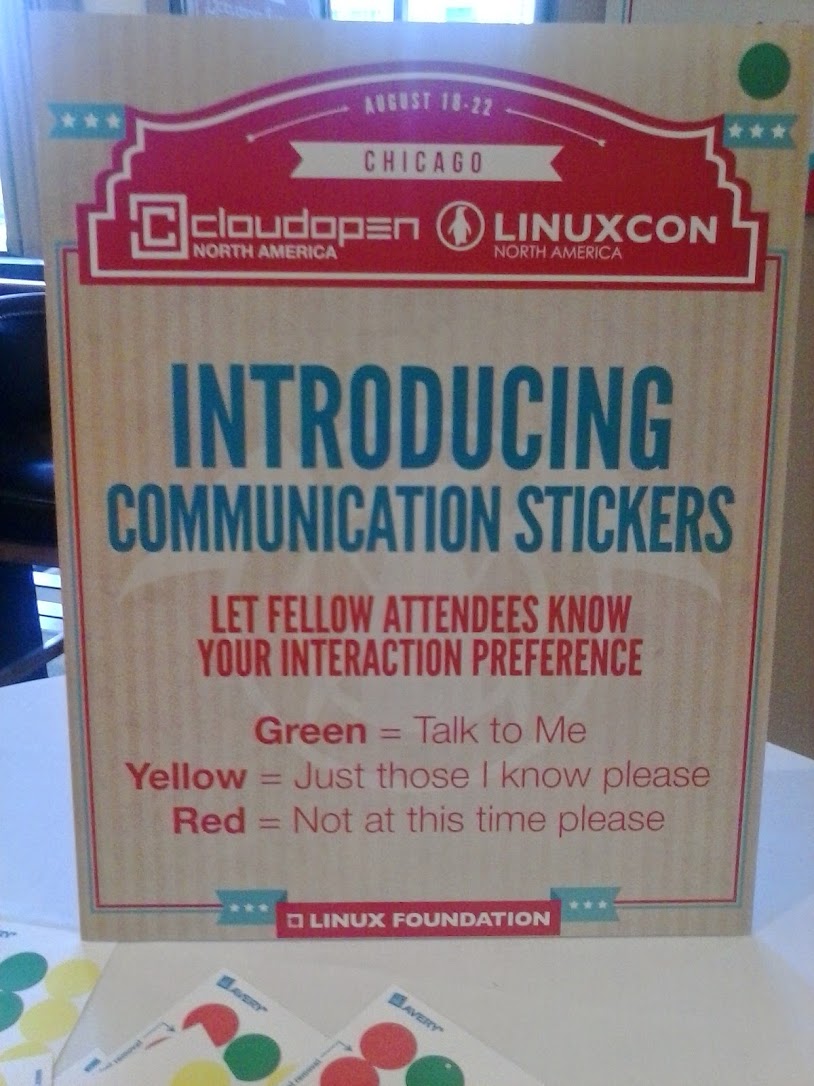
I also really enjoyed the new Communication Stickers that you could attach to your badge, showing your preferences: green = talk to me, yellow = only people I know please, and red = not at this time please. It seemed to be a hit among the attendees, as lots of green and yellow could be seen on many badges. This works especially for those who may be working away from home and have little time to network, as well as new persons of whom this may have been their first LinuxCon. It’s easier to talk to someone new if you can understand and subsequently respect their desired choice of communicating.

3. Women in Open Source Networking Luncheon, Women’s Resume Writing Workshop, and Ally Skills Workshop

One of my favorite things about Linux is the diversity and encouragement of choice. You are responsible for your decisions, but no one holds you back. Some may disagree with you on the finer points of which GUI you use, your package manager, even your file system – but ultimately you have a wide array of options to build something that Rikki Endsley LCNA14fits who you are.
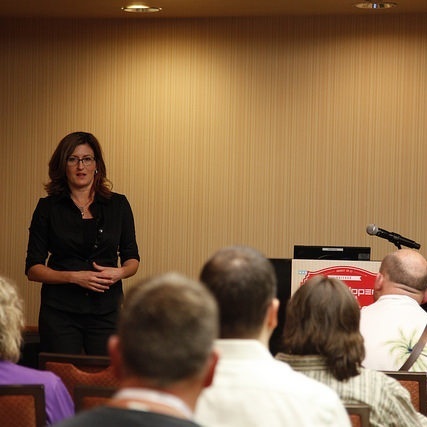
While I have noticed that technology seems to be a primarily male-dominated field, I’m noticing that it’s not going to stay that way – a change that in my opinion is long overdue. We have no idea or prediction of where and whom the ‘next big thing’ will come from, and without diversity in its beautiful forms, we may miss out on a concept, theory or viewpoint that could change….everything.

While I did not attend all of these sessions, I was glad to see them offered. I was also delighted to see more women attending and presenting this year; learning from Kelley Nielsen about her struggle to become a kernel hacker and be the person she wants to be, Rikki Endsley’s talk about improving technology education in schools and promoting inclusion of girls in what many schools see (in an archaic, outmoded and anachronistic view) as more male-centered subjects, and Dawn Foster’s always entertaining and informative discussion about community using science fiction – just a few sessions that provided insight and lessons that I found immediately usable and applicable in my own endeavors. I can definitely say that if they had not been there, the amount I learned and gained this year would not have been nearly as fruitful, nor the conference as worthwhile.

Finally, the Museum of Science and Industry was the perfect spot for a welcoming celebration, and was just phenomenal. The food, exhibits, etc. were just what was needed to kick off LinuxCon 2014. With that, I eagerly look forward to Seattle next year, and the progress we will make as a community in the meantime.

Spencer Hunley is an autistic individual and professional, open-source assistive technology enthusiast, and proud Linux user since 2008. He has presented at LinuxCon 2013 and 2014, giving talks about including people with disabilities in the Linux community, how accessible and assistive technology would benefit from more Linux and open-source contributions, and how people with disabilities can be an asset for the Linux and open source communities. He is currently a moderator for Universal Tux on Google+, and a board member of the Autism Society of the Heartland & ASAN’s Kansas City chapter. You can reach him at This e-mail address is being protected from spambots. You need JavaScript enabled to view it
, or at about.me/spencerhunley

Beware of BD_STATUS Alarms by Cross-Connect Boards of OptiX OSN 3500

Summary:
Creep occurs on SD585 soldered balls of some cross-connect boards on  Huawei transmission OptiX OSN 3500 equipment so these boards repeatedly reset, fail to work, and report BD_STATUS alarms.

Huawei OSN 3500

[Problem Description]
Trigger conditions:
There is a possibility that this problem occurs as a result of long-term exposure of the boards involved to high temperature.
Symptom:
1. Boards are reset repeatedly and fail to work.
2. NEs may report BD_STATUS alarms or COMMUN_FAIL alarms on cross-connect boards.System control boards may report BIOS_STATUS alarms on cross-connect boards.
Identification method:
The problem can be identified if the following two conditions are met:
1. The boards are manufactured in Feb 2010, Apr 2010, May 2010, Jul 2010, Aug 2010, or Mar 2011.
2. The cross-connect boards are repeatedly reset and fail to work. The board BOMs are found in the attached Board Delivery Information.
[Root Cause]
The SD585 chip radiator uses the thick spring, which applies high levels of stress to the chip. The soldered ball of the SD585 chip may deform and short-circuit as a result of long-term exposure to high temperature. Therefore, the board repeatedly reset and fail to work.

[Impact and Risk]
1. Services are not influenced because of the 1+1 protection scheme is configured on the cross-connect boards. When a cross-connect board is faulty, services are switched over to the other cross-connect board.

2. In extra situations, both cross-connect boards configured in the 1+1 protection scheme become faulty in a short time. As a result, the NE fails to work and services are interrupted.
[Measures and Solutions]
Recovery measures:
Replace the faulty cross-connect board.

Reference and buy new similar boards in  Huawei network product distributors 

Preventive measures:
None
Solution:
Replace the faulty boards.

Material handling after replacement:

Return the spare parts for repair.

[Rectification Instructions]
Replace the faulty boards.
SSN1SXCSA02 (03030KBM) boards are out of production, so replace SSN1SXCSA02 boards with SSN1SXCSA01 (03030DKF) when filling in an electric process application for board rectification in batches. The two kinds of boards can be mixedly inserted or completely replace each other. Active and standby boards of the same type are recommended.