If you’ve been thinking of encrypting your email, it is a rather bewildering maze to sort through thanks to the multitude of email services and mail clients. There are two levels of encryption to consider: SSL/TLS encryption protects your login and password to your mailserver. GnuPG is the standard strong Linux encryption tool, and it encrypts and authenticates your messages. It is best if you manage your own GPG encryption and not leave it up to third parties, which we will discuss in a moment.
Encrypting messages still leaves you vulnerable to traffic analysis, as message headers must be in the clear. So that necessitates yet another tool such as the Tor network for hiding your Internet footprints. Let’s look at various mail services and clients, and the pitfalls and benefits therein.
Forget Webmail
If you use GMail, Yahoo, Hotmail, or another Web mail provider, forget about it. Anything you type in a Web browser is vulnerable to JavaScript attacks, and whatever mischiefs the service provider engages in. GMail, Yahoo, and Hotmail all offer SSL/TLS encryption to protect your messages from wiretapping. But they offer no protections from their own data-mining habits, so they don’t offer end-to-end encryption. Yahoo and Google both claim they’re going to roll out end-to-end encryption next year. Color me skeptical, because they will wither and die if anything interferes with the data-mining that is their core business.
There are various third-party email security services such as Virtru and SafeMess that claim to offer secure encryption for all types of email. Again I am skeptical, because whoever holds your encryption keys has access to your messages, so you’re still depending on trust rather than technology.
Peer messaging avoids many of the pitfalls of using centralized services. RetroShare and Bitmessage are two popular examples of this. I don’t know if they live up to their claims, but the concept certainly has merit.
What about Android and iOS? It’s safest to assume that the majority of Android and iOS apps are out to get you. Don’t take my word for it– read their terms of service and examine the permissions they require to install on your devices. And even if their terms are acceptable when you first install them, unilateral TOS changes are industry standard, so it is safest to assume the worst.
Zero Knowledge
Proton Mail is a new email service that claims zero-knowledge message encryption. Authentication and message encryption are two separate steps, Proton is under Swiss privacy laws, and they do not log user activity. Zero knowledge encryption offers real security. This means that only you possess your encryption keys, and if you lose them your messages are not recoverable.
There are many encrypted email services that claim to protect your privacy. Read the fine print carefully and look for red flags such as limited user data collection, sharing with partners, and cooperation with law enforcement. These indicate that they collect and share user data, and have access to your encryption keys and can read your messages.
Linux Mail Clients
A standalone open source mail client such as KMail, Thunderbird, Mutt, Claws, Evolution, Sylpheed, or Alpine, set up with your own GnuPG keys that you control gives you the most protection. (The easiest way to set up more secure email and Web surfing is to run the TAILS live Linux distribution. See Protect Yourself Online With Tor, TAILS, and Debian.)
Whether you use TAILS or a standard Linux distro, managing GnuPG is the same, so let’s learn how to encrypt messages with GnuPG.
How to Use GnuPG
First, a quick bit of terminology. OpenPGP is an open email encryption and authentication protocol, based on Phil Zimmerman’s Pretty Good Privacy (PGP). GNU Privacy Guard (GnuPG or GPG) is the GPL implementation of OpenPGP. GnuPG uses symmetric public key cryptography. This means that you create pairs of keys: a public key that anyone can use to encrypt messages to send to you, and a private key that only you possess to decrypt them. GnuPG performs two separate functions: digitally-signing messages to prove they came from you, and encrypting messages. Anyone can read your digitally-signed messages, but only people you have exchanged keys with can read your encrypted messages. Remember, never share your private keys! Only public keys.
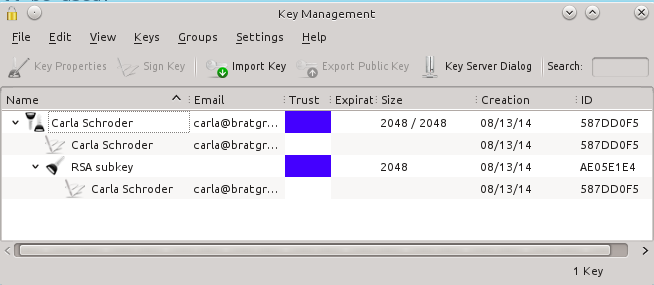
Seahorse is GNOME’s graphical front-end to GnuPG, and KGpg is KDE’s graphical GnuPG tool.
Now let’s run through the basic steps of creating and managing GnuPG keys. This command creates a new key:
$ gpg --gen-key
This is a multi-step process; just answer all the questions, and the defaults are fine for most people. When you create your passphrase, write it down and keep it in a secure place because if you lose it you cannot decrypt anything. All that advice about never writing down your passwords is wrong. Most of us have dozens of logins and passwords to track, including some that we rarely use, so it’s not realistic to remember all of them. You know what happens when people don’t write down their passwords? They create simple passwords and re-use them. Anything you store on your computer is potentially vulnerable; a nice little notebook kept in a locked drawer is impervious to everything but a physical intrusion, if an intruder even knew to look for it.
I must leave it as your homework to figure out how to configure your mail client to use your new key, as every one is different. You can list your key or keys:
$ gpg --list-keys
/home/carla/.gnupg/pubring.gpg
------------------------------
pub   2048R/587DD0F5 2014-08-13
uid                  Carla Schroder (my gpg key)
sub   2048R/AE05E1E4 2014-08-13
This is a fast way to grab necessary information like the location of your keys, and your key name, which is the UID. Suppose you want to upload your public key to a keyserver; this is how it looks using my example key:
$ gpg --send-keys 'Carla Schroder' --keyserver http://example.com
When you create a new key for upload to public key servers, you should also create a revocation certificate. Don’t do it later– create it when you create your new key. You can give it any arbitrary name, so instead of revoke.asc you could give it a descriptive name like mycodeproject.asc:
$ gpg --output revoke.asc --gen-revoke 'Carla Schroder'
Now if your key ever becomes compromised you can revoke it by first importing the revocation certificate into your keyring:
$ gpg --import ~/.gnupg/revoke.asc
Then create and upload a new key to replace it. Any users of your old key will be notified as they refresh their key databases.
You must guard your revocation certificate just as zealously as your private key. Copy it to a CD or USB stick and lock it up, and delete it from your computer. It is a plain-text key, so you could even print it on paper.
If you ever need a copy-and-paste key, for example on public keyrings that allow pasting your key into a web form, or if you want to post your public key on your Web site, then you must create an ASCII-armored version of your public key:
$ gpg --output carla-pubkey.asc --export -a 'Carla Schroder'
This creates the familiar plain-text public key you’ve probably seen, like this shortened example:
-----BEGIN PGP PUBLIC KEY BLOCK-----
Version: GnuPG v1
mQENBFPrn4gBCADeEXKdrDOV3AFXL7QQQ+i61rMOZKwFTxlJlNbAVczpawkWRC3l
IrWeeJiy2VyoMQ2ZXpBLDwGEjVQ5H7/UyjUsP8h2ufIJt01NO1pQJMwaOMcS5yTS
[...]
I+LNrbP23HEvgAdNSBWqa8MaZGUWBietQP7JsKjmE+ukalm8jY8mdWDyS4nMhZY=
=QL65
-----END PGP PUBLIC KEY BLOCK-----
That should get you started learning your way around GnuPG. The GnuPG manuals have complete details on using GnuPG and all of its options.
