

System administration can be a thankless job. To all of the tireless administrators out there who keep the systems we reply upon up and running, today is the day that we say thank you!
Read more at OpenSource.com
System administration can be a thankless job. To all of the tireless administrators out there who keep the systems we reply upon up and running, today is the day that we say thank you!

About 10 years ago, when I got my first mobile phone, I hardly knew anything about its operating system or its processor. Even its screen size didn’t matter. I was just happy to have a ‘mobile’ phone.
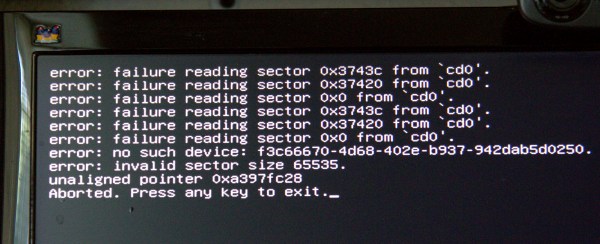 Well there I was, rebuilding a router and having a good time when I accidentally damaged the partition table on my main Linux installation, which is a GUID partition table, or GPT. Figure 1 (above) shows the cheery message that greeted me at boot.
How did this happen? I was installing Voyage Linux on a compact flash card, and while I was messing around with GParted and other filesystem tools I accidentally ran some commands on/dev/sdb, my main hard disk, instead of /dev/sdc, the compact flash card. Like, oops. I don’t know exactly which operations gummed up /dev/sdb, which would be good to know. But I don’t, so let us carry on.
“Press any key to exit” landed at a blinking cursor on a black screen. Fortunately, I always foil the desires of certain distros that disable ctrl+alt+delete, or make it behave like Windows and open a services manager. I make sure that it is enabled and that it reboots the system. I booted into a different Linux installation and pondered how to make repairs. When your partition table is damaged to the point that your Linux will not boot, you have to fix it from the outside of the damaged system via bootable rescue media, or another Linux in a multi-boot installation. SystemRescueCD on a USB stick is my fave. Any *buntu live system also makes a great rescue distro, especially on a USB stick with persistent storage, because then it remembers your settings, you can install apps, and store documents.
There are no guarantees- you may be able to repair the problem, or you may have to reinstall your operating system. If the partition table is unrecoverable you may not be able to recover your data. So, as always, your first and best line of defense is good backups.
A good tool for repairing partition tables and recovering files is TestDisk. TestDisk operates on both the legacy MBR and the newfangled GPT (see Using the New GUID Partition Table in Linux (Goodbye Ancient MBR)) . TestDisk is in most Linux repos, and on SystemRescueCD. Start it up as root:
$ sudo testdisk TestDisk 6.14, Data Recovery Utility, July 2013 Christophe GRENIER This e-mail address is being protected from spambots. You need JavaScript enabled to view it ; http://www.cgsecurity.org TestDisk is free data recovery software designed to help recover lost partitions and/or make non-booting disks bootable again when these symptoms are caused by faulty software, certain types of viruses or human error. It can also be used to repair some filesystem errors. Information gathered during TestDisk use can be recorded for later review. If you choose to create the text file, testdisk.log , it will contain TestDisk options, technical information and various outputs; including any folder/file names TestDisk was used to find and list onscreen. Use arrow keys to select, then press Enter key: >[ Create ] Create a new log file [ Append ] Append information to log file [ No Log ] Don't record anything
Select “create a new log file”. In the next screen select the disk you want to repair.
Select a media (use Arrow keys, then press Enter):
Disk /dev/sda - 2000 GB / 1863 GiB - ST2000DM001-1CH164
>Disk /dev/sdb - 640 GB / 596 GiB - WDC WD6401AALS-00J7B1
Disk /dev/sdc - 32 GB / 29 GiB - SanDisk CF Extreme USB2
Disk /dev/sr0 - 366 MB / 349 MiB (RO) - ATAPI iHAS424 B
>[Proceed ] [ Quit ]
This example shows two hard drives, a compact flash drive, and an audio CD.
/dev/sdbis the broken one. In the next screen we select the partition type:Disk /dev/sdb - 640 GB / 596 GiB - WDC WD6401AALS-00J7B1 Please select the partition table type, press Enter when done. [Intel ] Intel/PC partition >[EFI GPT] EFI GPT partition map (Mac i386, some x86_64...) [Humax ] Humax partition table [Mac ] Apple partition map [None ] Non partitioned media [Sun ] Sun Solaris partition [XBox ] XBox partition [Return ] Return to disk selection Hint: EFI GPT partition table type has been detected.In the next screen, select Analyse:
Disk /dev/sdb - 640 GB / 596 GiB - WDC WD6401AALS-00J7B1 CHS 77825 255 63 - sector size=512 >[ Analyse ] Analyse current partition structure and search for lost partitions [ Advanced ] Filesystem Utils [ Geometry ] Change disk geometry [ Options ] Modify options [ Quit ] Return to disk selectionHmm. This does not look good. Select Quick Search:
TestDisk 6.14, Data Recovery Utility, July 2013 Christophe GRENIER This e-mail address is being protected from spambots. You need JavaScript enabled to view it ; http://www.cgsecurity.org
Disk /dev/sdb - 640 GB / 596 GiB - CHS 77825 255 63 Current partition structure: Partition Start End Size in sectors Bad GPT partition, invalid signature. Trying alternate GPT Bad GPT partition, invalid signature. P=Primary D=Deleted >[Quick Search] Try to locate partitionThis can take a little time, so be patient. And hopefully TestDisk will find your partitions:
TestDisk 6.14, Data Recovery Utility, July 2013 Christophe GRENIER This e-mail address is being protected from spambots. You need JavaScript enabled to view it ; http://www.cgsecurity.org
Disk /dev/sdb - 640 GB / 596 GiB - CHS 77825 255 63 Partition Start End Size in sectors > MS Data 63 89470974 89470912 MS Data 80078846 265625597 185546752 [xubunthome] P MS Data 265625600 1250263039 984637440 [data-xubuntu] Structure: Ok. Use Up/Down Arrow keys to select partition. Use Left/Right Arrow keys to CHANGE partition characteristics: P=Primary D=Deleted Keys A: add partition, L: load backup, T: change type, P: list files, Enter: to continue ext4 blocksize=4096 Large file Sparse superblock, 45 GB / 42 GiBHurrah, this is looking hopeful. If it doesn’t find your swap partition, or gives you a message that it won’t restore it, don’t worry about it because a swap partition doesn’t hold data and you can easily restore it later. At this point you have the option to select a partition and press P to see your files, and copy them to another storage medium like a different hard drive or a USB stick. Don’t copy them back to the same device, because if your recovery fails your copied files go with it. It did a funny thing on my system: no matter which directory I chose to copy files into, they all went into
/home/carla/carla. I couldn’t find out if this is the correct behavior, but I got my files back.When TestDisk finds a partition that it can restore, it is marked in the left column with a P, and highlighted in green. In the above example that is only the third partition. Press the return key, and then you can try writing the partition to disk, or doing a deeper search for more recoverable partitions. The deeper search can take a long time, even several hours on a big hard disk.
TestDisk 6.14, Data Recovery Utility, July 2013 Christophe GRENIER This e-mail address is being protected from spambots. You need JavaScript enabled to view it ; http://www.cgsecurity.org
Disk /dev/sdb - 640 GB / 596 GiB - CHS 77825 255 63 Partition Start End Size in sectors 1 * Linux 16534 109 24 77825 70 5 984637440 [data-xubuntu] [ Quit ] >[Deeper Search] [ Write ] Try to find more partitionsThen you can select writing the recovered partitions to disk:
TestDisk 6.14, Data Recovery Utility, July 2013 Christophe GRENIER This e-mail address is being protected from spambots. You need JavaScript enabled to view it ; http://www.cgsecurity.org Write partition table, confirm ? (Y/N)
TestDisk 6.14, Data Recovery Utility, July 2013 Christophe GRENIER This e-mail address is being protected from spambots. You need JavaScript enabled to view it ; http://www.cgsecurity.org You will have to reboot for the change to take effect. >[Ok]Several things could happen: You could get a complete restoration with all of your partitions and files. You could get a partial recovery that you can mount from another system and retrieve your files. Or it could all go to that great bitbucket in the sky. Most likely you will get at least some of your files back even if you can’t restore your partition table, because stuff that is written to disk is amazingly persistent.
Please visit CGsecurity.org to learn more about TestDisk, and also PhotoRec, an excellent data recovery tool.
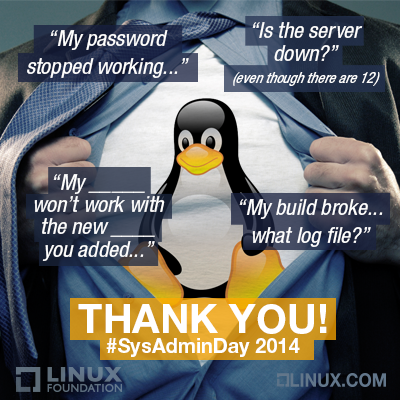 Happy SysAdmin Day 2014! Over the past three weeks we’ve been profiling the Linux Foundation’s heroic team of system administrators in honor of the amazing work they do behind the scenes to keep this organization and our collaborative projects humming. Here are some of their best quotes, which highlight just how talented, passionate and also fun-loving Linux SysAdmins really are.
Today is also the last day to nominate your system administrators for recognition here on Linux.com, as well as the chance to win free tickets to LinuxCon and CloudOpen North America taking place in Chicago August 20-22, 2014. Just email the Linux.com editors at This e-mail address is being protected from spambots. You need JavaScript enabled to view it
about why your SysAdmin should be recognized. Submissions are due by the end of the day today, July 25.
“The thought that we are in a position to tell Linus what he can and cannot do on the Linux systems we manage makes me giggle every time – because it’s so wonderfully absurd.” – Konstantin Ryabitsev, part of the Collaborative Projects IT team, which is responsible for providing IT hosting for projects like kernel.org, codeaurora.org, opendaylight.org, allseenalliance.org, and a few others.
“My favorite part of the job would definitely be getting to play with new technologies… I also really enjoy architecting systems that interoperate well and improve the lives of my customers.” – Andrew Grimberg, the primary administrator for the OpenDaylight Project’s infrastructure.
“I love the flexibility of working from home… My family is typically around me all day and I love feeling involved in their lives and still being able to get work done.” – Clint Savage, a systems administrator for the Collaborative Projects building virtual machines, maintaining authentication systems and identity management.
“My specialties are in web performance scaling, automation, security, and monitoring. I also am pretty good at faking being a DBA (database administrator). :-)” – Eric Searcy, IT Infrastructure Manager responsible for the design and architecture of the systems that power core programs such as Events and Training.
“Have you ever worked with someone who refused to use new software until they had been trained? I find that frustrating. No one here is like that. We have broad foundations of knowledge to work from. We can all read documentation, learn as we go, and adapt to changes as they come. That’s the best.” – Michael Halstead maintains all of the Yocto Project’s public facing infrastructure, including Yocto Autobuilders, which are based on Buildbot.
“I like the saying: “Failure isn’t an option. It’s mandatory.” That’s how I think about complex systems at large scales. The individual components are going to fail in lots of different ways and the challenge is to think about how to build systems that can deal with that failure gracefully and transparently.” – Ryan Day, part of the team that provides infrastructure and services for Collaborative Projects.
“I like to joke around with my coworkers to feel funny, and write scripts to feel clever. I just want to be loved.” – Aric Gardner, a Linux Foundation SysAdmin who works on the OpenDaylight collaborative project.
Happy SysAdmin Day! This profile is part of a series on Linux Foundation system administrators over the past three weeeks. Do you have a super-hero sysadmin you’d like to recognize? Send your nomination to This e-mail address is being protected from spambots. You need JavaScript enabled to view it
by the end of the day today, July 25, and enter them to win a free ticket to LinuxCon and CloudOpen North America taking place in Chicago August 20-22, 2014. (See the full contest announcement for more details.)
 Aric Gardner is a Linux Foundation SysAdmin who works on the OpenDaylight collaborative project. Here he tells the story of how became a sysadmin, shares his specialty in scripting and automation, and describes a typical day at work, among other things.
How long have you been a sys admin?
Aric Gardner: Since 2008. I have what may be an inspiring story about becoming a sysadmin. I had just moved to Montreal, with my then pregnant girlfriend. I was 22 and was working mostly odd jobs unloading shipping containers. My friend had given me his old computer and, let me tell you, Windows XP was not running well. Later that day, I was at the local cafe and I saw an Ubuntu live CD. When I got home I popped it in and was sucked into a world that has yet to spit me out. Three years later on the mlug, Evan Prodromou was looking for a sysadmin for his new startup, identi.ca. I hit the books and taught myself the basics of running a Nagios server. A few weeks later, I met him for an interview, told him I was green but willing, and he took me on. That moment really changed my life. My first task was to create the very Nagios server that would enslave me (happily) for the next three years. A big thanks to the anonymous member of the Linux community that left those live CD’s at my cafe, and to Evan for giving me the opportunity to prove myself.
When did you start at the Linux Foundation and how did you get the job?
April 2014. I was working for eNovance and got headhunted by Konstantin. tsk. tsk.
What do you do for the Linux Foundation? What’s your speciality?
I’m new here so other than learning the ropes, I’ve been making myself useful by migrating OpenDaylight’s build infrastructure to Rackspace.
I don’t like graphical interfaces or repetitive tasks (I know, typical), so I’ve become good at scripting and automating as much of my job as possible. So far I have scripts that grab snmp passwords and add new machines to our cacti servers, create and populate new puppet manifest, generate and distribute ssh keys for rsyncs, and probably a few others I’m forgetting. Just things that make my day more interesting.
Will you describe a typical day at work for you?
Lately, I’ve been creating custom machines for Rackspace (their images don’t have SELinux) puppetizing them and then migrating existing Jenkins systems on to them. I try to leave something hanging from the day before so that I can hook into the that task and ramp up productivity as soon as I’m done with my first coffee. Barring that, I check the ticket queue and then my weekdone to see if anything is hanging. Since I’m new here I still have a lot of questions, so I also spend a good deal of time on IRC bugging tykeal (Andy).
What’s your favorite part of the job/ thing to do and why?
I like to joke around with my coworkers to feel funny, and write scripts to feel clever. I just want to be loved.
A more serious answer is text processing, basically taking output and making it input to remove the teduim from my job.
What is your nightmare scenario? How have you prepared for it?
Oh boy. Clicking the wrong box on a graphical user interface with dire consequences. I try to avoid using them when I can.
What is your favorite sysadmin tool and how do you use it?
Just the regular tool belt. I like to pimp my vim, I recommend using pathogen to load up at least neocomplcache and syntastic, snip mate can be great as well. I’m also a big fan of awk, and writing good bash. If you want to up your game I really recommend this page. http://mywiki.wooledge.org/BashGuide
The guide is made by the wizards who hang out in #bash on freenode.
What’s your favorite story about working at the Linux Foundation?
Hmm, not sure. I don’t have too many stories. Ask me after August’s LinuxCon in Chicago.
What do you do for fun, in your spare time?
Weekly I play ice hockey, ride my bike and check out my friends’ shows in the local comedy scene. The overall theme of my life is more geared towards spending time on the Ottawa River and trying to tame the wild hearts of my children.
Read more about the Linux Foundation’s system administrators:
Linux Foundation SysAdmin Eric Searcy Lives By Regex
Linux Foundation SysAdmin Clint Savage Reminisces on Weeklong Hackfest
Linux Foundation SysAdmin Konstantin Ryabitsev, an SELinux Expert
Linux Foundation SysAdmin Michael Halstead’s IT Career Started at Age 15
Linux Foundation SysAdmin Andy Grimberg Loves New Tech and Snowboarding
To Linux Foundation SysAdmin Ryan Day, Elegance is the Best Tool