Home Blog Page 1413

Easy Steps to Make GNOME 3 More Efficient

Few Linux desktops have brought about such controversy as GNOME 3. It’s been ridiculed, scorned, and hated since it was first released. Thing is, it’s actually a very good desktop. It’s solid, reliable, stable, elegant, simple… and with a few minor tweaks and additions, it can be made into one of the most efficient and user-friendly desktops on the market.

Of course, what makes for an efficient and/or user-friendly desktop? That is subject to opinion — something everyone has. Ultimately, my goal is to help you gain faster access to the apps and the files you use. Simple. Believe it or not, stepping GNOME 3 up into the world of higher efficiency and user-friendliness is quite an easy task — you just have to know where to look and what to do. I am here to point you in the right directions.

I decided to go about this process by first installing a clean Ubuntu GNOME distribution that included GNOME 3.12. With the GNOME-centric desktop ready to go, it’s time to start tweaking.

Add window buttons

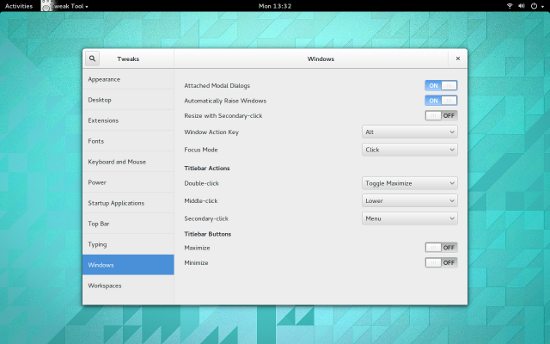
For some unknown reason, the developers of GNOME decided to shrug off the standard window buttons (Close, Minimize, Maximize) in favor of a single Close button. I get the lack of a Maximize button (since you can simply drag the window to the top of the screen to maximize) and you can also gain access to the minimize/maximize actions by right-clicking the titlebar and selecting either Minimize or Maximize. This behavior simply adds steps, so the lack of a minimize button is a bit confounding. Fortunately, there’s an easy fix for this. Here’s how:

By default, you should have the GNOME Tweak Tool installed. With this tool you can turn on either/or the Maximize or Minimize buttons (Figure 1).
gnome3-max-min-window

Once added, you’ll see the Minimize button, to the left of the close button, ready to serve. Your windows are now more easy to manage.

From the same tweak tool, you can configure a number of other helpful aspects of GNOME:

  • Set window focus mode

  • Set system fonts

  • Set the GNOME theme

  • Add startup applications

  • Add extensions. 

Add extensions

One of the best features of GNOME 3 are shell extensions. These extensions bring all sorts of handy features to GNOME. With shell extensions, there’s no need to install from the package manager, you either visit the GNOME Shell Extension site, search for the extension you want to add, click on the extension listing, click the On button, and then okay the installation of the extension or you add them from within the GNOME Tweak Tool (you’ll find more available extensions through the web site).

NOTE: You may have to allow the installation of extensions through your browser. If this is the case, you’ll be given a warning when you first visit the GNOME Shell Extension site. Just click Allow when prompted.

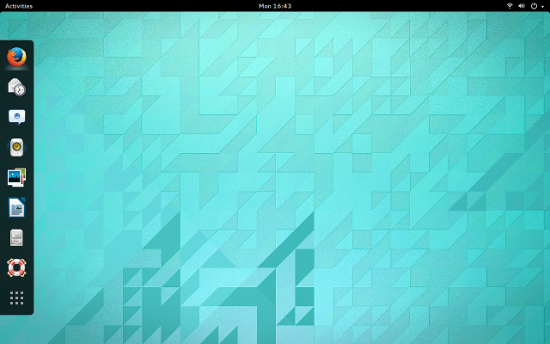
One of the more impressive (and handy extensions) is Dash to Dock. This extension moves the Dash out of the application overview and turns it into a fairly standard dock (Figure 2).
gnome3-dash

As you add applications to the Dash, they will also be added to the Dash to Dock. You also get quick access to the applications overview, by clicking the 6-dotted icon at the bottom of the Dock.

There are plenty of other extensions focused on making GNOME 3 a more efficient desktop. Some of the better extensions include:

  • Recent items: Add a drop-down menu of recently used items to your panel.

  • Search Firefox Bookmarks Provider: Search (and launch) your bookmarks from the Overview.

  • Quicklists: Add a quicklist popup menu to Dash icons (which allows you to quickly open new documents associated with the application, and more).

  • Todo List: Adds a drop-down in the panel that allows you to add items lists.

  • Web Search Dialog: Allows you to quickly search the web by hitting Ctrl+Space and entering a string of text (results appear in a new browser tab). 

Add a complete dock

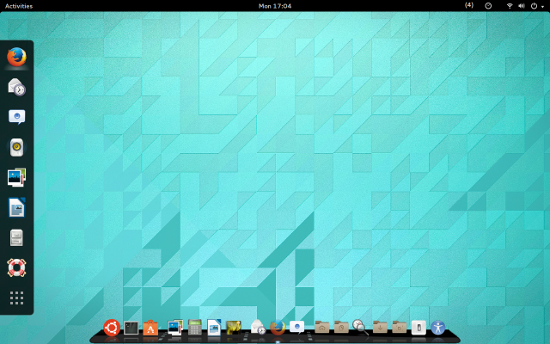
If the Dash to Dock is too limiting for you (say you want a notification area and more), one of my favorite docks is Cairo Dock (Figure 3). This amazing addition to GNOME 3 will go a long way to up the efficiency of the desktop. With it, you can add/remove applications, get quick access to shortcuts (folders such as Documents, Downloads, Music, and Videos), add applets (such as RSS reader, wi-fi indicator, netspeed, drop-to-share, and more). Cairo also allows themes and OpenGL hardware acceleration support.
gnome3 Cairo dock

With Cairo Dock added to GNOME 3, your experience will be made exponentially better. Install this great dock from within your distribution’s package manager.

GNOME 3 doesn’t have to be seen as an inefficient, user UN-friendly, desktop. With just a tiny bit of tweaking, GNOME 3 can be made as powerful and user-friendly as any desktop available.

A New Video Has Us Real Excited About The New UT For Linux

Epic Games has posted another video about their upcoming free Unreal Tournament game that is natively supporting Linux…

Read more at Phoronix

Interview with Nathan Willis, GUADEC Keynote Speaker (GNOME News)

LWN editor Nathan Willis is giving a keynote talk at the upcoming GUADEC (GNOME Users and Developers European Conference) and was interviewed by GNOME News. Willis’s talk is titled “Should We Teach The Robot To Kill” and will look at free software and the automotive industry. “And, finally, my ultimate goal would be to persuade some people that the free-software community can — and should — take up the challenge and view the car as a first-rate environment where free software belongs. Because there will naturally be lots of little gaps where the different corporate projects don’t quite have every angle covered. But we don’t have to wait for other giant companies to come along and finish the job. We can get involved now, and if we do, then the next generation of automotive software will be stronger for it, both in terms of features and in terms of free-software ideals.” GUADEC is being held in Strasbourg, France July 26–August 1.

Read more at LWN

First CoreOS Stable Release

First off, Happy SysAdmin Day. We think we have a pretty good SysAdmin surprise in store for you today as we are announcing the CoreOS stable release channel. Starting today, you can begin running CoreOS in production. This version is the most tested, secure and reliable version available for users wanting to run CoreOS. This is a huge milestone for us. Since our first alpha release in August 2013:


  • 191 releases have been tagged
  • Tested on hundreds of thousands of servers on the alpha and beta channels
  • Supported on 10+ platforms, ranging from bare metal to being primary images on Rackspace and Google


It is a big day for us here at CoreOS, as we have been working hard to deliver the stable release. Of course, we couldn’t do this without the community so thank you for all of your support and contributions to the project.

Read more at CoreOS Blog.

Rackspace Announces OnMetal Server Availability, Pricing

The company is offering customers bare-metal cloud servers that can be spun up as quickly as VMs and bring better performance.

Read more at eWeek

Bugcrowd Seeks to Streamline Reporting and Handling of Bugs

“All software contains security flaws,” touts the homepage of Bugcrowd, a new site that seeks to streamline the way flaws are reported by enforcing crowdsourced “responsible disclosure” policies. The Bugcrowd statement is probably pretty close to correct, too. As we’ve reported, Google, Mozilla and other companies have had success offering cash bounties for people who find security flaws, and those who find them are often security researchers.

 “Bugcrowd puts a crowd of 9,900 good guys who think like bad guys in your corner,” we are told.

In the open source community, the concept of throwing many eyeballs at problems is not a new one. Open source projects often draw their power from community-driven collaboration.


Read more at Ostatic

Nvidia Salutes Women Who CUDA

cuda2

This week Nvidia salutes Women who use CUDA for incredible science and engineering. They’ve compiled 30 profiles so far, and the advice they share from their experiences is quite inspiring. “It’s a good way to remind people that women write code, participate in open-source projects, and invent things,” said Lorena Barba from George Washington University. “It’s important to make the technology world more attractive to female students and show them examples of women who are innovators.”

The post Nvidia Salutes Women Who CUDA appeared first on insideHPC.

 
Read more at insideHPC

An Illustrated History of the Computer Virus

Computer viruses have come a long way, starting as the practical jokes of computing’s early days and ending up as modern military weapons. A site called Computer Virus Catalog is walking through the history one virus at a time, pairing each one with a fitting illustration. The list leans heavily on the DOS era, particularly the late-’90s virus boom, and shines a light on many pivotal malware moments that have since been lost to history. And since so many of the viruses had a visual component,…

Continue reading…

Read more at The Verge

Guix 0.7 Can Now Install The GNU Operating System

The Guix package manager that’s designed to be a purely-functional package manager for GNU with an emphasis on being dependable, hackable, and liberating is out with its latest release…

Read more at Phoronix

It’s Free, But It’s Broken

Google Abandonware


About six months ago I noticed that one of the portfolios I was tracking using Google Finance Portfolio suddenly started reporting wrong historical data for nearly all of the equities in the portfolio. I clicked on the “Report a problem” link at the bottom of the page and used the form to send off a detailed description of the problem off to Google.

I never received a reply, of course. I’ve sort of come to expect that when reporting issues with free Google resources. So, in the mean time I clicked on the link for theGoogle Finance Blog to see if anybody else had reported the problem.

Oh, oh. Here is the top post, dated two years ago:

Please follow us on the Inside Search blog

Thursday, August 9, 2012 at 9:20 AM

Posted by Karolina Netolicka, Product Manager

Thanks to everyone who has been a loyal reader of the blog over the last five years. After some consideration, we’ve realized that we’re just not generating enough content here to warrant your time, so we won’t be posting here any longer.


Instead, we’ll start contributing to the Inside Search blog, so tune in there for updates on Google Finance.


Looking through the referenced Inside Search Blog  blog turned up no discussion on the broken Google Finance portfolio tracker, but a more general search turned up plenty of discussions on the topic, such as this one. Bottom line: Google Finance is broken, and unsupported.

 
More recently, about three weeks ago I went over to the Google Finance Stock Screener using, as always, Google’s Chrome Browser on my Linux box, and I found it to broken as well, and fairly recently. I had used it just one month prior.
 
Digging a little deeper, I realized that their stock screener page itself wasn’t really broken; it worked fine when using Firefox. However, the page was not being rendered properly by the Google Chrome browser; elements of the page overlapped each other, making the page unusable.
 
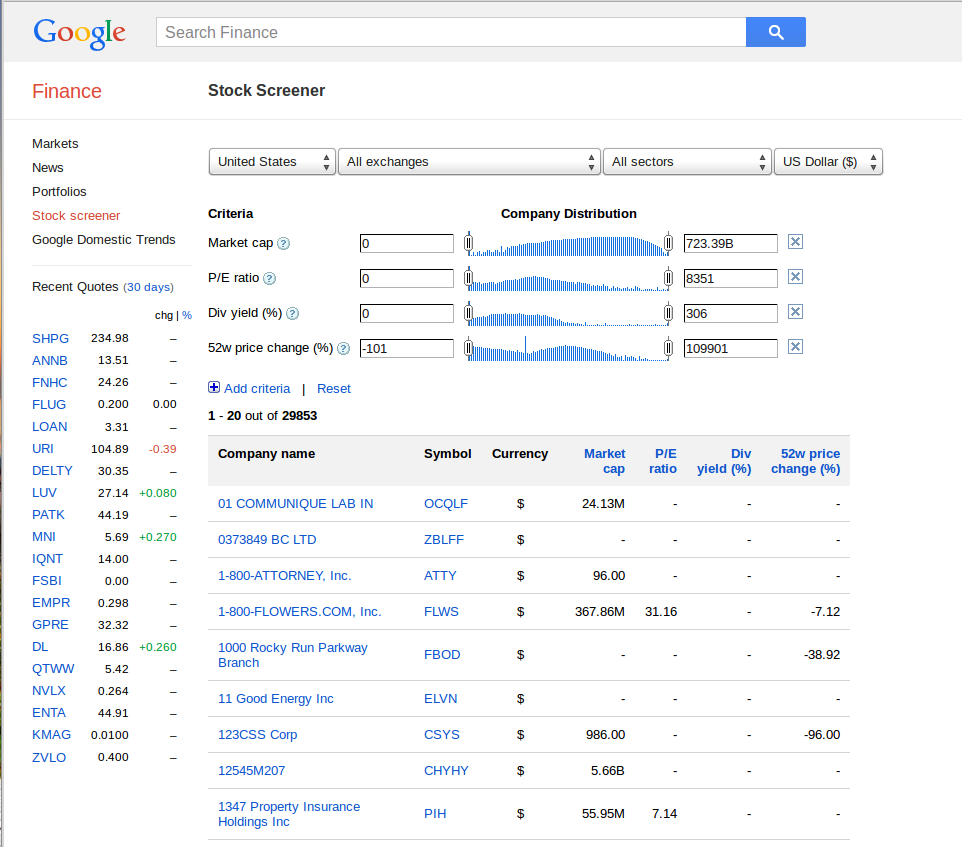
Here’s how the screener page is supposed to look (Firefox):


And here’s how it looks in Chrome:


The slider elements overlay the the numeric input boxes on the right making it impossible to set screener selection criteria.
 
Bottom line: it is probably not a good idea to include Google products in any mission-critical applications, because you simply never know if they will continue to be supported in the future.
 
–Doug