Home Blog Page 1420

MIT Research Shows the Future of Datacenter Networking

MIT researchers are presenting a paper (next month at the annual meeting of the ACM Special Interest Group on Data Communication) on a network management system they are calling “no-wait datacenters.” The researchers have experimentally shown that the system can reduce network transmission queue length by over 99 percent.

With testing done in cooperation with Facebook — making use of one of their data center facilities — the researchers were able to show latency reductions that effectively did away with the normal queue. Their report stated that even in times of heaviest traffic, the average latency per request dropped from 3.56 microseconds to .23 microseconds.

6 Excellent Lightweight Linux Distros for x86 and ARM

Presenting a nice assortment of lightweight yet fully-functional Linux distros for all occasions. All of these are full distros that do not depend on cloud services; four for x86 and two, count ’em, two for ARM hardware. (Updated Feb 2016: Read the latest.)

Elementary OS

Elementary OS is a beautiful, fast, lightweight Linux for 32- and 64-bit x86. It is built on an Ubuntu core, and Elementary’s desktop environment, Pantheon, started out with some stripped-down GNOME 2 elements. But it is more than an Ubuntu respin or GNOME fork– a lot of custom development goes into Elementary OS, including apps and its development toolkit.
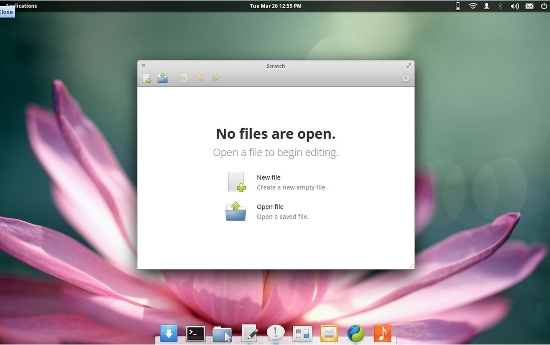
 fig1-elementary os distro

A significant aspect of Elementary OS is the inclusion of accessibility features for hearing, sight, and motor-impaired users. The state of accessibility technologies in Linux is far behind where they should be, so it’s encouraging to see a distro building them into its core system. Elementary OS has a bit of a Mac-like feel with a sleek, elegant appearance, subtle highlighting cues, minimal clicks to get from one place to another, and lots of useful super key shortcuts. I expect that even inexperienced Linux users could start using Elementary OS and be productive with just a little bit of poking around.

There is currently $5,755 of cash bounties available for bug-fixing some applications and base libraries. If you can’t code, putting a few bucks in the bounty kitty is a great way to support Elementary OS.

LXLE

LXLE takes Lubuntu LTS (long-term support), customizes the LXDE desktop, adds proprietary codecs and drivers and a thoughtful selection of default applications, and advertises it as a drop-in replacement for Windows. Me, I think anything is a good replacement for Windows, including an Etch-a-Sketch. But LXLE (Lubuntu eXtra Life Extension) really is an excellent choice for users who want to swap Linux for Windows.
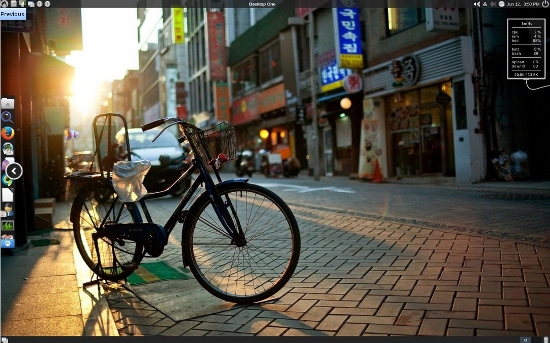
fig2-lxle-distro

LXLE is not amazing new revolutionary technology, but rather an excellently-crafted and refined enhancement of Lubuntu 12.04 and 14.04. The last 5 percent is the hardest, and LXLE goes all the way and finishes that last 5 percent. Installation is fast and simple, and it boots up very quickly. LXLE has five desktop looks to choose from: Unity, Windows XP, GNOME 2, Mac OS X and Netbook. Its most fun feature for me is the 100+ included beautiful wallpapers, and the Random Wallpaper button to cycle them automatically. Windows refugees, or any casual user, will find their way around easily. It also includes the full capabilities of Linux for power users. That is why I love Linux: we can have it all. (32- and 64-bit x86)

Arch Linux ARM

arch linux logoArch Linux is the choice of fine nerds everywhere who want a simple yet versatile, up-to-date, lightweight rolling distribution. Arch calls itself simple because it comes with a minimum of bells and whistles, and is for users who want maximum control of their systems with no backtalk from “helpful” utilities.

Arch supports x86, and also has an excellent ARM port. ARM devices are everywhere thanks to single-board computers like Raspberry Pi, Beagleboard, and Arduino, smartphones, tablets, and netbooks like the Samsung Chromebook. Arch is extremely customizable, so you can pare it down to fit even the smallest SBC and make it into a router, a special-purpose server, or even a tiny but useful portable desktop computer. Just like x86 Arch, ARM Arch is well-documented and has active community support.

Point Linux

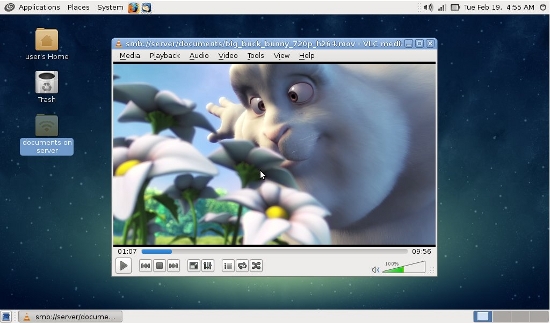
Point Linux is a baby, barely a year old. It is based on Debian 7 and the MATE desktop, which was originally forked from GNOME 2. So it has a traditional system menu and panels– nice and clean, and everything easy to find with no dancing icons, no hidden things that appear only when you luck out and hover your cursor over the exactly correct spot, and virtual desktops that stay put. It runs well on old feeble hardware, and comes with a good basic selection of applications. Point Linux is based in Russia, and has good comprehensive localization. If you miss the Ubuntu of old, when it had the best GNOME 2 implementation of any distro, then you might like Point Linux. (32- and 64-bit x86)
pointlinux distro

Porteus

Porteus was originally named Slax Remix. Porteus is a combination of “portability” and “Proteus”, the god of the sea who could change his form. This is a reference to Porteus’ flexibility; it weighs in at less than 300MB, and is optimized to run from a USB stick, CD, Compact Flash, or hard disk. It’s a great way to get a prefab version of Slackware all ready to go to work.
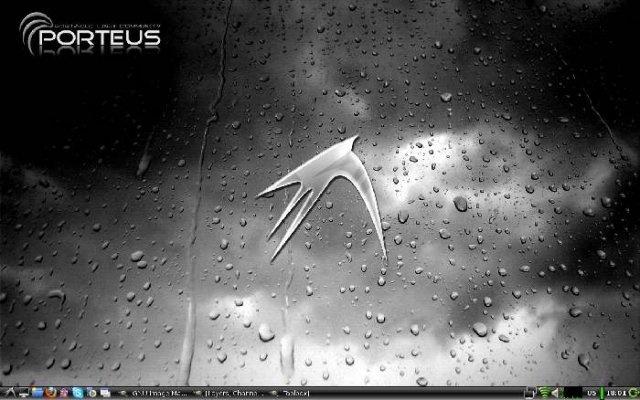
fig5 porteus

You get a choice of five, count ’em, five desktop environments: KDE4, Razor, LXDE, MATE, or Xfce. Porteus includes a package manager, so you can install and remove packages to your heart’s content. In my un-humble opinion it is the best portable Linux.

Fedora ARM

Fedora’s ARM port has finally been promoted to primary architecture status, as of the Fedora 20 release in December 2013. This is a significant step because it now gets equal priority with the x86 releases, and no packages are pushed into repositories if they fail to build. In typical Fedora fashion, ARM support is broad and pushes into the bleeding edge with support for 64-bit ARM, all the popular ARM SBCs, and a nice selection of unofficial remixes for unsupported devices including the Samsung Chromebook. Which I keep mentioning because it looks like a perfect travel notebook once you clear the Google gunk off and install a good proper Linux on it. Visit the Fedora ARM wiki page to learn everything.
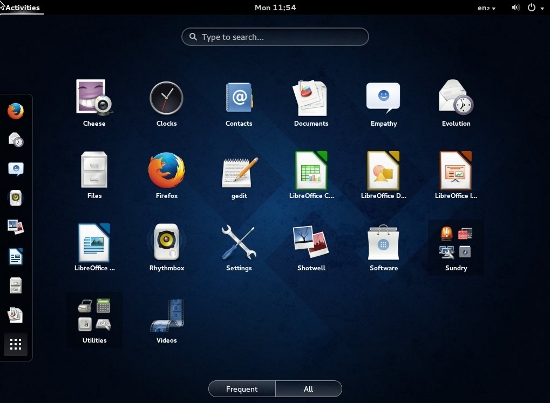
fig6 fedora unity desktop


KernelASan: Bringing Address Sanitizer To The Linux Kernel

Work being done by Samsung and other Linux stakeholders is bringing the Address Sanitizer capabilities found in GCC as being useful for detecting potential memory issues within the Linux kernel…

Read more at Phoronix

Mirantis and Oracle Partner on OpenStack

The deal could be worth tens of millions of dollars as Oracle digs deeper into the cloud.

Read more at eWeek

Slackware Turns 21 Years Old

It was on this day in 1993 that Patrick Volkerding announced the Slackware 1.00 release that was inspired by the Softlanding Linux System…

Read more at Phoronix

10 Tips to Avoid Sweating About IT This Summer

Here are guidelines on how to keep cool this summer when it comes to IT. These tips range from backing up data to cross-training staff.

Read more at eWeek

OSCON 2014 – The Art of Tizen UI Theme Technology in Various Profiles

  Tizen, the follow on Operating System (OS) from MeeGo, is aimed at various profiles, not only mobile, just like MeeGo was. With that in mind a User Interface (UI) must be scalable and themeable to support these diverse profiles. Daniel Juyung Seo, who is a software engineer from Samsung, will be presenting at OSCON at 11:30am 23rd July a session entitled “The Art of Tizen UI Theme Technology in Various Profilesâ€. There will also be a stand at OSCON with demonstrations about the Tizen SDK. The presentation will share the technology behind the scalable and themeable Tizen UI which is called EFL (Enlightenment Foundation Libraries). With some configuration, you can reuse the same UI elements in different sized devices easily, regardless of DPI. This will reduce development time tremendously to support multiple products and applications. A couple of devices are already being shipped based on this technology. If you are attending OSCON, please make sure you check out Daniel’s session at 11:30am on the 23rd July, and also the Tizen SDK demos.

The post OSCON 2014 – The Art of Tizen UI Theme Technology in Various Profiles appeared first on Tizen Experts.

Read more at Tizen Experts

Heterogeneous Multicore Dev Platform Targets Linux

Mentor Graphics has released a heterogeneous multicore development platform for combining Linux, Nucleus, and bare metal OSes on a single multicore SoC. Just as Wind River had its VxWorks real-time operating system before it developed its embedded Linux distribution, Mentor was known for its Nucleus RTOS years before it acquired embedded Linux experts Embedded Alley […]

Read more at LinuxGizmos

Linux System Administration Skills are Changing

Walter HeckWhen was the last time you compiled a kernel? For many of the latest generation of Linux admins, the answer is really simple: never. I am one of those, provided we don’t count a few times I tried it just for fun, then couldn’t see why I would need a custom kernel and went back to my out-of-the-box kernel. 

 
For many of the longer-time Linux admins and engineers this may seem laughable, but it is a reality: As Linux adoption grows in the enterprise, a new generation of Linux admins is created that has extremely good technical skills, but lacks these ‘simple’ low level skills seen by many as fundamental to being a good Linux admin. We can build a high performance, highly available web infrastructure that uses the latest of the latest techniques, but don’t ask us to fix a non-booting Linux machine: our advice will be to ditch it and set up a new vm.
 
Over the past decade or so, we have seen some interesting trends. Linux became a commodity in the enterprise, and as that happened the various distributions became powerful yet flexible enough to remove the need for the average admin to ever have to do low level things like compiling a kernel. 
 
Next, we welcomed virtual machine technology as a commodity, which added another layer of abstraction. Users of clouds like amazon or VPS providers will possibly never have to deal with deploying Linux on bare metal. As hybrid and private clouds are becoming common as well, many enterprise admins will also not have to deal with this kind of thing anymore, they will just log into a web interface and spin up 5 more apache vm’s.
 
The newest two trends add even more abstraction: configuration management and the seemingly brand new (yet not new at all) containerization with tools like docker. Whenever a client asks us at OlinData to configure a Linux machine, our first action will be to set up Puppet. With our trusted library of well-functioning Puppet modules, that is very easy and will cost me less time then doing this manually.
 
For example with Puppet, I can install Apache on a new machine as simple as this:
 
node ‘web01.olindata.com‘ {
  include apache
  apache::vhost{ ‘www.olindata.com‘:
    docroot => ‘/var/www/olindata’
  }
}
 
Depending on the environment, I don’t even have to log into the machine anymore. Deploying this code through Continuous Deployment tools like Jenkins will allow me to deploy my infrastructure code automatically as it passes the tests I set up.

SysAdmin skills move up the stack

Even as we move toward higher levels of abstraction, ongoing Linux training is still highly valuable and desirable for admins today and will be well into the future. Knowing the fundamentals is key but as abstraction removes some of the old tasks, this requires sysadmins to move up further in the stack and enhance their skills in the higher level tools and practices. It is critical for a sysadmin to become familiar with the tools that enable these higher levels of abstraction. It pushes them to become more skilled in things like coding so that they can do more with these “new” tools. 
 
Will the need for low(er) level linux skills ever go away completely? Of course not. We still have many other uses for Linux then just the commodity server deployments. Also, people will still benefit hugely from knowing how to do lower level operations in their everyday work. On top of that, with demonstrable Linux skills on your resume, I (and many other employers with me) will always prefer you over candidates that don’t have them. You never know when you need those low-level skills!
 
Walter Heck is CEO and Founder of OlinData, an authorized Linux Foundation training partner. Here’s a list of scheduled official Linux Foundation courses by OlinData. 

Faults in Linux 2.6

Six researchers (including Julia Lawall of the Coccinelle project) have just released a paper [PDF] (abstract) that looks at the faults in the 2.6 kernel. “In August 2011, Linux entered its third decade. Ten years before, Chou et al. published a study of faults found by applying a static analyzer to Linux versions 1.0 through 2.4.1. A major result of their work was that the drivers directory contained up to 7 times more of certain kinds of faults than other directories. This result inspired numerous efforts on improving the reliability of driver code.

“Today, Linux is used in a wider range of environments, provides a wider range of services, and has adopted a new development and release model. What has been the impact of these changes on code quality? To answer this question, we have transported Chou et al.’s experiments to all versions of Linux 2.6; released between 2003 and 2011. We find that Linux has more than doubled in size during this period, but the number of faults per line of code has been decreasing. Moreover, the fault rate of drivers is now below that of other directories, such as arch. These results can guide further development and research efforts for the decade to come. To allow updating these results as Linux evolves, we define our experimental protocol and make our checkers available.” (Thanks to Asger Alstrup Palm.)

Read more at LWN