Home Blog Page 1429

How to Operate Linux Spycams With Motion

fig1 spycamWhen you want something a little simpler and more lightweight than Zoneminder for operating surveillance cameras, try Motion.

Motion is a nice lightweight, yet capable application for operating surveillance cameras on Linux. It works with any Linux-supported video camera, including all V4L Webcams, many IP cameras, Axis cameras, and it controls pan and tilt functions. Motion records movies and snapshots in JPEG, PPM, and MPEG formats, and you can view these remotely in a Web browser thanks to Motion’s built-in HTTP server. It stores image files in a directory of your choosing, and it does not require a database, though it supports MySQL and PostgreSQL if you do want to use one.

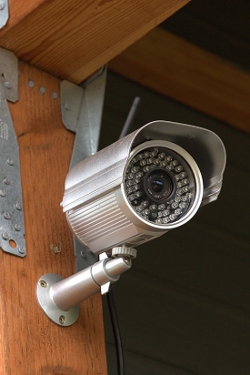
First let’s look at how to get an IP camera working with Motion using my trusty Foscam FI8905W (figure 1), and then we’ll add a USB Webcam.

Installation is easy on Debian and Debian derivatives, because Motion is included in the standard software repositories. So all you need to do is run apt-get install motion. You also need libav-tools, which is a fork of ffmpeg. Many moons ago, Debian dropped ffmpeg and replaced it with libav-tools (See Is FFmpeg missing from the official repositories in 14.04? to learn the gory details, and how to get ffmpeg itself if that’s what you really want). On other distros, check the downloads page and installation guide for instructions. Most other distros still include ffmpeg.

The installer should create a motion group and user, and add the motion user to the video group. If it doesn’t, then you must create them yourself. Add yourself to the video group as well, to get around permissions hassles.

Now run motion to see if it works:

$ sudo motion
[0] Processing thread 0 - config file /etc/motion/motion.conf
[0] Motion 3.2.12 Started
[0] ffmpeg LIBAVCODEC_BUILD 3547904 LIBAVFORMAT_BUILD 3544067
[0] Thread 1 is from /etc/motion/motion.conf
[1] Thread 1 started
[0] motion-httpd/3.2.12 running, accepting connections
[1] Failed to open video device /dev/video0: No such file or directory
[0] motion-httpd: waiting for data on port TCP 8080
[1] Could not fetch initial image from camera
[1] Motion continues using width and height from config file(s)
[1] Resizing pre_capture buffer to 1 items
[1] Started stream webcam server in port 8081
[...]

It will go on for many more lines, until you see:

[1] Failed to open video device /dev/video0: No such file or directory
[1] Video signal lost - Adding grey image

Point your Web browser to localhost:8081 and you will see a gray image:
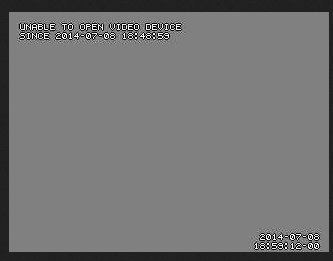
fig2 gray image

This is good, as it means Motion is installed correctly, and all you have to do is configure it. Press Ctrl+C to stop it. Then create a .motion directory in your home directory, copy the default configuration file into it, and change ownership to you:

~$ mkdir .motion
~$ sudo cp /etc/motion/motion.conf .motion/
~$ sudo chown carla:carla .motion/motion.conf

You also need a directory to store images captured by motion:

~$ mkdir motion-images

When you start Motion it looks for a configuration file in the current directory, then in ~/.motion, and finally /etc/motion. Now edit your ~/.motion/motion.conf file– this example includes basic configurations, and the lines relevant to my Foscam IP camera:

# Start in daemon (background) mode and release terminal (default: off)
daemon on
# Output 'normal' pictures when motion is detected (default: on)
[...]
output_normal off
# File to store the process ID, also called pid file. (default: not defined)
process_id_file /var/run/motion/motion.pid 
# Image width (pixels). Valid range: Camera dependent, default: 352
width 640
# Image height (pixels). Valid range: Camera dependent, default: 288
height 480
# Maximum number of frames to be captured per second.
# Valid range: 2-100. Default: 100 (almost no limit).
framerate 7
# URL to use if you are using a network camera, size will be autodetected (incl http:// ftp:// or file:///)
# Must be a URL that returns single jpeg pictures or a raw mjpeg stream. Default: Not defined
netcam_url value http://http://192.168.10.250:8080/videostream.cgi
# Username and password for network camera (only if required). Default: not defined
# Syntax is user:password
netcam_userpass admin:mypassword
# Target base directory for pictures and films
# Recommended to use absolute path. (Default: current working directory)
target_dir /home/carla/motion-images
# Codec to used by ffmpeg for the video compression.
[...]
ffmpeg_video_codec mpeg4

You need to create the directory for storing the PID file, as it says in motion.conf:

$ sudo mkdir /var/run/motion

Now try starting it up again:

$ sudo motion
[0] Processing thread 0 - config file /home/carla/.motion/motion.conf
[0] Motion 3.2.12 Started
[0] Motion going to daemon mode

Good so far, now try localhost:8081 again:
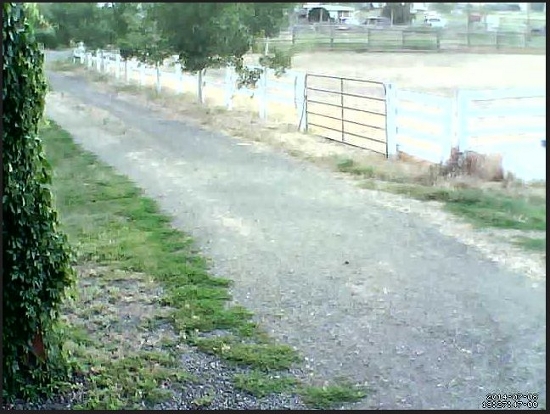
fig3 driveway

Well look, there is my driveway. Now I will have plenty of warning when visitors come, so I can loose the moat monsters. Run around in front of your camera to trigger motion detection, and when you come back your images directory should have some .avi movies in it. You should also find a simple Motion control panel at localhost:8080.

IP Camera Settings

How to Operate Your Spycams with ZoneMinder on Linux (part 1) goes into some detail on setting up your camera. You must follow the vendor’s instructions for the initial setup, such as assigning a login and password, and setting the IP address. You may have other options as well, such as frame size, motion sensitivity, and color depth or black and white.

Getting the correct netcam_url is sometimes a hassle. For my Foscam I brought up its control panel in Firefox, right-clicked on the image (figure 4), then left-clicked View Image Info. This opens a screen like figure 5, which shows the exact URL of the videostream. In the Chrome browser use “Inspect element.”
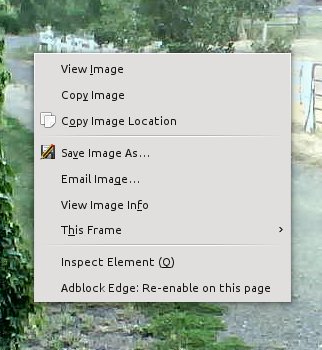
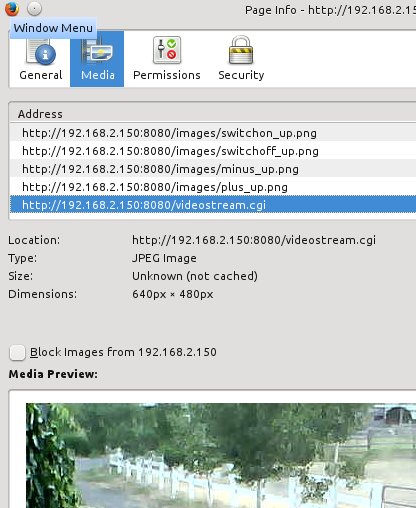
fig4 control panel

fig5 foscam

Fine-tuning Configuration Values

You can make all kinds of adjustments in your configuration file such as image size, image quality, frame rate, sensitivity to movement, greater sensitivity in selected areas of the frame, file paths, HTTP server settings, and time stamp formats. Motion Guide – Alphabetical Option Reference Manual gives detailed information on each option. Remember to harmonize your Motion settings with the settings in your camera’s control panel, if it has one.

USB Cameras

Any V4l-supported USB Webcam should work with little fuss. The video device will be /dev/video0. /dev/video0 will be present only when a video camera is connected directory to your computer. This is a basic example configuration for my Logitech Webcam:

videodevice /dev/video0
width 640
height 480
framerate 24
output_normal off
ffmpeg_video_codec mpeg4
target_dir /home/carla/motion

And again, remember that settings such as frame rate and size are dependent on what your camera supports.

Daemonizing Motion

Once you have everything working, make Motion run as a daemon by editing /etc/default/motion, and changing start_motion_daemon=no to start_motion_daemon=yes. Now Motion will start automatically when you start your computer, and you can start and stop it like any other daemon.

Controlling Multiple Cameras

Motion manages multiple cameras with ease — all you do is give each camera its own configuration file, named thread1.conf, thread1.conf, and so on. You still need your main motion.conf for common options such as daemon on and filepaths. Then each “thread” file has configurations specific to each camera.
Day: Sandboxed Applications for GNOME

In the first of a two-part series, GNOME contributor Allan Day looks at sandboxed applications for the GNOME desktop. In this installment, he looks at the benefits of application sandboxes from a couple of different angles. “Security and privacy, I think, are core beliefs for Free Software. Users should be able to trust us to have their interests at heart, and should be able to have more faith in our products than proprietary alternatives. Ironically, though, the Free Software desktop world hasn’t done a great job at security. It is actually pretty scary what a malicious desktop application could do if it wants to. We rely on transparency and good faith to ensure that applications do not infringe on user privacy, rather than robust technical architecture.“

Read more at LWN

AMD Publishes Open-Source Linux HSA Kernel Driver

AMD has just published a massive patch-set for the Linux kernel that finally implements a HSA (Heterogeneous System Architecture) in open-source. The set of 83 patches implement a Linux HSA driver for Radeon family GPUs and serves too as a sample driver for other HSA-compatible devices. This big driver in part is what well known Phoronix contributor John Bridgman has been working on at AMD…

Read more at Phoronix

Raspberry Pi Compute Module Becomes Pico-ITX SBC

On Kickstarter, Geekroo launched a “CoMo Booster” Pico-ITX baseboard for the Raspberry Pi Compute Module that adds WiFi, audio I/O, and wide-range power. Raspberry PiCompute Module(click to enlarge) Last year, Australia-based Geekroo ran a successful Kickstarter project to build a Mini-ITX board called the Fairywren, which extends the I/O and power supply of the Linux-ready […]

Read more at LinuxGizmos

Android: Number One With a Bullet

Android is well on its way to being the most popular end-user operating system of all.

The First Chromebook With a Core i3 Processor is Here

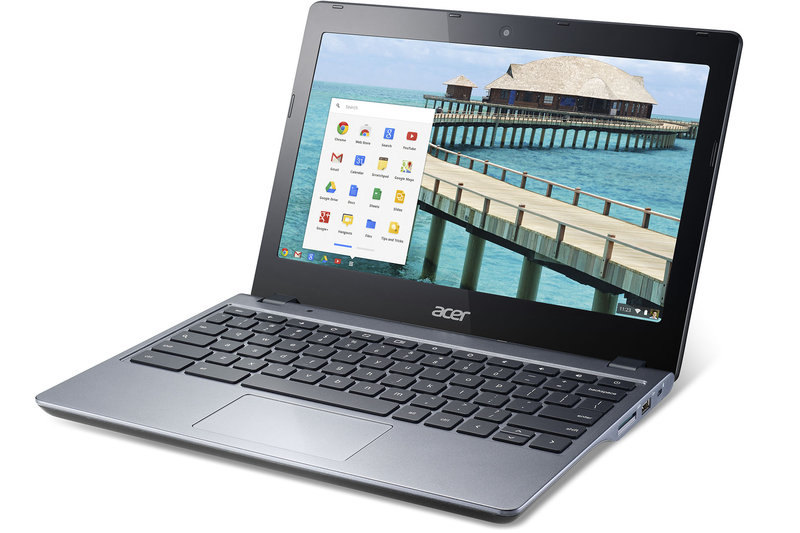
Chromebooks are best known for being simple, pared-down devices that browse the web and don’t do much else. As a result, aside from the exhorbitantly expensive Chromebook Pixel, most Chromebooks have underpowered processors when compared with more fully featured laptops. Google and Intel promised that would change to some extent earlier this year, and now Acer is launching the first Chromebooks with Intel’s more powerful Core i3 processor.

The Acer C720 is now available with a 1.7GHz Core i3 processor and 2GB of RAM for $349.99 or 4GB of RAM for $379.99. Both versions have 32GB of internal storage, twice that of most Chromebooks. That’s a slight bump in price over the earlier C720 models, which featured a weaker Intel Celeron processor….

Continue reading…

Read more at The Verge

Automotive Grade Linux Released: An Interview With Dan Cauchy

AGL dashboardOn June 30, the Linux Foundation’s Automotive Grade Linux (AGL) project released the first version of its open source AGL stack for in-vehicle infotainment (IVI). Based on Tizen IVI, AGL adds a stylish user interface and various applications written in HTML5 and JavaScript. The AGL stack, which is partially compatible with the somewhat similar, open source Linux GENIVI Foundation spec, supports multiple hardware architectures.
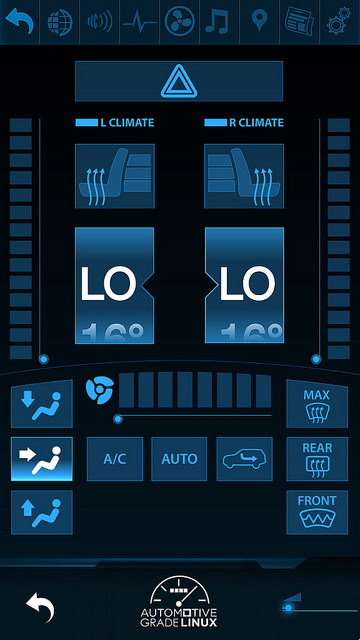
Most of the initial UI components are related to IVI functionality except for the HVAC app, which hooks into a car’s telemetry system via an Automotive Message Broker (AMB). Applications include media playback, Google Maps, a news reader, audio controls, and mobile device integration, including Bluetooth support.

This week, I spoke with Dan Cauchy, general manager of automotive for the Linux Foundation, about the role of Automotive Grade Linux comparative to GENIVI and other IVI platforms, We also discussed the future of Linux in automotive, including autonomous cars.

Cauchy has played a major role in the Linux IVI scene, as a VP of marketing at MontaVista Software, helping to develop the GENIVI-compliant, MontaVista Linux based Automotive Technology Platform (ATP). During the same period, he acted as a GENIVI board member and chairman of GENIVI Compliance.

Cauchy later helped MontaVista sell ATP to Mentor Graphics before leaving to join the Linux Foundation. Earlier in his career, Cauchy was also chairman of the Linux Foundation’s Carrier Grade Linux working group, which plays a somewhat similar role as AGL, except for high-end networking.

Last year IHS projected that by 2020, Linux will push past QNX and Microsoft to lead a 130 million-unit IVI market with a 41.3 percent share. Do you also see a shift toward Linux?

Cauchy: In general, automotive is moving to Linux, and it’s just a matter of time before Linux is the leading platform. The automotive market is where telecom and consumer electronics were about five years ago. It’s only happening now in automotive because the product cycles are longer, and the manufacturers have been concerned about open source licensing. But it won’t be any different than any other market where Linux has made gains.

Aren’t carmakers concerned that Linux lacks the real-time capabilities of say, QNX?

Cauchy: Over the last few years, we’ve seen about 90 percent what we used to call the real-time patch, implemented in Linux, including preemptive scheduling. If you want 99.999 percent determinism, it’s quite good today, but if you need 100 percent it’s not yet there. In any case, it’s not an issue with IVI. When we get more into telematics, real-time becomes more important.

AGL HVAC

How does building an automotive computing stack differ from other embedded Linux technologies?

Cauchy: The basic technology is not that different. It’s the same kernel , middleware, a lot of the same open source components. That’s the beauty of using open source Linux — you can reuse what’s available. There is, however, more of a focus on fast boot and security, and you need access to the vehicle’s CAN bus. That’s not a huge adjustment for Linux.

What needs are being filled by AGL that are not already supported by GENIVI?

Cauchy: GENIVI and AGL were launched with different goals. GENIVI wants to promote Linux and open source in the automotive market, and it did a fantastic job at that. They educated the manufacturers about licensing and liability. The focus with GENIVI is on the spec and the compliance program. It was never about an actual distribution or a common platform. It’s more about people building their own platform and making it compliant. AGL was started as a distribution reference platform from the get go.

Another difference is that AGL is a completely open source project. The GENIVI spec has some components that are not available in open source. With AGL, any developer can contribute code, and everything is released in the open.

AGL and GENIVI are really not very competitive, and in fact, we are pretty closely aligned. We’re talking to GENIVI about other ways our two organizations can become better aligned.

Speaking of alignment, Intel said that its new Intel In-Vehicle Solutions (IIVS) automotive reference platform, based on the Intel Atom E3800 and Tizen IVI, is “aligned” with AGL, but not fully compliant with it. How would you define the relationship, and will there be other Tizen-based automotive platforms that don’t fully comply with AGL?

Cauchy: I can’t comment on IIVS. All I know is Intel is very supportive of AGL.

I’ve heard that Toyota and Jaguar/Land Rover are both working on Tizen IVI systems based on AGL. What is the timetable for releasing products, and are other AGL members like Hyundai and Nissan planning AGL products?

Cauchy: I can’t comment on OEM plans. However, Toyota and Jaguar/Land Rover are both very active in AGL, and have developers working on the platform. I think we can expect at least one manufacturer to come out with an AGL-based IVI system within the next year.

AGL is processor agnostic, but what chips are being used in the early designs?

Cauchy: The Intel Atom is a big cornerstone, and we are also supporting Renesas R-Car and TI’s OMAP5-based Jacinto. We don’t have Freescale i.MX6 support yet. In general, we support inexpensive, $300-$400 development boards so a wide range of developers can use AGL. But the car manufacturers are responsible for porting to specific platforms.

Will AGL and/or its partners collaborate with some of the emerging schemes for standardizing interactions between IVI systems and mobile devices, such as MirrorLink, Apple’s CarPlay, or the new Android Auto?

Cauchy: It’s not within our scope to support them because it requires manufacturers to enter into agreement to offer access. There’s nothing preventing any of those standards to run on the AGL stack. If membership wants us to provide standardized access, however, it would be possible.

Renault is using Android for all its IVI systems. To what extent will Android catch on as an IVI platform?

Cauchy: Android has a problem in that a lot of car manufacturers are not willing to give up the control of the display to Google or Apple. They want to keep that relationship with the consumer and maintain their branding, which is something that AGL and Tizen IVI are better designed to support.

What benefits does Tizen IVI provide that are not available on Android or other GENIVI Linux flavors?

Cauchy: Tizen is fully open source, and is very actively developed and supported, with hundreds of engineers working on it. It offers HTML5, which is a fantastic development platform, very cutting edge. We think that HTML5 and Javascript will eventually surpass Android. The Tizen IVI variant is also very solid.

Where is the dividing line between AGL and Tizen IVI?

Cauchy: AGL builds on top of Tizen IVI with a UI and automotive specific apps. We develop things that we submit upstream back into Tizen, and then there are other things that are AGL specific. The delineation is that AGL tends to reside above the middleware stack.

What are the future directions for AGL? Any new releases expected this year?

Cauchy: We use a code-first methodology, so when there are chunks ready, we release them. We’ve implemented Wayland support and W3C extensions, and we will keep extending support for new web APIs. We’ll move from the Webkit runtime to Crosswalk in the third quarter. Smack is under consideration for holistic security, but we’re also looking at SELinux.

Will AGL move beyond IVI to support more telematics functions, and eventually advanced driver assistance systems (ADAS) and autonomous cars?

Cauchy: From the get go, we have wanted to support everything in the car, not just IVI. The next steps will be to support instrument clusters — there are all these LCD clusters now that run Linux — and then HUD [head-up displays] and more telematics. Manufacturers want all of these systems, plus IVI, running on one system, with a portioning scheme using a multicore hypervisor. But that won’t happen for a while. Today all these run on different systems, many of which have their own RTOS. But it makes sense to have Linux control the cluster, which is a lot like IVI. Why wouldn’t the OEMs want to standardize on that?

ADAS is not in our scope right now. It’s too early. You’ve got some ambitious folks at Google who seem to be going the full autonomy route, but the rest of the industry is probably moving to a more semi-autonomous design, with vehicle to vehicle communications. All this will take time to get properly automated. The world is not yet ready for an autonomous car.

Microsoft, Docker, Red Hat and IBM Join Google’s Kubernetes Project

A few weeks ago, I covered the news that Google has released Kubernetes under an open-source license, which is essentially a version of Borg, which harnesses computing power from data centers into a powerful virtual machine. It can make a difference for many cloud computing deployments, and optimizes usage of container technology. You can find the source code for Kubernetes on GitHub.

Now, news has arrived that some vey big contributors to the Kubernetes project, including IBM, Microsoft, Red Hat, Docker, CoreOS, Mesosphere, and SaltStack are working in tandem on open source tools and container technologies can run on multiple computers and networks.

Read more at Ostatic

Preview: Benchmarking CentOS 7.0 & Scientific Linux 7.0

CentOS 7.0 was released this week and that came just days after the first alpha of Scientific Linux 7, both of which are based upon last month’s release of Red Hat Enterprise Linux 7. With these new community-based EL7 releases coming about, it’s time for some fresh Enterprise Linux benchmarking and performance monitoring on Phoronix.

Read more at Phoronix

Stackify – Application Monitoring for DevOps

Stackify’s CEO and VP of Marketing discuss what monitoring/management tools developers/operators need. In short, simplicity and the ability to dive deep into the software stack when needed.