
Command-line lovers, allow me to introduce you to Xiki, the incredibly interactive, flexible, and revolutionary command shell. I do not use the word “revolutionary” lightly. The command shell has not advanced all that much since the ancient days of Unix. Xiki is a giant leap forward. If you’re looking for the Next Big Thing in FOSS, Xiki is it.
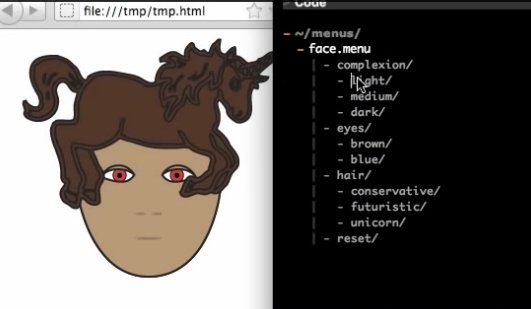
Xiki merges shell and GUI concepts. It runs in a text editor, so everything is editable and you can save your Xiki sessions in text files. You can use a mouse in Xiki, insert a command prompt anywhere you want, incrementally filter searches, expand and filter directory contents, open and edit files in place, enter text notes wherever you want, edit, re-order, and re-use command history, and you can do all of this in a natural progressive flow. You can create new commands as you go, browse and replay commands that were run from specific directories, and have menus of favorite commands. You can send Tweets and emails directly from Xiki. Xiki is so different it can be a little difficult to wrap your mind around it, so watch the screencasts to see it in action.
Currently Xiki supports Emacs, Vim, and Aquamax. Note: Vim support is immature, so try Emacs (Linux) and Aquamax (OS X). Emacs runs in GUI mode by default, so you don’t need Xemacs or other variants just to get GUI mode.
You can download and install it from github.com/trogdoro/xiki. Linux users need to install Ruby and ruby-dev 1.9.3, and ruby-railties. Then follow these steps to install Xiki:
$ git clone git://github.com/trogdoro/xiki.git
Cloning into 'xiki'...
remote: Reusing existing pack: 6282, done.
remote: Total 6282 (delta 0), reused 0 (delta 0)
Receiving objects: 100% (6282/6282), 4.88 MiB | 239.00 KiB/s, done.
Resolving deltas: 100% (2980/2980), done.
Checking connectivity... done.
$ cd xiki
$ sudo gem install bundler
Successfully installed bundler-1.6.3
1 gem installed
Installing ri documentation for bundler-1.6.3...
Installing RDoc documentation for bundler-1.6.3...
$ bundle
$ sudo ruby etc/command/copy_xiki_command_to.rb /usr/bin/xiki
Fetching gem metadata from https://rubygems.org/........
Fetching additional metadata from https://rubygems.org/..
Resolving dependencies...
Using rake 10.3.2
Using i18n 0.6.9
[...]
Using trogdoro-el4r 1.0.10
Using xiki 1.0.1a from source at .
Using bundler 1.6.3
Your bundle is complete!
Use `bundle show [gemname]` to see where a bundled gem is installed.
$ sudo ruby etc/command/copy_xiki_command_to.rb /usr/bin/xiki
Putting the 'xiki' shell command at:
  /usr/bin/xiki
Finished.
Now run the xiki command:
$ xiki
$ > Summary
The 'xiki' shell command is mostly meant to be called by programs
that want to interface with Xiki.  But it is sometimes useful for
people to call it directly.  Example usages:
$ xiki ip
$ xiki docs/faq

Setting up your editor
The most common way to use Xiki is from a text editor.  For
example, from in a text editor, typing "tables" on any blank line
and then double-clicking on it (or typing control-enter or
command-enter) to browse and update your mysql database.
See the README.md file in the Xiki dir for help setting up
your editor. You can view it by typing this command or going to
this url:
$ xiki readme
https://github.com/trogdoro/xiki
> Service
The 'xiki' shell command automatically runs a service in the
background to keep things fast.
% xiki status
% xiki stop
% xiki restart
> Interfaces
Xiki can be used from...
- A text editor
- The 'xiki' shell command
- The http://xiki/ url in your browser (experimental)
For more information type:
$ xiki docs
> Google Group and Twitter
Join the google group or follow @xiki on twitter for help with
installing and using, or just to chat or share your ideas:
http://groups.google.com/group/xiki/http://twitter.com/xiki
> Troubleshooting
A couple commands to help you trouble-shoot:
% bundle install
% xiki restart
% xiki readme
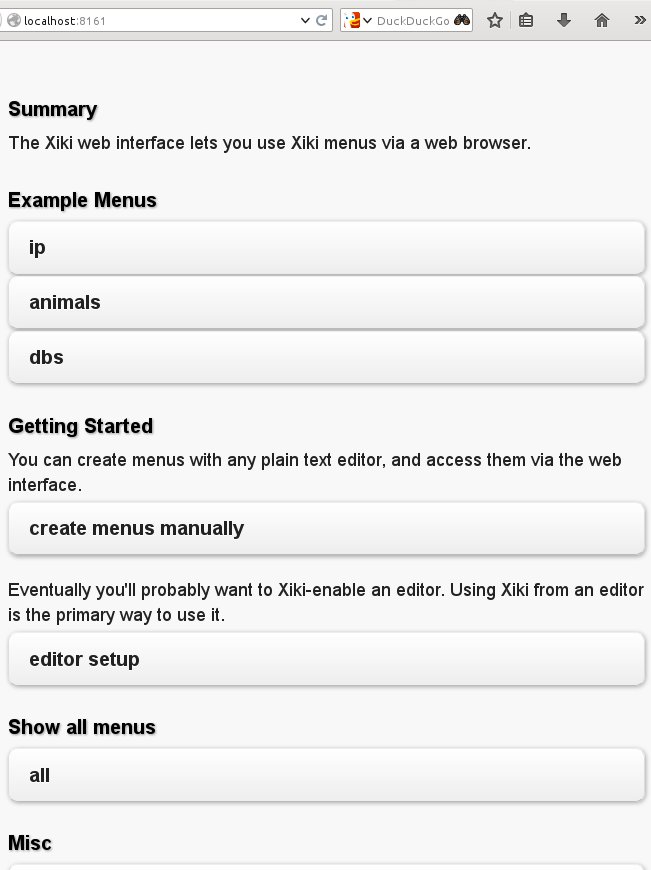
If you see all this, then Xiki is installed correctly and working. Try running xiki status, xiki stop and xiki start. These operate like ordinary shell commands, without all the cool stuff like you see in the screencasts. Now how do you get it working in a text editor? Your choices on Linux are Xemacs and Vim. Xemacs is supported better than Vim, and you need Xemacs (or any variant of Emacs that has a graphical interface) rather than plain Emacs. The easy way to configure Xemacs is to run the Xiki Web interface, which you start with xiki web/start. Then point a Web browser to http://localhost:8161/, and you’ll see something like figure 2.
Click the “editor setup” button, and then you’ll see something like figure 3.
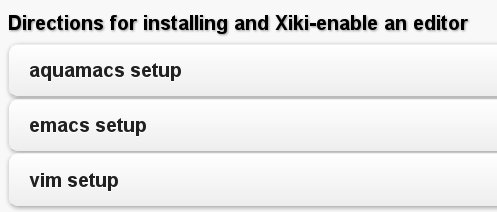
Click the “emacs setup” button, and then when it takes you to the next click on all three buttons in turn. Then fire up Xemacs, and you should be able to do some of the cool things demonstrated in the screencasts. Xiki is under heavy development, so if you run into glitches visit the Xiki group on Google to get help.
Howcome I Never Heard of It?
Xiki’s inventor, Craig Muth, has been working on Xiki for ten years. Maybe I’ve led a sheltered life, but I never heard of it until he started a Kickstarter campaign to raise funds to help accelerate development, and to push it into general release. Craig especially wants to improve the installer and expand Xiki into other text editors, and possibly have some budget for paying contributors.
Xiki is written in Ruby, and carries the permissive MIT license. Craig would love to have some collaborators, and has an open invitation to pair-program with anyone who is interested.
Accessibility and Mobile Devices
When I started playing with Xiki it quickly became clear that it has huge potential as an interface for assistive devices such as Braille keyboards, wearable devices like high-tech glasses and gloves, prosthetics, and speech-to-text/text-to-speech engines, because Xiki seamlessly bridges the gap between machine-readable plain text and GUI functions. Ruby is a wonderful language for doing a lot with a few lines of code. Which also makes Xiki a natural platform for mobile devices, like phones, tablets, smart watches, smart glasses, and all the “Internet of things” that the buzzspeakers are so excited about. The current state of programming these devices is pretty sad: every manufacturer has their own incompatible secret sauce, and they’re not user-hackable. Even Android isn’t as open as it could be. I would love to see the Linux model of open, hackable code and open device spread to the “Internet of things” as well.

 Ask many IT adminstrators about sticky issues they are facing as they pursue OpenStack deployments, and lots of them will say that they are wrestling with the security features built into the platform. Enterprises simply don’t want to trust a cloud platform and move apps and data to the cloud without having confidence in platform security.
 The
The