For a long time, Samsung’s been trying to take down the iPad. Since 2010, the company has released a seemingly endless line of tablets aimed at taking away market share from Apple. Some have been so similar to Apple’s products that they became the center of Apple’s infamous trademark lawsuit against Samsung. But the effort has paid off to some degree — Samsung reported shipping 40 million tablets last year, far more than it had in prior years. It’s still behind the 70 million iPads Apple…
How to Rescue a Non-booting GRUB 2 on Linux

Once upon a time we had legacy GRUB, the Grand Unified Linux Bootloader version 0.97. Legacy GRUB had many virtues, but it became old and its developers did yearn for more functionality, and thus did GRUB 2 come into the world.
GRUB 2 is a major rewrite with several significant differences. It boots removable media, and can be configured with an option to enter your system BIOS. It’s more complicated to configure with all kinds of scripts to wade through, and instead of having a nice fairly simple /boot/grub/menu.lst file with all configurations in one place, the default is /boot/grub/grub.cfg. Which you don’t edit directly, oh no, for this is not for mere humans to touch, but only other scripts. We lowly humans may edit /etc/default/grub, which controls mainly the appearance of the GRUB menu. We may also edit the scripts in /etc/grub.d/. These are the scripts that boot your operating systems, control external applications such as memtest and os_prober, and theming./boot/grub/grub.cfg is built from /etc/default/grub and /etc/grub.d/* when you run the update-grub command, which you must run every time you make changes.
The good news is that the update-grub script is reliable for finding kernels, boot files, and adding all operating systems to your GRUB boot menu, so you don’t have to do it manually.
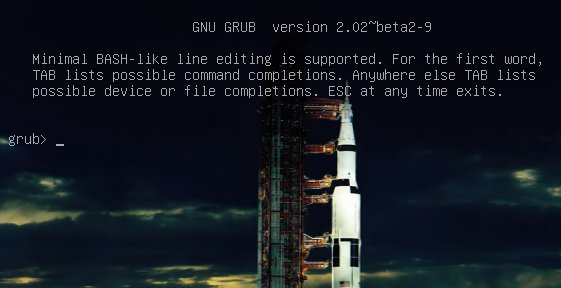
We’re going to learn how to fix two of the more common failures. When you boot up your system and it stops at the grub> prompt, that is the full GRUB 2 command shell. That means GRUB 2 started normally and loaded the normal.mod module (and other modules which are located in /boot/grub/[arch]/), but it didn’t find your grub.cfg file. If you see grub rescue> that means it couldn’t find normal.mod, so it probably couldn’t find any of your boot files.
How does this happen? The kernel might have changed drive assignments or you moved your hard drives, you changed some partitions, or installed a new operating system and moved things around. In these scenarios your boot files are still there, but GRUB can’t find them. So you can look for your boot files at the GRUB prompt, set their locations, and then boot your system and fix your GRUB configuration.
GRUB 2 Command Shell
The GRUB 2 command shell is just as powerful as the shell in legacy GRUB. You can use it to discover boot images, kernels, and root filesystems. In fact, it gives you complete access to all filesystems on the local machine regardless of permissions or other protections. Which some might consider a security hole, but you know the old Unix dictum: whoever has physical access to the machine owns it.
When you’re at the grub> prompt, you have a lot of functionality similar to any command shell such as history and tab-completion. The grub rescue> mode is more limited, with no history and no tab-completion.
If you are practicing on a functioning system, press C when your GRUB boot menu appears to open the GRUB command shell. You can stop the bootup countdown by scrolling up and down your menu entries with the arrow keys. It is safe to experiment at the GRUB command line because nothing you do there is permanent. If you are already staring at the grub> or grub rescue>prompt then you’re ready to rock.
The next few commands work with both grub> and grub rescue>. The first command you should run invokes the pager, for paging long command outputs:
grub> set pager=1
There must be no spaces on either side of the equals sign. Now let’s do a little exploring. Type ls to list all partitions that GRUB sees:
grub> ls (hd0) (hd0,msdos2) (hd0,msdos1)
What’s all this msdos stuff? That means this system has the old-style MS-DOS partition table, rather than the shiny new Globally Unique Identifiers partition table (GPT). (See Using the New GUID Partition Table in Linux (Goodbye Ancient MBR). If you’re running GPT it will say (hd0,gpt1). Now let’s snoop. Use the ls command to see what files are on your system:
grub> ls (hd0,1)/ lost+found/ bin/ boot/ cdrom/ dev/ etc/ home/ lib/ lib64/ media/ mnt/ opt/ proc/ root/ run/ sbin/ srv/ sys/ tmp/ usr/ var/ vmlinuz vmlinuz.old initrd.img initrd.img.old
Hurrah, we have found the root filesystem. You can omit the msdos and gpt labels. If you leave off the slash it will print information about the partition. You can read any file on the system with the cat command:
grub> cat (hd0,1)/etc/issue Ubuntu 14.04 LTS n l
Reading /etc/issue could be useful on a multi-boot system for identifying your various Linuxes.
Booting From grub>
This is how to set the boot files and boot the system from the grub> prompt. We know from running the ls command that there is a Linux root filesystem on (hd0,1), and you can keep searching until you verify where /boot/grub is. Then run these commands, using your own root partition, kernel, and initrd image:
grub> set root=(hd0,1) grub> linux /boot/vmlinuz-3.13.0-29-generic root=/dev/sda1 grub> initrd /boot/initrd.img-3.13.0-29-generic grub> boot
The first line sets the partition that the root filesystem is on. The second line tells GRUB the location of the kernel you want to use. Start typing /boot/vmli, and then use tab-completion to fill in the rest. Type root=/dev/sdX to set the location of the root filesystem. Yes, this seems redundant, but if you leave this out you’ll get a kernel panic. How do you know the correct partition? hd0,1 = /dev/sda1. hd1,1 = /dev/sdb1. hd3,2 = /dev/sdd2. I think you can extrapolate the rest.
The third line sets the initrd file, which must be the same version number as the kernel.
The fourth line boots your system.
On some Linux systems the current kernels and initrds are symlinked into the top level of the root filesystem:
$ ls -l / vmlinuz -> boot/vmlinuz-3.13.0-29-generic initrd.img -> boot/initrd.img-3.13.0-29-generic
So you could boot from grub> like this:
grub> set root=(hd0,1) grub> linux /vmlinuz root=/dev/sda1 grub> initrd /initrd.img grub> boot
Booting From grub-rescue>
If you’re in the GRUB rescue shell the commands are different, and you have to load the normal.mod andlinux.mod modules:
grub rescue> set prefix=(hd0,1)/boot/grub grub rescue> set root=(hd0,1) grub rescue> insmod normal grub rescue> normal grub rescue> insmod linux grub rescue> linux /boot/vmlinuz-3.13.0-29-generic root=/dev/sda1 grub rescue> initrd /boot/initrd.img-3.13.0-29-generic grub rescue> boot
Tab-completion should start working after you load both modules.
Making Permanent Repairs
When you have successfully booted your system, run these commands to fix GRUB permanently:
# update-grub Generating grub configuration file ... Found background: /usr/share/images/grub/Apollo_17_The_Last_Moon_Shot_Edit1.tga Found background image: /usr/share/images/grub/Apollo_17_The_Last_Moon_Shot_Edit1.tga Found linux image: /boot/vmlinuz-3.13.0-29-generic Found initrd image: /boot/initrd.img-3.13.0-29-generic Found linux image: /boot/vmlinuz-3.13.0-27-generic Found initrd image: /boot/initrd.img-3.13.0-27-generic Found linux image: /boot/vmlinuz-3.13.0-24-generic Found initrd image: /boot/initrd.img-3.13.0-24-generic Found memtest86+ image: /boot/memtest86+.elf Found memtest86+ image: /boot/memtest86+.bin done # grub-install /dev/sda Installing for i386-pc platform. Installation finished. No error reported.
When you run grub-install remember you’re installing it to the boot sector of your hard drive and not to a partition, so do not use a partition number like /dev/sda1.
But It Still Doesn’t Work
If your system is so messed up that none of this works, try the Super GRUB2 live rescue disk. The official GNU GRUB Manual 2.00 should also be helpful.
Forked Android Build Targets Dual-Boot x86 Laptops, Tablets
A “Console OS” Kickstarter project is building an Android 4.4 fork for Intel CPUs on everything from PCs to tablets, complete with a dual-boot option. Intel is hoping to spur a new wave of dual-boot Android/Windows 2-and-1s and tablets with its Atom Z3000 and upcoming, newly announced Core M processors. So far, however, Android has […]
Age of Wonders III Will Be Coming To Linux
Ages of Wonders III, a turn-based strategy game released earlier this year by Triumph Studios for Windows will be coming to Linux with a native port…
Tesla Shares its Electric Car Technology in Spirit of Open Source

In an attempt to spur innovation, Tesla Motors says that it will allow anyone to use its patented technology on electric vehicles — even its biggest competitors. In a blog post, company CEO Elon Musk says that Tesla will not initiate patent lawsuits against anyone using its technology “in good faith.” He’s made this decision in part because the electric vehicle landscape is so limited right now, with these vehicles representing less than one percent of major automakers’ sales. Musk also believes that the current patent system often serves to stifle innovation and bolster large corporations, rather than helping out individual inventors.
Symantec Joins AllSeen as IoT Group Increases Security Focus
The industry consortium has grown its membership to 50 in six months and is expanding its efforts beyond the connected home.
New Private Cloud Devices Aim to Block Cyber Spies
Suddenly, consumer-oriented private cloud storage devices are everywhere, with many — if not most — running Linux. The market segment has blossomed thanks to growing concerns over government cyber-spying, notably in the case of the U.S. National Security Agency and the Chinese military. There is also growing unease about sharing of user data by mobile carriers, financial firms, and high-tech companies, as well as fears about cyber-criminals.
We’ve already seen privacy-minded, encryption-ready Linux distributions like Tails, as well as Linux-based Tor peripherals like Safeplug. An Android derived Blackphone, meanwhile, claims to be resistant to prying keyboards. Even Google — which is often singled out by critics as a privacy abuser — jumped on the trend last week by announcing Chrome End-to-End extensions that will make it easier to use OpenPGP email encryption within the browser.
Now, cloud storage is coming under scrutiny, despite relatively few cases of successful hacker exploits of sites like DropBox. You’re more likely to have your data stolen from less protected retail sites like Target.com. Still, we store a lot more personal information on our hard drives than we commonly offer up to retailers.
In recent years, server-based private clouds have been growing in popularity among companies that want more control, performance, and potentially reduced costs compared to cloud services. Platforms include the open source OwnCloud.
Now, we’re seeing smaller scale systems aimed at consumers and small businesses. They don’t require a PC, let alone a server, but instead use standalone private storage gizmos. These devices let users securely store and access their data while providing access to friends. They also avoid storage fees, and are often touted as being faster than cloud services. Most systems offer mobile app access, providing secure mobile access to synced files, and some even support streaming video.
The four Linux-based systems covered here range from mainstream network-attached server (NAS) devices such as Qnap’s TS-X51, which has added private cloud functionality, to simple devices like the Lima that lack onboard storage. Two other Linux-based systems that fall somewhere in between include the Sherlybox and the
OPI.
4 Linux-Based Private Cloud Devices
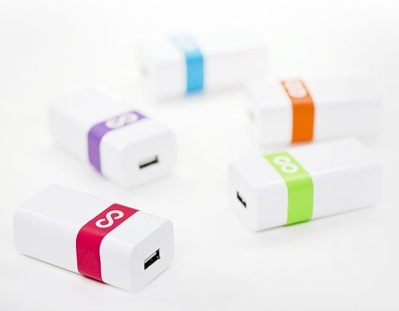
Lima (Cloud Guys Corp.) — This Paris-based startup surpassed its Kickstarter funding goals in July 2013, and then quickly ran into delays. The commercial version, expected to cost about $150, is not yet available for pre-orders, but Lima’s 12,840 Kickstarter supporters, who paid $69 and up, should receive the device this summer.
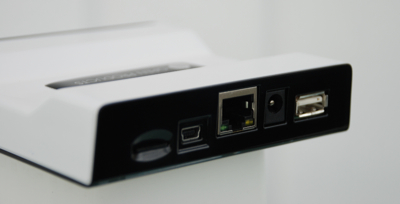
The Lima device itself is a tiny embedded computer running OpenWRT Linux, equipped with an Ethernet port and a USB port that supports up to eight connected drives. The secret is in the software. Once the Lima app is loaded on your device, whether a PC, tablet, or smartphone, it commandeers the operating system’s virtual file system, redirecting access to the Lima’s USB-attached storage.
By intercepting filesystem access, Lima redirects data reads and writes over the Internet to the device’s attached USB drives. Authorized files appear to a mobile device user like local storage, with files sync’d between devices. The system offers automatic backup, and can stream to media players. Because there is no copying of files as in DropBox, access times are claimed to be much faster.
Whereas products like the Linux-based PogoPlug do something similar, they require a cloud service that provides a dynamic DNS intermediary. To avoid this potentially hackable site, Lima uses a decentralized, encrypted VPN similar to OpenVPN, so every node participates in the process.
OPI (OpenProducts) — OPI has a few days left to reach its flexible funding goal on Indiegogo. The device goes for $119 with 8GB, with products said to be shipping within the month.
Unlike the Lima, which depends on USB storage, OPI uses microSD storage encrypted with LUKS and AES. The Ubuntu-based private file and email server is limited to a maximum of 64 GB of storage, but offers optional USB or cloud backup.
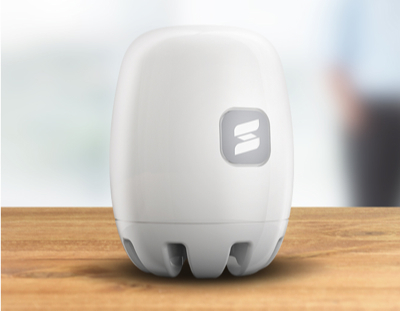
OPI not only provides synchronized access to files to multiple users, it adds encrypted email accounts and shared calendars and contacts for multiple users. No multimedia streaming is supported, however. Access to data is available via web browsers and email programs like Thunderbird, as well as an Android app.
OPI has more levels of encryption than most, including Transport Layer Security (TLS) for communications. Other open source components include the Nginx web server, Dovecot IMAP server, Roundcube mail client, and Owncloud for contacts, calendar, and file sync. S3QL is used for backup, and a free dynamic DNS service is available.
Sherlybox (Sher.ly) — Polish startup Sher.ly tapped the Raspberry Pi as the foundation for a privacy-oriented NAS device. The Sherlybox has already snagged its Kickstarter funding, but new funders can pile on for another few weeks, with products available for $149, or $199 with 1TB of built-in storage.
The Sherlybox creates a private cloud network that lets invited visitors share public data or add their own synced files. The device uses the same Sher.ly app already available for PC file sharing, and similarly sets up a peer-to-peer VPN. The file-sharing protocol is said to be 20 times faster than most CIFS/SMB based protocols. The Sherlybox also supports mobile device access, and provides streaming capability, supporting Plex.tv and XBMC.
The Sherlybox is equipped with WiFi, Ethernet, an HDMI port and audio jack. In addition to the 2.5-inch HDD bay, there’s a USB 2.0 hub. The Raspberry Pi will eventually be swapped out for the new Raspberry Pi Compute Module. Sher.ly says it will publish APIs to enable third-party app development, but there are no open source promises.
TS-X51 Turbo NAS (Qnap) – Announced at last week’s Computex show and due later this year, the TS-X51 is claimed to be the first NAS to offer private cloud sharing and advanced virtualization. In addition to the extensive suite of servers and other applications in the device’s mature, Linux-based QTS stack, the TS-X51 adds video transcoding features.
The product family includes the dual-HDD bay TS-251, 4-bay TS-451, 6-bay TS-651, and 8-bay TS-851. Personal clouds can be created with a myQNAPcloud SmartLink Service that lets users control multiple Turbo NAS units from a single interface, and publish content to invited users from QTS services like Photo Station, Music Station, and File Station. For security, the VPN-like application provides SSL certificates up to 2,048 bits.
The TS-X51 doesn’t go as far as the other private cloud devices in controlling all processes from the local device. The application uses Qnap’s cloud server-based myQNAPcloud service as an intermediary for pointing users to authorized content. Yet, Qnap claims the files are encrypted and kept completely under the NAS owner’s control. Another limitation is that it currently supports Windows desktop users only.
Qnap’s solution may not work for everyone, but it introduces the private cloud concept to a much broader audience. Perhaps this will encourage other vendors of mainstream NAS devices, the vast majority of which run on embedded Linux, to develop further innovations.

Linux Mini-Drones Jump, Flip, Climb, and Fly
Parrot is prepping two Linux-based mini-drones: a $160 “Jumping Sumo” wheeled robot and a $100 “Rolling Spider” quadrocopter that can fly, roll, or climb. Parrot, which last month announced a Bebop successor to its popular AR.Drone 2.0 quadrocopter, has released new information on two smaller, cheaper mini-drones that were originally unveiled back at CES in […]
How to Manage Heterogeneous Hardware/Software Solutions
Heterogeneous hardware is now present in virtually all clusters. Make sure you can monitor all hardware on all installed clusters in a consistent fashion. With extra work and expertise, some open source tools can be customized for this task. There are few versatile and robust tools with a single comprehensive GUI or CLI interface that can consistently manage all popular HPC hardware and software. Any monitoring solution should not interfere with HPC workloads.
The Open Cloud, Virtualization, and Their Impact on Applications
For many years, the predominant model for running software applications has been to run them locally, as countless users of Microsoft Office can attest. But many players have been steadily chipping away at that model.
From Google Docs to many other applications, the cloud is emerging as the new platform to run applications on. In a new interview with Forbes, Red Hat CEO Jim Whitehurst points to this as a paradigm shift, and one that could permanently shift the stranglehold that players like MIcrosoft and VMware have had on the application sofware market.
Keep in mind, Red Hat has already pursued changing the model for application delivery through its software collections, which bundle many applications that can steer enterprises away from traditional Microsoft applications.