In part two of this series we load and test our critter-scaring Arduino sketch, and play scary motion-activated noises. First let’s go back to part 1 and dissect our simple EZ1 sensor-testing sketch.
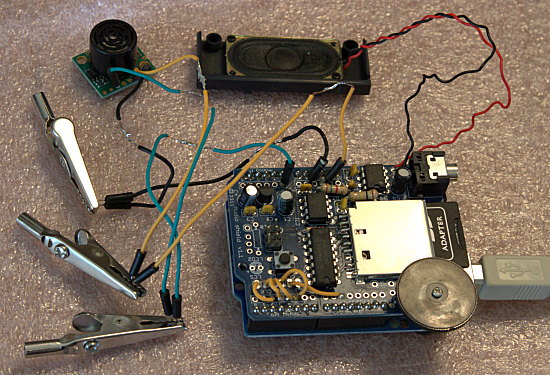
An Arduino sketch contains two required functions: setup() and loop(). setup() contains code that you want to run once at the beginning of your sketch, such as pin modes and initializing hardware. In our ez1_measure.ino sketch we set our data transmission speed in setup(). We are setting a serial port speed even though our Arduino is connected with a USB cable because it is still a serial port, a proper UART (Universal Asynchronous Receiver/Transmitter), and it supports the standard serial port speeds: 300, 1200, 2400, 4800, 9600, 14400, 19200, 28800, 38400, 57600, or 115200 baud. And that is why the Arduino IDE has a serial monitor where we can watch the output of our sketches.
loop() contains our program, and it is called loop() because it runs over and over until we pull the plug. So we have to figure out how to make a sound play only when someone intercepts the EZ1’s sonar beam, and then stop after playing once.
loop() begins by declaring two variables, a0value and inches. These are arbitrary keywords invented for this sketch, and are not reserved keywords. a0value holds the value captured from Analog Pin #0, and inches holds the final value of the calculated distance of an object. float is a reserved keyword, a built-in datatype for floating-point numbers, which are numbers with decimals.
analogRead() is a built-in function for reading values from the analog pins.
Serial.print() is a built-in function that prints text strings, which are enclosed in single or double quotes, to the serial port.
Serial.println() is a built-in function that prints the values of datatypes.
delay() is a built-in function that defines the length of a pause, in milliseconds, so in the ez1_measure.ino sketch we have three seconds delay between each sensor reading.
How is anyone supposed to know all this stuff? Simply consult the lovely Arduino language reference on Arduino.cc, the official Arduino Web site.
The Complete CritterScare Sketch
Mind your line breaks when you copy this sketch– // only comments out a single line, so if you accidentally insert some line breaks it won’t work.
And now, behold, the complete CritterScare Sketch.
// CritterScare.ino. Plays scary sound effects
// when a deer or other freeloader comes within
// 24 inches of the sonar rangefinder
#include <FatReader.h>
#include <SdReader.h>
#include <avr/pgmspace.h>
#include "WaveUtil.h"
#include "WaveHC.h"
SdReader card;
FatVolume vol;
FatReader root;
FatReader f;
WaveHC wave;
// declare functions; function bodies are
// below loop() function
int freeRam(void);
void sdErrorCheck(void);
void playfile(char *name);
void playfile(char *name);
// setup() is a required Arduino function
void setup() {
  Serial.begin(9600);
  Serial.print("nThe serial port is set to 9600 baud. nWelcome to the CritterScare Sketch!");
  Serial.print("nYou have ");
  Serial.println(freeRam());
  Serial.print("bytes of free RAM.");

// Set the output pins for the DAC control
  pinMode(2, OUTPUT);
  pinMode(3, OUTPUT);
  pinMode(4, OUTPUT);
  pinMode(5, OUTPUT);

  if (!card.init()) {
    Serial.print("nCard init. failed!");
    sdErrorCheck();
    while(1);
  }

// enable optimize read - some cards may timeout.
// Disable if you're having problems
  card.partialBlockRead(true);

// Now we will look for a FAT partition!
  uint8_t part;
  for (part = 0; part < 5; part++) {
    if (vol.init(card, part))
      break;
  }
  if (part == 5) {
    putstring_nl("Sorry, there is no valid FAT partition!");
    sdErrorCheck();
    while(1);
  }

// Print partition and filesystem information
  Serial.print("nI'm using partition ");
  Serial.print(part, DEC);
  Serial.print(" on the SD card, and the filesystem type is FAT");
  Serial.println(vol.fatType(),DEC);

// Try to open the root directory
  if (!root.openRoot(vol)) {
    Serial.print("nCan't open root dir!");
    while(1);
  }

// Whew! We got past the tough parts.
  Serial.print("nEverything checks out, so let's get going!n");
}
// loop() is a required Arduino function
// convert voltage from sensor to inches
void loop() {
    float a0value = analogRead(0);
    float inches = 0.496 * a0value;
    Serial.print("nThe value captured from pin a0 is: ");
    Serial.println(a0value);
    Serial.print("nThe distance in inches is ");
    Serial.println(inches);
    delay(3000);

    int playback = 0;
    if (inches < 24 && playback == 0){
    playback = 1;
    playcomplete("COYOTEHOWL.WAV");
  }
  else if (inches < 24 && playback == !0){
  }
  else { playback = 0;
    wave.stop();
  }
}
// And now the other function bodies
// this handy function will return the number
// of bytes currently free in RAM, great for debugging!
int freeRam(void)
{
  extern int  __bss_end;
  extern int  *__brkval;
  int free_memory;
  if((int)__brkval == 0) {
    free_memory = ((int)&free_memory) - ((int)&__bss_end);
  }
  else {
    free_memory = ((int)&free_memory) - ((int)__brkval);
  }
  return free_memory;
}
void sdErrorCheck(void)
{
  if (!card.errorCode()) return;
  Serial.print("nrSD I/O error: ");
  Serial.println(card.errorCode(), HEX);
  Serial.print(", ");
  Serial.println(card.errorData(), HEX);
  while(1);
}
// Plays a WAV file from beginning to end with no pause.
void playcomplete(char *name) {
// call our helper to find and play this name
  playfile(name);
  while (wave.isplaying) {
    //do nothing else
     }
}

void playfile(char *name) {
// see if the wave object is currently doing something
  if (wave.isplaying) {
    wave.stop();
  }
// look in the root directory and open the file
  if (!f.open(root, name)) {
    Serial.print("nCouldn't open file ");
    Serial.println(name);
    return;
  }
// OK read the file and turn it into a wave object
  if (!wave.create(f)) {
    Serial.print("nNot a valid WAV"); return;
  }
// ok time to play! start playback
  wave.play();
}
How it Works
Most of the code in this sketch is setup and error checks. The loop() function is where we tell it what to do, so let’s dissect it.
We are already familiar with the first seven lines, which are repurposed from ez1_measure.ino.
The next bit is where the magic happens to play the audio file only once and then stop, and not play it again until triggered by the sensor. Two conditions must be met to play the file: a critter must be within 24 inches or closer, and the file must not be already playing.
First initialize the value of playback (an arbitrary name and not a reserved keyword) to zero, which means don’t play:
int playback = 0;
Then set up the conditions to trigger playback: an object within 24 inches or closer, and the value of playback is at zero, which means the file is not already playing. When these two conditions are met then assign 1 as the value of playback, which means play, and specify which audio file to play:
if (inches < 24 && playback == 0){
    playback = 1;
    playcomplete("COYOTEHOWL.WAV");
  }
When your scary file is already playing, assign the value of zero to playback, so that it will stop when it reaches the end:
  else if (inches < 24 && playback == !0){
  }
  else { playback = 0;
    wave.stop();
  }
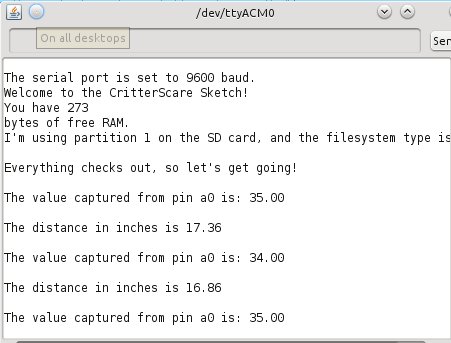
Then it is reset and waiting for the two conditions to trigger playback to happen again. There are other ways to do this, of course, so feel free to share your own ideas in the comments. Figure 2 shows what it looks like in action:
Well alrighty then, that does it for now! Please enjoy this project, and if you have any questions consult the Resources section.
Resources
Ladyada.net Arduino Tutorials
Arduino language reference
An excellent introductory book for novices is Programming Arduino: Getting Started with Sketches by Simon Monk, and Arduino Cookbook, 2nd Edition by Michael Margolis is great if you already know a little about electronics and a smidgen of C programming.