Home Blog Page 1548

Development Release: Oracle Linux 7.0 Beta 1

Oracle has announced that the initial beta build of Oracle Linux 7.0, a distribution built from source code for Red Hat Enterprise Linux 7.0 and enhanced with an “unbreakable” Linux kernel, is ready for testing: “We are pleased to announce the availability of the first beta build for….

Read more at DistroWatch

Google Details How to Make Project Ara Smartphone Modules

Of course, you could add a camera, more storage, an extra battery… but why not a toaster module? For breakfast, that is. Why not something that trims a beard, or mixes a cocktail? Could we nix a battery altogether in favor of a large solar panel? I don’t really want to work at night anyway. How about a bug zapper?

Read more at The Verge

Linux 3.15 Picks Up New Notebook Support

The x86 platform driver update was pulled today for the Linux 3.15 kernel, which includes new notebook support…

Read more at Phoronix

The KVM Groundswell Continues

Jim Wasko is Director of IBM’s Linux Technology Center.

Jim-Wasko-IBMKVM (Kernel based Virtual Machine) is a leading open source virtualization technology and an important tool in any Linux administrator’s handbook, especially with the increased adoption of cloud technologies such as OpenStack and the need for hypervisors to better manage compute, network and storage resources. The “potential” of KVM for enterprises is incredibly valuable far beyond its origins – just like Linux. After a year of contributing patches to the KVM community, IBM is announcing today that a Power Systems version of KVM, PowerKVM, will be available on IBM’s next generation Power Systems servers tuned for Linux before the end of the quarter.

You may remember that IBM officially announced its intent to run KVM on Power Systems servers at last year’s Red Hat Summit in Boston. However, we felt it was equally important to not only follow up when KVM on Power was a reality but to address why IBM is supporting KVM so heavily. There are two reasons we created a KVM product to exploit the Power Systems architecture – beyond its increasing deployment in the open source environment. First, Linux users wanted a “familiar” look-and-feel for virtualization; and second, cloud solutions demand KVM’s flexibility, performance, and OpenStack integration. We also recognize that for those who prefer to work in a pure Linux environment, working with KVM is highly desirable.

Just like Linux, KVM for Power exploits the underlying hardware including multi-threading, large memory support, a range of I/O. It also comes with Kimchi – a graphical open source tool for easy virtualization management of simple configurations. Larger configurations such as clouds can be managed with OpenStack-based tools.

There is great opportunity for growth in KVM, and through the contributions of the large developer community, the hypervisor will continue to evolve and innovate. Now, thanks to the work by the Linux Foundation and the Open Virtualization Alliance, KVM is gaining recognition beyond the community and becoming a mainstream answer to solving virtualization needs.

A few weeks ago, at the Linux Foundation Collaboration Summit, KVM was a key topic of conversation amongst the attending member organizations, especially around its use in conjunction with OpenStack. It’s a perfect example of how KVM as a technology is growing in maturity, being woven into the various elements of a data center, network or cloud offering from the beginning, rather than being considered after an issue or need arises.

It certainly seems as if 2014 will be a major year for KVM in technology. Expect more from IBM as well as other technology players and it will likely be a key piece of the story as the cloud – and eventually the open cloud — continues to mature. KVM’s day in the spotlight has only just begun and at least at IBM, we are excited to embrace and support another important open source movement.

Jim Wasko is the Director of IBM’s Linux Technology Center (LTC), where he is responsible for Linux development across IBM’s broad product portfolio. His Linux involvement began in 2000 leading the team that provided enterprise-level Linux support — a major step by IBM at the time. He transitioned various leadership roles in Linux Operating System development in the LTC during the mid-2000s. With Linux being the foundation for cloud computing, he next spent three years as the Program Director for Cloud Computing development in IBM’s Systems and Technology group, helping create IBM’s public and private cloud offerings. In 2010, Jim returned to lead the LTC in his current role as Director. In 2012, the LTC mission was expanded to include OpenStack upstream open source development.

Hacking Your Linux Keyboard with xkb

The humble computer keyboard supports multiple languages, layouts, and custom hotkeys, and Linux has the tools to hotrod it to your heart’s content.

The difference between the typewriter and computer keyboard is the computer keyboard is programmable. Two different systems control keyboard input in Linux. The kernel manages console keyboard input, and in X it’s managed by xkb, X Keyboard. xkb controls keymapping, keyboard models, and layouts. Today we’ll learned how to make customizations with the stock xkb configuration. Messing with keyboard hacking is addictive, so in a few weeks we’ll look at making our own customizations.

Keyboards and Wheels

Until the glorious day of talking computers arrives, and by that I mean easy and universal voice recognition and good speech output replacing the rinky-dinky hacks we have now that have not advanced since the early 2000s, our main interface with computers is the keyboard. Ponder this for a moment. The keyboard, descended from the typewriter. The concept of the typewriter goes back to the 1700s, and maybe even further back in time. Typewriters have been in service since the 1800s. Old technology isn’t necessarily bad technology; after all, we still use the wheel, and Linux is a libre Unix variant. Philosophical digressions aside, good touch-typing skills are still essential to using a computer.

cm keyboard

If you work on your computer a lot, a nice keyboard matters. You can get a decent rubber-dome keyboard for way cheap these days. You can also get a nice mechanical keyboard for not much more money. A mechanical keyboard has easily-replaceable keycaps and switches, and options for key switches with different levels of responsiveness and clickiness. My keyboard is a Cooler Master Storm QuickFire Rapid Tenkeyless Mechanical Keyboard with Cherry Brown switches (figure 1). Which is a long name for a compact keyboard. It costs under $100, and you have your choice of blue, brown, red, or green Cherry MX switches. The colors represent different levels of tactile and clicky feedback.

Red switches have a low actuation level, so they are fast and responsive with a light touch, and they are quiet. These are marketed as gaming switches.

Blue switches are a little bit stiffer than red switches, and make loud clickies.

Brown switches are nice and tactile, take a light touch, and are fairly quiet, but you still get the good clicky feedback.

Green switches are stiff and loud. Some manufacturers use these for select keys such as spacebars and backspace keys.

Mechanical keyboards range in price from around $80 to several hundred dollars. They last forever, and some vendors offer customizations so you can have them exactly the way you want.

Making Caps Lock Obey

The infamous Caps Lock key is a reliable source of woe, even to fabulous touch-typists such as me. My left little finger is my weakest and most wayward finger, and it sometimes presses Caps Lock instead of the A key. Emery Fletcher showed us how to tame it with xmodmap. We’re going to use xkbxmodmap is fine for simple tweaks; xkb gives us great keyboard-hacking powers.

Sometimes I needs Caps Lock, so I don’t want to disable it completely. So first I disable it, and then toggle both Shift keys to turn Caps Lock on and off. My pinky can pound Caps Lock all it wants to and nothing will happen. Brilliant, yes? Try it with the setxkbmap command first. This is great for testing, as it does not survive reboots:

$ setxkbmap -option "caps:none"
$ setxkbmap -option "shift:both_capslock"

Now pressing Caps Lock does nothing, and pressing both Shift keys toggles Caps Lock, something I’m not likely to do accidentally. Hurrah! We have conquered Caps Lock and bent it to our will. Now how to make these settings persistent? By creating the /etc/X11/xorg.conf.d/10-keyboard.conf file ( /usr/share/X11/xorg.conf.d/10-keyboard.conf for Debian/Ubuntu users), and entering our customizations in it. This is what mine looks like:

Section "InputClass"
        Identifier "system-keyboard"
        MatchIsKeyboard "on"
        Option "XkbLayout" "us"
        Option "XkbModel" "pc104"
        Option "XkbOptions" "shift:both_capslock,caps:none"
EndSection

shift:both_capslock must come first, or nothing will happen.

Option “XkbLayout” is your country code. Option “XkbModel” selects your keyboard model. xkb includes layouts for a number of keyboard models such as Dell, Logitech, Apple, and HP. Read man xkeyboard-config to see all of your configuration options including country code, keyboard models, layouts, and key mappings.

Killing X

ctrl+alt+backspace is the traditional keypress combination to stop the X server, but a number of distros (mainly Ubuntu and its derivatives) have disabled it. Because we dumb users might do something awful with it, I guess. It’s not the best way to stop X, so use it when nothing else works. I put it back on my Kubuntu system by adding it to the Option line in the10-keyboard.conf file. This must be on a single line:

 Option "XkbOptions" "terminate:ctrl_alt_bksp,shift:both_capslock,caps:none"

Exit your X session and log back in to activate your changes. Verify by testing them, and setxkbmap displays your settings:

$ setxkbmap -query
rules:      evdev
model:      pc104
layout:     us
options:    terminate:ctrl_alt_bksp,shift:both_capslock,caps:none

evdev is the kernel’s input driver. You can clear all of your options, including the ones you added to your 10-keyboard.conf file, by running setxkbmap with an empty option set:

$ setxkbmap -option ""

This is useful while you’re testing. Logging out of X/logging back in puts your options back. Or you can use setxkbmap again:

$ setxkbmap -option "terminate:ctrl_alt_bksp,shift:both_capslock,caps:none"

Making Caps Lock Useful

Maybe you don’t want your Caps Lock key to be useless. You can assign other actions to it, such as caps:swapescape. This swaps Caps Lock with the ESC key. If you use Caps Lock a lot, try caps:shift_nocancel, which disables the Shift key from overriding Caps Lock. caps:shiftlock forces all keys into uppercase when Caps Lock is pressed. The normal behavior is for Caps Lock to only affect the letter keys, and not numbers and punctuation. You can also reassign Caps Lock to act as the Hyper, Super, or Backspace key.

Customizations

Two more great customizations you can make with xkb are installing and quickly switching between multiple layouts, and doing per-user customizations that are not in man xkeyboard-config. Stay tuned for a nice how-to in the near future.

Resources

man setxkbmap

man xkeyboard-config

Citrix: Top 5 Do’s and Don’ts When Moving to the Cloud

Krishna Subramanian is VP of product marketing in the Cloud Platforms Group at Citrix.

Krishna SubramanianBusinesses today realize that transforming IT to agile and efficient cloud services  is a strategic priority – it is no longer a matter of if, but when, and how. A recent study found that for most companies, the process of selecting and implementing a cloud platform can take anywhere from 6 to 9+ months! The key challenges businesses said they faced were lack of staff expertise, managing app-specific performance on the cloud, and moving legacy apps to a cloud architecture.

As members of the open source community, many of you are well aware that Apache CloudStack has rapidly become the go-to open source platform for building, managing and delivering highly scalable clouds – in fact, the CloudStack Collaboration Conference this week in Denver is sold out! As the first commercial version of Apache CloudStack, Citrix CloudPlatform has enabled more than 250 major enterprises and service providers to transform their on-premise IT infrastructures into agile and efficient clouds, and provide app-centric cloud orchestration for any workload – in some cases in just a matter of weeks.

Leading companies such as BT, Datacentrix, DU, Globo.com, Interoute Teleommunications, KDDI Corporation, NTT Communications, Zajil Telecom and Zynga, are embracing Citrix CloudPlatform powered by Apache CloudStack to run their cloud environments. In the process of working with these customers, Citrix has learned some key dos and don’ts to accelerate this transformation. Here are the top five:

Top 5 Dos and Don’ts when transforming to the cloud

  • DO plan a roadmap of cloud adoption.  The value of a cloud grows as you consolidate more workloads on it. So it is important when choosing a cloud platform that it is extensible to meet not just your immediate needs, but also your longer term needs. It helps to plan a roadmap of where you want to take your cloud adoption. Most businesses want to start with a few new cloud apps and grow to add more of  the enterprise and legacy IT apps as cloud services. Knowing this upfront will help you avoid getting locked in to a narrow cloud platform that won’t be able to accommodate both your cloud-native and traditional enterprise workloads. Most cloud platforms are built to run one or the other, but not both.

  • DO know which apps you want to move to the cloud and the hypervisors, etc. they require. Planning which apps you want to transform will help you understand the requirements of these apps and ensure that your cloud platform can accommodate these choices. For example, many businesses use more than one hypervisor, and need a cloud platform that supports multiple hypervisors. Knowing this up front will ensure multi-hypervisor support is high on your evaluation criteria.

  • DO pick a platform that offers flexibility.  A key benefit of a cloud is the ability to abstract and make changes to the underlying infrastructure without impacting the apps that run on it. For instance, perhaps you want to change the secondary storage to take advantage of less expensive object storage options. Or, you want to move from a flat network during Dev/Test to a tiered and dedicated network when going to production. Your cloud platform should offer the flexibility to support these modifications without restricting your choices.

  • DON’T get locked-in.  Many cloud platform vendors are optimizing for their own stacks, and may not make it easy for you to leverage other alternatives. It is important to understand the APIs that a solution supports. If you want to add AWS to your architecture, does your cloud platform have an AWS-compatible API? Does it enable you to use your choice of networking, storage, and hypervisor technologies? These are important considerations when choosing a cloud platform.

  • DON’T turn it into a science project.  Yes, you want your cloud management platform to offer flexibility, but this does not mean you need to roll your own platform. Some open source cloud efforts like OpenStack can often be a collection of projects that you need to devote engineering resources to in order to design and develop your own solution. This is one of the key reasons why cloud deployments end up taking a long time and lead to frustration. It is best to start with a narrow set of use cases, deploy quickly, deliver results, while architecting for flexibility in the longer term and expanding the scope of your deployment as you grow.

Krishna Subramanian is vice president of product marketing for Citrix Cloud Platforms group, overseeing the company’s marketing strategy for its cloud infrastructure and server virtualization products. She joined Citrix through the acquisition of Kaviza, the industry leader in affordable desktop virtualization for SMBs, bringing more than 20 years of industry experience to Citrix in enterprise software, virtualization and cloud computing. At Kaviza, she served as chief operating officer, marketing, sales and alliances.

Prior to Kaviza, Subramanian led mergers and acquisitions for the Sun Microsystems cloud computing business, which delivered more than $500 million in incremental revenue. Before Sun, Subramanian was the chief executive officer and co-founder of Kovair, a software-as-a-service CRM company that grew to become a Computerworld Top 100 Emerging Company.

Follow Subramanian’s blog.

Pivotal Brings PaaS to the Enterprise Through Community Collaboration

Pivotal-ApacheCon-Watters

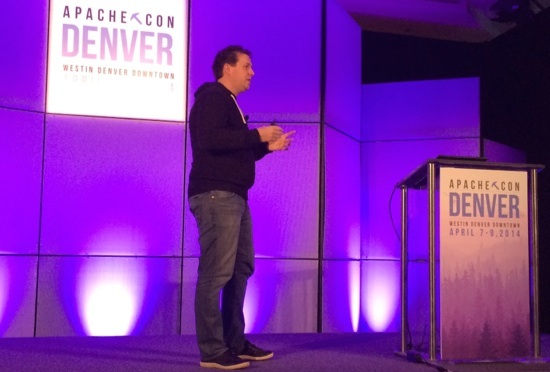
Open source in the enterprise has changed dramatically since Pivotal Software’s Head of Product James Watters worked on the OpenSolaris operating system for Sun at the start of the new millenium. Back then companies used open source software mainly for the cost savings and didn’t see much benefit to participating in the open source community, he said in his ApacheCon keynote in Denver this week.

Sun, for example, released OpenSolaris in 2008, 10 years too late to really compete with Linux, Watters said. And when Oracle acquired Sun in 2010, the project was promptly shut down.

That was Watters’ first experience with an open source project. He’s learned a lot since then about the business of open source and is happy to say that Pivotal has pretty much taken the opposite approach: starting out as a collection of open source projects, licensed largely by Apache, to build the Cloud Foundry open Platform-as-a-Service.

In the early days, “we thought open sourcing the code was enough… we were wrong,” Watters said. “It’s also about the collaborative community you have built around it.”

Pivotal started by releasing its code on GitHub, then set about amassing a community that includes vendors as well as users. This collaborative approach has become the standard way to build a commercially successful open source software project and is key to attracting enterprise customers and investors, Watters said.

James Watters“Collaboration is fundamental to the success of any project,” Watters said. “I don’t think it would have been possible to go build a new infrastructure software company today that caters to developers without having a leading open source community around it.”

“A large, robust, active user community is the greatest governance model, in some sense, for anyone who’s writing software,” he said.

Apache Key to Cloud Foundry Community

The Apache 2.0 open source software license has been one of the most important enablers of Cloud Foundry’s community, Watters said. The license set the standard for how companies and contributors interact with the project by making it impossible for potential contributors (and their lawyers) to modify their CLA (contributor license agreement), for example. All contributors participate on the same terms. That, in turn, made it possible for commercial partners such as IBM to invest in Cloud Foundry as part of a $1 billion commitment to PaaS, he said.

Cloud Foundry has also seen some success in attracting new developers to the project with its own in-house training program. Their Dojo invites potential contributors into the Pivotal offices to pair program with a project developer who brings them quickly up to speed on the technology.

“Within 4 to 6 weeks they can get an expert-level knowledge of a specific part of the code because every day they’re working in two, four-hour blocks with one of the key programmers on the project,” Watters said.

The dojo approach can help encourage corporations to contribute to other open source projects as well, he said.

In February, Pivotal established the Cloud Foundry Foundation to act as a neutral, non-profit organization to host the project, which they expect to further boost enterprise participation and investment. By joining the foundation, companies are essentially giving their product departments permission to heavily invest time and resources into PaaS development, Watters said.

“It’s a landmark moment for Platform-as-a-Service,” Watters said. “A lot of startups out there are using cloud as a service, but we need to bring the stack to the enterprise as well. Everybody should have cloud services and be able to participate.”

Why You’ll Want a Do-It-Yourself, NSA-Proof, Open-Source Laptop

Andrew “Bunnie†Huang lists a bunch of reasons why you’ll want his open-source laptop, the Novena. You can modify it yourself so that its battery will last however long you want it to. You can inspect the software to see if there’s any present from the National Security Agency. And you don’t have to pay a tax to any big corporation just because you want to do some computing.

It’s all part of the do-it-yourself hardware movement that is giving us things like 3D printing, cool robots, and virtual reality headsets. Huang recently unveiled his ARM-based quad-core Novena laptop, which has air-pump hinges so you can easily get under the hood and modify it. He is raising $250,000 on Crowd Supply so that he can build and ship initial units to crowdfunding contributors. The machine costs about $1,995 now, but that price could come down over time if volume sales are good.

Read more at VentureBeat.

The Many Alternative Computing Worlds of Linux

Installing Linux as the main operating system on a spare computer is one way to explore it. Some versions can also run live on a CD or DVD, but a more flexible choice may be to run it “virtually.” That way, it can run within Windows or Mac OS X and a variety of Linux versions can be installed. Programs like VirtualBox or VMware Fusion make this possible.

To do this, you will need to figure out a few things. Does your computer have a 32-bit or 64-bit processor? (Most newer ones are 64-bit, but Linux is available for either.) And you may need to enable your processor’s virtualization capabilities. If you become stuck, plenty of online tutorials are available to help.

There are many types of Linux. At their core, many are the same. But their interfaces and applications may differ, as well as the level of support from the open-source community.

Read more at the New York Times.

Wearable Tech Shipments to Pass 100 Million by 2018, says IDC

With shipments expected to reach 19 million this year, IDC thinks wearables will finally move beyond early-adopter status.