In “How to Manage Btrfs Storage Pools, Subvolumes And Snapshots on Linux (part 1)” we learned how to create a nice little Btrfs test lab, and how to create a Btrfs storage volume. Now we’re going to learn how to make live snapshots whenever we want, and how to roll the filesystem back to any point to any arbitrary point in time. This does not replace backups. But it’s a great tool for quickly going back in time to a known good state. If you make a mess, for example a botched upgrade, this is a great way to keep your system up while you figure out what to do.
The Coolness of Subvolumes
One of Btrfs’ coolest and most useful features is subvolumes. A Btrfs subvolume behaves somewhat like a block device, though it is not a block device but rather separate a POSIX file namespace. This is an ingenious construct that lets us easily create and manage a Btrfs storage pool all full of subvolumes that we can mount and unmount independently like block devices, but without hassling with disk partitioning. Subvolumes don’t have a fixed size, but are allocated space dynamically from the storage pool as data are added and removed. We can create subvolumes as easily as creating new directories, and can have nested subvolumes just like having sub-directories inside of directories. There is always a top-level default subvolume that is mounted by default, and all of its subvolumes. We can change the default, and can mount a subvolume without mounting the top-level subvolume that contains it.
A snapshot is a special type of subvolume. It is a copy of a subvolume, without the parent or child subvolumes. The snapshot does not make copies of files, but shares the data and metadata of the original subvolume, so it’s space-efficient and extremely fast to create. It behaves independently of the original subvolume, so when you add files to it they won’t appear in the original. You can make snapshots of snapshots, and each one is a discrete unit.
Creating and Removing Subvolumes
Creating new subvolumes is just as easy as creating new directories, by using the btrfs command. The following examples creates three new subvolumes on a mounted top-level subvolume:
# btrfs subvolume create /btrfs/sub1
# btrfs subvolume create /btrfs/sub2
# btrfs subvolume create /btrfs/sub2/sub3
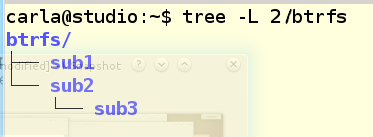
Each new subvolume is automatically mounted as it is created, and it looks like an ordinary directory (figure 1).
Of course there is a special btrfs command to see your subvolumes:
# btrfs subvolume list /btrfs
ID 260 gen 22 top level 5 path sub1
ID 261 gen 22 top level 5 path sub2
ID 262 gen 22 top level 5 path sub2/sub3
To mount a subvolume all by itself, without the top-level subvolume, first unmount the top-level subvolume, and then mount the subvolume using its ID:
# umount /btrfs/
# mount -o subvolid=261 /dev/sdd1 /btrfs/
I used /dev/sdd1 because it’s part of the same Btrfs storage pool as /dev/sdd3— remember how we can use any block device in the pool to mount it? Now let’s make subvolid 261 the default subvolume:
# btrfs subvolume set-default 261 /btrfs
Then unmount it, and remount it just like the top-level subvolume example:
# umount /btrfs/
# mount /dev/sdd3 /btrfs/
And behold, you will see only the single subvolume. To put everything back the way it was, re-set the default using the 0 ID, which is always the top-level subvolume:
# btrfs subvolume set-default 0 /btrfs/
Unmount, remount, and everything is back to the default. Want to delete a subvolume? Make sure it’s mounted, and then easy peasey:
# btrfs subvolume delete /btrfs/sub2/sub3
You can’t delete a subvolume that contains another subvolume, so you have to start at the end of the line and work backwards.
How do you configure a subvolume mount in /etc/fstab? Remember, anything you can do with the mount command you can do in /etc/fstab. Go back to the blkid example (in part 1) to get the correct label or UUID, and then fetch your subvolume ID from the btrfs subvolume list command. Put it all together and your /etc/fstab entry looks like this:
LABEL=testbtrfs /btrfs defaults,subvolid=269 0 0
Run mount /btrfs to test it. Yep, it’s that easy.
Playing With Snapshots
Now we’re ready to make snapshots, which is so fun and easy you’ll dance with happiness. First copy some files into one of your subvolumes, and then make a snapshot of it:
# btrfs subvolume snapshot /btrfs/sub1 /btrfs/sub1/snapshot
Of course you may substitute whatever name you want for snapshot, like a timestamp or helpful description. Your new snapshot will automatically appear in your filesystem, just like a new subvolume, and it will include all the files in the original subvolume. Remember, it behaves independently of the original subvolume, so you can do whatever you want to it without affecting the original.
Suppose you make a big mess and you want to roll back to a known good state. It’s a good thing you made a snapshot before the mess happened. First unmount the mangled subvolume, then mount the snapshot in its place. If you decide you don’t need the mangled subvolume anymore you can delete it and rename the snapshot with the same name as the mangled subvolume, so you don’t have to change configuration files like /etc/stab. Use our old friend the mv command for renaming:
# mv /btrfs/snapshotname /btrfs/subvolumename
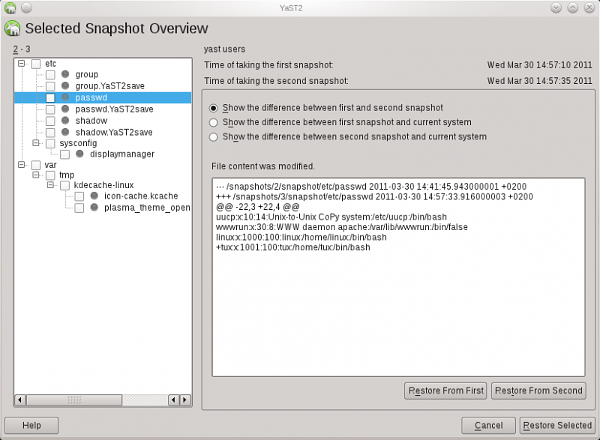
Want a nice graphical tool to do this? SUSE’s Snapper is a fabulous graphical Btrfs manager. There are packages for other RPM distros and some Debian and Xubuntu packages. Someday it will be a standard app in most distro repositories.
Et voilà! My friends, this has been glorious fun and thank you for reading. Please consult the References to learn more.
References
Matthias Eckermann’s LinuxCon 2013 Btrfs slides
Btrfs Wiki
Btrfs FAQ
man btrfs
man mv
man mount
man fstab
man blkid

 Red Hat is out with a slew of news this week. As Susan covered earlier, the company reported better-than-expected quarterly results, aided by strong subscription growth for its Linux operating system, but also forecast full-year profit following below average analyst estimates. Along with that news, the company announced the Red Hat Enterprise Virtualization 3.4 Beta, which builds on the recent Red Hat Enterprise Virtualization 3.3 release, and aims to automate enterprise virtualization tasks while providing integration with OpenStack.