GNOME developers are looking at delaying the official release of GNOME 3.12 until the Wayland 1.5 release that should happen in April…
Microsoft Names Satya Nadella New CEO
The new CEO replaces Steve Ballmer and will take the reins as questions mount about the company’s direction. [Read more]
Linux Shell Tip: Remove files with names that contains spaces, and special characters such as -, —
In Linux or Unix-like system you may come across file names with special characters such as:
- –
- —
- ;
- &
- $
- ?
- *
- White spaces, backslashes and more.
In this quick tip I am going to show you to delete or copy files with names that contain strange characters on Linux.
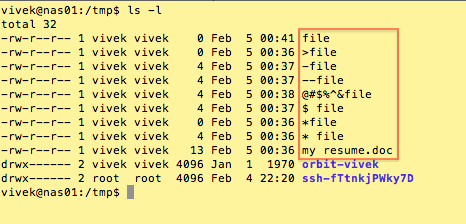
Sample file list
Here is a sample list of file names:

The problem and solution
Your default bash shell considers many of these special characters (also known as meta-characters) as commands. If you try to delete or move/copy such files you may end up with errors. In this example, I am trying to delete a file named ‘>file’:
$ rm >file
Sample outputs:
rm: missing operand Try `rm --help' for more information.
The rm command failed to delete the file due to strange character in filename.
Tip #1: Put filenames in quotes
The following command is required to copy or delete files with spaces in their name, for example:
$ cp "my resume.doc" /secure/location/ $ rm "my resume.doc"
The quotes also prevent the many special characters interpreted by your shell, for example:
$ rm -v ">file" removed `>file'
The double quotes preserve the value of all characters enclosed, except for the dollar sign, the backticks and the backslash. You can also try single quotes as follows:
$ rm -v 'a long file name here' $ cp 'my mp3 file.mp3' /backup/disk/
Tip #2: Try a backslash
You can always insert a backslash () before the special character in your filename:
$ cp "my resume.doc" /secure/location/ $ rm "*file"
Tip #3: Try a ./ at the beginning of the filename
The syntax is as follows to delete a file called ‘-file’:
$ rm -v ./-file removed `./-file'
The ./ at the beginning of the filename forces rm not to interpret – as option to the rm command.
Tip #4: Try a — at the beginning of the filename
A — signals the end of options and disables further option processing by shell. Any arguments after the — are treated as filenames and arguments. An argument of – is equivalent to –. The syntax is:
$ rm -v -- -file $ rm -v -- --file $ rm -v -- "@#$%^&file" $ rmdir -v -- "--dirnameHere"
Tip #5: Remove file by an inode number
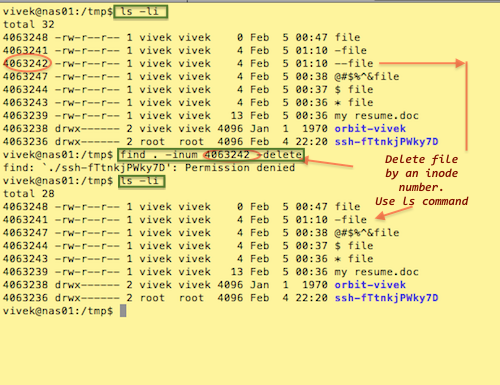
The -i option to ls displays the index number (inode) of each file:
ls -li
Use find command as follows to delete the file if the file has inode number 4063242:
$ find . -inum 4063242 -delete
OR
$ find . -inum 4063242 -exec rm -i {} ;
Sample session:
For more information and options about the find, rm, and bash command featured in this tip, type the following command at the Linux prompt, to read man pages:
$ man find $ man rm $ man bash
Make Money and Have Fun in Open Source

Women in open source. Women in programming. Women in tech at all. Where are they?
10 Linux Bash and KSH Shell Job Control Examples
Linux and Unix are multitasking operating systems i.e. a system that can run multiple tasks (process) during the same period of time. In this new blog series, I am going to list the Linux and Unix job control commands that you can use for multitasking with the Bash or Korn or POSIX shell.
Read more: 10 Linux Bash Shell Job Control Examples
How to Configure a Mail Server with Postfix and Dovecot for Different Requirements
Mail server admins may often have to deal with different types of requirements based on service policies or customer-specific requests. This tutorial will cover common cases of mail server administration. More specifically, it will show how different mail server requirements can be met by tuning parameters of Postfix and Dovecot. Useful Postfix Commands Before we […]
Continue reading…
The post How to configure a mail server with Postfix and Dovecot for different requirements appeared first on Xmodulo.
Related FAQs:
Intel Linux 3.3 To Linux 3.13 Kernel Benchmarks
The latest kernel benchmarking that happened at Phoronix was testing every major Linux kernel release from Linux 3.3 through the latest stable Linux 3.13 release from an Intel Sandy Bridge system to see how the kernel performance has evolved during the hardware’s lifetime for key subsystems.
SaltStack: Getting Redundancy and Scalability with Multiple Master Servers
Today’s article is an item I covered briefly during my presentation at SaltConf 2014 (which was a pretty awesome conference by the way). One of the lesser known features of SaltStack is the ability to configure multiple master servers. Having an additional master server allows for some extra redundancy as well as capacity for large implementations. While I covered the benefits of having an additional master server in my presentation I didn’t cover in full detail how to set this up, today I will cover the details of configuring multiple salt masters.
How SaltStack multi-master works
SaltStack’s multiple master configuration is actually a pretty simple implementation. The master servers do not require any communication or heartbeats between each other, both servers are simply online at the same time. This allows minions to communicate to either master server without any special DNS or IP fail-over mechanisms. The only prerequisite is that the two masters must share the same public/private keys.
Distribution Release: Zorin OS 8 “Educational”
Artyom Zorin has announced the release of Zorin OS 8 “Educational” edition, a an updated version of the project’s specialist edition designed primarily for educational institutions: “The Zorin OS team has released Zorin OS 8 Educational, the education-oriented edition of our operating system designed for new Linux users…..
Gallium3D’s Freedreno Driver Gets A New Compiler
Rob Clark has landed a new shader compiler into his Freedreno Gallium3D open-source graphics driver for Qualcomm’s Adreno A3xx hardware…