Home Blog Page 1637

How to update Ubuntu 12.04 LST

First thing you should do just after the installation is updating the Ubuntu. Ubuntu 12.04 is the LST version and would be supported until April 2017. If you have Ubuntu 12.04 freshly installed, very first thing after installation is to update all the repositories. This would save you from unmet dependency errors.

Read complete step by step Guide here

How to update Ubuntu 12.04 LST

Hands-on with Knoppix Linux 7.2.0: A well-established and very stable Linux distribution

Experience really shows in this versatile Linux distribution

Every company will revolve around software: How many will succeed?

Simply put, whether it’s custom software or off the shelf with tweaks, applications will make or break brands.

Android dominates Apple across the globe

iOS shed market share in most countries, though it stayed strong in such key areas as the US, the UK, and China, says Kantar Worldpanel ComTech. [Read more]


Read more at CNET News

How to Kill the Caps Lock on your Linux Desktop

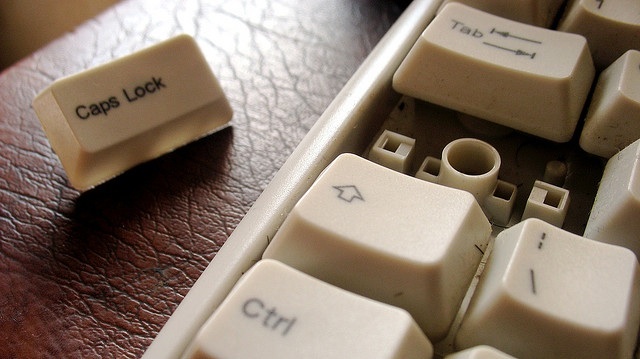
caps lock key removed from a keyboard

Didn’t there used to be a straightforward, GUI-powered way to disable the Caps Lock key on one’s keyboard? I remember it as being one of the first modifications I did as a Linux newbie that actually altered the way a piece of equipment performed (boy, was I proud!). But some time around Ubuntu 11.04 (yes, during the Unity Revolution) that function seems to have vanished. I still use the machinery of Ubuntu, but with the less restrictive Xubuntu as a desktop.

I really liked being free of the intrusive Caps Lock, since I’m not a very good typist; I look down at the keys a lot, and if I’ve hit the lock by mistake it can be half a line or more before I notice. Anyway, with Disable suddenly unavailable I did some searching and found that the function of the Caps Lock key could be replaced by adding a script to xmodmap.

Now my Linux smarts had increased some by then, but they weren’t yet up to the do-it-yourself script level, so I did some more searching to find a ready-made script. The first script I found was to change the function of the key to a Shift only. It was simple; in Leafpad (or Gedit, for that matter), make a little file:

!
! Swap Caps_Lock and Shift_L
!
remove Lock = Caps_Lock
keysym Caps_Lock = Shift_L

Save it as a hidden file in your /home folder and give it a name that defines it as a runnable script: it could be .capless, .nocaps, .freeatlast, even .name, as long as that . in front of it is present. Then, whenever you want to assert your independence from that old fAMILIAR ENDLESS LINE of capital letters, just run:

$ xmodmap /home/yourname/.capless

in a terminal or, for fellow Xubuntians, set it up once and for all in your Application Autostart section.

That was all I needed, at least for a while, but when I started using a new low-profile keyboard I occAsionally would notice strAnge results. The caps didn’t stay locked, but the overlap of my finger on lock key and letter key becAme an intermittent problem. (Well, maybe not that bad.)

I figured one good script deserved another, so I began to look into just how that sort of keysym changing really works under the hood. I checked out the man page for xmodmap and found I could access the entire keysym list by entering:

$ xmodmap -pk

That lists the keysyms in hexadecimal; at 7 keysyms per keycode and 255 keycodes, be prepared to scroll if you’re looking for something special. I lucked out: right up at the top is 0x0000, for No symbol – Caps Lock doesn’t do anything. I realized I had found the way those old-time keyboard-altering GUIs worked! On the spot I did my new Caps Lock-disabling script:

!
! Set Caps_Lock to no symbol
!
remove Lock = Caps_Lock
keysym Caps_Lock = 0x0000

and saved it as .killer in the Application Autostart part of the Settings Manager.

On a different machine where I run Lubuntu, it isn’t quite as easy to set it up for automatic startup. Once you have the script written and saved, open

$ /etc/xdg/lxsession/LXDE

and open the autostart text. At the bottom, add the line

@.killer enable

Log out, log in again, and you will be caps-free for all your subsequent logins.

But if you’re lazy like me, you can just do the script and put in the Run Program line the full:

$ xmodmap /home/emery/.killer

After a while it gets used to seeing that, and autocompletes.

Welcome DIY, Open source Lux camera Project

Another 100% Open Source camera is coming up: we really think that Open Source photography is the next big thing in open source! Lux is a work of beauty. This velvet looking camera is a has a waist level viewfinder and it shoots 120 film. Made by Kevin Kadooka it is 100% open source with everything up for improvement […]

Continue Reading

 
Read more at Open Electronics

Linux Game Sales Statistics From Multiple Developers

GamingOnLinux.com reached out to multiple game developers to get insights into how well their games are doing on Linux and these are the results.

http://www.gamingonlinux.com/articles/linux-game-sales-statistics-from-multiple-developers.2963

What’s the best thing about being an open source community manager?

open source communities

I recently listed five best practices for community managers in 2014. Today, on Community Manager Appreciation Day, we’ve collected the wisdom of 14 great leaders from a variety of open source communities to find out:

What is the best thing about being a community manager?

 Here’s what they said.

read more

Read more at OpenSource.com

Intel Continues Optimizing Counter-Strike: GO For Linux

Another patch hit mainline Mesa this past week that further improves the Linux performance of Counter-Strike: Global Offensive even though Valve has yet to publicly release the title for Linux gamers…

Read more at Phoronix

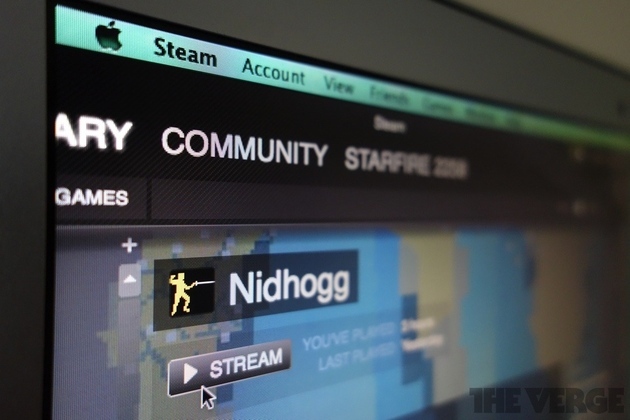
Steam In-Home Streaming Preview: A Short-Range Slingbox for Your Gaming PC

With the right hardware setup, you may no longer need to sit in front of your gaming machine. With a PlayStation Vita, you can play PS4 anywhere in your house. With an Nvidia Shield, you can do the same with a Windows gaming PC. But what if you don’t want to buy a multiple-hundred dollar handheld game system to play Tomb Raider in bed? Valve is building a game streaming solution right into its free Steam game platform, so you can sling games from your beefy desktop PC to laptops as thin as a MacBook Air. Late last week, Valve invited a host of new users into the Steam In-Home Streaming beta, and we made it in. Read on for our first impressions.

Continue reading…

Read more at The Verge