
For those in need of a high-performance specially-optimized file-system for flash storage devices, the F2FS file-system developed at Samsung has seen more “major enhancements” queued up for the Linux 3.13 kernel…
Read more at Phoronix
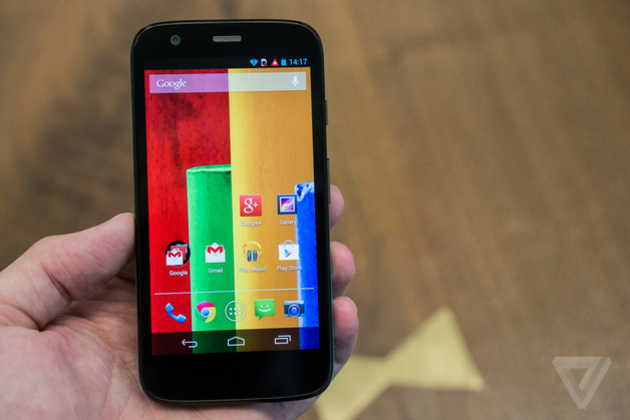
Following the expansion of its Moto Maker service and a price drop for the Moto X earlier this week, Motorola today announced the Moto G, a new low-cost entry-level smartphone for global markets. The Moto G doesn’t skimp on features, but Motorola is selling it for a rock-bottom price: $179 unlocked and without contract. The company says that its partners plan to offer it for even less.
Despite its bargain basement price tag, the Moto G has a 4.5-inch, 720p LCD TFT display, a quad-core Qualcomm Snapdragon 400 processor, 1GB of RAM, 8 or 16GB of storage, a 5-megapixel rear camera and 1.3-megapixel front-facing camera, and a 2,070mAh battery. Aesthetically, the Moto G looks almost identical to the Moto X, with a very similar shape and…
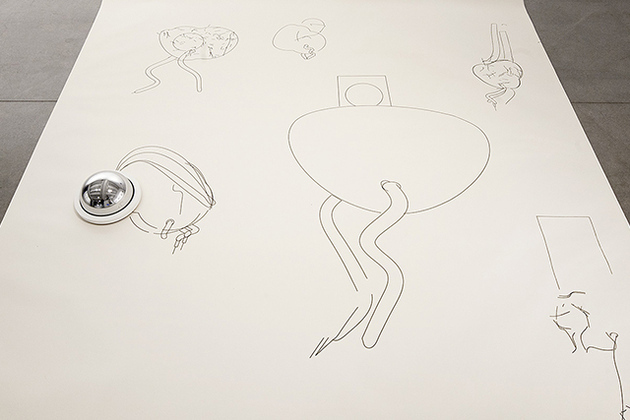
Robo Faber is an autonomous drawing robot that’s programmed to sketch random artworks. Created by LA-based Matthias Dörfelt, the tiny Arduino robot is designed to echo the artist’s current creative aesthetic. It’s an unconventional take on the self portrait: the concept is that Faber will be an offshoot of the artist’s creative thinking that remains frozen in time, replicating his current style long after he has moved onto different things.

 Welcome to our fourth Sneak Peek for openSUSE 13.1! The release is getting very close and you’ve already learned about all the awesome new Cloud features, the new YaST and what our new GNOME and KDE fans will get. Today, we feature a much requested article: some in-depth Geeko Tips!
Last release, we featured a set of geeko tips for new users. If you come from Fedora, Gentoo or Ubuntu, that’s the article to read. It not only explains what all that green is about but also gives openSUSE equivalents of your familiar terminal commands and introduces you to YaST, getting software on openSUSE and more. Talking about software, we featured some interesting tips in that area with in this article about getting the latest fresh software from the Open Build Service. Finally, find some more tips and information on using the repositories on OBS and One-Click-Install in this blog post.

We are celebrating the SELinux 10th year anversary this year. Hard to believe it. SELinux was first introduced in Fedora Core 3 and later in Red Hat Enterprise Linux 6. For those who have never used SELinux, or would like an explanation…