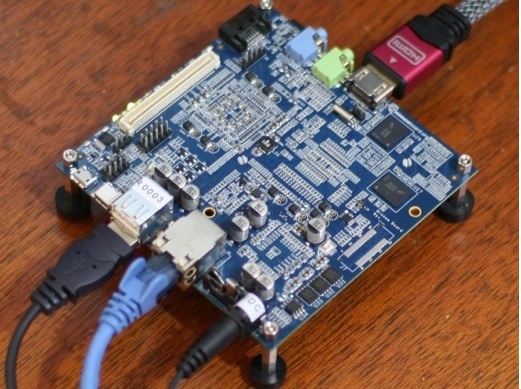
The MinnowBoard packs a SATA, gigabit ethernet port, and PCI Express connectivity with the HDMI and USB trimmings one expects from a modern Single Board Computer (SBC). The MinnowBoard also brings an Atom CPU with Intel GMA 600 graphics, 1Gb of RAM, 4Gb of flash storage, a handful of GPIO ports to tinker with and the beginnings of a daughterboard community.
The first duaghterboard is the BoB which offers more GPIO, SPI, I2C, and UART headers. The daughterboards are referred to as Lures in the MinnowBoard community, much like Ardunio Shields and Beagle Capes. The white header shown in the top left of the below picture contains many goodies such as PCIE, SATA, USB, UART, I2C and SPI.
Booting the board
After booting the MinnowBoard for the first time I was automatically logged into a GNOME desktop running at 1600×900. It took a moment for the bad font rendering on my LCD to lead me notice this and change to 1080p resolution. The Angstrom Linux Distribution that is the default choice for the MinnowBoard shows signs of its embedded heritage. For example, the default shell is /bin/sh and the dropbear ssh daemon is running instead of openssh. I discovered the latter because dropbear wasn’t allowing connections. It wasn’t denying them, but was failing with an error about buffers.
A bit of shuffling with the opkg package manager that Angstrom uses and I had a working openssh server up and running. I later found that I had to install nfs-utils-client in order to mount an NFS share from the MinnowBoard. A final hiccup was having to download and install Firefox manually because it didn’t appear in the opkg listing.
Graphics Performance Tests
I then turned to seeing how the GMA 600 worked on the board. First, mplayer on Big Buck Bunny, I lost the desktop and could only see the terminal text before killing mplayer over ssh. Then attention was turned to the cairo demos to see how 2D graphics performance was. Flowers got 0.5 fps and gears 6.6 fps. The gears number is directly in line with what theGK802 could get, but well below the 25+ FPS that the Beagle Bone Black gave when it was running at 720p. For reference, a desktop machine running an Intel 2600K with an NVidia 570 graphics card got 140 FPS in gears.
After digging in a bit, the GMA 600 is based on a PowerVR chip and it seems Linux support may require some tinkering to get up and running. I then contacted Scott Garman from the Intel Open Source Technology Center who responded that “Patrik Jakobsson is the maintainer of the open source GMA500 kernel driver. He currently has a MinnowBoard and is working on including some 2D acceleration in it. With any luck he hopes to get that included in the upcoming 3.12 kernel”.
Programming on the Board
My first thoughts for programming on the MinnowBoard were Toggling an LED and then some light GPIO programming to do a similar thing. Both of those having been done and well documented for me I had to aim a little higher. The 8 GPIO pins on the J9 header block can be read and written through the /sys/class/gpio filesystem just as with the Beagle Bone Black. This is wonderful for code portability, you may need to change the path to which GPIO file to use, but code written for Linux GPIO should work across a range of hardware. For the MinnowBoard there is a warning about overloading the GPIO pins by going over 3.3V/10mA which may cause permanent damage.
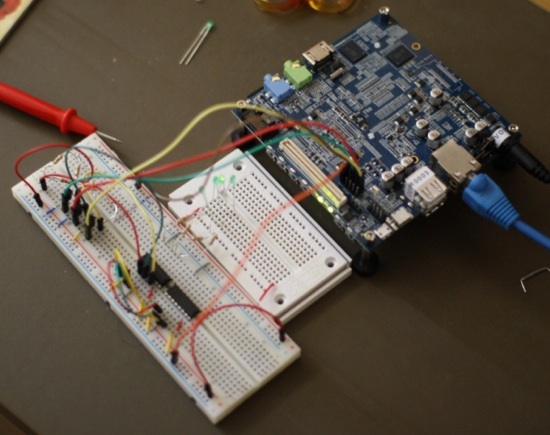
Shown in the image below is the work in progress with the ultimate aim of having the MinnowBoard drive some 595 shift registers powering a bunch of LEDs using an external power source. As at the diagram stage, the transistor circuit on the top left of the larger breadboard is being passed by leaving the LEDs quite dimly lit. The two ICs in the bottom breadboard of the figure are 595 shift registers. These work with a latch, clock, and data line, turning those three lines into any multiple of 8 output lines. This is because each 595 has 8 outputs and can chain to a subsequent 595 shift register which itself can chain to another and so on. Using 595s can quickly give you many output lines from only 3 GPIO headers on the Minnowboard.
To program the 595 you hold the latch line low, write a bit of data (high or low) to the data line and pulse the clock line to have the 595 take whatever the value on the data line is currently as the next bit of input. When you are done you release the hold on the latch line (set it high again) which instructs the 595 to output your data. The 595 makes no changes to its output while you are shifting your data in using the data and clock lines. The changes to the output of the 595 happen at once when you release the latch line.
Running Arduino Functions
In the code I’ve reimplemented some Arduino functions on top of the Linux kernel /sys/class/gpio filesystem. Although these functions are similar to the Arduino ones, the program and memory size restrictions of Arduino programming don’t apply and you get to choose which language you like, for me this time around it is C++. First the Arduino like functions, pinMode() sets a GPIO pin to read or write, digitalWrite() puts a single boolean value to a GPIO pin, and shiftOut() sends an octet of bits to a data line pulsing the clock as it goes.
#include <string>
#include <fstream>
#include <iostream>
#include <bitset>
using namespace std;
#include <unistd.h>
enum pinmode { INPUT = 0, OUTPUT = 1 };
static void pinMode( std::string pin, pinmode mode ) {
    ofstream oss(( pin + "direction" ).c_str());
    if( mode )
        oss << "out" << flush;
    else
        oss << "in" << flush;
}
enum writemode { LOW = 0, HIGH };
static void digitalWrite( string fname, int state )
{
   ofstream oss( (fname + "/value").c_str() );
   oss << state << flush;
}
enum shiftOutMode { MSBFIRST = 1 };
static void shiftOut( const string& data,
                      const string& clock,
                      enum shiftOutMode,
                      char userdata ) {
    for( int i = 7; i>=0; --i )
    {
        digitalWrite( clock, 0 );
        int v = !!(userdata & (1<<i));
        digitalWrite( data,  v );
        digitalWrite( clock, 1 );
        usleep( 20 );
        digitalWrite( clock, 0 );
        usleep( 20 );
    }
}
The main program is shown below, first the three lines are set for output and the two octets of data are set to an initial value. Each iteration the latch is held while the data is shifted into the 595 ICs and the latch released. The next 6 lines just shift the two octets by one bit as a circular buffer. For simplicity a bitset<16> could be used which would reduce those 6 lines right down. This code starting as an Arduino sketch still leaves refactoring to be done.
int data[ 4 ];
int main( int argc, char** argv )
{
    std::string DATA("/sys/class/gpio/gpio251/");   // PIN 10
    std::string CLOCK("/sys/class/gpio/gpio249/");  // PIN 8
    std::string LATCH("/sys/class/gpio/gpio247/");  // PIN 6
    data[0] = 0xE2;
    data[1] = 0xAD;
    pinMode(LATCH, OUTPUT);
    pinMode(DATA,  OUTPUT);
    pinMode(CLOCK, OUTPUT);
    while( true )
    {
        digitalWrite(LATCH, LOW);
        shiftOut(DATA, CLOCK, MSBFIRST, data[0] );
        shiftOut(DATA, CLOCK, MSBFIRST, data[1] );
        digitalWrite( CLOCK, 0 );
        digitalWrite(LATCH, HIGH);
        int b0 = data[0] & 0x1;
        int b1 = data[1] & 0x1;
        data[0] >>= 1;
        data[1] >>= 1;
        data[0] |= (b1 << 7);
        data[1] |= (b0 << 7);
        cerr << "data[0]:" << (bitset<8>)data[0]
             << " data[1]:" << (bitset<8>)data[1]
             << endl;
        usleep( 1000 * 1000 );
    }

    return 0;
}
Speed Performance Tests
As for performance, the MinnowBoard got 1164 overall in Octane. For comparison TI ARM OMAP5432 (Dual core A15) at 800Mhz got 1914, the IFC6410 quad ARM A15 Snapdragon obtained 1439, and the ODroid-U2 quad core ARM got 1411. Openssl 1.0.1e “speed” performance for the MinnowBoard for 1024 bit RSA got 89 signs/s and 1562 verify/s. This puts the MinnowBoard at a little over a third the number RSA operations/sec that the IFC6410 quad ARM A15 Snapdragon can perform.
The MinnowBoard is in the ball park of around half the RSA performance of the Beagle Bone Black. As the Octane benchmark can take advantage of multiple threads of execution the MinnowBoard performed reasonably closely to the ARM machines. It would seem that the code for the openssl that came with the MinnowBoard may not have been optimized as best as it could for the Atom CPU it was running on.
Power wise the MinnowBoard took 9.2 Watts at an idle desktop, up to 10.5 when a keyboard and mouse where connected using a passive hub. Still with the hub connected for the rest of the figures, power usage moved up to 10.8 during an openssl speed test. While running the Octane benchmark peaks up to 11.5 Watts where seen. As with all the articles in this series, I am using a Belkin at the wall meter to measure power, so these numbers all also include the inefficiency of the power supply.
Bringing PCIE to the maker market is a wonderful thing. The MinnowBoard has 1Gb of RAM and a single (Hyper threaded) core. There are high end ARM boards coming with 2Gb of RAM, for example the ODroid-U2. There are also those with only 512Mb of RAM such as the Raspberry Pi Model B and Beagle Bone Black ($45).
It will be interesting to see what variants of the MinnowBoard rise up, taking advantage of the open design with “Customizations possible without signing NDAs” and available information about the board itself (bottom of linked page). We would like to thank the Intel Open Source Technology Center for providing a review sample.
 Red Hat is very rapidly increasing its focus on OpenStack. The company is out with a new