
Juniper announced the commercial availability of its Juniper Contrail SDN and its open- source counterpart. Project Daylight, it’s open-source SDN rival, would love to integrate it.
Read more at Enterprise Open Source Toolkit
Does the world really need another Ubuntu respin? Maybe not the world, but maybe you do. You might want to make your own customized Ubuntu to use in your business, or for your personal needs, or make your own ultimate rescue Ubuntu for performing rescue and recovery tasks on Linux, Mac, and Windows computers.
We’re going to use UCK, the Ubuntu Customization Kit, to roll our own ultimate customized Ubuntu. We’ll put whatever packages we want on it, and we’ll make it a hybrid image so we can install it to a CD/DVD, USB stick, or hard drive. USB sticks are great for portable and rescue Linuxes because they are nearly as fast as hard drives, reusable, and you can save changes across reboots.
UCK is one of the easiest tools for creating a customized Ubuntu through a nice graphical wizard. It offers a root console option for more flexibility and advanced options such as using apt-get and tasksel, and for complete control, such as using preseed files, some hackable scripts. (Documentation is in /usr/share/doc/uck/html/.)
UCK only works with Ubuntu, so you need to install it on Ubuntu or an Ubuntu derivative, such as Linux Mint. The package name is uck, which you install in the usual way with your favorite package manager. Then you’ll need your chosen Ubuntu/Kubuntu/Lubuntu/etc. installation ISO, and you must have Internet access while uck is building your custom Ubuntu. You can’t build for other architectures; for example you can’t build an ARM image on an x86 machine, or a 64-bit image on a 32-bit PC.
You’ll need a minimum of 5GB free space in your home directory, and of course way more is always better. If you have VirtualBox or some other virtualizer you can preview and test your custom images before copying them to other media.
A very important prequisite is to install libfribidi-bin. It is a required dependency that is not present in the uck package. If you don’t install it your custom build will fail, when it is almost finished, with a “Failed to build gfxboot theme” error. This is is a bug going back to 12.04 or earlier, so sigh and deal with it.
Fire up UCK and follow the prompts. These are the steps:
Now you’ll see a message that the building will now start, with the location of your new ISO. This opens a terminal, and you’ll have to enter your sudo password. Follow along as it updates package repos, removes unnecessary language packs, and then opens the customization dialog (figure 1). Run package manager opens Synaptic so you can select whatever additional packages you want. Use Synaptic in the usual way, searching and marking packages for installation. The base packages on your installation ISO are already selected, so you only need to select your chosen extras. Close Synaptic when you’re finished, and you’ll be returned to the customization dialog. You can then return to Synaptic if you need to, or select Continue Building to go to the next step.
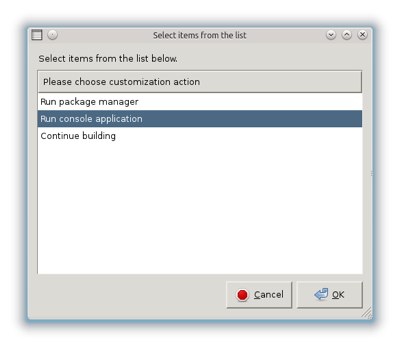
Run console application opens a root terminal if you prefer using apt-get, or any other custom commands you want to use. For example, you could install tasksel, the fabulously useful Debian installation tool that installs package groups such as LAMP Server, Virtual Machine Host, Audio recording and editing suite, various desktops, plus a manual package selector (figure 2).
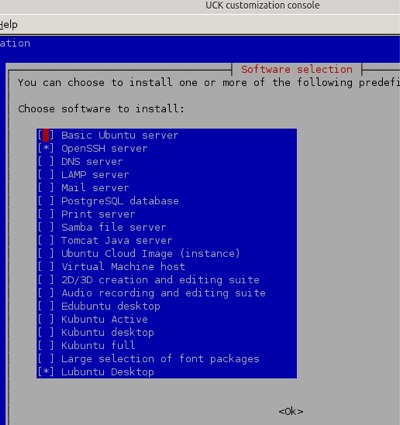
Install and run tasksel this way from the UCK root console:
root@studio:/# apt-get install tasksel
root@studio:/# tasksel
You can generate a list of package groups and their installation status with tasksel --list-tasks. tasksel --task-desc [package group name] displays the description, and tasksel --task-packages [package group name] lists all the packages in the group. Consult man tasksel for complete options.
When you’re finished running commands in the root console type exit to return to the customization dialog. You can run Synaptic or the console again, or select Continue Building to go to the next step, which is building your new ISO. This takes just a few minutes, and when it’s finished you’ll see a Build Success dialog that tells you where to find your new Ubuntu image, and how to quickly test it with qemu.
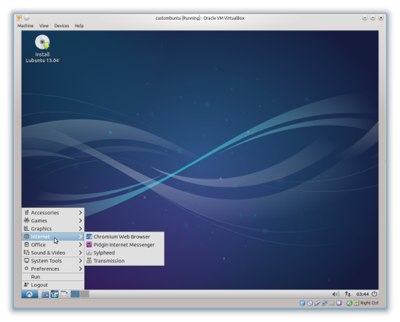
Use the excellent http://unetbootin.sourceforge.net/ to install your new custom Ubuntu to a USB stick. Use the “Space used to preserve files across reboots” option to save configurations and files, and to not have to start over with every reboot. This is a great way to make a personal portable Ubuntu you can carry with you anywhere. Any PC or laptop made in the last 7 seven years should reliably support booting to a USB device, though you may have to enter the BIOS to allow USB booting. In many BIOS pressing the F12 key opens a boot device selector.
For making a bootable CD/DVD use the excellent K3b or Brasero. When you boot your new custom Ubuntu you’ll have the option to either run it live from your boot media, or install it to a hard drive.
UCK is a great introduction to creating a customized Linux distribution. Here are some other roll-your-own tools you might be interested in:
 On the last day of LinuxCon and CloudOpen North America the “all things cloud computing” podcast, The CloudCast hosts Aaron Delp and Brian Gracely were busy recording back-to-back episodes. They talked with Kyle Mestery, Ian Wells, and Mark McClain about OpenStack Neutron and how OpenStack could integrate with OpenDaylight for SDN environments; Jono Bacon about Canonical Cloud and Juju; Diane Mueller (The PaaS Queen) about common barriers to PaaS adoption; James Shubin about Puppet; and Kenneth Hui about his journey from VMware to OpenStack.
Listen to the episodes, below, or visit www.thecloudcast.net for the full show notes. And be sure to catch up on all of their CloudOpen coverage from Monday and Tuesday here:
Live from LinuxCon: The CloudCast Podcasts on SaltStack, OpenDaylight, Xen and CoreOS
Live From LinuxCon: The CloudCast Podcasts on SDN, Gluster and OpenStack
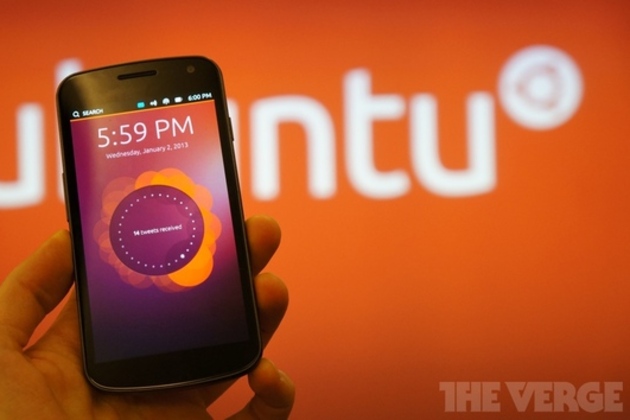
The Ubuntu Edge smartphone may have missed its crowdfunding goal by a huge amount, but the Ubuntu Touch operating system is far from dead — it now has a planned release date of October 17th. That’s according to a blog postfrom Canonical employee and QA community coordinator Nicholas Skaggs, who said that Ubuntu is “committed to delivering an image” of the OS for supported devices (Galaxy Nexus, Nexus 4, Nexus 7, and Nexus 10). That’s backed up by a post on the Ubuntu Phone Team mailing list that confirms “phone 1.0 will be a reality” in four and a half weeks. In the meantime, both posts implore interested users to download the current images and report bugs to the QA team to help them get everything sorted out before the October…
 All the way back in 2009, when Android was still ramping up as a mobile platform, we covered a significant spat between Google and a developer named Steve Kondik. Kondik’s Cyanogenmod software framework was a modified Android ROM that angered Google because it included a number of proprietary Google applications, such as GMail and YouTube.
The dispute ended with some agreements, but Cyanogenmod continued on, and now the Android firmware project CyanogenMod is a brand new company, thanks to a $7 million Series A financing round led by Silicon Valley venture firms Benchmark Capital and Redpoint Ventures.