In previous tutorials we looked at writing code to access the onboard camera, preview the display, and save an image in an Android application. That’s the basics; but modern smartphones often have quite complicated cameras with a whole array of features – flash, white balance, a variety of scene modes, different Instagram-style photo effects, even face recognition (handled only in the most recent Android release and not covered in this tutorial). Check out the Camera.Parameters API docs for the full lowdown on the features you may be able to play with. The Camera.Parameters API also allows you to find out what 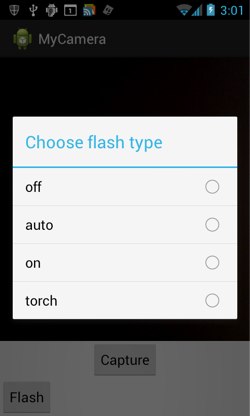 features are supported by the hardware your app happens to be running on. Once you know what parameters/features you have available, they’re all dealt with in a fairly similar way. Read on to find out how to handle them.
Handling Flash
Let’s start off by looking at the flash, which is probably the most-used camera feature. We’ll create a chooseFlash() method to set up the flash choice options:
private void chooseFlash() {
  final Camera.Parameters params = camera.getParameters();
  final List<String> flashModeList = params.getSupportedFlashModes();
  if (flashModeList == null) {
    // no flash!
    return;
  }
  final CharSequence[] flashText = flashModeList.toArray(
                                 new CharSequence[flashModeList.size()]);
  AlertDialog.Builder builder = new AlertDialog.Builder(this);
  builder.setTitle("Choose flash type");
  builder.setSingleChoiceItems(flashText, -1,
                               new DialogInterface.OnClickListener() {
    public void onClick(DialogInterface dialog, int which) {
      params.setFlashMode(flashModeList.get(which));
      camera.setParameters(params);
      dialog.dismiss();
    }
  });
  final AlertDialog alert = builder.create();
  alert.show();
}
Before doing anything else, we need to check whether there are any supported flash modes at all, with getSupportedFlashModes(). If the list is empty, there’s no flash, and we return without doing anything.
If there are flash modes, we want the user to pick one. Here, we use an AlertDialog to handle that, but you could use another option. We turn the list of flash modes (in string form) into a CharSequence array, to pass into AlertDialog.Builder, then use the Builder methods to set the title and to create a radio button choice (setSingleChoiceItems(); you can also create checkboxes, or use setItems() for a selectable list without radio buttons).
After the user selects their preferred flash mode, we use the dialog’s OnClickListener to identify the index of the selected item, and pull that item out of the String list flashModeList to set the parameter. Because we’ve translated flashModeList directly into the CharSequence array used in the AlertDialog builder, the index of the item chosen in the AlertDialog will be the same as the index of that item in flashModeList.
You must call camera.setParameters() after params.setFlashMode() to make the change actually take effect. We then finish the onClick() method by dismissing the dialog and returning to the main screen. Finally, having built the dialog, we create and show it.
Dynamic layouts
The next issue is how to show this to the user. We could just run it automatically on app startup, but that’s not particularly user-friendly. We could add some XML in the static layout, but then that would be shown even if the device doesn’t have a flash, which is a big waste of screen space and very user-unfriendly. Instead, we can use dynamic layout – layout which is managed depending on what happens in the program.
To do this, let’s add this code at the end of the chooseFlash() method, replacing the alert.show() line so that we only show the select flash type list if the button is clicked.
LinearLayout lin = (LinearLayout) findViewById(R.id.linearlayout);
Button flashButton = new Button(this);
flashButton.setText("Flash");
flashButton.setLayoutParams(new LayoutParams(LayoutParams.WRAP_CONTENT,
                            LayoutParams.WRAP_CONTENT));
lin.addView(flashButton);
flashButton.setOnClickListener(
  new View.OnClickListener() {
    public void onClick(View v) {
      alert.show();
    }
  }
);
You’ll also need to add an ID value to the parent LinearLayout in your XML:
<LinearLayout xmlns:android="http://schemas.android.com/apk/res/android"
    android:id="@+id/linearlayout"
  ... >
The code grabs a reference to the parent LinearLayout, creates a ‘Flash’ button, and adds it to the layout, then shows the AlertDialog once the button is pressed. As you can see here, you can set the height and width of a button programmatically, using setLayoutParams(). (These are ViewGroup.LayoutParams.) A couple of constructors are available; this one takes width and height. (You can use one of the subclasses of LayoutParams to get more specific when constructing a layout.) All the other attributes of a button can also be set programmatically. You might, for example, want to set the button to show an image rather than text, using setBackgroundDrawable() instead of setText() (or use an ImageButton and setImageResource() instead).
Finally, we hook this into our setUpLayout() method:
private void setUpLayout() {
  // ... as before
  chooseFlash();
}
Compile and run on your hardware to test it out.
Scene setting
There are a bunch of other camera effects available in Android, although hardware availability of course varies with each handset. These include zoom, antibanding, scene mode, focus mode, and so on. Check out the Camera Parameter docs for a full list. They’re all set and handled in much the same way, though, so let’s have a quick look at another example, setting scene mode. Modes include Party, Portait, Landscape, Night, etc – see the getSceneMode() docs for more possibilities. The actual list available will vary with your camera type.
private void chooseSceneMode() {
  final Camera.Parameters params = camera.getParameters();
  final List<String> sceneModeList = params.getSupportedSceneModes();
  if (sceneModeList == null) {
    // no scene mode available!
    return;
  }
  final CharSequence[] sceneModeText = sceneModeList.toArray(
                                 new CharSequence[sceneModeList.size()]);
  AlertDialog.Builder builder = new AlertDialog.Builder(this);
  builder.setTitle("Choose scene mode");
  builder.setSingleChoiceItems(sceneModeText, -1,
                               new DialogInterface.OnClickListener() {
    public void onClick(DialogInterface dialog, int which) {
      params.setSceneMode(sceneModeList.get(which));
      camera.setParameters(params);
      dialog.dismiss();
    }
  });
  final AlertDialog alert = builder.create();
  LinearLayout lin = (LinearLayout) findViewById(R.id.linearlayout);
  Button sceneModeButton = new Button(this);
  sceneModeButton.setText("Scene Mode");
  sceneModeButton.setLayoutParams(new LayoutParams(LayoutParams.WRAP_CONTENT,
                            LayoutParams.WRAP_CONTENT));
  lin.addView(sceneModeButton);
  sceneModeButton.setOnClickListener(
    new View.OnClickListener() {
      public void onClick(View v) {
        alert.show();
      }
    }
  );
}
As you can see, this is basically identical to chooseFlash(). (So much so, in fact, that it would be a good idea to factor it out into a chooseEffect() method and pass in the type of effect you are setting as a parameter. Try that out as a useful exercise and see what other effects you can plug into it.)
You’d probably also want to look at improving the layout, which is currently not visually appealing, and would get less so with more buttons and effects added. You might, for example, want to have a sliding menu, or arrange the buttons in a row. In future tutorials, we’ll look in more detail at both static and dynamic layouts, and at menus and options which appear only in certain circumstances or when requested by the user.

 The GNOME project announced plans for supporting Wayland quite a while ago and progress has been reported incrementally for months. Wayland was supported in GNOME 3.95 for the particularly crafty, but starting with 3.10, binaries will be offered for Wayland right beside X. Matthias Clasen posted of this and other decisions made today at Guadec.
 Chang will share her insights on community and collaboration in her keynote at