
The Korean handset maker’s second-quarter smartphone share slipped to 30 percent, but that still far outstripped the competition, according to research firm IDC. [Read more]
Read more at CNET News
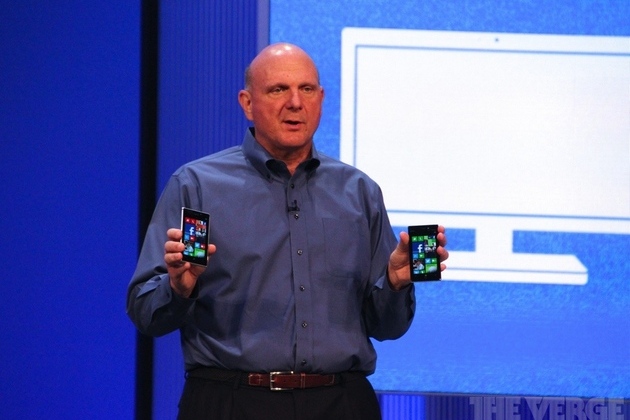
Microsoft CEO Steve Ballmer has admitted that the company built too many Surface tablets, and it’s not selling as many Windows devices as it wants. During an internal town hall event earlier this week, Ballmer and COO Kevin Turner both addressed the recent $900 million hit for Surface RT and the sales pace of Windows across various devices. According to several sources, Ballmer openly discussed Microsoft’s focus on securing Instagram for Windows Phone, and its plans for the next-generation Surface. Neowin first reported parts of the meeting.
“We built a few more devices than we could sell,” admitted Ballmer when referring to the slow Surface RT sales. Microsoft recently cut the price of its Surface RT tablets by 30 percent worldwide,…

George Vlahavas has announced the release of Salix OS 14.0.1 “KDE” edition, an updated build of the project’s Slackware-based distribution featuring the KDE 4.8.5 desktop: “Salix KDE 14.0.1 has been released. It is built around KDE 4.8.5 and as always, it is available in both 32-bit and 64-bit….
In How to Upgrade Your Linux PC Hardware we learned about choosing Linux-compatible components, and some great Linux commands for probing hardware without opening the box. Today we’re going to explore the mysteries of GPT, the GUID partition table, which is the newfangled replacement for the tired and inadequate MS-DOS partition table, and why you might want to use it instead of the familiar old MBR. GPT is part of the UEFI specification, and because Linux is a real operating system with modern features you can use GPT with both UEFI and legacy BIOS.
The Globally Unique Identifiers Partition Table is the modern replacement for the antique MS-DOS Master Boot Record (MBR). The MBR was born in the early 1980s for IBM PCs, way back in the thrilling days of ten-megabyte hard disks. The MBR must live on the first 512 bytes of your storage device, and it holds the bootloader and partition table. The bootloader occupies 446 bytes, the partition table uses 64 bytes, and the remaining two bytes store the boot signature. The MBR is limited to four primary partitions, and a single primary partition can hold an extended partition which can then be divided into logical partitions. Linux supports (theoretically) an unlimited number of logical partitions. In the olden days Linux maxed out at 63 IDE partitions and 15 SCSI partitions because the kernel was limited in the total device numbers it could allocate. udev allocates device numbers dynamically, so those limitations are gone.
The MBR is tiny and inflexible, and has lasted this long thanks to clever hacks to get around its limitations. Logical Block Addressing (LBA) gets around the limitations of its original cylinders, heads, and sectors (CHS) addressing. The traditional hard disk block size of 512 bytes limits partitions to 2TB in size, though more clever hackery supports the new 4096-byte sectors for a maximum 16TB partition size.
Clever hackery takes us far, and modern tools take us even farther. GPT is part of the Unified Extensible Firmware Interface (UEFI) specification, and on Linux you don’t need an EFI BIOS to boot from a GPT partition, but can use it with legacy BIOS systems. Mac OS X and Windows have various limitations that make me tired to even think about, so if these are an issue for you this Microsoft FAQ and Apple’s Secrets of the GPT should help you.
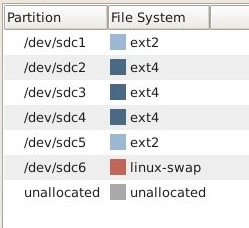
GPT does not have primary and logical partitions, but just partitions as GParted shows (figure 1).
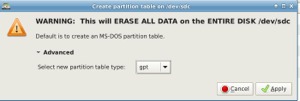
When you’re formatting a hard disk in GParted and want to use GPT, just select the gpt option, as in figure 2:
 GPT has several advantages over the MBR:
The GPT GUIDs (Globally unique identifiers) and our familiar Linux UUIDs (Universally Unique Identifiers) are not the same thing, though they serve the same useful purpose: giving block devices unique names. Linux UUIDs are a function of filesystems, and are created when the filesystem is created. To see Linux UUIDs just fire up the blkid command:
# blkid
/dev/sda1: LABEL="storage" UUID="60e97193-e9b2-495f-8db1
  -651f3a87d455" TYPE="ext4"
/dev/sda2: LABEL="oldhome" UUID="e6494a9b-5fb6-4c35-ad4c-
   86e223040a70" TYPE="ext4"
This example also shows the filesystem labels, which are arbitrary names we can give our block devices. We can use the UUIDs in /etc/fstab like this:
# storage, /dev/sda1 data storage
UUID=60e97193-e9b2-495f-8db1-651f3a87d455 /home/carla/storage ext4 user,defaults 0 0
Or use the label, like this:
LABEL=storage /home/carla/storage ext4 user,defaults 0
To get GUIDs we need the gdisk command:
# gdisk /dev/sdc
GPT fdisk (gdisk) version 0.8.1
Partition table scan:
  MBR: protective
  BSD: not present
  APM: not present
  GPT: present
Found valid GPT with protective MBR; using GPT.
Command (? for help):
This offers immediately useful information: That this disk uses GPT, with an MBR in protective mode. This protected MBR allows booting from a legacy BIOS, and and protects GPT from GPT-unaware utilities (such as fdisk) and operating systems. These will see an MBR disk with no free space. gdisk serves up a wealth of information on partitions. Press the p key to see all partitions:
Command (? for help): p
Disk /dev/sdc: 3907029168 sectors, 1.8 TiB
Logical sector size: 512 bytes
Disk identifier (GUID): 058D39EE-5D06-409F-AA0C-298A3E6CC302
Partition table holds up to 128 entries
First usable sector is 34, last usable sector is 3907029134
Partitions will be aligned on 2048-sector boundaries
Total free space is 819142765 sectors (390.6 GiB)
Number  Start (sector)    End (sector)  Size       Code  Name
   1            2048         1953791   953.0 MiB   0700
   2         1953792        80078847   37.3 GiB    0700
   3        80078848      2033203199   931.3 GiB   0700
   4      2033203200      3009765375   465.7 GiB   0700
   5      3009765376      3048826879   18.6 GiB    0700
   6      3048826880      3087888383   18.6 GiB    8200
Note that the logical sector size is 512 bytes. All new large hard disks use 4096-byte sectors, so what’s up? Let’s fire up the lsblk command and see:
$ lsblk -t /dev/sdc
NAME   ALIGNMENT MIN-IO OPT-IO PHY-SEC LOG-SEC ROTA SCHED RQ-SIZE
sdc            0   4096      0    4096     512    1 cfq       128
|--sdc1         0   4096      0    4096     512    1 cfq       128
|--sdc2         0   4096      0    4096     512    1 cfq       128
|--sdc3         0   4096      0    4096     512    1 cfq       128
This shows that the physical sectors are 4096 bytes. 4096 bytes is a magic number on large hard drives for multiple reasons: it’s a more efficient use of storage space, a normal page of memory on x86 computers is 4096 bytes, and the ext3/4 file systems default to 4KB clusters. But to preserve backwards compatibility (disk controllers, older software and operating systems) hard disk manufacturers have to emulate 512B sectors.
Let’s go back to gdisk and examine a single partition. Press i, then the number of the partition:
Command (? for help): i
Partition number (1-6): 3
Partition GUID code: EBD0A0A2-B9E5-4433-87C0-68B6B72699C7 (Microsoft basic data)
Partition unique GUID: 8C208C30-4E8F-4096-ACF9-858959BABBAA
First sector: 80078848 (at 38.2 GiB)
Last sector: 2033203199 (at 969.5 GiB)
Partition size: 1953124352 sectors (931.3 GiB)
Attribute flags: 0000000000000000
Partition name: ''
Note the Partition GUID code, and how it says “Microsoft basic data.” Yeah, ole Microsoft always party-crashing, because this an EXT4 partition, so there is no way for Windows to read it, but will see it as an unformatted partition. You won’t see this with current releases of gdisk, because until 2011 there were no Linux filesystem GUIDs. Now there are, so if you’re not using an old Linux like mine (Mint 13) you’ll see a proper Linux GUID instead (0FC63DAF-8483-4772-8E79-3D69D8477DE4).
The Partition unique GUID is what you’ll use in fstab, like this:
PARTUUID=8C208C30-4E8F-4096-ACF9-858959BABBAA /data ext4 user,defaults 0 0
As always, Linux has complete support for this newfangled stuff. You’ll need GRUB 2, though some users report that LILO works with GPT, gdisk, and GNU parted or GParted for a nice graphical view. Read the fine man pages, and Wikipedia’s GUID Partition Table nicely condenses a lot of useful information, including operating system support and a table of GUID labels.
The embedded Linux community has shown considerable interest in recent months in the ARM/FPGA combo Xilinx Zynq processor, which for the first time opens up FPGA-like programmable logic functions to Linux developers. The Zynq and the similar new Altera Cyclone V SX could bring Linux into new markets in high-end industrial and military equipment, scientific research, SDR radio, and much more.
Xilinx’ initial Zynq-7020 system-on-chip runs its dual Cortex-A9 cores at a modest 667MHz to 800MHz, so it may not match the latest quad-core, Cortex-A15 SoCs at multimedia. But it does have one thing the other super-SoCs don’t: a powerful field programmable gate array (FPGA) capable of high-speed parallel processing. The Zynq-7020 offers 85k programmable logic cells with equivalent power to Xilinx’ Artix-7. Higher-end models like the 1GHz Zynq-7100 offer up to 444k cells, much like a Kintex-7 FPGA.
The Zynq places Cortex-A9 and FPGA subsystems on a single die, connected via a high-speed AXI4 interconnect. This helps integrate processing in ways that were impossible with earlier chipsets and modules that combined ARM9 and FPGA chips. The interconnect is said to simplify the development of specialized peripherals in the FPGA fabric.
 Unlike mainstream FPGAs, which require complex, time-consuming hardware description language (HDL) programming – largely beyond the control of higher-level languages and OSes — much of the Zynq’s logic is programmable by Linux via its Extensible Processing Platform architecture. Instead of depending on FPGA programmers, vendors interested in pursuing parallel processing intensive applications can tap a much larger group of embedded ARM/Linux savvy C developers, and bring products to market more quickly. With the Zynq, Xilinx has done for the FPGA what Texas Instruments accomplished with its DaVinci SoCs in making the similar, but less flexible DSP (digital signal processor) more accessible to developers.
While ARM/FPGA SoCs are luring new vendors, they are attracting customers already using FPGAs. “In most electronic systems, you will find processor-based products and FPGAs, often side-by-side,” said EMEA Marketing Director Giles Peckham in an email. “Architecting designs around a single Zynq-7000 SoC enables designers to benefit from higher integration and system performance, with lower BOM costs, lower power and accelerated design productivity.”
The Zynq-7020 has been shipping for over a year now, and all five 28nm-fabricated models reached full production this February. A second generation of 20nm Zynq’s should begin sampling this fall.
Xilinx is now beginning to face competition. Last year, FPGA rival Altera introduced its own ARM/FPGA SoC with its Altera Cyclone V SX-U672. The Cyclone V SX, which recently entered production, combines dual 800MHz Cortex-A9 cores with programmable logic equivalent to Altera’s Stratix V FPGAs. Like the Zynq, the Cyclone V SX uses an AXI interconnect to link ARM and FPGA subsystems. In May, the company began shipping its Linux-ready Cyclone V SoC Development Kit.
Last month, Altera announced a Generation 10 family of 20nm-fabricated processors, including an Arria 10 SoC due to sample in early 2014 that combines dual 1.5GHz Cortex-A9 cores with a more powerful FPGA. Other ARM/FPGA mashups include Microsemi’s SmartFusion2, which can run Linux on the ARM subsystem, although on a slower 166MHz Cortex-M3 processor.
ARM/FPGA SoCs should enable further inroads by Linux into signal- and packet- processing intensive devices for machine vision, test and measurement, broadcast, military/aerospace, motor control, automotive, and scientific and medical imaging and instrumentation. Many of the early Zynq products have been software defined radio (SDR) transceivers, and higher-end models will join a new generation of ARM SoCs aimed at carrier-grade networking. In this role, ARM drives the control plane while the FPGA handles the data plane. Some server applications that demand real-time performance could also tap ARM/FPGA SoCs.
It’s no wonder Denx founder Wolfgang Denk recently told Linux.com that ARM/FPGA SoC combos were one of the five hottest trends in embedded Linux.
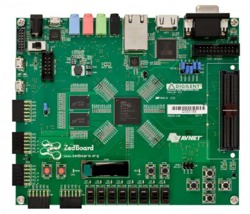 The Zynq has a head start over Altera, and has already won numerous accolades and awards. According to the EE Times 2013 Embedded Market Study survey, when asked which microprocessors developers were planning to use, the Zynq had the largest percentage point rise, jumping from 6 percent to 13 percent.
Some other signs of the Zynq’s ascent include:
ARM/FPGA combos like the Zynq are not ideal for everyone. They’re more expensive and harder to master than most mainstream ARM SoCs, and many projects still require some HDL programming. Yet, this new wave of processors has taken a huge leap in bringing Linux developers closer to the arcane world of FPGAs.