Home Blog Page 1884

Creating a Custom Linux OpenSuSE 11 EC2 S3 Backed AMI Using Kiwi

I finally got around to testing running opensuse on AWS!!

To begin with I started by using SuSEstudio and plumbing in my EC2 credentials and getting the SuSEstudio platform to push the AMI to S3 for me and run from EBS. This was great and I messed around a bit with creating small installations of JeOS and OpenSuSE. But I wanted to be able to have the all same functionality without being dependant on an external service to push a new version of my AMI and so on.

I read that Kiwi was pretty cool, and that SuSEstudio actually used this behind the scences to power its platform. First steps were to download the cookbook and have a read. Also at one of the last stages I subscribed to the Kiwi google group. – The guys on here were brilliant at coming back to me with answers and sanity checks.

Anyhow, heres how I got things up and running.

Firstly I noticed that there were problems with Kiwi working successfully on OpenSuSE 12 if you were trying to create an EC2 guest, so in my final test I used an OpenSuSE 11.3 Virtual Machine using VMware Fusion  on my Mac and ran Kiwi on here to generate the OpenSuSE 11.4 AMI.

Firstly I copied /usr/share/doc/packages/kiwi/examples/suse-11.4/suse-ec2-guest to /usr/local/testing/suse-ec2-guest.

I then changed directory to the latter and edited the file config.xml
In this section enter the details for your privatekey,certificatefile,EC2 Account number and region.
for example:

<ec2config><ec2privatekeyfile>privatekey-12345.pem</ec2privatekeyfile>
<ec2certfile>cert-12345.pem</ec2certfile>
<ec2accountnr>111222333444</ec2accountnr>
<ec2region>EU-West-1</ec2region>

</ec2config>

This is also the place to enter any additional packages you want to be included in the AMI before it gets bundled and pushed up to AWS.
This normally happens at the end of the xml file, if you know the name of the package you are after its as easy as:

<package name=”ruby”/>

Next thing to do is start off the initial part of kiwi’s system image creation:

kiwi –prepare /usr/local/testing/suse-ec2-guest/ –root /home/myec2

You’re almost ready to roll, but before you do, you need to do a boot.local hack for SSH to work. – This needs to be done before you do “kiwi create

vi /home/myec2/etc/init.d/boot.local then a quick google for a similar issue suggests making the following entries:

rm -f /etc/ssh/ssh_host_key*
rm -f /etc/ssh/ssh_host_rsa_key*
rm -f /etc/ssh/ssh_host_dsa_key*

echo “recreating SSH Keys”
/usr/bin/ssh-keygen -q -f /etc/ssh/ssh_host_key -N ” -t rsa1
/usr/bin/ssh-keygen -f /etc/ssh/ssh_host_rsa_key -N ” -t rsa
/usr/bin/ssh-keygen -f /etc/ssh/ssh_host/dsa_key -N ” -t dsa

echo “restarting SSH”
/etc/init.d/sshd restart
echo “finished”

kiwi –create /home/myec2 -d /home/myec2-result -y

ec2-upload-bundle -b mytestsuse114 -m /home/myec2-result/suse-11.4-ec2-guest.x86_64-1.1.2.ec2-EU-West/suse-11.4-ec2-guest.x86_64-1.1.2.ami.manifest.xml -a accesskey -s secretkey –location=EU

ec2-register –private-key=privatekey.pem –cert=cert.pem –region=EU-WEST-1 mytestsuse114/suse-11.4-ec2-guest.x86_64-1.1.2.ami.manifest.xml -n mysuse114 -a x86_64 -d “My Kiwi SuSE 11.4”

Once this has completed, the ec2-register command should send back to the command line a note of your AMI that has just been created eg:ami-1f111f1a. Make a note of this as you will need to know which AMI you want to start.

Next to fire up the Instance…

According to the Kiwi docs the images that it creates for S3 do not contain a partition table so when looking for the correct AKI to use you need to pick one that uses hd0 not hd00 from the AWS “user specified kernels doc”

My image is x86_64 and running on S3 in EU-WEST-1, so according to the list that means I need to specify aki-4feec43b as the AKI for this image. – Check the doc for your region and architecture.

Rule of thumb is for S3 select and AKI with hd0 an for EBS backed chose hd00. For EU-WEST-1 I wrote out this table.

aki-4feec439(32 bit S3 backed)
aki-4feec43b(64 bit S3 backed)
aki-47eec433(32 bit EBS backed)
aki-41eec435(64 bit EBS backed)

Ok, so lets fire up the Instance then:

ec2-run-instances -K privatekey.pem -C cert.pem –region EU-WEST-1 ami-1f111f1a -g mysecuritygroup –key mykeypairname -n 1 -t m1.large -z EU-WEST-1a –kernel aki-4feec43b

As you can see the above command launches my AMI (ami-1f111f1a)in EU-WEST-1a as an m1.large using the AKI aki-4feec43b as my Instance is S3 backed and is 64-bit.
You should now be able to login to you OpenSuse 11.4 Instance on AWS!

ssh -i my-eu-west-1-key.pem
This e-mail address is being protected from spambots. You need JavaScript enabled to view it

Hope you found my notes useful, this is a post I wrote on my personal blog last year, but thought other might find it interesting.


(c)Matt Palmer


The 3.10 Kernel is Out

Linus has released the 3.10 kernel. “In the bigger picture (ie since 3.9) this release has been pretty typical and not particularly prone to problems, despite my waffling about the exact release date. As usual, the bulk patch-wise is all drivers (pretty much exactly two thirds), while the rest is evenly split between arch updates and ‘misc’. No major new subsystems this time around, although there are individual new features.” Some of those new features include a number of Ftrace enhancements, the memory pressure notification mechanism, tickless operation, ARM multi-cluster power management support (part of the big.LITTLE solution), the bcache block caching layer, and much more. See the (still in-construction) KernelNewbies 3.10 pagefor lots of details.

Read more at LWN

Kernel Patches Start Coming For 2013 MacBook Air

The Linux support for Apple’s new Haswell-based MacBook Air is less than desirable, but at least it’s on the path to getting better…

Read more at Phoronix

Linux on Power

Linux_rgb_white-bckgrnd-298x300

In the office today is an old IBM P-Series running OpenSUSE. We’ve had nothing but outstanding uptime with the box, but for some reason, before now, we have not considered expanding our Linux infrastructure to more Power systems. Since we are now exploring all of our options, the idea of moving from lots of small virtual machines to a few LPARs is being tossed around. Would it make sense to migrate our environment away from standard Intel machines to big-iron IBM systems? It is an interesting proposal.

Determining the best hardware for a self-hosted web environment is complicated, and fraught with danger. One of the most popular schemes in use is to purchase commodity hardware. Normally, the term “commodity hardware” is meant to include basic Intel pizza box servers that may not have the most power, and may not come with the best reputation for high mean time between failure for components, but are plentiful and cheap. The core concept is to avoid the need for larger, more expensive hardware by purchasing a lot of pizza boxes, and just adding on as you go. When done right, this results in a fairly easy to manage system, but it needs to be done right from the start. 

 
Read more at Ostatic


Knoppix 7.2 Review

You may not know about Knoppix, but before there was Ubuntu and before there was Mint there was a time when Knoppix was among the few distros that hardly needed introduction.

Read more at Muktware

DoudouLinux 2.0 “Hyperborea” released

Version 2.0 of the DoudouLinux educational distribution is out. “But DoudouLinux is not just a CD/DVD of educative stuffs for children. DoudouLinux is now a vast project on its own. We have published with version 2.0 a manifesto that defines the philosophy and the ethics of our project: we want our children be able to fully master the digital world they are going to live in, instead of undergoing it. As a result we now feel very concerned about user privacy, especially when it comes to children.” LWN looked at DoudouLinux in 2011.

Read more at LWN

First Tizen Tablet is a Quad-Core Powerhouse

The Tizen-based tablet announced this week by Japan-based Shisutena is the first formally announced Tizen device. The surprisingly powerful slate suggests not only that Tizen is about more than just Samsung smartphones, but that the mobile Linux OS is not afraid to go head to head with Android on the high end.

Shisutena appears to be a partner or division of Japan’s Systena, which ran the same press release republished by Hermitage Akihabara and later reported on by Liliputing.

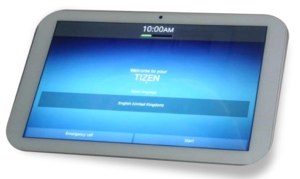
Shisutena Tizen tabletThe unnamed Tizen device matches the specs of a high-end Android tablet, featuring a 1.4GHz, quad-core Cortex-A9 processor backed up with 2GB of RAM and 32GB of flash. The Shisutena tablet also features a 10.1-inch display with impressive 1920 x 1200 resolution. Other features include WiFi, a microSD slot, and both 2-megapixel and 0.3-megapixel cameras.

Shisutena says it will show the tablet at a trade show on Oct. 23, and that it is prepping an in-vehicle infotainment (IVI) product using Tizen. Japanese mobile operator and Tizen backer NTT DoCoMo will sell the device, according to a report by TizenExperts.

Until this week, I comfortably assumed that Samsung would be the first to announce Tizen products. I also assumed, a bit less comfortably, that the first products would have mid-range specs, aimed at advanced emerging markets like China.

Tizen Devices Aim High

At the Tizen Developers Conference in late May, Samsung said its first Tizen phone would appear “very soon.” That same week images emerged of Samsung GT-I8805 and GT-I8800 smartphones running Tizen 2.1 on a Cortex-A9 processor, and offering modest 1280 x 720 resolution. Earlier this month the phones resurfaced on the Samsung test-center website.

The only other vendor to publicly commit to Tizen is Huawei. Meanwhile, carriers NTT DoCoMo and Orange have promised Tizen smartphone launches in 2013, but like Huawei and Samsung, they have offered no details.

The Shisutena tablet’s supercharged specs may be an anomaly, reflective of its focus on Japan, which like Korea, has a thriving high-end market. It’s may also be the tablet won’t ship until 2014, at which point faster tablets running Cortex-A15 processors like the Exynos 5, Tegra 4, or Snapdragon 800 will define the high end even in China. Then again, Tizen may be aiming higher than we thought.

Officially, Tizen supports smartphones, tablets, netbooks, IVI, and Smart TV systems, but so far the action has been in smartphones and IVI. Shortly after the Tizen conference, however, Tizen developer Arnaud Dupuis posted a video of a Tizen port to the Android-based Nexus 7 tablet. On the netbook front, meanwhile, Tizen backer Intel used the conference to demo a preview version of Tizen 3.0 running on a laptop via a GNOME shell.

No doubt, Intel would like to see Tizen loaded onto tablets running its upcoming Silvermont architecture Bay Trail system-on-chips. The chipmaker may also have Tizen in mind for the upcoming mobile versions of its 4th Generation Core (“Haswell”) processors, which target high-end Android and Windows tablets. Recently, an Intel staffer leaked images of a home-grown smartphone UI overlay called “Obsidian” designed for Tizen.

“Most Notable Player” Tizen Plays it Close to the Vest

Earlier this month ABI Research projected that Tizen will be the “most notable player” among emerging Linux-based mobile platforms. No specific projections were supplied except for an estimate that 65 percent of Tizen’s future installed base will be in the Asia-Pacific region.

It’s not surprising that Tizen is the de facto leader. It’s backed by Android potentate Samsung and CPU leader Intel, as well as the Linux Foundation and an extensive list of mobile carriers. Still, because Tizen vendors are playing it close to the vest, the platform has been far less visible than its similarly HTML5-based rival Mozilla’s Firefox OS, despite having been launched almost a year before.

That could change in a hurry. Although some MeeGo veterans may fear that Samsung could “pull a Nokia” and abandon the platform, it’s more likely the tech giant will pour a ton of money into the launch. The recent announcement of a Tizen App Challenge featuring over $4 million in prizes suggests the funding we might expect to see.

Mozilla and partners like ZTE have less cash to throw around, but Firefox OS got a major boost this month when Chinese ODM manufacturer Foxconn (Hon Hai Precision Industry) demonstrated a Firefox OS tablet. Foxconn said it was working with Mozilla on other devices, including smart TVs and digital signage systems. Last week, the Taipei Times reported that Foxconn will hire up to 3,000 engineers to work on Firefox OS.

While Tizen and Firefox OS announced extensive carrier support months ago, the other two mobile Linux players — Canonical and Jolla – announced their first carriers only this month. Finland-based DNA will carry the first Jolla Sailfish OS phones by the end of the year. Canonical had no similar commitments for next year’s Ubuntu Touch devices, but announced an eight-member “Carrier Advisory Group” (CAG) that will influence Ubuntu for Phones.

Canonical is also developing an Ubuntu for Tablets platform, but the first slates aren’t expected until late 2014. By then there should be a number of other Linux-based tablets available that don’t sport a little robot on the box.

Red Hat’s OpenShift Online Expands the Company’s Cloud Horizons

In June, Red Hat has steadily taken its next significant steps in the cloud computing arena, as it expanded the focus of its OpenShift open source Platform-as-a-Service hybrid cloud computing offering, launching a new cloud-hosted commercial edition called OpenShift Online. OpenShift Online is Red Hat’s public cloud application development and hosting platform for automating the provisioning, management and scaling of applications. Now, Red Hat runs private and public versions of OpenShift, and note that there is a free usage policy for OpenShift Online, although more resource-intensive applications will probably require subscription services.



Read more at Ostatic

KDE 4.11 Beta 2 Is Now Available For Testing

The second beta of the KDE 4.11 Software Compilation has been released…

Read more at Phoronix

Juniper Research Finds Much Malware Getting Through the Door on Android Devices

Juniper Networks is out with its 2013 Mobile Threats Report, and it includes some disturbing news for users of Android devices. According to the report, a whopping 92 percent of mobile threats (which include more types of threats than just malware) are aimed at Android devices–a number that has nearly doubled from 47 percent in 2012.

According to the Juniper report, more Android attackers are finding ways to make money with their mischief, too. There are many non-Google app stores that house infected applications, and one of the fastest growing types of Android malware is the type of attack that includes a bogus installer.


Read more at Ostatic