
New screenshots reportedly show an early build of Android 4.3 taken from the Google Play Edition of the Galaxy S4, says blog site Sammobile. [Read more]
Read more at CNET News
New screenshots reportedly show an early build of Android 4.3 taken from the Google Play Edition of the Galaxy S4, says blog site Sammobile. [Read more]
Paweł Pijanowski has announced the availability of the second beta release of SparkyLinux 3.0, a Debian-based distribution with a choice of LXDE (default), Enlightenment, Openbox, JWM and MATE desktop user interfaces: “SparkyLinux 3.0 beta 2 ‘Annagerman’ has been released. Sparky 3.x has been built from the ‘testing’ branch….
Awk and Sed are powerful text processors that run circles around bloaty word processors. We’re going to use them to customize the Bash prompt, add and remove line numbers, insert commas in long numbers, and perform all manner of experiments without endangering our source files.
Awk and Sed are brilliant text processors, and as you learn more ways to use them the less you’re going to find yourself using a word processor. Word processors, in my sometimes-humble opinion, are great lumbering things all full of buttons and menus, and good luck finding what you want — or if it even exists. They’re much too “helpful”, to the point that I yell mean things at them and order them to get out of my way. As they don’t understand voice commands it’s not very effective. The simplest use of Awk is sorting words and numbers that are separated in some way, by spaces, line breaks, commas, and other punctuation– anything that can be used as a delimiter. Awk’s boon companion, Sed (stream editor) operates on individual characters. Sed even has a sense of humor– this example changes your good Linux prompt to a DOS prompt:
$ export PS1="C:$( pwd | sed 's:/:\\\:g' )\>
C:homecarla>
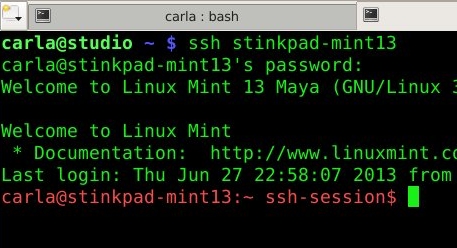
This is not permanent, and will go away when you close your terminal. While we’re messing with Bash prompts, let’s fix it so that when we log into a remote PC the prompt turns red and says “ssh-session” so we know for sure it’s a remote session. Add these lines to your ~/.bashrc on the remote machine:
if [ -n "$SSH_CLIENT" ]; then text=" ssh-session"
fi
export PS1='[e[0;31m]u@h:w${text}$[e[m] '
Log in from a remote machine to test it, and you’ll see something like figure 1. (The Bash prompt is extremely customizable with all kinds of colors and information; see the Bash Prompt HOWTO to learn all the color and customization codes.)
Suppose you’re writing a code example and you want to insert printable line numbers. Some editors do this, some don’t. This is how Awk does it:
$  awk '{ print FNR " "":"" " $0 }' /bin/cgroups-mount
[...]
7 :# For simplicity this script provides no flexibility
8 :
9 :# If /sys/fs/cgroup is mounted, we don't run again
10 :if [ -n "`grep /sys/fs/cgroup /proc/mounts`" ]; then
11 :    exit 0
I threw in some nice spaces and colons for prettiness. You can also display line numbers with the less command:
$ less -N /etc/ardour/ardour.menu
[...]
      7  <menuitem action='New'/>
      8  <menuitem action='Open'/>
      9  <menuitem action='Recent'/>
     10  <menuitem action='Close'/>
     11    <separator/><
I use this when I have to wade through XML files, which to my eyes are giant undigestible snarls, even with color syntax highlighting. Now suppose you have some example code copied from somewhere with line numbers, and you need to get rid of the line numbers; Sed is perfect for this task:
$ sed "s/^ *[0-9]* //g" filename
These examples print the results to stdout and do not change the source files, which is a nice safety mechanism. You can create a new file containing your changes with a simple redirect, like this:
$ awk '{ print FNR " " $0 }' /bin/cgroups-mount > newfile
Sed can edit files in place with the -i, so if you’re really really sure you can edit your source file directly. This example inserts commas into a file full of columns of long numbers:
$ sed -i ':a;s/B[0-9]{3}>/,&/;ta' numbers.txt
So this:
20130607215015
607220701
992171
Becomes this:
20,130,607,215,015
607,220,701
992,171
A good learning tool is to look up the command options in the man pages. To learn more about these wonderful commands try the “Definitive Guide to sed: Tutorial and Reference” by Daniel A. Goldman, which is the first new Sed & Awk book in years, and it’s very good. A good companion book is “Introducing Regular Expressions” by Michael Fitzgerald, because regular expressions are essential to pretty much everything in scripting, programming, and many Linux commands.
 In Stephen King’s Dark Tower series, the giant, insane, cyborg bear named Shardik is known by the forest dwelling people around his territory as Mir, the world beneath the world. Ubuntu’s naming of Mir probably leans more towards the African heritage deriving the name from “Mayor”, or “Leader”, but personally I like the insane bear analogy better. ThePowerBase.com has a story linked to fridge.ubuntu.com reporting that Ubuntu plans to ship their controversial replacement for X11 in the next version of Ubuntu, 13.10, by default, along with XMir, an X11 compatibility layer running on top of Mir.
Ubuntu announced Mir in March of this year, and assuming no delays on 13.10, that will mean a mere seven months of development from announcement to the users desktop. Shipping a complete replacement for X11 in such a short time frame is ambitious, to say the least. Ubuntu appears to be hoping to use this release as a major beta testing ground: