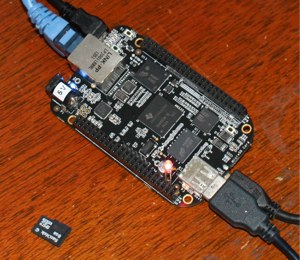
The BeagleBone Black (BBB) provides a 1GHz ARM Cortex-A8 with 512Mb of RAM and 2Gb of eMMC flash from which you can run a GNU/Linux system around a 3.8 Linux Kernel. Throw ethernet, HDMI, and a load of IO pins into the mix and you have a little machine that straddles the border between embedded Linux and the Arduino world. The Black is the latest addition to the Beagle series of ARM-based, single-board computers and is based on the BeagleBone before it. The package I got with the BBB contained the board and a single USB cable. You can power the BBB over the USB cable from a HUB so a dedicated power brick is not a necessity.
 Looking at the rows of 46 pins on each side of the BBB indicates that the board is very useful for many hardware projects. Depending on how you configure your BBB you can have up to 65 general-purpose, digital IO pins, 8 PWMs, 4 timers, 7 1.8V analog inputs, some serial UARTs, 2 I2C, and 2 SPI along with access to 3.3V and 5V. Some of the pins can be used for multiple purposes. For example, pin 17 on one header serves as a digital IO pin, an I2C, and an SPI pin, so you have to choose for which purpose you want to use it. The two header blocks on the BBB are referred to as the P8 and P9.
The HDMI output on the BBB is implemented by bringing a “cape” onto the main board. Capes are what the Beagle community calls the cards, which can be attached to the pin headers, similar to what are called Shields in the Arduino world. The HDMI output on the BBB uses a collection of the general-purpose output pins from the two headers on the BBB. Specifically, it wants 3 SPI pins on header P9 and 30 pins on the P8 header. So if you have an HDMI display then you lose about 2/3 of the pins on the P9 header. More disturbing, if you are planning to output to a 1080 display you can only get a 24Hz output at that resolution (Page 68 of the System Reference Manual). Though that limitation has changed over software revisions.
Getting Started with the BeagleBone Black
When I first booted the BBB I got a graphical display over its HDMI but I couldn’t get any mouse or keyboard to work on any USB port with either a passive or powered hub. That was when I decided I needed to update to the latest software before proceeding. The first step in updating the Linux distribution on the eMMC of the BBB is to download the Angstrom Distribution eMMC flasher from the Latest Images. Use unxz to uncompress the downloaded image and dd to write it to a microSD card. Many of the directions, including those that came on my BBB itself are very Windows-centric.
Once you have written the roughly 4GB image to a microSD card, turn off the BBB, insert the card into the BBB, and apply power while holding the “boot” button which is on the opposite side of the BBB from where the microSD card plugs in. During flashing, the LEDs will flash and when done all the LEDs will remain on. For me, the flashing procedure took around an hour to complete.
After updating the eMMC I found that if I booted the BBB with a network cable plugged in, I never got HDMI output. To get a display I had to boot without the network cable and then plug in the network cable to gain network access.
Power wise, the BBB drew 2.7 Watts sitting idle at a 720p desktop with a passive hub, keyboard and mouse connected but without a network connection. Plugging in an ethernet cable boosted the draw to 3.2 W. Running the CPU at 100 percent moved to 3.9 W total. Disconnecting the hub (and thus keyboard and mouse) dropped the power draw by 0.8 W.
How to Use the GPIO Pins
Access to the various pins in the headers on the left and right side of the BBB is done through the Linux kernel using its GPIO Interfaces. To demonstrate how to give this a spin I attached an LED from pin 42 (GPIO_7) to the ground pin 44 next to it. That is the red LED shown in the photo, above. The BBB booted up without the LED lit.
To get the LED to shine you have to map the GPIO_7 pin into the filesystem. This is done by echoing the GPIO pin into the export file. As you can see, below, I created the new gpio7 link using the export file in order to control that pin. The value is initially zero but when I echo high into the direction the LED lit up!
root@bbb:/sys/class/gpio# echo 7 > /sys/class/gpio/export
root@bbb:/sys/class/gpio# ls -lh
total 0
--w------- 1 root root 4.0K Jun  1 10:54 export
lrwxrwxrwx 1 root root    0 Jun  1 10:54 gpio7 -> ../../devices/virtual/gpio/gpio7
lrwxrwxrwx 1 root root    0 Jan  1  2000 gpiochip0 -> ../../devices/virtual/gpio/gpiochip0
lrwxrwxrwx 1 root root    0 Jan  1  2000 gpiochip32 -> ../../devices/virtual/gpio/gpiochip32
lrwxrwxrwx 1 root root    0 Jan  1  2000 gpiochip64 -> ../../devices/virtual/gpio/gpiochip64
lrwxrwxrwx 1 root root    0 Jan  1  2000 gpiochip96 -> ../../devices/virtual/gpio/gpiochip96
--w------- 1 root root 4.0K Jan  1  2000 unexport
root@bbb:/sys/class/gpio# cd gpio7
root@bbb:/sys/class/gpio/gpio7# cat value
0
root@bbb:/sys/class/gpio/gpio7# echo low  > direction
root@bbb:/sys/class/gpio/gpio7# echo high > direction
To use GPIO pins that are not connected to the first gpio controller chip (which controls 32 pins), you should refer to the Expansion Header Pinout table in the System Reference Manual to calculate the correct number to echo into the exports file. For example GPIO_51 on pin 16 of the P9 header is gpio1[19]. This makes it the 19th pin on the second gpio controller so you would echo 32+19=51 into the exports file to access GPIO_51.
One issue I encountered with the hardware design is that the large USB port on the BBB is very close to the microHDMI port which is attached to the other side of the board. The common combination of plugging in cables to both ports left the cable sleaves pushing each other slightly.
In my next article on the BBB I’ll show benchmarks for its CPU, along with performance figures for the eMMC flash that comes on the board.