See how easy it is to setup a dual boot to Fedora 18 on your recent model MacBook Air (MBA). You don’t need to install custom boot loaders or touch the internal SSD that contains OSX at all. Instead, take advantage of a high speed USB 3 pen drive as your Linux boot disk. After booting Fedora, graphics and wifi work without any extra tinkering. With the higher end modern USB 3.x pen drives disk performance doesn’t need to crawl, either.
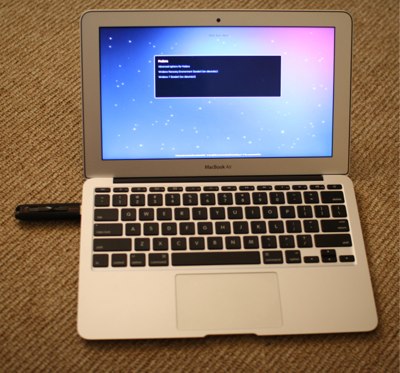 This might be just the ticket if you have a MacBook Air and wish to retain OSX on it but also want to have access to a laptop running a full flavored Linux while on the go.
I recently got an MBA and found myself in the bind of having to carry two laptops with me while traveling. I’d read about the ability to run Linux on the MBA, but I had already setup the OSX installation to perform some tasks which I didn’t want to risk losing. I saw sites mentioning the rEFIt boot loader and various tinkers that one can do, including custom kernel parameters and the like, to get Linux to boot up on the MBA. This all made me put the project on the back burner for when I had made good backups and had prepared the time to tinker.
Disclaimer: This process worked for me, and it might for you. I take no responsibility if things do not work as you expect. You acknowledge that the material may not be accurate, complete or fit for this purpose and that its use is entirely at your own risk. You should have all your data backed up before you begin!
Step One: Fedora Live Boot from USB
The first step to getting Linux on the MBA was to install the Fedora Live ISO onto a USB stick to see how hard it was to get to boot. Then the battle to get graphics, then get wifi, and then regroup at that stage. Creating the USB stick is a matter of a few clicks using liveusb-creator.
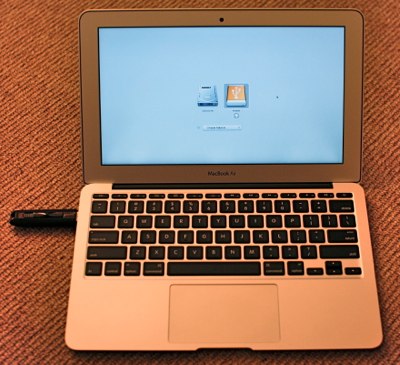 Select the ISO and the target USB device to write it to and wait a few minutes. Plug the Fedora USB stick into the MBA and reboot it holding the Alt/Option key down. You should see two extra options other than the internal SSD to boot from. I first tried the EFI Boot option which stalled right away not finding the vmlinuz0 file, not encouraging… Selecting to boot from “Windows” instead started the Fedora 18 Live disk boot and that ran all the way through to the graphical desktop.
The Fedora Live disk includes some persistent storage, so you can make changes and they will survive a reboot. However for longer term use I wanted as close to a normal Fedora install as I could get. I had seen some pages describing methods of converting the Live Fedora into a more permanent solution. But I thought I’d try a wacky plan first. Why not install from the live USB drive onto a second high speed USB 3 drive instead of onto any internal drive?
Step Two: Fully Installed Fedora
Clicking “Install to Hard Drive” I selected a second USB stick as the target to install onto and let it do its thing. I performed this install from one USB stick to another on a separate laptop than the MBA.
I was expecting that some sort of customization to the boot loader would be needed after this. Or perhaps the partition setup on the fully installed Fedora USB stick would need a tweak. To my complete surprise holding Alt/Option down during boot and selecting the USB drive icon labeled “Windows” to boot from worked fine.
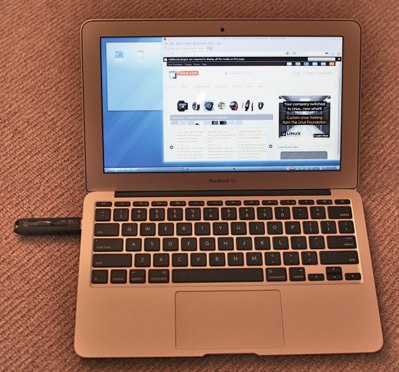 There were a few moments when I suspected otherwise, for example, a longish delay after loading the initial RAM disk. But given a few seconds here and there things moved on and got to a graphical login. But this time I had a complete installed Fedora which was inline with a normal hard disk installation instead of a Live image. Graphics and wifi were again working, and the few tests of suspend to RAM also worked as one would expect. As for the mouse pad, two-finger click worked as the right button and two finger scroll worked for up and down in Firefox and the terminal.
Performance Testing
The fast USB 3.x stick I used was a SanDisk Extreme 32Gb CZ80. These go for a little under $50 currently. There are other flash drives advertising 200mb/s read and above 120mb/s write performance, though at the time of writing these might set you back $150 for 128Gb of storage. The 32Gb SanDisk Extreme bonnie++ gave a write of 105 mb/s, 41 mb/s rewrite and about 227 mb/s for sequential read. While these numbers are not at the current 500 mb/s range that a SATA SSD will give you, they are still very respectable.
To test the performance difference on smaller random read and write operations I used iozone with the below invocation. In the command line, the -I tells iozone to use direct IO and thus avoid the kernel caches. The various -i select which tests to run, -r 4k stipulates a 4kb record size and -s 64k selects a 64kb total file size.
iozone -a -b sam-tmp.xls -I -i 0 -i 1 -i 2 -r 4k -s 64k
On an OCZ Vertex2 SSD attached to a SATA port on a desktop machine I got about 60mb/sec for random read and write of 4kb records. On the Sandisk Extreme USB3 on the MBA it was closer to 10mb/sec for both. While there is certainly a gap, the USB3 flash disk still performed extremely well for these small random IO patterns.
I was very surprised at how easy it is to run Fedora on the MacBook Air. Using an external USB3 drive lets you keep all the internal SSD for OSX while being able to take advantage of the laptop hardware to run Linux when you want. This is a great thing when you are travelling and want to share a single piece of hardware for multiple purposes.