

Read more at LinuxInsider
In my last two posts, I discussed the evolution of open source knowledge: where we came from, where are we now, and how did we get here. I provided some examples of common misunderstandings and knowledge gaps and suggested that such gaps may be due to the need to take action without taking as much time to prepare and plan as is optimal. The sum total is that misconceptions and misunderstandings about open source persist both within and outside the software industry.
On a practical level, companies that have not been tracking use of open source software–whether via internal development, out-sourcing, or software acquired from vendors–may suddenly find themselves being held accountable, for example, by being asked for a software bill of materials listing all open source software and applicable licenses. Such a situation then sets in motion some amount of scrambling to answer the request, which may not allow time to think through a thorough and pro-active solution for the future.


As an organization or even individual there always seem to be questions when considering whether or not to make your project or code snippet open source. Many times, it starts with trying to figure out which license to use. But there are many other things to consider. We derived a list for you the next time you ask yourself: Should I open source my code?
Hewlett-Packard’s new SlateBook x2 can double as an Android laptop, and that’s a first for HP. [Read more]
The Debian project earlier this month put the finishing touches on their latest release: Debian 7.0, code named “Wheezy.”
Debian was an early pioneering Linux distribution, and has been a pillar of the community for nearly two decades. Today, it is well-known for its comprehensive repositories of software, its careful approach to updates, its smooth package installation and upgrade process, and its commitment to software freedom. It is particularly popular as a base for customization, with notable derivatives including Ubuntu and Linux Mint.
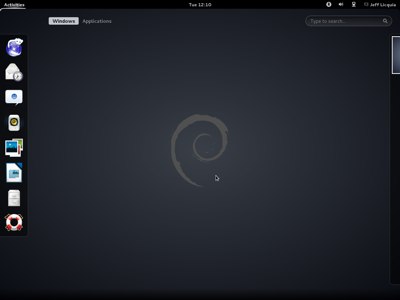 This release marks the availability of two new architectures and a number of major updates and new features.
Debian’s new system for supporting multiple architectures (called “multiarch”) is perhaps the biggest change in this new release.
Most distributions provide some support for running compatible architectures, usually targeted at supporting older 32-bit applications on newer 64-bit operating systems transparently. Debian’s previous system for doing so involved a single large package containing a subset of the available 32-bit libraries.
The new system, in the works for eight years, moves all libraries to separate directories for each architecture, making it possible to simultaneously install every architecture’s libraries on the same system. The package manager then controls which architectures are available on a particular system. Architectures can be removed or added by changing the package manager’s configuration.
Besides the normal use case of supporting 64-bit and 32-bit architectures simultaneously, multiarch could in principle support transparent emulation of incompatible architectures, in-place upgrades from 32- to 64-bit (or the reverse), or support for other operating systems.
While the count of official architectures remains the same, it includes two new architecture variants: ARMv7 (“armhf”) and 64-bit IBM System z (“s390x”). Both of these architectures take advantage of the new multiarch feature to support the older “armel” and 31-bit “s390” platforms.
Debian has also improved its support for cloud computing. Besides the usual updates to the KVM and Xen hypervisors, the Xen Cloud Platform and OpenStack cloud suites are now available for easy installation.
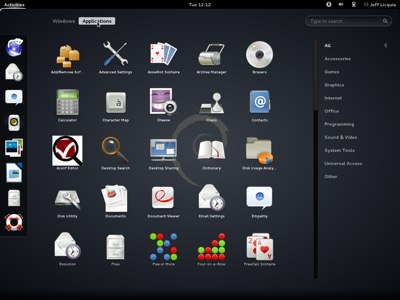 GNOME 3 makes its debut in Debian with this release, based on GNOME 3.4. It is available for easy installation and as an officially-supported live image, along with KDE 4.8, LXDE, and XFCE. Ubuntu’s Unity and Mint’s MATE and Cinnamon are not supported in this release.
In keeping with its goal as “The Universal Operating System”, Debian 7.0 supports all of the major init systems, including the old System V init system (which remains the default), systemd, and upstart.
The recent trend among Linux distributors to replace OpenOffice.org with LibreOffice continues with Debian 7.0. KOffice continues to be supported along with the Calligra office suite.
Nearly the entire distribution has been updated from Debian 6.0. Some of the most notable updates include:
– Linux 3.2.0
– GCC 4.7
– glibc 2.13
– Python 2.7 and 3.2
– X.Org 7.7
With the release of “Wheezy”, development has started on the next version of Debian, codenamed “Jessie”.
Debian is available for download now at www.debian.org. Installation images are available for all supported architectures in CD- and DVD-sized ISOs, as well as network install images and a multi-arch image that supports both 32- and 64-bit Intel x86 systems. Debian also provides live images in minimal and rescue profiles, as well as the four desktops mentioned above.
Debian is also available as an AMI on Amazon Web Services in 32- and 64-bit paravirtualized images.
Users of Debian 6.0 “squeeze” can upgrade their systems in-place, as with previous Debian releases.
(Jeff Licquia is a Senior Engineer at the Linux Foundation.)