In a 2010 post here on OStatic, I asked this question: “Is It Too Late for an Open Source Challenge to Android?” Now, of course, we know that there are several open source smartphone strategies in the works that will be coming to fruition this year. Mozilla is moving ever closer to delivering its first phones based on the Firefox OS platform, and urging developers to build apps. Meanwhile, Canonical founder Mark Shuttleworth maintains that Ubuntu phones will ship in the coming months, and early reviews of the Ubuntu Touch operating system are already arriving.
New Open Source Phones: Nearly Upon Us
ScaleMP Using RAM plus vSMP to Boost Server Performance
Over at The Register, Timothy Prickett-Morgan writes that ScaleMP has cooked up some new ways to build big memory machines for less money.
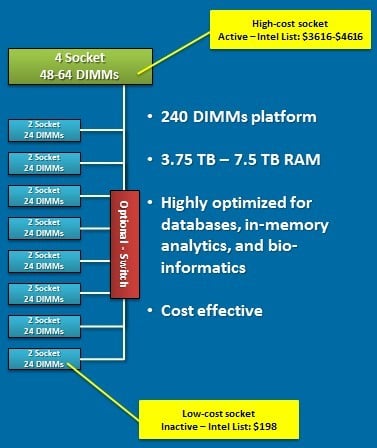
In the example above, the workload in question only needs a four-socket Xeon E5-4600 or Xeon E7-4800 in terms of the processing capacity, but the 48 to 64 memory sticks in this box do not offer enough main memory capacity, and moreover, the fat memory needed to build up terabytes of memory space are very expensive. So instead of buying an eight-socket box to get more memory slots, you get the four-socket box and put in the faster Xeon or Opteron processors you can afford. Then you buy a bunch of skinny server nodes with 24 memory sticks each, and you turn off the cores and leave on the memory controllers and memory in the boxes as well as the InfiniBand ports, and now the FDR links are effectively a backplane for an SMP based on the vSMP hypervisor.
If this sounds enticing, the good news is that there will soon be an easy way to kick the tires and give it a try. Morgan also writes that ScaleMP plans to roll out a variant of vSMP Foundation called Memory Expansion Free. As a free download without support, Memory Expansion Free will have one compute node and up to a total of eight nodes in a cluster and is also limited to four sockets of processing in a machine and 1TB of aggregate main memory across the server nodes in the cluster.
Read the Full Story.
Related posts:
- ScaleMP announces vSMP Foundation 2.0
- ScaleMP Announces vSMP for Cloud
- ScaleMP Extends SMP Capabilities to IBM’s x3850 X5 Servers
The post ScaleMP Using RAM plus vSMP to Boost Server Performance appeared first on insideHPC.
30 Linux Kernel Developer Workspaces in 30 Weeks: Greg Kroah-Hartman
Welcome to 30 Linux Kernel Developer Workspaces in 30 Weeks! This is the first in a 30-week series that takes a new approach to the original series, 30 Linux Kernel Developers in 30 Weeks. This time we take a look inside developers’ workspaces to learn even more about what makes them tick and how to collaborate with some of the top talent in all of software. Each week will share a picture and/or a video of the workspaces that Linux kernel developers use to advance the greatest shared technology resource in history.
We start this year’s 30 in 30 series with Linux kernel stable maintainer and Linux Foundation fellow Greg Kroah-Hartman. Greg shares a video of his workspace, which is located in the beautiful Pacific Northwest, as well as more detail about some of the more interesting workspaces he’s used over the years.
It’s the first office I’ve ever worked in that has a window. My previous home office was in the basement of my house, which was great for getting lots of work done with no distractions, but I’ve found that sometimes it is nice to be able to see the birds and trees outside.
What do you like least?
I have a total lack of bookshelves, which forces me to keep things neater than I normally am. I’ll get some shelves eventually, which will then cause my collection of various hardware components to spread out taking up all available space.
What’s the oddest work space you’ve ever used?
The house my family and I were living in when I first got involved in Linux kernel development many years ago, was very small, with no room for any type of a desk or home office. So I took the hall closet, built a desk into it that provided enough room for a monitor and keyboard, with a workstation below it, and a cut-out for a chair to all fit with the door closed. To work there, the door had to be open, with the chair taking up the tiny hallway. I wrote my first Linux drivers in that hall closet, which eventually let me to getting a full-time job doing Linux kernel work in another town, so we had to sell the house and move.
Google I/O 2013: What to Expect in Gaming, Glass, and More

Google I/O — Mountain View’s biggest event of the year — returns to San Francisco later this week for an event highlighted by a massive three-hour keynote presentation on Wednesday. The annual conference is ostensibly aimed at developers, who will spend three days in sessions learning how to build for Android, Chrome, and a host of other Google products and services. Google’s new head of mobile, Sundar Pichai, has said this year’s event will not be as focused on consumer products as in years past. There won’t be “much in the way of launches of new products or a new operating system,” Pichai told Wired. That may be the case, but we still expect Wednesday’s keynote to be stacked with product news.
Big announcements at I/O have…
Distribution Release: Antergos 2013.05.12
Antergos is a new name for Cinnarch, a project that used to combine the Cinnamon desktop and Arch Linux into a complete desktop Linux distribution. As Cinnamon tends to be behind times and not always compatible with the latest version of GNOME, the project’s developers have taken a….
The 3.10 Merge Window Closes
Linus Torvalds made a Mother’s Day gift to the world in the form of the 3.10-rc1 kernel prepatch. With this release, the merge window for the 3.10 development cycle has closed, so we know which features to expect this time around.
The feature that has arguably drawn the most attention is one that will probably not have a huge effect for most users: the addition of (nearly) full dynamic tick support. The periodic “timer tick” is an interrupt that is delivered every 1-10ms while the CPU is busy; it is the kernel’s cue to perform various important housekeeping tasks. It is also a distraction from the work the user really wants done and it can slow down the system’s response time slightly. That slowdown is especially irksome to some high-performance computing and realtime users.
In 3.10, the kernel can turn off the timer tick in some situations, but most users will notice no performance difference. The suppression of the timer tick should happen more widely in future kernel releases; meanwhile it is an interesting bit of work and a significant step forward for the core kernel. Congratulations are due to Frederic Weisbecker, who did the bulk of the heavy lifting in this effort.
Other significant changes include a number of tracing improvements, a mechanism by which user space can be notified when the system is under memory pressure, and the bcache storage caching layer. See the Linux Weather Forecast page for a more complete list.
In the end, nearly 12,000 independent changes were pulled into the mainline during the twelve-day merge window. That makes this merge window the busiest in kernel development history and suggests that the final 3.10 release (due in early July) will be the largest kernel development cycle ever. The kernel and the community that develops it continue to grow.
Ouya Android Game Console Gets VC-Funded, Torn Down
Ouya, the Android-powered game console that began its career as a Kickstarter project, has just received $15 million in venture capital funding led by Kleiner Perkins Caufield & Byers (KPCB). For those who haven’t followed Ouya’s wild ride, its Kickstarter project generated a feeding frenzy of $8.6 million in pledges, more than 900 percent of […]
Atom-Powered SBC Does Rich Multimedia, Offers 3G
Aaeon announced a Linux-friendly ‘EPIC’ form-factor SBC (single-board computer) based on a 1.6GHz Intel Atom N2600 processor, which is bottom-mounted for efficient heat transfer. The EPC-CV1 supports up to 2GB RAM, offers dual-display HD video output, provides Gig-Ethernet, USB, serial, and SATA ports, and accommodates a 3G cellular module and SIM. Aaeon expects the EPC-CV1 […]
Ubuntu Working on New Linux Application Installer
Does Linux really need another application packaging and installment system? Ubuntu will be adding another one for its Ubuntu Touch smartphones and tablets.
Protect Yourself Online With Tor, TAILS, and Debian
Our privacy and rights to our own data mean nothing on the Internet as businesses and governments freely capture, mine, and sell as much personal information on Web users as they can possibly grab. There is no oversight or accountability, and we have little say. Sure, there are always people who shrug and say “I have nothing to hide and I don’t care.” Fine for them, but not fine for Web users who do care about this. I daresay they would care if the consequences were as immediate as multitudes of strangers entering their homes and snooping into all of their stuff, but it’s abstract and the consequences are not as obvious as physical trespass. Though for some Internet users the consequences are drastic, such as whistleblowers and journalists who live in
countries where they face arrest or worse.
There are some tools we can use to try to protect ourselves, and one of them is Tor, the onion router. Tor was originally developed by the U.S. Naval Research Laboratory for protecting government communications. Tor is a distributed, anonymous network of thousands of relays that obscure your pathways as you use the Internet. Tor aims to foil traffic analysis, which is widely used to track sites that you visit, your location, and your identity. Encrypting your data doesn’t protect you from traffic analysis, because packet headers must be unencrypted, and a whole lot of information is gleaned from packet headers. Most Internet users don’t bother to encrypt their data, so it’s a feast for snoopers.
Tor creates private network pathways for you by building chains of encrypted TCP connections. Each link in the chain only knows about the previous link and the next link, so your “footprints” are erased as you go.
If you tried Tor in the past and struggled to configure it, it’s easier than ever to use, thanks to the Tor Browser Bundle. This is a pre-configured Web browser all ready to anonymize your Web surfing. Tor also supports the Thunderbird mail client, the Tor Cloud project creates anonymous bridges across Amazon EC2, and Orbot anonymizes Android users.
What Tor Does Not Do
Tor is about hiding your location, not encrypting your communications. It cannot encrypt the exit node from the Tor network to your destination, and if anyone is in a position to snoop your computer and any of your destinations it is possible for them to connect the dots and do some traffic analysis. For end-to-end encryption you’re on your own and need SSL or SSH.
Anyone running a Tor exit node has the ability to perform mischief; this is the weakest point in Tor. A security researcher ran several Tor exit nodes to see what information he could snoop, and it was a lot. The Tor documentation warns about this– again, you are responsible for your own end-to-end security.
Tor can’t protect you from yourself; it can’t stop you from clicking on scammy email links, downloading scammy games and apps, or revealing everything about yourself in Web forms and on Facebook. Tor does not support IPv6. Tor is slower than unprotected Internet travels.
TAILS, the Anonymous Distro
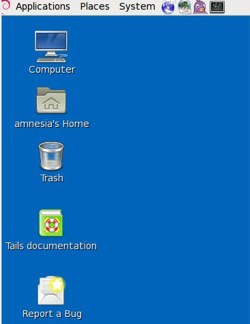
TAILS, the Amnesic Incognito Live System, is a complete live Debian distro that routes all network traffic through Tor, and erases all traces of your network activities from your local storage devices, unless you explicitly allow it. TAILS is not just for Web surfing, but routes all of your Internetworking through Tor– email, IRC, the works. It is a complete Debian system all ready to do actual work as it includes the usual system tools and productivity applications such as OpenOffice, Scribus, Audacity, and GIMP. Use it like any live distro: copy it to a DVD or USB stick and boot it up. Figure 2 shows what it looks like after booting. Click the big green button and it will confirm that you’re protected.
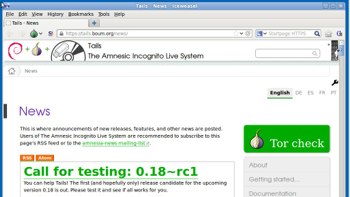
TAILs uses the Iceweasel Web browser (Debian’s version of Firefox) and enables HTTPS Everywhere by default. This is a plugin that ensures your Web sessions use HTTPS on sites that support it. (It won’t magically make HTTPS work on sites that do not deploy it.) There is a handy CS Lite cookie manager button, NoScript, and the Torbutton. The Torbutton gives you a great deal of control and the default configuration is very safe. Some of the options include not writing cookies to disk, setting the User Agent for Tor usage, controlling your History, disabling plugins and isolating dynamic content. It sends a minimum of browser identifying information, and the “New Identity” options clears your browser state and starts over with a new Tor session. Try the EFF’s Panopticlick to see how trackable your Web browser is.
Pidgin is included for anonymous IRC, and Claws-Mail for anonymized emailing. You can create a persistent storage volume on a TAILS USB stick with Tails > Configure Persistent Volume, and delete it just as easily with Tails > Delete Persistent Volume.
Running TAILS from a USB stick is faster than from a DVD-R, and you have the persistent storage option, but it’s also less safe because a USB stick is writable, and a DVD-R is not.
I used TAILS for my daily work for a week, and it’s definitely a lot slower for Internet activities. Though it might help to keep in mind that reading and communicating online is a lot faster than visiting people and libraries in person. It’s very easy to use, and I figure something that you can actually use is always better than something that isn’t used because it’s difficult.